

Ticketón - Event tickets
- 10.00
- 4.1
- Installs
- 10.00K
- Price
- Free

Screenshots

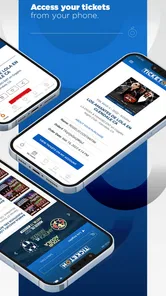






Analysis by Reviewed
I approached Ticketón as an event-discovery and ticketing app rather than as a general entertainment platform. That distinction matters: its value depends less on keeping me occupied every day and more on helping me move from “what is happening near me?” to a realistic decision about whether I want to attend. After spending time with it, I see a focused tool for people who enjoy live entertainment and prefer checking opportunities from a phone instead of searching across many unrelated pages.
The app is free to install, is intended for everyone, and comes from Ticketon Entertainment. Its current version is 1.2.6, while its public release dates back to September 20, 2023. Those details place it in the category of a relatively young event app, so I would judge it by how clearly it helps with discovery and purchase decisions, not by expecting the depth of a long-established all-purpose ticket marketplace.
How Ticketón fits into real event planning
I use Ticketón as the first step in turning a vague wish to go out into a workable plan: I look for possibilities, then narrow them by timing, location, and who is coming. That approach keeps browsing light and leaves the serious checks for the events I might actually choose. It also makes the next question clearer: which settings and choices are worth reviewing before I rely on the app for a night out?
A practical starting point for live entertainment
My first impression is that Ticketón makes the most sense when I already know I want to go out but have not settled on a specific event. That is a different need from searching directly for a particular artist, venue, or sports team. The app’s role is to bring live entertainment possibilities closer to me, giving the browsing process a more local and immediate feel.
That can be useful on an ordinary weekend. Imagine I am chatting with friends on a Friday afternoon and nobody has made a plan. Instead of opening several venue pages, social networks, and search results, I can use the app as one place to begin looking. I can compare the events that catch my attention, discuss them with the group, and then decide whether one is worth the time and expense. The important benefit is not simply seeing a ticket button; it is reducing the number of places I need to check before making a plan.
I would not treat it as a complete calendar for every kind of local activity. Its identity is centered on live entertainment, so someone looking primarily for community meetings, museum schedules, classes, or informal free gatherings may find a broader local-events service more suitable. Ticketón is more appealing when the event itself is the main reason for going out.
What the public reception tells me
The application has an average rating of 4.1 from around 27 ratings, with around 10 written reviews and more than 10 thousand installs. I read those numbers as encouraging but still limited evidence. They suggest that the app has found a useful audience, yet they are not enough to make me assume that every city, event type, or purchase flow will feel equally mature.
More From Our News Desk

 Gmail
GmailGmail in a Busy Inbox: Who Benefits Most?
From first account to crowded workday, Gmail earns its place through dependable search and flexible sorting—but its best fit depends on how much inbox maintenance you can tolerate.

 Prime Video
Switching to Prime Video: What Changes in Your Viewing Routine
Prime Video can make a compelling second home for streaming, but switching means learning a different catalog, rental layer, and route from browsing to playback.

 Universal TV Remote Control
Universal TV Remote Control Works Best as a Reliable Backup
A phone remote earns its place through quick setup and reliable habits. Here is how to get more from Universal TV Remote Control—and where its limits show.

 Weather - By Xiaomi
Weather by Xiaomi Review: Clear at a Glance, Less Clear Up Close
Xiaomi’s weather app makes everyday forecasts quick to scan, but its calm surface can leave useful details and recovery paths harder to find than they should be.

 X
XX Under Pressure: Can It Recover When Posting Goes Wrong?
A resilience-focused review of X, examining setup, mistaken posts, interruptions, weak connections, and the gaps that matter when recovery needs to be dependable.

 Clash of Clans
Clash of Clans Is Won Between the Battles
Its raids are quick; its community is a long-term project of coordination, teaching, rivalry, and shared responsibility—with all the friction that entails.
Latest News



That small review footprint changes how I would use it. I would be comfortable treating Ticketón as a discovery companion, but I would still inspect the event details carefully before committing to a purchase. A positive average can tell me that the general experience works for some people; it cannot replace checking the venue, schedule, ticket conditions, and the practical details of the specific event I am considering.
This is also why I would keep a second route available for important plans. If I am arranging travel, coordinating a large group, or buying tickets for an event that may sell out, I would compare the information shown in the app with the organizer or venue’s own communication. That is not a criticism unique to Ticketón. Ticketing is a high-consequence category: a small misunderstanding about timing, entry rules, or ticket type can affect an entire evening.
Trust begins with what I can see
For me, trust in an event app is not created by a polished interface alone. I want to know what I am being asked to do, what information is visible before I proceed, and whether I can make choices without feeling pushed through an unclear sequence. Ticketón earns a reasonable starting level of confidence by presenting itself plainly as an events app from a named developer, but I would still evaluate each transaction on its own terms.
When I browse, I pay attention to whether the event page answers the questions I would normally ask a friend: where it is, when it starts, what kind of experience it is, and what I am actually selecting. If a page leaves any of those points ambiguous, I slow down rather than assuming the missing detail will become obvious later. That habit is especially important when an app brings many different events together, because the rules may vary from one organizer to another.
My main trust rule is simple: discover in the app, then verify the commitment before paying. I do not see that as unnecessary caution. It is a sensible way to use any ticketing service when the cost of a mistake includes transport, accommodation, or disappointing friends.
Permissions, account choices, and personal information
The safest way to judge an app’s data practices is to look at the permissions it requests on the device, the account information it asks me to provide, and the choices presented during sign-in or checkout. I do not assume that an event application needs unrestricted access to everything on my phone. If a permission appears, I consider whether it has a clear connection to the action I am trying to perform.
For example, I would be more comfortable granting access that is directly tied to an optional convenience than accepting a broad request before I can even browse. If I only want to inspect upcoming entertainment, I prefer to remain in that low-commitment stage until I decide that an account or purchase is worthwhile. This separation between browsing and buying is one of the most useful privacy habits I can apply with Ticketón.
I also check whether I can understand the account path before creating one. A good experience should make it clear when I am browsing as a visitor, when I am signing in, and when information is required to complete a transaction. If the app asks for details that do not seem necessary for my immediate goal, I would pause and look for an explanation rather than filling in every field automatically.
Because data practices can change with updates, I would review the permissions and privacy choices shown on my device at the time of installation. The version currently associated with the app is 1.2.6, but that does not give me a reason to assume that future releases will behave identically. Keeping notification access, location access, and other optional permissions under my control is better than granting them permanently without thinking.
The moments when I become more data-sensitive
Browsing event listings feels relatively low risk to me. The more sensitive moments arrive when I move toward an account, a purchase, a saved preference, or a notification. At those points, I become more deliberate because the app is no longer just helping me look around; it is becoming part of a real-world plan.
Location is a good example. An event app may be more convenient when it knows where I am, but I would first ask whether I can search by a city or area manually. If manual browsing works for my purpose, I prefer that option. If I choose to share location for convenience, I would treat it as a decision to revisit later rather than a permanent default.
Notifications deserve the same attention. Reminders about an event I have chosen can be useful, especially when travel time or entry details matter. Promotional alerts that I did not ask for are a different matter. I would keep only the notifications that help me act, and I would turn off the rest if they begin to make the app feel noisy. The ability to reduce interruptions is part of user control, even when it does not change the ticket itself.
Payment is the point where I slow down most. Before confirming, I review the event name, date, venue, ticket type, quantity, and final amount shown on the screen. I avoid rushing through the last step simply because the event looks popular or urgent. For a group purchase, I also save the confirmation details somewhere accessible to everyone involved, rather than assuming one person’s phone will always be available at the entrance.
Small workflows that make the app more useful
One practical approach is to use Ticketón in two passes. On the first pass, I browse broadly and note the events that fit my schedule. On the second, I return only to the strongest candidates and inspect the details with a buyer’s mindset. This prevents the excitement of discovery from blending too quickly with the pressure to purchase.
A second useful habit is to separate “interesting” from “actionable.” An event may look appealing but still be impractical because of its location, start time, or the number of people I need to coordinate. I would write down those constraints before buying. Ticketón can help me find possibilities, but it cannot decide whether an event works with my commute, budget, or group.
For spontaneous plans, I would use the app earlier in the day rather than waiting until I am already on the way. That gives me time to compare the event information with my transport options and to resolve questions before the purchase becomes urgent. For planned outings, I would revisit the listing shortly before leaving, since event details and personal arrangements can change even when the original decision was sound.
Another trade-off is convenience versus independence. Keeping everything inside one ticketing app may make the process easier, but I do not want my entire plan to depend on one screen. I keep the essential confirmation information available offline or in another safe place when possible. That is particularly sensible if I expect weak mobile coverage at a crowded venue.
Where it beats the usual alternatives
Compared with searching the open web, Ticketón can offer a more focused path to live entertainment. A normal search often mixes official pages, old announcements, social posts, advertisements, and unrelated results. An event-specific app has a clearer purpose, so I can spend less time filtering out material that is not useful for buying or planning.
Compared with following individual venues on social media, it is also easier to look beyond the places I already know. Social feeds are good at showing me familiar organizers, but they can reinforce my existing habits. Ticketón is more valuable when I want to discover something outside my usual circle of venues or performers.
Compared with a very large ticket marketplace, the appeal may be focus rather than sheer breadth. A massive platform can be the better choice when I need a globally recognized event, extensive resale options, or a long history of handling a particular category. Ticketón is the better starting point for me when I am exploring nearby live entertainment and want a simpler route from discovery to a possible plan.
Who should use it, and who should skip it
I would recommend trying Ticketón if you regularly look for concerts, shows, parties, or other live experiences and prefer discovering them from a phone. It is especially suitable for flexible planners who enjoy browsing first and deciding later. The free price makes that trial easy, and the Everyone age rating means the app is positioned for a broad audience, although the suitability of an individual event still depends on that event’s own rules.
I would be more cautious if I need a specialized service with extensive customer support, complicated group arrangements, or a very specific ticket category. Someone who already knows the exact venue and event may find the official organizer’s channel more direct. Likewise, a person who dislikes creating accounts, receiving alerts, or reviewing purchase details on a mobile screen may prefer buying through a familiar website or box office.
I would also skip relying on it as my only source when the plan is expensive or difficult to change. In that situation, I want the strongest possible confirmation from the organizer, clear cancellation information, and a backup record of the purchase. Ticketón can still be part of the research, but it should not replace careful verification.
My cautious verdict after using it
Ticketón is a promising, focused choice for finding live entertainment without beginning every search from scratch. I like its role as a first stop: open it when I want ideas, narrow the options according to my schedule, and then make a considered decision. Its rating of 4.1 shows a generally favorable response, while the modest number of ratings and reviews tells me to keep my expectations measured rather than assuming a universally proven service.
The app works best when I stay in control of the process. I check permissions instead of accepting them automatically, use notifications selectively, distinguish browsing from buying, and verify the important details before payment. Those steps do not make the experience difficult; they make it more dependable.
My final recommendation is therefore conditional but positive. If you want a free way to explore nearby live entertainment, Ticketón is worth installing and testing for your own area. I would use it as a convenient discovery tool and a possible route to tickets, while keeping the final decision grounded in the event details, my personal data choices, and the organizer’s practical information. For casual plans, that balance feels sensible. For high-cost or high-stakes bookings, I would compare it with the official venue or organizer before committing.
Ticketón - Event tickets Frequently Asked Questions
Does Ticketón help me find events near me?
Ticketón is intended to give users access to live entertainment experiences near them, making it a useful starting point when you want to explore what may be happening in your area. Event availability can depend on your location, so browse the listings after installing the app and check each event’s details before making plans. Ticketón is free to download and is rated for Everyone.
What is Ticketón, and what can I use it for?
Ticketón is an event-ticketing platform designed to help users discover and purchase tickets for concerts, festivals, sporting events, cultural activities, and other live entertainment. After installing the app, you can browse available events, check dates and venues, review ticket categories, and complete a purchase from your mobile device. Availability and event selection may vary depending on your location.
How do I buy tickets through Ticketón?
To purchase tickets, search for an event or browse the available listings, open the event page, and choose the date, ticket type, and quantity you want. You will typically need to sign in or provide contact information before paying. Carefully review the venue, event time, ticket conditions, service charges, and total price before confirming, because some fees may only appear near the final checkout step.
Are Ticketón tickets delivered digitally or physically?
Ticket delivery depends on the specific event and the organizer’s rules. Many purchases provide digital tickets, confirmation details, or a barcode that can be shown at the entrance from your phone. Other events may use will-call collection or have different delivery instructions. Always check the confirmation email and the event page for pickup requirements, identification rules, and entry procedures.
Can I cancel my Ticketón order or receive a refund?
Refund and cancellation policies are generally determined by the event organizer and the conditions shown during checkout. Tickets may be nonrefundable unless an event is canceled, postponed, or the organizer authorizes a refund. Before paying, read the purchase terms carefully and save your confirmation. If you need assistance, contact Ticketón support or the organizer as soon as possible with your order information.
Pros
- Quick access to concerts
- festivals
- and local events in one app.
- Mobile ticket storage makes entry easier without printing paper tickets.
- Event listings include dates
- venues
- prices
- and essential details.
- Useful search and browsing tools help discover events by location or category.
- Digital purchasing can save time compared with buying tickets at the venue.
Cons
- Some events may have limited availability or sell out quickly.
- Service fees can increase the final price beyond the displayed ticket cost.
- Event information and availability depend on organizer updates.
- Refund and cancellation rules may vary between different events.
- A stable internet connection may be needed to load tickets at entry.











