

TicketNetwork
- 34.00
- 4.0
- Installs
- 10.00K
- Price
- Free

Screenshots


Analysis by Reviewed
When I need to find a ticket without jumping between several event pages, I prefer starting with one place that covers sports, concerts, and theater. TicketNetwork is built for that exact starting point. I tested it as an events app from TicketNetwork Inc, and my impression is that it works best as a practical search and comparison tool rather than as a complete replacement for every venue or team app.
The app is free to install and is suitable for everyone, which makes it easy to keep available for those moments when plans come together quickly. Its average rating is 4.0 from around 121 ratings, and it has passed 10K+ installs. Those figures suggest a modest but established Android audience, not the enormous reach of a general-purpose ticketing platform. I would treat that as useful context: TicketNetwork can be convenient, but I would still check the final event details carefully before committing to a purchase.
From a vague plan to a ticket decision
When I open TicketNetwork with only a loose idea—perhaps a show next month or a game this weekend—I want to turn that thought into a decision without getting lost in unrelated searches. This section looks at how I narrow the choice and what I check before moving ahead. The next part considers how that process feels when I’m comparing several possibilities at once.
Starting with the event you actually want
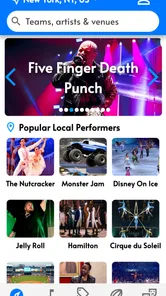
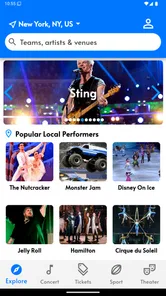
A realistic use case is a Friday afternoon when a friend messages me about going to a concert, a basketball game, or a theater performance that weekend. I may know the artist or team, but not the exact venue, section, or available date. TicketNetwork gives me a focused place to begin instead of opening a search engine, several venue sites, and resale pages separately.
That first step matters because event searches are often less precise than people expect. I might remember only the city and approximate day, or I might be comparing two different performances. The app is more useful when I enter the strongest detail I have first and then refine the results. Searching too broadly can leave me with a long list that is harder to compare than expected, especially when several events share similar names.
I also like the idea of using the app before discussing money with someone else. If a friend says, “Let’s go to the game,” I can check whether there are suitable listings before assuming the plan is realistic. That changes the conversation from a vague suggestion into a choice involving date, location, seating, and total cost.
Reading results instead of choosing the first listing
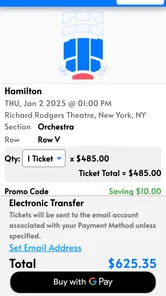
Once I find the right event, I slow down. The first attractive result is not automatically the best one. I compare the event date, venue, section information, and the number of tickets needed. For a pair of seats, a listing that looks inexpensive at a glance may be less appealing if the seats are separated or if the final amount changes during checkout.
More From Our News Desk

 Gmail
GmailGmail in a Busy Inbox: Who Benefits Most?
From first account to crowded workday, Gmail earns its place through dependable search and flexible sorting—but its best fit depends on how much inbox maintenance you can tolerate.

 Prime Video
Switching to Prime Video: What Changes in Your Viewing Routine
Prime Video can make a compelling second home for streaming, but switching means learning a different catalog, rental layer, and route from browsing to playback.

 Universal TV Remote Control
Universal TV Remote Control Works Best as a Reliable Backup
A phone remote earns its place through quick setup and reliable habits. Here is how to get more from Universal TV Remote Control—and where its limits show.

 Weather - By Xiaomi
Weather by Xiaomi Review: Clear at a Glance, Less Clear Up Close
Xiaomi’s weather app makes everyday forecasts quick to scan, but its calm surface can leave useful details and recovery paths harder to find than they should be.

 X
XX Under Pressure: Can It Recover When Posting Goes Wrong?
A resilience-focused review of X, examining setup, mistaken posts, interruptions, weak connections, and the gaps that matter when recovery needs to be dependable.

 Clash of Clans
Clash of Clans Is Won Between the Battles
Its raids are quick; its community is a long-term project of coordination, teaching, rivalry, and shared responsibility—with all the friction that entails.
Latest News



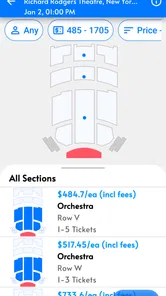
This is one of my main practical tips: treat the search result as the beginning of the decision, not the decision itself. I use it to build a short list of realistic options. For a theater show, that might mean comparing a cheaper seat with a better-located one. For a sports event, it may mean deciding whether being closer to the action is worth spending more. For a concert, the important trade-off could be visibility versus proximity.
Ticket apps are often judged by how quickly they display a result, but the more important test is whether the result helps me make a sensible choice. TicketNetwork is useful when I already have a clear event in mind and want to inspect available possibilities. It is less helpful if I expect the app to make the decision for me or explain every venue’s seating layout in the same depth as the venue itself.
Moving from discovery to purchase
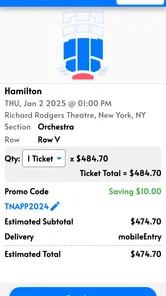
The handoff from browsing to buying is where I become more careful. I check the selected event again, confirm the quantity, and review the order details before proceeding. I do not rely on memory, especially when several dates or performances look similar. A small mistake at this point can turn a successful search into an inconvenient purchase.
I would also keep the event page open long enough to understand what I am selecting. Ticket availability can make people rush, but rushing is exactly when the wrong date or an unsuitable section slips through. My preferred workflow is to decide the maximum I am comfortable spending before I start comparing listings. That makes the app’s options easier to evaluate and reduces the temptation to keep escalating the budget.
For a group, I would coordinate outside the app before completing the order. One person should confirm the date, another can check the seating preference, and everyone should agree on the spending limit. This is a small but important handoff: the app can help one person search, but it cannot prevent confusion when several people are making assumptions in a chat.
What happens after the choice
After selecting tickets, I would save the confirmation details somewhere easy to reach and add the event to my personal calendar. I would not assume that finding the listing is the same as having a complete day-of-event plan. I still need to remember the venue, arrival time, transportation, and the exact ticket information required at the entrance.
This is where TicketNetwork fits into my routine. I see it primarily as the place where I discover and arrange the ticket, while my calendar, email, and the venue’s own information handle the rest. That division is sensible, but it means the app is only one part of the workflow. If I want a single application to manage reminders, venue directions, entry instructions, and event updates in one continuous experience, a direct venue or team app may be a better match.
Useful habits for different events
For sports, I compare the event time and seating area before focusing on price. A low-cost seat can be perfectly reasonable if I mainly want to be present, but it may disappoint someone who expects a close view. I would also confirm that everyone in the group is looking at the same game, since teams can have multiple nearby fixtures and similarly named events.
For concerts, I pay particular attention to the difference between being inside the venue and having a satisfying view. A listing can meet the basic goal of attending while still being a poor choice for someone who cares about sightlines. If I am buying for another person, I ask about that preference first rather than guessing from the price alone.
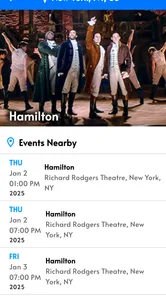
For theater, the performance date is especially important. A show may have several times that are easy to confuse when I am searching quickly. I check the day and start time twice, then make sure the selected seats suit the person attending. Theater is also the category where a direct venue source may offer clearer information about the room, accessibility, or performance-specific instructions, so I would compare before finalizing an important booking.
Where the handoffs create friction
The biggest potential weakness is that ticket buying is not a single clean action. It moves from search to listing, from listing to order, and from order to the venue. Every handoff creates a chance for uncertainty. The app may help me locate an option, but the final experience still depends on how clearly the order details are presented and how well I understand the event’s own rules.
That is why I avoid treating a displayed price as the entire cost until I have reviewed the checkout information. Ticket buyers should be comfortable checking the full order summary, the number of tickets, and the event details before paying. This is not a criticism unique to TicketNetwork; it is a normal trade-off of using a ticket marketplace instead of buying directly from a box office. The convenience of comparing options comes with a greater need for careful reading.
Another friction point is confidence. A direct venue or team app can feel more straightforward when I already know exactly where I want to sit and simply need an official purchase path. TicketNetwork is more attractive when I value breadth and comparison. If I have a strong preference for one venue’s own interface, loyalty benefits, or event-specific information, I would probably start there instead.
How it compares with the usual alternatives
Compared with searching through a browser, TicketNetwork feels more focused. A browser gives me broader context, but it also produces unrelated pages, old event references, and multiple sources that are difficult to compare on a phone. The app makes more sense when I want to move quickly from an event idea to available ticket options.
Compared with a venue’s own app, it offers a different advantage. The venue app is usually the natural choice when I already know the building and event. TicketNetwork is more useful at the discovery stage, particularly when I am considering sports, concerts, and theater in the same place. The trade-off is that a venue’s own service may provide more event-specific detail and a clearer relationship with the organizer.
Compared with a general ticket marketplace, the deciding factor is not simply whether tickets appear. I care about how easily I can compare the choices that matter to me: event identity, date, section, quantity, and final order information. TicketNetwork earns its place when it reduces the number of separate searches I need to perform. It is not automatically the best option for every event, and I would still compare an important purchase with the official source.
Device and version considerations
The Android release I reviewed is version 4.5.5 and requires Android 8.0 or later. That makes it accessible on many still-used phones, although anyone using an older device should check compatibility before planning around it. Since this is an app I might open while traveling or coordinating with friends, I would also keep the operating system and the application updated through the normal store process.
The app’s free price is helpful for occasional users. I can install it for a specific event search without paying for access first. The important distinction is that free access to the app does not mean the tickets themselves are free; the purchase decision remains the part that needs the most attention. I appreciate not having to make a subscription decision before I can see whether the app is useful for my event.
Its Everyone age rating also makes sense for a general events search tool. Families can use it to look for suitable entertainment, while adults can use it for sports or concerts. The rating should not be confused with an assurance that every event is appropriate for every child. The app covers different kinds of live entertainment, so I would still consider the individual event and venue when buying for younger attendees.
Who will get the most from it
I would recommend TicketNetwork to someone who regularly compares live events and wants a dedicated mobile starting point. It is particularly well suited to a person who has a rough plan but needs to examine dates, ticket quantities, and seating possibilities before involving the rest of the group. It can also suit occasional buyers who do not want to install separate apps for every team, artist, or theater.
It is less suitable for someone who already knows the exact official source they trust and wants the shortest possible route to a particular seat. It may also frustrate users who expect every venue to present seating and event details in exactly the same way. The more specialized the information I need, the more likely I am to consult the venue or organizer directly alongside the app.
For a family outing, I would use it to compare options first, then verify practical details before paying. For a spontaneous night out, I would value the quick access to several event types, but I would still avoid making a rushed decision solely because a listing looks available. For a high-cost concert or a trip involving travel, I would treat TicketNetwork as one part of a broader check rather than the only source I consult.
My final take after following the whole workflow
TicketNetwork succeeds when the problem is “I want to find and compare tickets for a live event from my phone.” Its coverage of sports, concerts, and theater gives it a clear everyday purpose, and the free installation makes trying it low-risk. I like it most as a discovery and comparison layer that helps turn an uncertain plan into a shortlist.
My reservation is that the app cannot remove the responsibility that comes with buying tickets. I still need to verify the event, date, seats, quantity, and final order information, and I may need the venue’s own service for details after the purchase. That extra care is the price of flexibility, especially when comparing options rather than buying directly from one known box office.
Overall, I would keep it on my phone if I often organize outings or compare several types of live entertainment. I would not use it blindly, and I would not insist on it when an official venue or team app clearly offers the better route. For the right starting condition—an event idea that needs checking, comparing, and coordinating—TicketNetwork is a practical tool, provided I treat careful verification as part of the workflow.
TicketNetwork Frequently Asked Questions
Is TicketNetwork free to download, and what devices can run it?
TicketNetwork is a free app in the Events category, focused on sports, concert, and theater tickets. It is intended for devices running Android 8.0 or later, so checking your device’s operating system before downloading can help avoid compatibility issues. The app was released on July 30, 2019, and its current version is 4.5.5.
Who develops TicketNetwork, and is it a well-established app?
TicketNetwork is developed by TicketNetwork Inc. It has been available since July 30, 2019, and has more than 10,000 installs. Its average rating is 4.0 from 121 ratings, with 34 written reviews. These figures offer a quick sense of its presence and user feedback, though your own experience may depend on the event you are searching for and the ticket options available.
What is TicketNetwork, and what can I use it for?
TicketNetwork is an online ticket marketplace where users can search for and purchase tickets to concerts, sports events, theater performances, festivals, and other live entertainment. It connects buyers with independent ticket sellers rather than acting as the original box office for every event. The platform is useful for comparing available listings, seating locations, prices, and event dates in one place.
Are TicketNetwork tickets legitimate and guaranteed?
TicketNetwork states that tickets purchased through its marketplace are covered by its buyer guarantee, subject to the terms and conditions of the order. In general, the guarantee is intended to help ensure that tickets arrive on time, are valid for entry, and match the description provided in the listing. However, buyers should carefully review the guarantee, seller information, delivery details, and event policies before completing a purchase.
Why can TicketNetwork prices be higher than the original ticket price?
TicketNetwork is a resale marketplace, so ticket prices are determined by individual sellers and may be higher or lower than the original face value. Prices can also change according to demand, event popularity, seat location, availability, and timing. Before paying, review the complete order total because service charges, delivery fees, taxes, and other costs may be added during checkout.
Pros
- Wide selection of tickets for sports
- concerts
- and theater events.
- Useful filters make it easier to compare events
- dates
- and seating options.
- Mobile access lets you browse and manage ticket purchases while traveling.
- Marketplace listings can include tickets for sold-out or high-demand events.
- Order details and delivery information are available in one place.
Cons
- Prices may increase noticeably after service and delivery fees are added.
- Ticket availability and seat quality depend on independent marketplace sellers.
- Some tickets may be delivered close to the event date.
- Refund and cancellation options can vary by order and event policy.
- The app may feel less useful when browsing events in smaller local markets.











