Thumbnail Maker – Video Cover
- 1.12K
- 4.7
- Installs
- 1.00M
- Price
- Free
Screenshots

Analysis by Reviewed
I first looked at Thumbnail Maker – Video Cover as the sort of utility people install for a very specific reason: they need a YouTube image that looks intentional, but they do not want to learn a full design program. After using it in that context, I found it most useful as a quick, practical design workspace rather than a complete replacement for professional creative software. It belongs to the Art & Design category, is free to install, and is aimed at making video covers without demanding advanced design knowledge.
The app makes the most sense in a shared household. One person may record cooking clips, another may post gaming videos, and someone else may simply need a clean cover for a school or hobby project. On a family tablet or a shared phone, the value is not only speed. It is also the ability to sit together, choose a visual direction, and finish a usable image before the idea loses momentum. I would recommend it to beginners who want a straightforward starting point, while experienced designers may find its guided approach restrictive.
How it works in everyday household use
A practical workflow for several people sharing one device
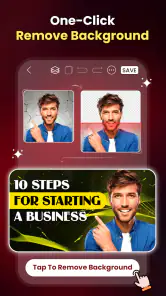
A realistic example is a parent helping a teenager prepare a cover for a new YouTube upload. The teenager already knows the subject of the video, but the original photo is too plain and the title disappears against the background. Instead of opening a desktop editor, you can work directly on the phone, build a stronger visual arrangement, and make a version that is easier to recognize in a crowded video list.
That scenario highlights the app’s main strength: it reduces the distance between an idea and a finished thumbnail. I do not need to begin with a blank canvas and make every design decision myself. The app’s focus keeps the task narrow, which is helpful when the goal is simply to create a recognizable cover rather than produce a complete brand identity.
For shared use, I would keep the workflow deliberate. Decide the video title first, choose the main image second, and only then adjust decoration. This prevents a common beginner mistake: spending time on effects before checking whether the central message can be understood at a small size. A thumbnail can look attractive while still failing when viewed beside other videos.
Another useful habit is to create a small visual rule for each person using the device. One household channel might use bright backgrounds and large lettering, while another might prefer darker images and a simpler layout. The app can support those separate approaches, but the users need to coordinate them themselves. I would not treat the application as a family publishing system; it is a design tool, so organization remains the household’s responsibility.
What to settle before anyone starts designing
Because this is an editing utility rather than a shared account manager, boundaries matter. Before handing the phone to a child or another family member, I would agree on which project is being edited, where the finished image should be saved, and who has permission to publish it. Those decisions are outside the creative canvas, but they prevent confusion when several people use the same device.
More From Our News Desk

Clash of Clans Is Won Between the Battles

Android Auto Makes the Case for Quieter Car Software

MobiOffice: Transforming Mobile Productivity with Seamless Integration

EA SPORTS FC™ Mobile Soccer: Redefining Mobile Sports Gaming

How Microsoft OneDrive Became a Mobile Productivity Giant

How Google Translate Breaks Language Barriers Effortlessly
It is also worth separating personal images from household projects. If someone selects a private photo as the background, another person should not casually reuse it for a public cover. The app makes visual creation accessible, but accessibility does not remove the need for ordinary consent and careful file handling.
Families should also discuss purchases before using the free version. The app is free, but it includes in-app purchases ranging from $3.99 to $39.99 per item. I would explain that clearly before a child explores every available option. A shared device can make it easy for one person to assume that a design choice is automatically available, while the person responsible for the device may have a different view about spending.
My preferred arrangement is simple: use the free experience first, decide whether it genuinely improves the household’s workflow, and only then consider an optional purchase. That approach keeps expectations realistic and avoids treating paid elements as necessary for every project.
Coordinating ideas without losing the original voice
When more than one person works on a cover, the biggest problem is often not technical. It is disagreement. One user may want a dramatic title, while another wants the image to remain clean. I find it helps to assign roles for a single session: one person chooses the message, another checks readability, and the owner of the channel makes the final decision.
This arrangement is especially useful for younger creators. It gives them control over the subject and tone while allowing an adult to ask practical questions: Can the title be read quickly? Does the image match the video? Is anything misleading? The app can make the visual part approachable, but it does not decide whether a design communicates honestly.
A non-obvious advantage of a focused thumbnail tool is that it encourages editing with the final viewing context in mind. I would periodically step back from the phone and look at the design as a small rectangle rather than zooming into details. Fine decorations that seem impressive during editing may become visual noise in the finished cover. Large, clear elements usually survive reduction better than complicated arrangements.
I also recommend keeping the first version intentionally restrained. Start with one main subject, one readable title, and a background that does not compete with either. Only add more visual treatment if the image still feels empty. This workflow is quicker than trying to fix a crowded design after every available element has been added.
Age, trust, and suitable supervision
The content rating is Everyone, which fits the app’s basic purpose as a design utility. Still, an age label does not answer every household question. A young user may be perfectly capable of arranging a title and image, yet still need guidance about public posting, personal photos, misleading claims, or contact with strangers on a video platform.
I would be comfortable letting a child use the creative side with ordinary supervision, especially for a school project or a private family channel. I would be more cautious about independent publishing. The risk is not the canvas itself; it is what happens when a finished cover becomes part of a public online identity.
Trust also matters when several people share one device. If the app is used for personal projects, users should know which images belong to whom and avoid overwriting another person’s work. A quick verbal check before editing can be more valuable than a complicated process: ask whose project is open, confirm that the selected image is appropriate, and save the finished result in a clearly agreed location.
The developer is Digital Marketing Tools, and the app has been available since June 22, 2018. Its current version is 79.0 and it requires Android 8.0 or later. Those details make it relevant to many existing Android phones, although anyone using an older device should check compatibility before planning a shared workflow.
Where it beats the usual alternatives
Compared with a full desktop editor, this app is less intimidating. Professional software offers deeper control over layers, typography, masking, color correction, and export workflows, but that power comes with a learning curve. If I only need a clear YouTube cover for a weekend project, opening a large editor can feel like using a workshop to tighten one screw.
Compared with a general-purpose mobile design app, the focused purpose is both an advantage and a limitation. A broad design platform may be better for posters, invitations, social posts, presentations, and brand materials across several formats. This app is more appealing when the immediate task is a video cover and the user wants to stay inside that narrow workflow.
For a professional channel with strict brand guidelines, I would probably choose a more advanced tool. Consistent type systems, reusable brand assets, detailed alignment, and precise color control can matter more than speed. For a beginner who would otherwise publish a random frame from a video, however, this app can be a meaningful improvement.
The trade-off is clear: convenience over fine control. I would not call that a weakness in every situation. It becomes a weakness only when the project demands exact design consistency or detailed retouching.
Small techniques that improve the result
The first technique I would teach is to write the shortest useful title. A thumbnail is not the place to repeat an entire video headline. Use the cover to communicate the central promise, then let the video title carry the additional detail. This keeps the design readable and makes the image more useful at a glance.
The second is to choose the image for recognition, not merely quality. A sharp photograph can still be a poor thumbnail if the subject blends into the background. I look for a clear focal point and enough empty space for the title. If the original image is busy, I would rather select a simpler frame than cover it with more decoration.
The third is to compare versions before settling. I would make one restrained draft and one more expressive draft, then view both at a small size. This exposes whether the extra styling improves recognition or only looks interesting while zoomed in. It is a simple test, but it teaches beginners how thumbnails are actually consumed.
A fourth useful habit is to design around the channel’s recurring subjects. Even without building a formal brand system, repeating a similar placement for the title or a familiar visual mood can help viewers identify related videos. I would keep that consistency flexible, though. Forcing every topic into one layout can make covers feel dull or inappropriate.
Performance expectations and purchase judgement
The app has an average rating of 4.7 from around 84 thousand ratings, with about 1.1 thousand written reviews, and it has passed one million installs. That level of adoption suggests that the basic idea resonates with many Android users, but popularity should not be mistaken for professional depth. I see those figures as reassurance that the app is established enough to be worth trying, not as proof that it will suit every design style.
Since it is free to install, the sensible test is to use it on a real project rather than judge it from a few minutes of browsing. Try making a cover for an actual video, check whether the text remains readable, and see whether the workflow feels faster than the alternative you already use. If it saves time and the result looks honest and clear, it has done its job.
The paid range deserves a practical decision rather than an automatic upgrade. Someone who creates videos occasionally may never need to spend anything. A frequent creator may decide that additional design options are worthwhile, but I would first identify the exact problem the purchase solves. Paying for more decoration does not fix a weak title, a confusing image, or an unclear video idea.
On a shared device, I would make the purchase decision with the person who owns the channel or manages the household budget. That avoids the awkward situation where a child experiments with a paid item or where one family member assumes a purchase applies to everyone’s projects.
Who should use it, and who should look elsewhere
I think this is a good fit for first-time YouTube creators, casual hobbyists, students preparing video projects, and families helping one another make simple covers. It is also useful for someone who has good ideas but tends to postpone publishing because the visual preparation feels too difficult. The focused format lowers that barrier.
I would suggest looking elsewhere if you need advanced photo manipulation, exact brand management, complex compositing, or a complete cross-platform design suite. A professional creator may outgrow the app once every cover must follow strict rules. Likewise, someone who wants to design many unrelated materials may prefer a broader tool instead of a specialist application.
I would also skip it if the real need is channel planning, audience management, or publishing coordination. Creating the image is only one part of a video workflow. The application can help with that one part, but it should not be mistaken for a complete solution for managing a household’s online activities.
My household verdict
After weighing the convenience against the limits, I see Thumbnail Maker – Video Cover as a friendly entry point for Android users who want better-looking YouTube covers without studying professional design. Its strongest quality is focus: it keeps attention on the visual that viewers will see first and makes the process approachable for people working on a phone.
For shared household use, I would recommend setting clear project boundaries, discussing purchases, and supervising public publishing for younger users. Those steps are not missing features to complain about; they are sensible habits around any creative app connected to online video.
My final recommendation is positive, with a clear condition: use it when speed, simplicity, and a usable result matter more than deep control. I would start with the free version, test it on a genuine video, and judge the result at a small viewing size. If the app helps your family turn rough ideas into clear, honest covers, it earns a place on the device. If your channel already depends on precise branding or advanced editing, a more capable design tool will likely be the better long-term choice.
Thumbnail Maker – Video Cover Frequently Asked Questions
Can I create a YouTube thumbnail quickly with Thumbnail Maker – Video Cover?
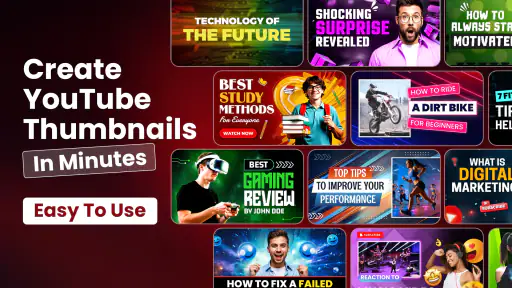
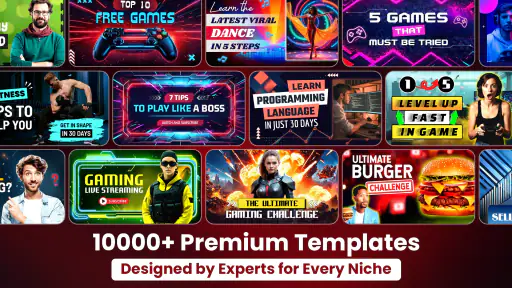
Yes. Thumbnail Maker – Video Cover is designed to make YouTube thumbnail creation straightforward, even if you have little experience with graphic design. You can start from a ready-made design and adapt it to your video, which can be more convenient than building a cover from a blank canvas. Take a moment to check the text and layout before using the finished image.
What should I check before downloading Thumbnail Maker – Video Cover?
Check that your device runs a compatible operating system and that the app is available through your regional app store. It is also worth considering whether a template-based editor suits the kind of covers you want to make and reviewing any optional purchases before you begin. The app is free to download, while some purchases are priced from $3.99 to $39.99 per item.
Do I need design experience to create a video cover with Thumbnail Maker – Video Cover?
No design experience is needed to get started. The app is intended to make YouTube thumbnail creation approachable, with a workflow built around choosing a design and editing it to suit your content. Its template-based approach can help you make a polished cover more quickly than designing from a blank canvas, while still leaving room to personalize the result.
Is Thumbnail Maker – Video Cover available for my device?
The app is available for devices running Android 8.0 or later, and its current version is 79.0. Before downloading, check your device’s operating system version and confirm that the app is offered in your region’s app store. Meeting the minimum OS requirement helps establish compatibility, though the experience can still vary depending on your particular device.
What is Thumbnail Maker – Video Cover used for?
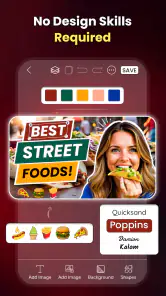
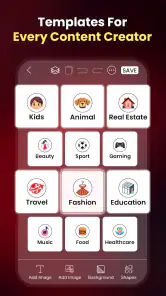
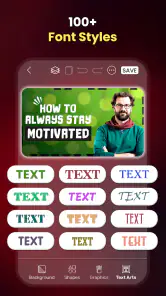
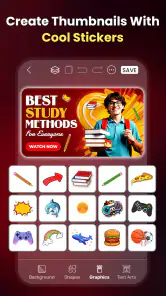
Thumbnail Maker – Video Cover is designed to help you create attractive cover images and thumbnails for videos, social media posts, channels, and other digital content. It typically provides ready-made templates, text tools, background options, stickers, filters, and image adjustments, allowing you to produce a professional-looking design without advanced graphic design experience.
Pros
- Quickly creates eye-catching thumbnails for videos and social posts.
- Includes ready-made templates for different content styles and platforms.
- Text editing tools offer useful fonts
- colors
- shadows
- and alignment options.
- Supports custom images
- allowing more personalized cover designs.
- Simple interface makes basic thumbnail creation accessible to beginners.
Cons
- Some templates and design elements may require a premium subscription.
- Free exports can include ads or other limitations depending on the version.
- Advanced editing controls may feel limited for experienced designers.
- Template quality and style variety can vary across different content categories.
- Large projects may affect performance on older or less powerful devices.
- Category
- Art & Design
- Version
- 79.0