Thrift Savings Plan
- 1.92K
- 4.8
- Installs
- 500.00K
- Price
- Free

Screenshots


Analysis by Reviewed
I find retirement accounts easiest to neglect when checking them means setting aside time, finding the right website, and remembering what I wanted to review. A phone app can remove some of that friction, especially when the account is tied to federal service. Thrift Savings Plan is a free business app from the Federal Retirement Thrift Investment Board for people who want to handle TSP tasks from a mobile device. Its value is practical rather than exciting: it brings account access closer to the moments when you have a question or need to take action.
Why quick access matters
The recurring problem is not always a lack of interest in retirement savings; it is that a small question can be easy to postpone. You may want to check a contribution, confirm an account detail, or simply make sure you are looking at the right plan, yet a task that requires a dedicated computer session can slide down the list. A phone-based route can make that first check easier to fit into an ordinary day.
I would judge this app by whether it saves the effort of getting to your TSP account and whether it remains dependable when you need it. Convenience is useful, but financial access also needs care: a quick screen check should help you decide what to review, not pressure you into making a change without thinking it through. That distinction is especially important when a mobile action could affect a long-term plan.
A useful first visit
I’d start by treating the app as a way to check and manage your own plan, not as a replacement for understanding your retirement choices. Before making changes, make sure you can sign in to your account and recognize the balance and contribution details you see. That gives you a useful baseline and makes later checks more meaningful. If you are setting up access while busy, I’d avoid rushing through a financial decision just to finish exploring the app.
The app is aimed at federal employees and members of the uniformed services who already have a Thrift Savings Plan account. It was released on May 20, 2022, and its current version is 6.1.1, with Android 9 as the minimum operating system. It is rated Everyone, costs nothing to download, and has passed 500,000 installs. Those details make it easy to try, though the average rating of 2.4 from around 1,500 ratings is a reason to keep expectations measured rather than assume every visit will be smooth.
Set up a useful routine before you need one
My practical tip is to test the basics during a calm moment, rather than waiting until you are under pressure to complete a task. Sign in, find the information you expect to use, and make sure you understand where account details appear. That small rehearsal can tell you whether the mobile experience suits you and leaves you less likely to troubleshoot while trying to answer an urgent question.
It also helps to decide what counts as a quick check and what deserves a longer review. Looking at an account detail is not the same as evaluating a contribution or investment decision. I would keep those activities separate: use the app to bring the question into focus, then give consequential choices the time and attention they deserve. That boundary is a simple way to get the convenience without letting convenience dictate your financial decisions.
More From Our News Desk

Weather by Xiaomi Review: Clear at a Glance, Less Clear Up Close

X Under Pressure: Can It Recover When Posting Goes Wrong?

Clash of Clans Is Won Between the Battles

Android Auto Makes the Case for Quieter Car Software

MobiOffice: Transforming Mobile Productivity with Seamless Integration

EA SPORTS FC™ Mobile Soccer: Redefining Mobile Sports Gaming
Where mobile access can help
The most practical use is a quick review between bigger financial check-ins. For example, if you are setting aside time to sort household paperwork and realize you are unsure what is going into retirement savings, opening the app can bring the account into view without waiting until you are back at a computer. That convenience can help you notice what you want to investigate, but I would still take time to understand the implications before changing contributions or investments.
It may also be useful when a plan-related task comes to mind away from home. Rather than relying on memory, you can check whether the app lets you complete the action you have in mind and decide whether it is the right moment to proceed. I see that as a helpful bridge between occasional, deliberate account reviews—not a reason to make frequent changes just because the controls are within reach.
A realistic day-to-day example
Imagine you are reviewing bills at the kitchen table and a question comes up about your retirement account. Instead of writing “check TSP” on a paper list and hoping you remember later, you can use the app to look at the account while the question is fresh. If the screen answers it, the task is done. If it raises a bigger question about your savings choices, make a note and return to it when you have time to compare your options carefully.
That second step is where I think a mobile account tool can be genuinely helpful: it can turn a vague concern into a specific follow-up. I would not use a brief glance as evidence that a plan is on track, because one account view cannot replace a broader look at household priorities. The app is most useful when it makes an ordinary check easier, while leaving room for a more thoughtful decision later.
What’s in it for you?
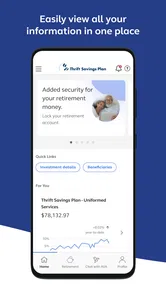
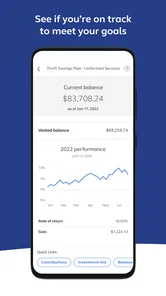
First off, the app is designed to give you easy access to your Thrift Savings Plan account. Whether you’re casually checking your account balance or diving deep into your transaction history, everything is laid out in a user-friendly manner. It’s like having a financial advisor in your pocket, without the hefty fees.
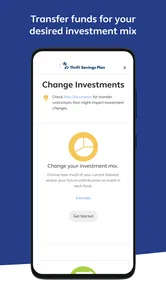
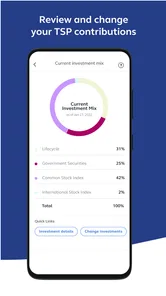
One of the coolest features, in my opinion, is the ability to manage your contributions and investments on-the-go. You can easily adjust your contribution amounts, change your investment allocations, and even request loans or withdrawals. It’s all about giving you control, and boy, does it deliver on that promise.
Convenience, with a deliberate pause
The useful trade-off is that the same accessibility that makes routine tasks easier can make larger actions feel deceptively casual. When I am only checking an account, I want speed. When I am considering a change to contributions or investments, I want enough time to understand what I am doing and why. I would treat mobile controls as a way to carry out a considered decision, not as a prompt to make one on the spot.
If you are comparing a possible change with a household budget or another financial goal, write down the question first and gather the context you need before acting. That is a more reliable workflow than opening the account with no clear purpose and tapping through options simply because they are available. The app can shorten the path to your account; it cannot decide whether an action fits your circumstances.
Ease of Use
Navigating through the app is a breeze. The interface is intuitive, with everything clearly labeled and easy to find. Even if you’re not particularly tech-savvy, you’ll find it straightforward to use. The developers have done a stellar job of making sure that the app is accessible to everyone, regardless of their tech skills.
Additionally, the app provides educational resources to help you make informed decisions about your retirement savings. From webinars to articles, it's got you covered. It's like having a mini-university for financial literacy right in your hands.
Security Features
Now, I know what you're thinking—what about security? Well, rest assured, the app has you covered. With multiple layers of security protocols, including biometric login options and two-factor authentication, your data is kept safe and sound. You can manage your finances with peace of mind, knowing that your information is protected.
Because a TSP account can affect long-term plans, I’d use mobile access for visibility and straightforward tasks, then pause before decisions with lasting consequences. The app is not a personal financial adviser, and educational material is a starting point rather than a substitute for weighing your own circumstances. A useful habit is to note the question you want answered before opening the account; that helps keep a quick check focused instead of turning into an impulsive change.
Who will get the most from it?
I think the app suits people who already know they have a TSP account and want a convenient way to review it or manage routine account actions. It can be particularly handy for someone whose schedule makes desktop access inconvenient, or for a household check-in where you want to confirm account details before discussing a broader savings plan. If you only need occasional access, it can still serve as a pocket-sized route to the account, though a browser may feel more comfortable for extended reading or careful comparison.
Compared with the usual alternatives—logging in through a browser or putting off the task until paperwork piles up—the app’s main advantage is immediacy. A browser can be easier when you want a larger screen and room to think; the phone is better for a brief check or an action you have already considered. I would not choose it as a general budgeting tool for tracking every household account, since its focus is the TSP rather than a complete picture of your finances.
Who should choose another route?
If you do not have a TSP account, this app is unlikely to have much practical value for you. The same applies if your main goal is to see multiple retirement accounts, bank balances, and household spending together: a broader financial organizer is a more suitable starting point, with TSP access handled separately. People who prefer reading detailed information on a larger display may also find the browser route more comfortable for a longer review.
I would also avoid relying on any one sign-in route for an important task until you have tried it yourself. If the app is awkward on your device or a login problem interrupts your workflow, use the browser instead and come back to the mobile option when you can test it without pressure. Keeping that fallback in mind is not a reason to dismiss the app; it is a sensible way to avoid making access friction part of a time-sensitive decision.
Limits worth keeping in mind
The app’s modest average rating is a practical caution: a low-friction idea is only useful when access works reliably for you. I would try signing in and finding the account information you use most before depending on it for a time-sensitive task. If you hit a login or navigation snag, switching to the browser is a sensible fallback rather than repeatedly attempting a consequential transaction while frustrated.
There is also a difference between being able to make an investment or contribution change on a phone and having enough context to make a good one. I’d use a quiet moment, review the relevant information, and avoid treating a quick screen glance as a full retirement review. People who want broad financial planning, consolidated accounts, or detailed analysis may be better served by a separate planning method alongside their TSP access.
My Two Cents
All in all, the Thrift Savings Plan app is a solid tool for anyone looking to manage their federal retirement savings efficiently. It’s comprehensive, easy to use, and packed with features that make managing your finances less of a chore and more of an enlightening experience.
Whether you're a seasoned federal employee or someone who's just starting out, this app has something for everyone. It’s a must-have for anyone looking to take control of their financial future. So, why not give it a shot? It might just be the game-changer you’ve been looking for.
My recommendation is more measured: if you have a TSP account and value quick mobile access, it is worth trying as a companion to your more careful retirement reviews. Its free access lowers the barrier to testing it, while the rating suggests keeping a browser option handy until you know how dependable it feels on your device. For someone who wants to make thoughtful checks without letting routine account tasks drift, that balance of convenience and caution is the right way to approach it.
Thrift Savings Plan Frequently Asked Questions
Is the Thrift Savings Plan app free, and who publishes it?
The Thrift Savings Plan app is free to download and is published by the Federal Retirement Thrift Investment Board. Its purpose is to give TSP participants a mobile place to access and manage their plan. Before installing, make sure you select the app with this publisher so you are using the official TSP app rather than an unrelated service.
What devices can run the Thrift Savings Plan app?
The app requires iOS 9 or later, so check your device’s operating system before downloading. Its content rating is Everyone, making it suitable for a general audience. The app is designed for managing a retirement account, so you should also consider whether you are comfortable accessing sensitive financial information on your device and keep your device protected.
What is the Thrift Savings Plan (TSP)?
The Thrift Savings Plan (TSP) is a retirement savings and investment plan for federal employees and members of the uniformed services, including the Ready Reserve. It offers participants the same types of savings and tax benefits that many private corporations offer their employees under 401(k) plans. TSP is designed to provide retirement income and is an integral part of the Federal Employees' Retirement System (FERS).
What can I do with the Thrift Savings Plan app?
The app is intended to let you access and manage your Thrift Savings Plan in one place. It serves as a mobile option for participants who want to handle plan-related tasks without relying solely on a computer. Your experience will depend on having an eligible TSP account and being able to sign in; the app itself does not replace the retirement plan or determine whether you are eligible to participate.
How do I enroll in the Thrift Savings Plan?
To enroll in the Thrift Savings Plan, federal employees are typically automatically enrolled in the TSP when they start federal service, but they can choose to change their contribution levels or investment options at any time through the TSP website. Uniformed service members need to actively elect to participate by setting up an account through their respective payroll provider or through the MyPay website.
Pros
- Low-cost investment options
- Tax advantages available
- Diverse fund choices
- Automatic payroll contributions
- Government-backed security
Cons
- Limited investment options
- Complex withdrawal rules
- No individual stock investments
- Lack of Roth conversion options
- Limited customer service hours











