The Wichita Eagle | Local News
- 113.00
- 3.0
- Installs
- 10.00K
- Price
- Free

Screenshots
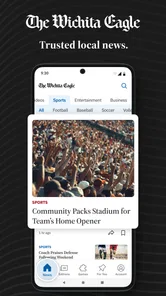
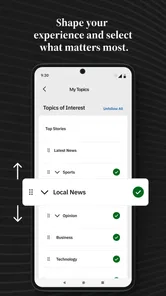
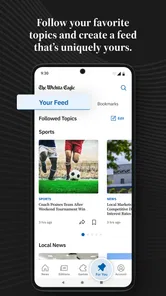
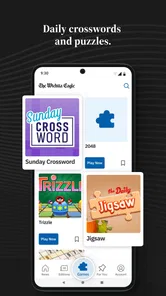
Analysis by Reviewed
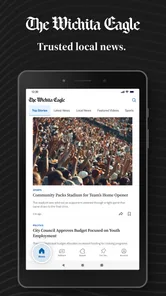
If you want a focused way to keep up with Wichita and the wider Kansas news picture, The Wichita Eagle | Local News is worth a look. I found it most useful as a local-news reading app rather than a complete replacement for every source on my phone. Its coverage is aimed at the stories that matter close to home: breaking events, politics, business, weather, games, and local sports.
The app comes from McClatchy and sits in the News & Magazines category. It is free to install, although in-app purchases range from $7.99 to $159.99 per item, so I would pay attention to any subscription or purchase screen before confirming anything. The audience rating is Everyone 10+, and the app supports Android 8.0 or later. That makes it accessible on many older devices, which is useful if you keep a spare phone for news or do not upgrade frequently.
What to expect when you open The Wichita Eagle
My first impression was that the app has a clear local purpose. Instead of trying to compete with a national news reader filled with stories from everywhere, it puts Kansas reporting at the center. That focus is the main reason to choose it. If you live in Wichita, work there, have family in the area, or simply want a closer view of Kansas events, the narrower scope can make checking the news feel less overwhelming.
The store short description calls it The Wichita Eagle, while the longer summary points to Kansas breaking news, politics, business, weather, games, and local sports. In practical terms, I would approach it as a publication app: open it when you want to see what is happening locally, scan the available headlines, and decide which stories deserve a full read. It is not the kind of app I would install solely for international coverage or a broad national news roundup.
The app has an average rating of 3.0 from around 300 ratings, with just over 100 written reviews. I see that as a reason to keep expectations measured rather than as an automatic rejection. A middling score often reflects differences in expectations around reading experience, account access, subscriptions, or performance. For me, the important question is whether local reporting is valuable enough to justify trying the app on your own device.
The current version is 11.1.16, and the app has been available since May 16, 2011. That long history suggests this is an established newspaper product rather than a temporary experiment. At the same time, an older publication app can feel different from a lightweight news aggregator: the experience is tied more closely to one newsroom and its way of presenting stories.
Who will get the most from it
I would recommend it first to readers who need Wichita and Kansas news in one place. A resident checking local developments before work, a parent following area sports, or someone watching state politics may find the app more relevant than a national news application that only occasionally mentions Kansas.
More From Our News Desk

Weather by Xiaomi Review: Clear at a Glance, Less Clear Up Close

X Under Pressure: Can It Recover When Posting Goes Wrong?

Clash of Clans Is Won Between the Battles

Android Auto Makes the Case for Quieter Car Software

MobiOffice: Transforming Mobile Productivity with Seamless Integration

EA SPORTS FC™ Mobile Soccer: Redefining Mobile Sports Gaming
It can also help people who have moved away but still care about the area. A local publication app gives that kind of reader a simple routine: open it during a break, scan the latest local headlines, and read more when a familiar place or issue appears. That is more useful than relying on a general search and hoping the right story surfaces.
I would be less enthusiastic for someone who wants a completely free, ad-free, or all-in-one news experience. The free installation does not mean every part of the reading journey is necessarily free, and the listed purchase range is wide enough that you should treat payment prompts seriously. If your priority is only weather alerts, a dedicated weather app may be more direct. If you want worldwide headlines, a national aggregator will probably cover that need better.
Getting started without unnecessary friction
I’d use the first session to learn how the local coverage is organized, rather than tapping through quickly and judging the app by its opening screen. A useful test is whether I can find a story relevant to my routine, read it, and understand where to return for related coverage. That small check makes it easier to decide whether the app belongs in my regular news habits.
Install it with the right expectations
Before installing, I would check that the phone runs Android 8.0 or newer. That is an easy detail to overlook, especially if you are setting up an older handset. Once installed, I would also decide what I actually want from the app: quick local updates, deeper newspaper reading, sports coverage, or a mix of these. Having that goal makes the first session much more useful.
Because the app is free to download but includes in-app purchases, I would not rush through the first screens. Read each prompt before tapping a confirmation button, especially if it presents access options or asks you to continue with a purchase. This is not a reason to avoid the app; it is simply the sensible way to approach any publication app that combines free installation with paid items.
I also recommend using the first opening as an orientation session instead of immediately judging the whole product. Look at how the main news stream is arranged, identify where local sections appear, and notice whether the stories you care about are easy to reach. The most important test is not how polished the first screen looks. It is whether you can move from opening the app to finding a meaningful Wichita story without searching around.
Choose a practical reading routine
A short routine works better here than constantly refreshing. I would open the app once in the morning for breaking news, weather, and major local developments, then return later if a story is unfolding. This avoids turning a local publication into background noise and helps you notice changes that matter to your day.
For example, imagine you are leaving home for work and hear that conditions may affect travel. I would open the app, look for the current local news and weather coverage, and then read the most relevant story rather than scrolling through every section. Later, if a city decision or sports result interests you, I would return for that specific subject. The app becomes more useful when you treat it as a quick local briefing followed by selective reading.
That workflow is one of the less obvious advantages of a focused publication. A broad news feed may offer more variety, but it also makes local information compete with stories from far away. Here, the narrower editorial focus can reduce the time spent filtering irrelevant headlines.
Your first meaningful action
The first successful action I would aim for is simple: find one current story that directly affects your interests and read beyond the headline. Start with the section that matches your reason for installing. If you care about city decisions, begin with politics or local reporting. If you follow employers and development, check business. If sports are your priority, go straight to local sports or games.
After reading that first story, ask yourself three questions: Was it easy to locate? Did the article provide enough context to be useful? Would you return to this app for the next update? These questions are more revealing than a quick glance at the home screen because they test the actual value of the newsroom’s coverage.
One useful habit is to compare the app’s local story with a general source only when the subject is important. A national news app may give you broader context, while The Wichita Eagle can be the better starting point for the local angle. Using both in that order helps prevent a common mistake: expecting a local publication to do the job of a worldwide news service.
Handling the areas that may confuse new users
The biggest point of confusion is likely the difference between downloading an app for free and receiving unlimited access to everything without payment. The installation costs nothing, but the presence of in-app purchases means some reading or access choices may involve payment. I would treat the first session as a chance to understand the available path before entering payment details.
The purchase range runs from $7.99 to $159.99 per item. Those figures are not something I would ignore, particularly if a child or another family member uses the phone. The age rating is Everyone 10+, but age suitability and purchase awareness are separate issues. If you share a device, make sure the person using it understands that a free download can still present paid options.
Another possible misunderstanding is expecting every headline to be breaking news. A local newspaper app covers several subjects, and not all of them will change at the same speed. Weather may require frequent checking, while business or political reporting may be more useful when you have time to read carefully. I would judge the app by whether it consistently helps with the kinds of Kansas stories I care about, not by whether every visit produces a dramatic update.
Some readers may also assume that a publication app should replace social feeds, television, radio, weather tools, and national news. I do not think that is the right test. Its strength is local relevance. If you use it alongside a broader source, it can fill a gap rather than compete with every other information tool on your phone.
Practical ways to get more value from it
First, make your reading goal specific. “Keep up with the news” is vague, while “check Wichita developments and local sports each evening” gives you a repeatable reason to open the app. This matters because a focused publication is easiest to appreciate when you use it for a defined local need.
Second, use the app as a verification step for local conversations. If someone mentions a city change, business development, or sports result, check the relevant coverage rather than relying only on a short social post. The benefit is not just finding a headline; it is moving toward a fuller account from a local newsroom.
Third, separate urgent information from background reading. Weather and breaking news may deserve a quick check before you leave home, while politics and business stories are better read when you have time to consider them. This simple split prevents the app from becoming frustrating when you only have a minute.
Fourth, revisit your expectations after several sessions instead of deciding based on one opening. A publication app earns its place through repeated usefulness. If the local sections consistently help you understand Wichita events, the app may be worthwhile. If you keep opening it and finding that your interests lie elsewhere, uninstalling it is reasonable; no single news source needs to serve every reader.
How it compares with usual alternatives
Compared with a general news aggregator, The Wichita Eagle offers a more local starting point. Aggregators are convenient when you want many publishers, national headlines, and different viewpoints in one stream. Their weakness is that local stories can be buried under more widely shared news. This app makes more sense when Kansas relevance matters more than maximum variety.
Compared with a dedicated weather application, it is broader but less specialized. The weather section may be useful as part of a local briefing, yet a weather-first app is usually the better choice when you need forecast tools, radar, or immediate conditions. I would keep a dedicated weather option for urgent planning and use this app for the surrounding local context.
Compared with social media, the app is a better place to begin when you want an article rather than an unverified post. Social platforms can surface events quickly, but they also mix commentary, repetition, and incomplete information. The trade-off is that social media feels faster and more conversational, while a newspaper app asks you to read through a more structured publication experience.
Compared with a national newspaper app, this one should win only when Wichita and Kansas are central to your interests. A national service will usually be stronger for federal politics, international affairs, and broad analysis. The Wichita Eagle is the more sensible choice when the question is, “What is happening around here?” rather than, “What is happening everywhere?”
When I would skip it
I would skip this app if I wanted one place for global headlines, specialized technology reporting, or a purely free reading experience with no purchase decisions. I would also skip it if I rarely care about Wichita or Kansas, because the central benefit is geographic focus. Installing a local publication without a local connection can make the narrower coverage feel limiting.
I would also hesitate if the average score of 3.0 makes you especially sensitive to interface issues or account friction. Ratings are only one signal, but they do suggest that the experience may not satisfy everyone equally. My advice would be to try the free installation, inspect the first reading path, and decide based on how quickly it delivers the local information you wanted.
My next-step recommendation
For a first-time user, I would install it, confirm that the device meets the Android requirement, and spend a few minutes locating local news, weather, politics, business, and sports coverage. Then I would read one story that has a direct connection to my daily life. That gives you a fair test without committing to a long reading session or a purchase.
After that, choose a routine that fits you. A morning scan works for travel and general awareness; an evening visit may suit sports and local developments; occasional checking is enough if you simply want to stay connected to the area. Keep an eye on any paid access screen, and do not assume that every option presented during setup is necessary.
My overall view is cautiously positive for the right reader. The best reason to use it is local focus, not sheer quantity of content. McClatchy’s app is most convincing when it helps you move quickly from a phone notification or a question about Wichita to a relevant local story. It is less convincing as a universal news replacement, and the in-app purchase structure means you should read prompts carefully.
If Wichita and Kansas are part of your everyday life, I think this free app is worth testing on an Android device that meets its requirements. If they are not, a broader news reader, a dedicated weather tool, or a national publication will probably serve you better. For local readers who want a straightforward starting point, The Wichita Eagle | Local News can become a useful part of a balanced news routine, provided you use it for what it does best.
The Wichita Eagle | Local News Frequently Asked Questions
Is The Wichita Eagle | Local News available for my device?
The Wichita Eagle | Local News is a mobile app for Android and iOS. Its current version is 11.1.16, and it requires Android 8.0 or later. Before downloading, check your device’s operating system and the relevant app store page to make sure your device can install it. The app is listed in News & Magazines and is developed by McClatchy.
What is The Wichita Eagle | Local News app?
The Wichita Eagle | Local News app is a mobile news platform focused on Wichita, Kansas, and surrounding communities. It provides access to local reporting, breaking news, politics, sports, business, entertainment, weather, and community updates. The app is designed for readers who want Wichita-focused coverage in a convenient format rather than relying only on a general national news application.
Is The Wichita Eagle app free to download and use?
The app is free to download, but access to all articles and premium features may depend on your subscription status. Some stories or a limited number of articles may be available to non-subscribers, while unlimited reading, digital editions, and other benefits can require a paid plan. In-app purchases range from $7.99 to $159.99 per item, so check the current terms, pricing, and trial conditions in the app or official store listing before subscribing.
What type of news and features are available in the app?
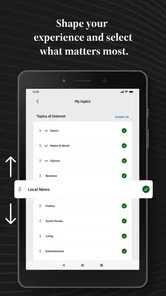
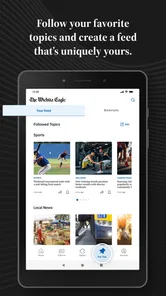
The Wichita Eagle app typically includes local and regional news, crime and public safety reports, sports coverage, opinion pieces, business updates, lifestyle stories, entertainment, weather information, and community reporting. Depending on the version and subscription, readers may also find breaking-news alerts, saved articles, personalized content, digital newspaper access, and options for sharing stories with others.
Does the app require an account or subscription?
You may be able to browse some content without creating an account, but an account is usually needed to access subscriber-only articles, manage a digital subscription, save stories, or use personalized features. A subscription may also be required after reaching a reading limit. Before entering payment details, review whether the plan renews automatically and learn how cancellation is handled.
Pros
- Covers Wichita and surrounding communities with strong local reporting.
- Offers timely updates on local events
- weather
- sports
- and public safety.
- Easy-to-navigate layout makes browsing headlines and sections straightforward.
- Push notifications can help readers stay informed about breaking local stories.
- Supports saving articles for reading later when available on the device.
Cons
- Many articles may require a paid subscription or account to access fully.
- Advertising can make some screens feel crowded or distracting.
- Coverage is mainly regional
- with limited value for readers outside Kansas.
- Some stories may load slowly on weaker mobile connections.
- Notification frequency may feel excessive unless alerts are customized.













