Sacramento Bee News California
- 429.00
- 3.1
- Installs
- 50.00K
- Price
- Free

Screenshots





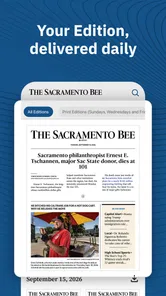

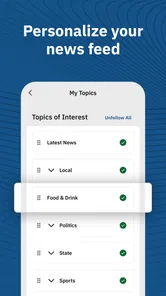
Analysis by Reviewed
I opened Sacramento Bee News California expecting a straightforward way to follow local reporting, and that is exactly where this app makes the most sense: when national headlines are not enough and I want Sacramento-area news, politics, business, crime, weather, sports, and a few lighter diversions in one place. It is a free News & Magazines app from McClatchy, aimed at readers who want a local news routine rather than another broad headline aggregator.
My overall impression is mixed but useful. The app puts a lot of relevant local subjects close together, which can save time during a busy morning. At the same time, the average rating sits at 3.1 from around 885 ratings, so it is fair to approach it as a practical local-news tool rather than a polished, universally loved reading experience. I found the strongest value in its coverage focus, while the weaker side is the friction that can appear when a free app also offers paid items and when readers expect every part of the experience to feel equally smooth.
From a quick local check to a daily news routine
I look at this app first as a quick local check, then as something that might earn a place in a daily routine. That distinction matters because a useful headline scan and a satisfying long reading session are different jobs; noticing which one you need helps you decide how much time to give the app before weighing its reliability.
Starting with a specific need
The best way to use this app is to begin with a clear question. I might want to know whether severe weather is affecting my commute, whether a local political decision has changed, what is happening in Sacramento business, or whether a crime story is developing nearby. Starting with one of those needs works better than opening the app with the vague expectation that it will replace every news source on my phone.
That local focus is important. General news apps can give me national context, but they often make regional stories compete with celebrity news, international events, and algorithmically selected topics. Here, the subject mix is more closely tied to California and Sacramento interests. The trade-off is that someone who mainly wants world news, financial markets, or a broad national briefing may find the app narrower than the alternatives they already use.
I also like that the coverage is not limited to one kind of urgent story. Weather can matter immediately, while politics and business may reward a slower read. Crime reporting can draw attention because it affects a particular community, and local sports can become the reason a reader returns even on a quiet news day. Games and other lighter material give the app a small break from serious headlines, although I would not install it primarily for those extras.
A practical morning workflow
My preferred routine would be to open the app before leaving home, scan the most important local developments, and then choose one or two stories worth reading fully. I would check weather first if conditions might affect travel, then move to breaking news and local politics. After that, business or sports can fill the remaining few minutes. This sequence keeps the app from becoming an endless scroll and turns it into a quick decision-making tool.
More From Our News Desk

Weather by Xiaomi Review: Clear at a Glance, Less Clear Up Close

X Under Pressure: Can It Recover When Posting Goes Wrong?

Clash of Clans Is Won Between the Battles

Android Auto Makes the Case for Quieter Car Software

MobiOffice: Transforming Mobile Productivity with Seamless Integration

EA SPORTS FC™ Mobile Soccer: Redefining Mobile Sports Gaming
A useful, less obvious habit is to separate information that requires action from information that only deserves awareness. A weather update may change whether I carry an umbrella or leave earlier. A traffic-related crime report may affect a route. A political article may be worth saving mentally for a later conversation but does not need to interrupt the morning. Treating the sections differently makes the broad topic range more useful than simply reading headlines in order.
For a household, the same workflow can serve different people without requiring everyone to use the app in the same way. One person may check weather and breaking news, another may go directly to sports, and someone else may focus on business or politics. That makes the local scope more valuable than its install count alone might suggest: it is not only a personal news feed but also a shared reference point for what is happening nearby.
Moving from headline to context
When a headline catches my attention, I would read it with a specific purpose: identify what happened, where it happened, who is affected, and what may happen next. That sounds simple, but it prevents a common mobile-news mistake—mistaking a short headline scan for understanding. Local stories often depend on place names, public decisions, weather conditions, or developing details, so a quick glance is not always enough.
The app is particularly useful when I already have local knowledge. Recognizing neighborhoods, roads, public institutions, and regional concerns helps me judge why a story matters. For readers who have recently moved to the area, the same coverage can work as a gradual orientation tool. A person who is unfamiliar with Sacramento may need more context from broader sources, but repeated local reading can make the area’s news vocabulary easier to follow.
I would also avoid treating a breaking-news headline as a complete account. The presence of crime and weather coverage makes rapid updates valuable, but fast-moving stories can change. My workflow would be to use the app to learn that something is happening, read the available details, and then return later if the event could affect my plans. That approach is more reliable than making a major decision from one brief update.
What happens when reading becomes a handoff
News rarely ends inside the app. I may read a weather item, then check my calendar and transportation plans. A local business story may lead me to compare information elsewhere before making a purchase or discussing an investment. A political report may prompt me to look for an official announcement or additional background. Sacramento Bee News California works best as the first handoff in that chain, not necessarily the only source for every conclusion.
This is one of the app’s genuine strengths and also a boundary. Its local subject range gives me a useful starting point, but I still need judgment when a story affects money, health, legal concerns, travel, or personal safety. A local-news app can point me toward the issue without replacing official information or deeper reporting. I appreciate it more when I use it as a focused doorway into the day’s regional conversation.
There is another handoff involving the reader’s attention. A headline may be enough for a casual check, while a longer article asks for uninterrupted reading. On a small phone screen, I would use the app in short sessions and avoid opening it when I have only a few seconds. If I need a calm, distraction-free reading experience, a browser or dedicated reading setup may feel better. The app’s convenience is strongest when speed and local relevance matter more than a perfectly minimal interface.
Free access and the paid boundary
The app itself is free to install, which makes trying the local coverage relatively easy. It is rated for Everyone 10+, so it is positioned for a broad audience, though parents should still remember that news about crime and other serious events can be uncomfortable for younger readers even when an app has an age rating of this kind.
In-app purchases range from $7.99 to $159.99 per item. That matters before I settle into the app as my only news source. I would pay attention to what appears during the reading or subscription process and make sure I understand which material or access level a purchase concerns. The practical lesson is simple: free installation does not mean every possible reading arrangement has the same cost.
For a light user, the free starting point may be enough to decide whether the coverage fits. For someone who reads local reporting every day, the purchase options become part of the decision rather than an afterthought. I would not recommend committing immediately. I would first use the app during the kinds of situations that matter most—morning planning, a local event, changing weather, or a major regional story—and then decide whether the paid path provides enough value for that person’s habits.
Where it stands beside familiar alternatives
Compared with a national news app, this one offers a clearer regional identity. I am less likely to lose Sacramento stories among unrelated headlines, and the combination of local politics, business, crime, weather, and sports gives the day a recognizable local shape. A national app is better when I want international context or a wide range of sources in one feed.
Compared with a general search engine or social media feed, the app is potentially calmer and more purposeful because I am entering a publication centered on local news rather than waiting for an algorithm to decide what deserves attention. Social feeds may surface eyewitness discussion faster, but they can also mix rumor, commentary, and unrelated material. I would use those platforms as a supplement, not as a replacement for reading a local report carefully.
Compared with a newspaper website in a mobile browser, the dedicated app may be more convenient for repeated checks. The browser can be better for comparing several publications, sharing a page, or avoiding another installed app. That choice comes down to routine: if I repeatedly return to Sacramento coverage, the app has a stronger case; if I read local news only occasionally, the browser may be sufficient.
Device expectations and everyday usability
The current version is 11.1.16 and the app supports Android 8.0 or later. That gives it a reasonably broad place on older Android phones, though the experience will still depend on the handset, screen size, connection, and the way the app handles its reading layout in practice. I would check the operating-system requirement before recommending it to someone using an older device.
On a normal weekday, I would use it in three short passes. First, I would scan for urgent local developments. Second, I would read one story connected to my work, route, family, or neighborhood. Third, I would return later for sports or a developing update. This prevents the app from taking over the morning and makes it easier to notice whether it is actually helping me stay informed.
A particularly useful workflow is to match the section to the time of day. Weather and breaking news belong early, business and politics fit a lunch break, and sports or games can work later when I want something less urgent. That is not a flashy feature, but it is a better use of the app’s range than opening every section at once. It also helps me notice which parts I genuinely use before considering any purchase.
Where the flow breaks
The first possible break is relevance. Sacramento-area coverage is the reason to choose this app, but it becomes a limitation if I live elsewhere or want a broad California roundup. Even a reader who cares about California may find the regional emphasis too specific when looking for statewide policy, national business, or international events. In those cases, I would pair it with a broader source or choose a different primary app.
The second break is attention. A wide mix of topics can make the app feel useful, but it can also encourage constant checking. Breaking news, crime, weather, sports, and lighter content do not all deserve equal urgency. If I find myself opening the app repeatedly without reading anything carefully, I would reduce the routine to one planned check in the morning and one later update.
The third break is the paid transition. The free entry point is appealing, but the range of in-app purchase prices means I would not assume that the complete experience fits every budget. Someone who wants only occasional headlines should be cautious about subscribing or buying anything impulsively. A committed local-news reader may see more value in paid access, but that is a personal calculation based on reading frequency and the importance of local reporting in daily life.
The fourth break is source dependence. No single local app should be my sole authority during an emergency, a rapidly changing weather situation, or a decision with serious consequences. I would use the app to orient myself, then confirm critical details through appropriate official or specialized sources. That extra handoff is not a criticism of this particular publication; it is a sensible habit for mobile news in general.
Who will get the most from it
I would recommend Sacramento Bee News California to someone who lives in or closely follows the Sacramento area and wants local subjects gathered in one mobile destination. It is a good fit for a commuter checking conditions, a resident following city or regional politics, a local business reader, a sports follower, or anyone who wants crime and weather updates alongside ordinary daily reporting.
I would be more hesitant to recommend it to a reader who wants a completely free, ad-free-feeling, all-purpose news replacement, or to someone whose interests are mostly national and international. It is also not the best first choice for a person who prefers comparing many publications side by side. Those readers may be happier with a broad news aggregator, a browser-based routine, or a source that is built around their particular specialty.
After using it as a local-news workflow, I see the app as a focused tool with a clear purpose rather than an essential app for everyone. Its strongest result is helping me move from “what is happening near Sacramento?” to a short list of stories that may affect my day. Its weaker result appears when I expect effortless coverage of everything, ignore the paid boundary, or treat a quick headline as the final word.
McClatchy’s app is worth trying because the download is free and the local emphasis is easy to understand from the first session. I would begin with a few real situations—planning around weather, checking a local development, following politics, or catching up on sports—and judge it by whether it improves those moments. If Sacramento-area reporting is the gap in your current news routine, this app can fill it; if broad coverage and maximum flexibility matter more, a different news option will likely serve you better.
Sacramento Bee News California Frequently Asked Questions
Who publishes the Sacramento Bee News California app?
The app is published by McClatchy and is focused on news for Sacramento and California. It is intended for readers who want local coverage alongside statewide reporting, including topics such as politics, business, crime, weather, games, and local sports. If you are deciding whether it suits your reading habits, its emphasis on regional news is the main distinction to keep in mind.
What is The Sacramento Bee News California app?
The Sacramento Bee News California app is a mobile news platform focused on Sacramento, the Central Valley, and broader California coverage. It brings together local reporting, politics, public safety, business, sports, entertainment, opinion, and breaking news in one place. After installing it, readers can browse the latest headlines, open full articles, and keep up with regional stories while away from a computer.
Is The Sacramento Bee app free to download and use?
The app can generally be downloaded at no cost, allowing users to install it and explore available headlines and selected content. However, access to every article may depend on the publication’s subscription and paywall rules. Some stories or features can require a digital subscription, so users should review the current pricing, trial terms, and account requirements shown in the app or official app-store listing. The app is free to download, while in-app purchases are listed from $7.99 to $159.99 per item.
What type of news and features does the app provide?
The Sacramento Bee app is designed for readers who want more than general national headlines. It typically includes Sacramento-area reporting, California politics, local government, crime and public safety, education, sports, food, entertainment, and community updates. Depending on the version, users may also find breaking-news alerts, saved articles, personalized notifications, photo galleries, and access to the publication’s opinion and investigative journalism.
Can I receive breaking-news notifications from The Sacramento Bee?
Yes, the app may send push notifications for breaking news, major local developments, weather-related events, sports updates, and other important stories. Notifications are useful for staying informed quickly, but they can become frequent depending on the categories selected. After installation, it is worth checking the notification settings and disabling topics you do not want, while keeping alerts enabled for the subjects most relevant to you.
Pros
- Covers Sacramento-area politics
- schools
- crime
- and community news.
- Offers local reporting that is difficult to find in national news apps.
- Breaking-news alerts help users follow important regional developments.
- Articles include useful California and Central Valley context.
- Clean reading experience with options to save stories for later.
Cons
- Many premium articles may require a paid subscription to read fully.
- Some content can feel focused on Sacramento rather than wider California.
- Frequent notifications may become distracting unless carefully managed.
- Advertising and subscription prompts can interrupt the reading experience.
- App performance and article loading may depend heavily on connection quality.













