Fort Worth Star-Telegram News
- 275.00
- 3.0
- Installs
- 100.00K
- Price
- Free

Screenshots

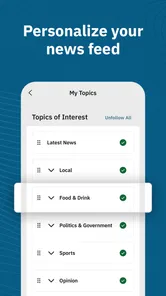
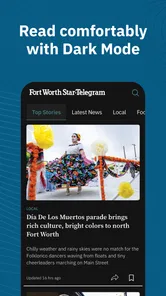
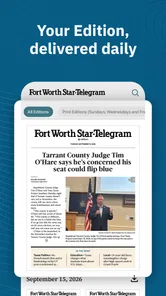
Analysis by Reviewed
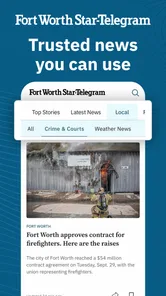
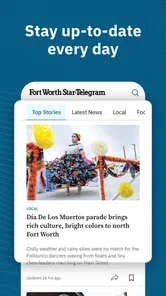
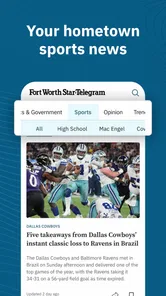
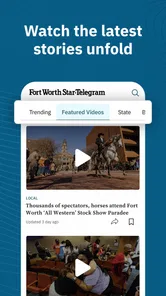
I approached Fort Worth Star-Telegram News as a local news reader rather than as a general-purpose headline app. Its focus is Fort Worth, Texas, with coverage built around breaking news, politics, weather, crime, and sports. That narrow focus is its main reason to exist, and it is also the first question to ask before installing it: do you want news from this community, or are you looking for a broader national feed?
In my experience, a focused local publication can be more useful than a large news aggregator when the information you need is tied to a place. Road disruptions, public safety stories, city decisions, school-related developments, local teams, and changing weather conditions matter differently when they affect your neighborhood directly. This app is designed for that kind of attention, not for endlessly browsing unrelated stories from around the country.
The app is free to install, although it includes in-app purchases ranging from $7.99 to $159.99 per item. That makes the first-use decision fairly simple, but the longer-term value deserves more thought. I would treat the free installation as a way to test the reading experience and local relevance before deciding whether it fits my news routine. The content rating is Everyone 10+, so it is aimed at a general audience while still recognizing that news can include serious subjects.
How the local-news focus shapes the experience
What stands out most is the relationship between geography and usefulness. A national news app can give me a polished overview of major events, but it may leave local consequences buried below bigger stories. Here, the subject areas are much closer to daily life in Fort Worth. If I live there, work there, commute through the area, follow local government, or have family nearby, the app has a clear practical role.
I would not use it as my only source for every kind of news. For international events, technology coverage, business analysis outside the region, or a broad political overview, another publication or an aggregator may be a better companion. The strength here is not breadth. It is the possibility of getting a more concentrated view of the place named in the app.
The developer is McClatchy, a recognizable newspaper publisher, and the app has been available since March 28, 2011. That long presence gives the product useful context: this is not presented as a temporary local feed or a newly assembled headline experiment. Still, longevity alone does not guarantee that every story will match my expectations, so I would judge it by how consistently it helps with the issues I actually follow.
The current version is 11.1.16 and it requires Android 8.0 or later. For someone using an older phone, compatibility is an immediate practical check rather than a minor technical detail. On a supported device, I would expect the main test to be simple: can I find the local subjects I care about quickly, read them comfortably, and decide whether the app deserves a regular place on my phone?
More From Our News Desk

Weather by Xiaomi Review: Clear at a Glance, Less Clear Up Close

X Under Pressure: Can It Recover When Posting Goes Wrong?

Clash of Clans Is Won Between the Battles

Android Auto Makes the Case for Quieter Car Software

MobiOffice: Transforming Mobile Productivity with Seamless Integration

EA SPORTS FC™ Mobile Soccer: Redefining Mobile Sports Gaming
What I would check during the first session
My first session would not be about reading every headline. I would scan the available local coverage and look for a useful mix of immediate reporting and stories that explain what is happening in the community. A good local-news routine needs both: quick awareness when something changes and enough context to understand why it matters.
I would also pay attention to whether the app helps me separate urgent information from ordinary updates. Weather and breaking news serve a different purpose from sports or political coverage. If the layout makes those areas easy to distinguish, that saves time. If every item feels like part of one undifferentiated stream, I would be more likely to open the app only when I already knew what I wanted to search for.
A realistic example is a weekday morning when I am deciding whether a normal commute still makes sense. I might check local breaking news and weather first, then glance at crime or civic coverage if there has been an overnight incident near my route. Later, I could return for sports or a developing political story. That is a more convincing use case for this app than casual scrolling during spare time.
Trust is about fit, not just familiarity
When I use a news app, trust has two sides. One is editorial usefulness: does the reporting help me understand what is happening nearby? The other is practical control: do I understand what I am choosing, what may require payment, and how much information I am comfortable sharing while using it?
For this app, I would keep those questions separate. McClatchy’s identity and the publication’s local focus establish who is behind the product, but they do not remove the need for personal judgment. I still want to notice the choices presented during installation, reading, sign-in, subscription, or purchase flows. I would not assume that a familiar publisher means every setting is automatically right for me.
The app’s average rating is 3.0 from around 800 ratings, with around 300 written reviews. I read that as a reason to test it personally rather than to accept either extreme: it is not a clear signal of universal satisfaction, but it also does not tell me exactly which issues matter to my situation. A commuter, a local sports follower, and someone interested mainly in statewide politics may all judge the same app differently.
Controls I would verify instead of assuming
I prefer to make decisions from visible prompts and settings, not guesses. During setup, I would look for any choices related to notifications, account access, subscriptions, purchases, and privacy. If alerts are offered, I would decide whether I want every breaking update or only the most important interruptions. A local news app can become useful or annoying largely because of that balance.
I would also check whether reading requires an account at the point where I want to use a particular part of the service. If an account is requested, I would consider whether the benefit is worth creating another login. If a purchase screen appears, I would read the wording carefully and confirm whether it describes a one-time item or an ongoing commitment before continuing. That is especially important here because the app includes paid items across a wide price range.
My advice is to treat the free download as a trial of the app’s actual workflow, not as a promise that all content or functions will remain free. I would avoid tapping through payment screens quickly, and I would check the purchase confirmation before accepting anything. The safest habit is simple: pause whenever the app changes from reading news to asking for billing or account information.
I would apply the same care to notifications. Breaking news can be valuable when I need immediate awareness, but too many alerts can make me disable all of them. A better approach is to start conservatively, keep only the alerts that affect my daily decisions, and adjust after a few days. That gives me more control than either accepting every prompt or rejecting notifications without testing their usefulness.
Data-sensitive moments deserve extra attention
News apps often feel harmless because the main activity is reading. The more sensitive moments usually appear around personalization, accounts, alerts, purchases, and any request for access to information on the phone. I would review each visible permission or consent request in context and ask whether it is necessary for the action I am trying to take.
I would not grant a permission simply because it appears during onboarding. If I only want to browse Fort Worth headlines, I would first see whether I can do that without enabling an unrelated device capability. If a feature genuinely depends on a setting, I would decide whether that feature is important enough to justify it. This keeps the choice tied to value instead of habit.
Location is another moment where I would be careful. Local coverage does not automatically mean the app needs precise location access. If a location-related prompt appears, I would read what it is asking and choose the narrowest option that still supports the feature I want, if the system offers one. If I do not need location-based behavior, I would leave it off and continue using the app in the most limited way available.
The same principle applies to personal information. I would avoid entering extra details just to make the profile feel complete. For a local news reader, the useful exchange should be clear: better access to relevant stories, manageable alerts, or a purchase I intentionally selected. If I cannot see what a requested detail changes, I would postpone providing it and look for a way to continue without it.
On a shared family device, I would be especially cautious around saved payment methods and account switching. A local publication app can be opened by more than one person, and a purchase screen may not be obvious to someone who is only trying to read. I would keep billing decisions under the account holder’s control and review confirmations rather than assuming that a tap on a highlighted button is harmless.
Where the app gives me useful agency
User agency is not only about privacy. It also means being able to decide how the app fits into my day. I would choose whether this is a morning briefing, an emergency-check tool, a sports update source, or an occasional reference for local developments. The app is more likely to succeed when I give it a specific job instead of expecting it to replace every other news source.
For a Fort Worth resident, I can imagine keeping it available for local awareness while using a separate national outlet for wider context. That combination may be better than forcing one app to cover everything. The local app can answer “what is happening near me?” while another source answers “how does this connect to the larger story?”
For someone who follows local sports closely, the app may be worth opening more often than it would be for a reader interested only in national headlines. The same is true for people who want local political or crime coverage and prefer a publication centered on their area. On the other hand, a reader outside Fort Worth may find the narrow geographic focus limiting, even if the app itself is easy to use.
I would also decide whether paid access makes sense based on reading frequency, not on one particularly interesting article. If I return regularly and the local reporting becomes part of my routine, a purchase may feel more reasonable. If I open the app only during major events, the free experience may be enough, assuming the content I want is available without payment. Either way, I would make the decision after observing my actual habits rather than treating the highest-priced option as automatically better.
Where alternatives may be the smarter choice
A general news aggregator is better when I want many regions and subjects in one place. It can reduce the need to switch between publications and may be more convenient for national or international coverage. Its weakness is that local stories can compete with much larger headlines, so I may miss the details that matter to Fort Worth residents.
A television station’s news app may be preferable when I mainly want quick weather updates, video, or broadcast-style alerts. A newspaper website in a mobile browser may suit someone who dislikes installing dedicated apps or wants to compare several local sources manually. Each alternative comes with its own compromises in navigation, depth, alerts, and account requirements.
That comparison makes the choice clearer. I would choose this McClatchy app when local Fort Worth reporting is the priority and I want a dedicated place to check it. I would skip it if my news needs are mostly national, if I want a single multi-source dashboard, or if I am unwilling to review purchase and account prompts carefully. The app’s value depends heavily on that local match.
My cautious verdict after weighing the trade-offs
Fort Worth Star-Telegram News makes sense as a focused local-news tool for people who have a real connection to Fort Worth. Its coverage areas line up with practical daily concerns, from weather and breaking events to politics, crime, and sports. I like the idea of using it as a deliberate check-in rather than an endless feed: open it when local awareness matters, read what affects me, and leave when I have the information I need.
I am less enthusiastic about recommending it blindly to everyone. The middling average rating suggests that the experience may not satisfy every reader, and the presence of in-app purchases means I would pay close attention to the path from free reading to paid access. I would also review every visible permission, notification, account, and billing choice instead of assuming that the default setup reflects my preferences.
For me, the best approach would be a short, controlled trial. Install it on a supported device, browse the local sections, test whether the stories match my interests, and adjust alerts conservatively. If it becomes the quickest way to understand what is happening around Fort Worth, it earns a place beside my broader news sources. If I mostly want national coverage or a wider range of publishers, I would choose something else.
Overall, this is a specialized app rather than a universal news replacement. Its strongest argument is relevance for the right reader, while its main cautions are the need to evaluate the reading experience personally and to stay alert during account, permission, notification, and purchase decisions. I would recommend it to Fort Worth-focused readers who want local awareness and are comfortable making those choices deliberately.
Fort Worth Star-Telegram News Frequently Asked Questions
Is the Fort Worth Star-Telegram News app available for my device?
The app is available for Android and iOS devices, with the minimum operating system requirement listed as version 8.0. Before installing, check that your device’s software is compatible and that you have enough space for the app. It is a News & Magazines app from McClatchy, built for readers who want to follow Fort Worth and North Texas coverage on a mobile device.
Is the app suitable for younger readers?
The app has an Everyone 10+ content rating, so it is intended for a broad audience but may include material that parents should consider for younger children. News coverage can involve crime, public safety, politics, and other serious local events. If a child will use the app, it is sensible for a parent or guardian to review the content and manage device settings as appropriate.
What is the Fort Worth Star-Telegram News app?
The Fort Worth Star-Telegram News app is a mobile way to follow reporting from the Fort Worth Star-Telegram, with coverage focused on Fort Worth, Tarrant County, and the wider North Texas region. After exploring the app, I found it useful for reading local breaking news, politics, crime, education, business, sports, entertainment, and community stories in one place. The exact sections and available features may vary by device and app version.
Is the Fort Worth Star-Telegram News app free to download and use?
The app can generally be downloaded without an upfront charge, allowing users to install it and browse some content. However, access to the complete article library and certain subscriber features may require a Star-Telegram subscription or account. Before downloading, check the current listing and subscription terms because pricing, trial offers, article limits, and available plans can change. In-app purchases may also be handled through Google Play or the App Store.
Do I need a subscription to read articles in the app?
Not necessarily. The app may let visitors read selected stories, headlines, alerts, or limited articles without signing in, but many premium reports can be restricted to subscribers. A subscription may also provide broader access across the app and the publication’s website, depending on the plan. If you already subscribe, signing in with your existing account is usually the best way to check what content and benefits are included.
Pros
- Fast access to breaking news from Fort Worth and North Texas.
- Local reporting covers politics
- crime
- sports
- and community events.
- Customizable alerts help you follow important developing stories.
- Includes coverage from the Star-Telegram’s experienced newsroom.
- Clean layout makes browsing headlines and sections straightforward.
Cons
- Some premium articles may require a subscription to read in full.
- Advertising can interrupt browsing and reduce available screen space.
- Notifications may feel frequent if too many topics are enabled.
- Coverage is primarily regional and may not suit readers elsewhere.
- App performance can vary depending on connection quality and device.













