Miami Herald Latest Local News
- 284.00
- 3.9
- Installs
- 50.00K
- Price
- Free

Screenshots
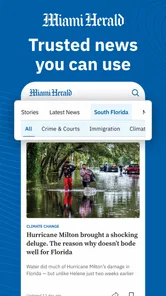
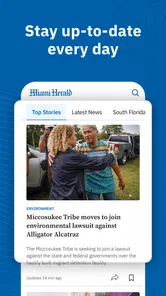
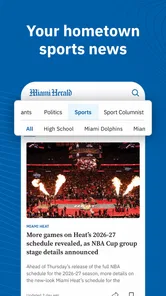
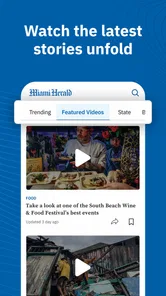

Analysis by Reviewed
When I want a quick view of what is happening across South Florida, I would rather open a local newsroom app than sort through a crowded social feed. Miami Herald Latest Local News is built for that purpose. It brings together reporting around Florida politics, business, crime, weather and sports in a mobile news experience from McClatchy. I found it most useful when I wanted regional context without spending time searching for separate sources.
This is a free News & Magazines app, rated for Everyone 10+, with optional in-app purchases ranging from $1.99 to $159.99 per item. Its average rating is 3.9 from around 800 ratings, and it has passed 50 thousand installs. Those figures suggest a reasonably established app, although they also tell me to approach it as a practical local-news tool rather than a universally loved replacement for every news source.
What to expect from the Miami Herald news experience
The first thing to understand is its focus. This is not a general-purpose headline reader that tries to cover every country and topic evenly. Its value comes from staying close to Florida stories, especially the subjects that affect daily life in and around Miami: public decisions, local companies, crime reports, weather developments and sports coverage.
I see that regional focus as the main reason to install it. A national news app may mention a major Florida event, but it usually gives only the broadest version. A local publication can make the story more useful by putting it in a community setting. If I am checking a developing storm, following a local political decision or trying to understand a crime story beyond a short social-media post, a dedicated Miami source is a better starting point.
The app is not designed to replace every kind of news service. It will not be my first choice for a worldwide news briefing, a specialized financial terminal or a private neighborhood discussion group. Its strength is editorial focus. I open it expecting local reporting and a selection of regional topics, not an endless stream tailored only to my personal interests.
That distinction matters for first-time users. The app becomes more useful when I decide what I want from it before opening it. For a short morning check, I can look for the most important local developments. During severe weather or a fast-moving public event, I can return to see whether the situation has changed. In the evening, I might use it to catch up on a sports result or a business story I missed during the day.
The best reason to use this app is local context, not sheer volume. I would recommend it to a Florida resident, someone who works in the region, or a person with family and practical interests there. I would be less enthusiastic about it for a reader who wants one app to summarize the entire world in a few minutes.
More From Our News Desk

Weather by Xiaomi Review: Clear at a Glance, Less Clear Up Close

X Under Pressure: Can It Recover When Posting Goes Wrong?

Clash of Clans Is Won Between the Battles

Android Auto Makes the Case for Quieter Car Software

MobiOffice: Transforming Mobile Productivity with Seamless Integration

EA SPORTS FC™ Mobile Soccer: Redefining Mobile Sports Gaming
How I would approach the first opening
The app was released on May 24, 2012, so it is not a new experiment from an unknown publisher. The current version is 11.1.16, and it runs on Android 8.0 or later. That combination makes it approachable for people using an older compatible Android phone, while still giving current users a clear version to look for when troubleshooting.
After installing, I would begin by scanning the main news presentation rather than immediately trying to read everything. I look for the subjects that matter to me and notice how the app separates or presents local coverage. This first pass helps me decide whether it fits my routine. A local news app should earn a place on the home screen by making relevant stories easy to recognize, not by demanding a long setup process before showing value.
Because the app is free to install, the initial decision is relatively simple: try it, read a few stories and judge whether the local emphasis matches your needs. The important financial question comes later. Optional purchases are available, so I would pay attention to any purchase prompt and make sure I understand what it offers before confirming anything. Free installation does not automatically mean every part of the reading experience has the same access conditions.
I also recommend installing it before a major local event rather than waiting until the moment information is urgently needed. If a storm, election decision or major traffic-affecting event is already unfolding, learning a new app at the same time adds unnecessary friction. A calm first session lets me see where local coverage appears and whether the reading flow feels comfortable on my phone.
Finding the first meaningful result
For a first successful action, I would choose one story connected to something I already care about. For example, on a weekday morning I might open the app to check local weather coverage before leaving home. I would then read beyond the headline and compare the article’s details with the practical question I actually have: Is this a developing situation, a forecast change, or simply a general update?
That small workflow is more useful than randomly tapping through headlines. It tests the app’s real purpose: can it help me understand a local issue well enough to make a decision or continue informed conversation? The same method works with politics and business. Instead of reading a headline and moving on, I look for the explanation behind the event, the people or institutions involved, and what might happen next.
Sports readers can use a similar approach after a game. I would open the relevant report not only for the result, but also for the local angle and the details that a short score notification leaves out. Crime coverage requires more care. I would avoid treating a headline as a complete account, especially while an event is developing, and read the full report before drawing conclusions.
One useful habit is to use the app as a starting point for verification rather than as a reason to stop looking. If a story affects a deadline, travel plan, safety decision or financial choice, I would check the latest available information and any relevant official source as well. Local journalism gives context, but fast-moving situations can change after an article is published.
Another practical tip is to separate “interesting” from “actionable” stories. A dramatic headline may attract attention, while a quieter weather, transportation, business or civic report may be more useful to your day. I find the app works best when I deliberately look for the second kind instead of letting the most emotional headline control the whole session.
Where new users may feel confused
The most likely confusion is expecting the app to behave like a personalized social feed. A publication-led news app has its own editorial priorities. That can be a benefit because I am not relying entirely on an algorithm to decide what deserves attention, but it also means the first screen may not match my exact interests every time.
I would not judge the app after reading only one headline. Local coverage changes throughout the day, and the usefulness of the service depends on whether its mix of Florida topics fits my routine. Someone interested mainly in national politics may find the regional material too narrow. Someone who wants neighborhood-level updates for a different part of the country may also be better served by a publication closer to home.
Another point to watch is access. The app costs nothing to download, but in-app purchases are part of the experience. If I encounter a prompt connected to reading or account access, I would slow down and read the wording instead of assuming that tapping through is consequence-free. This is especially important for families sharing a device or payment method.
The age rating is Everyone 10+, which is a useful general guide, but I would still use judgment with younger readers. News about crime, politics or emergencies can contain subjects that some families may not want children to encounter without discussion. The rating should not be treated as a promise that every article will feel suitable for every child.
There is also a difference between local reporting and instant alerts. A reader who needs continuous notifications for every development may prefer a service built primarily around alerts. I use this app more intentionally: open it, scan the coverage, choose a story and read it. That approach is calmer, but it may not satisfy someone who wants the phone to announce every update automatically.
For older Android users, the minimum operating-system requirement is Android 8.0. Before spending time troubleshooting, I would check the phone’s Android version. If the device meets that requirement but the app still feels awkward, I would first try closing other apps, updating the installation and checking the connection. Those are ordinary first steps, but they are more sensible than assuming the news service itself is unsuitable.
How it compares with other ways to follow Florida news
Compared with a general news aggregator, Miami Herald Latest Local News offers a clearer regional identity. Aggregators are convenient when I want many publishers in one place, but they can mix local reporting with national commentary, duplicated stories and unrelated headlines. This app is the better choice when I want a publication-centered view of South Florida.
Compared with a web browser, the app removes some of the searching involved in finding the right local section. A browser is more flexible, especially when I want to compare several outlets or search an older story. The app is more convenient for a repeat habit: open it, look through the local coverage and continue reading without rebuilding the same search each time.
Compared with social media, the advantage is editorial distance. Social platforms can surface eyewitness information quickly, but they also make rumors, incomplete clips and strong reactions easy to confuse with confirmed reporting. I would use social media to learn what people are discussing and this app to get a more structured account of the news. Neither approach has to replace the other, but they serve different purposes.
Compared with television news, the app gives me more control over timing. I do not have to wait for a scheduled segment or sit through unrelated stories. On the other hand, television may provide live visuals or a broader immediate overview during a major event. For a developing emergency, I would use whichever source gives the clearest current instructions, rather than treating one format as automatically superior.
The most important trade-off is breadth versus relevance. A broad service gives me more subjects, while this app gives me a stronger reason to care about the subjects it covers if I live in or follow Florida. That makes it a companion to a national news app, not necessarily a full substitute for one.
A realistic daily routine that works
Imagine I am commuting to work in the morning and want to know whether local conditions or a major regional story could affect my plans. I open the app, scan the local weather and breaking coverage, then choose one article that appears directly relevant. I read it carefully, note whether the situation is still developing and move on with enough context to decide whether I need another source.
At lunch, I might return for politics or business. Instead of trying to consume every headline, I choose one topic that could affect the community or my work. In the evening, I check sports or any follow-up to the morning’s story. This routine keeps the app useful without turning it into a constant distraction.
A less obvious benefit of this approach is that it creates a better memory of local events. Reading one complete report and then checking how the story develops is more informative than tapping through dozens of headlines. It also helps me notice which subjects deserve a separate search, such as official emergency information or detailed public documents.
For people who do not live in Miami but have relatives, property or business interests in Florida, the app can serve as a regional window. I would not use it as my only source for a serious decision from far away, but it can alert me to topics that deserve a closer look. That is a more realistic use than expecting it to provide a complete picture of every Florida community.
Who should install it, and who should skip it
I think it is a good fit for readers who want local Florida reporting in a dedicated mobile app, especially those following politics, business, crime, weather and sports in the Miami area. It is also suitable for people who prefer opening a publication directly instead of building a news routine around a social feed or a large aggregator.
I would skip it if my main goal is international coverage, highly specialized financial information, or a single dashboard combining many unrelated publishers. I would also look elsewhere if I dislike publication-based reading and want every headline filtered entirely around my personal interests. The app’s regional focus is its identity, so it becomes a limitation when that identity does not match your needs.
Families should consider the Everyone 10+ rating alongside the subjects they expect children to read. Adults who share devices should also keep the optional purchase model in mind. The free entry point is convenient, but I would still review any purchase screen carefully and avoid treating an in-app payment as part of ordinary browsing.
My verdict after settling into the routine
Miami Herald Latest Local News succeeds when I use it as a focused local-news doorway rather than as an all-purpose information machine. McClatchy’s connection gives the app a recognizable newsroom purpose, while the coverage areas make it relevant to everyday Florida concerns. I like the fact that I can begin with one practical question—what changed locally today?—and find a path into a fuller story.
It is not friction-free for every reader. The regional scope may feel narrow, the editorial selection may not always match personal interests, and optional purchases mean I should pay attention during the reading experience. The 3.9 average also suggests a mixed but generally workable reception rather than a reason to assume it will be perfect on every device or for every habit.
My recommendation is straightforward: install it if Miami and Florida news matter to your daily life, then test it with one complete article instead of judging it from the first screen. Use it for local context, return when a story develops and pair it with official sources when the information affects safety or an important decision. For that audience, this free app is a sensible, focused addition to a broader news routine.
Miami Herald Latest Local News Frequently Asked Questions
What devices and operating systems can run Miami Herald Latest Local News?
Miami Herald Latest Local News is a news app from McClatchy for readers who want Miami and South Florida coverage on a mobile device. Its current version is 11.1.16, and it supports devices running Android 8.0 or later. Check your device’s operating-system version before downloading, since an older system may not be compatible.
What is the Miami Herald Latest Local News app?
Miami Herald Latest Local News is designed to give readers access to reporting about Miami, South Florida, and surrounding communities. It typically includes breaking news, local politics, crime, weather, business, sports, entertainment, and investigative stories. The app provides a more convenient way to browse headlines and read articles than visiting the newspaper’s website through a mobile browser.
Is the Miami Herald app free to download and use?
The app is free to download, but downloading it does not necessarily mean that every article is free. It offers in-app purchases, with prices ranging from $1.99 to $159.99 per item. Access can depend on the current subscription model, account status, promotional offers, and the type of content being viewed. Before installing or subscribing, check the app’s purchase options and the publisher’s terms for pricing, trial periods, and renewal conditions.
Does the app require a Miami Herald subscription?
Some basic headlines or limited articles may be available without a paid subscription, while full access to the newspaper’s coverage can require a Miami Herald digital membership. Subscription requirements may change over time, and certain premium, investigative, or archived stories may be restricted. Readers should review the sign-in and subscription information shown in the app before assuming that all content is included.
What types of news and features are available?
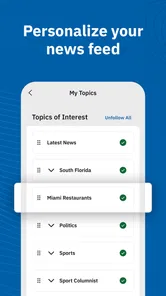
The app focuses primarily on local coverage, including Miami-Dade and South Florida news, community updates, politics, weather, traffic, sports, business, culture, and opinion content. Its local Florida coverage includes breaking news, politics, business, crime, weather, and sports. Depending on the version, it may also offer breaking-news alerts, saved articles, personalized sections, photo galleries, videos, and newsletters. Available features can vary by device, operating-system version, region, and subscription level.
Pros
- Covers Miami-Dade and South Florida stories with strong local relevance.
- Offers quick access to breaking news
- politics
- weather
- and community updates.
- Includes in-depth reporting and investigative journalism beyond short news briefs.
- Personalized alerts can help readers stay informed about important local developments.
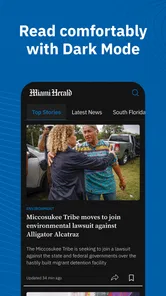
- Clean mobile layout makes browsing articles and sections relatively straightforward.
Cons
- Many premium articles may require a subscription to read in full.
- Advertising and subscription prompts can interrupt the reading experience.
- Some content may load slowly on weaker mobile connections.
- Push notifications can feel frequent if too many topics are enabled.
- Coverage is focused on South Florida
- so value is limited for distant readers.













