The Charlotte Observer | News
- 190.00
- 2.7
- Installs
- 50.00K
- Price
- Free

Screenshots




Analysis by Reviewed
When I want local reporting rather than a broad national news feed, I look for an app that helps me understand what is happening close to home without making me search through unrelated headlines. The Charlotte Observer app is built for that purpose. It is a free news and magazine app from McClatchy, focused on North and South Carolina coverage across politics, weather, business, and sports. After using it, I found that its main value is not novelty but concentration: it puts regional subjects in one place and gives them more attention than a general-purpose news app usually can.
The experience is best for readers who already care about the Charlotte area or the Carolinas and want a regular local-news habit. It is less convincing for someone who only wants occasional headlines, a completely free reading experience, or a single app covering every part of the world. The app has an average rating of 2.7 from around 438 ratings, so I would not ignore the possibility of friction. Still, that score does not tell the whole story. The useful question is whether its local focus matches your needs and whether you are comfortable with the way access to news is handled.
Getting from installation to useful local news
I approach a local-news app as a tool for a particular routine, not something that needs to replace every other source I use. This section looks at how I would turn the first visit into a focused check of regional headlines, then consider whether that habit is useful enough to keep. A small, repeatable routine also makes it easier to judge the coverage on its own merits, rather than confusing a busy news day with lasting value.
What to expect from the coverage
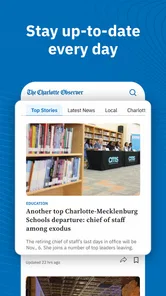
The first thing I noticed is that this is not trying to behave like a generic breaking-news reader. Its identity comes from regional reporting. Politics, weather, business, and sports are the obvious entry points, but the larger benefit is the local context connecting those subjects. A weather update matters differently when I am planning a commute, a business story matters differently when it affects nearby jobs, and a political report is more useful when it explains decisions that can change daily life in the area.
That local emphasis changes how I use it. I do not open it expecting an endless stream of international stories or a broad collection of viral articles. Instead, I use it when I want to catch up on what may affect my neighborhood, workplace, school routine, travel plans, or weekend activities. If your news routine is mainly national politics, technology, entertainment, or world events, a larger general news service will probably feel more complete.
The app is listed for Everyone 10+, which makes it suitable for a wide household audience, although parents should still remember that news can include difficult real-world subjects. It is available at no upfront cost, making it easy to try before deciding whether it deserves a permanent place on your phone. The current version is 11.1.16 and it requires Android 8.0 or later, so older devices may not be eligible even though the app itself is not aimed at a narrow age group.
What happens during the first setup
After installing, I recommend taking a moment to identify what you actually want from the app instead of treating it as another icon to open at random. A local news app becomes much more useful when I decide whether I am checking it for morning headlines, weather awareness, sports results, or deeper regional reporting. That small decision helps me judge the app fairly: I am looking for a dependable local briefing, not expecting it to replace every other source of information.
More From Our News Desk

Weather by Xiaomi Review: Clear at a Glance, Less Clear Up Close

X Under Pressure: Can It Recover When Posting Goes Wrong?

Clash of Clans Is Won Between the Battles

Android Auto Makes the Case for Quieter Car Software

MobiOffice: Transforming Mobile Productivity with Seamless Integration

EA SPORTS FC™ Mobile Soccer: Redefining Mobile Sports Gaming
The developer shown for the app is McClatchy, a name associated with newspaper publishing. That context is helpful because it sets a different expectation from a social feed. I approach the stories as editorial news content rather than as a stream shaped mainly by friends, influencers, or viral engagement. The result feels more purposeful when I open it with a question such as “What changed locally today?” rather than scrolling without a goal.
One practical tip is to use the first session as a test of relevance. Read a few headlines from different areas instead of judging the app from a single story. Check whether the balance between politics, weather, business, and sports fits your routine. Someone who wants only sports may find a dedicated sports app faster, while someone who wants a local overview may appreciate seeing several subjects together. This is a simple but important trade-off: breadth within one region versus depth in one topic.
The app is free to download, but in-app purchases range from $7.99 to $159.99 per item. I would therefore pay attention to any access prompt before confirming anything. The sensible approach is to explore the available reading experience first and decide whether the app’s local coverage justifies a purchase for your personal habits. I would not assume that installing a free app means every part of the reading experience will remain free.
The first successful action: building a useful daily check
My first meaningful success with the app would not be simply opening it. It would be creating a repeatable local-news check that takes only a few minutes. I start with the main headlines, move to weather when I need practical information, and then scan either business or sports depending on the day. This sequence prevents me from getting lost in a long session and gives the app a clear job on my phone.
A realistic example is a weekday morning before leaving home. I can look at regional headlines to see whether a local development may affect plans, check weather coverage for the day, and then glance at business or sports without switching between several unrelated services. The advantage is not that every story is essential. The advantage is that the app can act as a compact local checkpoint before I move on with the day.
Another useful workflow is to open it after work rather than first thing in the morning. That makes sense when I want a calmer summary of what happened locally instead of reacting to every alert or headline. I can compare the subjects that caught my attention during the day with the regional reporting available in the app. This helps me separate genuinely local developments from stories that were merely prominent on social media.
The strongest reason to keep this app installed is its regional filter. General news apps often give me a huge selection but make local stories compete with national and international coverage. Here, the geographic focus does much of the sorting for me. That saves time when my priority is understanding Charlotte and the surrounding Carolinas rather than monitoring the entire news cycle.
Where the app fits beside usual alternatives
Compared with a national news aggregator, The Charlotte Observer app is more focused and less overwhelming. An aggregator is usually better when I want several viewpoints, worldwide coverage, or a single place for many publications. It is also often more flexible for following unrelated interests. The Observer’s advantage is that I do not need to fight through a large national feed to reach regional subjects.
Compared with reading the publication in a mobile browser, the dedicated app offers a more direct starting point. I can keep it with my other daily tools and open it when I want local news, rather than beginning with a browser tab and searching for the publication. The browser may still be preferable for people who dislike installing separate apps, use several devices, or want to avoid managing another app’s storage and updates.
Compared with social media, the app is a better place to begin when I want reporting rather than reactions. Social platforms can surface local events quickly, but they also mix firsthand comments, speculation, advertising, and unrelated posts. The Observer gives me a more deliberate news destination. On the other hand, social media may provide faster community discussion, so I see the two as different tools rather than exact replacements.
Compared with a dedicated weather app, this app is not the one I would choose for detailed forecasting or constant weather monitoring. Its weather coverage is valuable as part of a local news routine, especially when I want weather alongside other regional developments. But if weather is my only concern, a specialist service will generally be a more direct choice. That distinction keeps expectations realistic.
Common confusion around access and value
The most important point for a first-time user is that “free” describes the app’s price to install, not necessarily the complete value of every reading option. Because purchases are available inside the app, I would read each access screen carefully and avoid tapping through automatically. If I only want occasional headlines, the free starting point may be enough for testing. If I expect frequent, in-depth reading, I should decide whether the available paid option makes sense before building the app into my routine.
This is also where the average rating deserves a careful interpretation. A 2.7 average from around 438 ratings suggests that some users have encountered problems or disliked aspects of the experience. I would treat that as a warning to test the app on my own device rather than as an automatic rejection. News apps can be judged on several things at once: story relevance, account or access flow, reading comfort, update behavior, and expectations about subscriptions. A person satisfied with local coverage may view the app very differently from someone who only wanted a completely open headline feed.
Another possible confusion is assuming that a local news app will always be the fastest source for every urgent event. I would use it as an important regional source, but I would not rely on one app alone for emergencies or critical travel decisions. When timing matters, I cross-check important information with official local notices or a specialist service. That is not a criticism unique to this app; it is a sensible habit for any news product.
Readers may also wonder whether the app is worthwhile if they do not live in Charlotte. I think the answer depends on the connection they have to the Carolinas. Someone who works there, has family there, travels regularly, or follows regional business and sports may still find it useful. For a reader with no personal or professional interest in the area, the focused coverage will probably feel too narrow compared with a broader publication.
Small habits that make the experience better
I found three habits especially helpful. First, I use the app at set moments instead of repeatedly checking it throughout the day. That keeps local news informative rather than distracting. Second, I read across at least two sections during a session. This gives me a better sense of the region and stops one favorite topic from becoming the only reason I open the app. Third, I make a note of which stories lead to useful follow-up questions. Those are the articles worth returning to, while less relevant headlines can be left behind.
A less obvious advantage of this approach is that it helps me judge whether paid access would be worthwhile. Rather than making a purchase based on one interesting headline, I can observe how often the app contributes something genuinely useful to my week. If it helps me make decisions, understand local changes, or stay connected to family and work concerns, the value is clearer. If I rarely move beyond the first few headlines, paying for expanded access may not be sensible.
I also recommend keeping expectations modest on an older phone. The minimum supported system is Android 8.0, and anyone using a device close to that requirement should allow extra patience during installation and updates. I would not interpret every delay as a content problem, but I would notice whether the app remains comfortable enough for regular reading. A local news service is only useful when opening it feels easier than searching elsewhere.
Who should use it and who should skip it
I would recommend The Charlotte Observer to a reader who wants a dedicated source for Charlotte and wider North and South Carolina news, especially if politics, weather, business, and sports all matter. It is a reasonable choice for someone trying to replace scattered local searches with one repeatable reading habit. The free installation also makes it practical to test without committing immediately.
I would be more cautious if you want a perfectly broad news dashboard, detailed specialist forecasting, or unlimited casual reading without encountering purchase decisions. In those cases, a national aggregator, a dedicated weather app, or a browser-based reading routine may suit you better. Likewise, readers who strongly dislike subscription-style access should inspect the app’s purchase prompts before investing time in it.
The app is also not ideal for people who want news entirely shaped by personal interests outside the region. Its focus is its defining strength, but that same focus limits its usefulness when your daily questions are mostly international, technical, entertainment-related, or unrelated to the Carolinas.
My next step after the trial
After the first session, I would give the app several ordinary days rather than deciding from one opening. I would check it during a normal morning, once after work, and during a day when weather or sports mattered to me. That reveals whether the local focus genuinely saves time or whether I keep returning to other services for the information I need.
If the app becomes part of my routine, I would keep the habit simple: headlines first, practical weather context when relevant, then one subject that connects to my personal interests. I would also review any paid access carefully before confirming it, remembering that the app is free to install but includes in-app purchases from $7.99 to $159.99 per item. The right decision depends less on the headline count than on how often its local reporting helps me understand something I would otherwise miss.
Overall, I see this as a focused regional news tool rather than an all-purpose replacement for every information app. Its coverage area gives it a clear purpose, and McClatchy’s newspaper background makes it feel oriented toward local reporting rather than a random headline stream. The modest average rating means I would approach the experience with realistic expectations, especially around access and everyday usability. If your main question is what is happening around Charlotte and the Carolinas, it is worth trying; if your main question is everything happening everywhere, choose a broader alternative.
The Charlotte Observer | News Frequently Asked Questions
Which areas does The Charlotte Observer | News cover?
The Charlotte Observer | News focuses on Charlotte and communities across North and South Carolina. Its coverage is intended for readers who want regional reporting alongside updates on topics such as politics, weather, business, and sports. If you follow news beyond the Charlotte area, the app’s broader Carolina focus may also make it useful for keeping up with developments around the region.
What is The Charlotte Observer | News app?
The Charlotte Observer | News app is a mobile news platform focused on Charlotte, North Carolina, and the surrounding Carolinas. It typically provides local reporting, breaking news, politics, sports, business, entertainment, weather, and community coverage. After installing it, readers can browse headlines, open full articles, save stories, and receive updates about important regional events.
Is The Charlotte Observer app free to download and use?
The app is free to download, but access to all content may depend on your subscription status. Some articles or premium features can be limited to subscribers, while non-subscribers may receive a restricted number of stories. In-app purchases are available, with listed prices ranging from $7.99 to $159.99 per item. Check the current subscription options before assuming every article is freely available.
Do I need a subscription to read articles in the app?
A subscription may be required for unlimited access to The Charlotte Observer’s journalism and selected digital features. The app can allow visitors to read certain articles without subscribing, but paywall limits may appear after several stories or when opening premium content. Subscription prices, trial terms, and included benefits can change, so review the offer shown in the app before purchasing.
What kind of news and features are available?
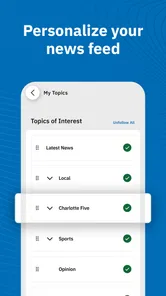
The Charlotte Observer app is designed primarily for local and regional coverage, including breaking news, crime, education, politics, sports, business, food, culture, and weather. Depending on the current version, it may also offer personalized sections, breaking-news notifications, photo galleries, video, newsletters, and tools for saving or sharing articles. Available features can vary between devices and app updates.
Pros
- Fast access to breaking news across Charlotte and the surrounding region.
- Local reporting covers politics
- crime
- schools
- sports
- and community events.
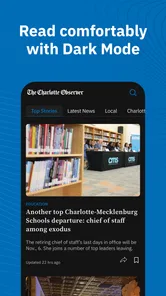
- Clean layout makes articles easy to browse on phones and tablets.
- Personalized alerts help you stay informed about important local updates.
- Includes Charlotte-focused sports coverage and analysis for dedicated fans.
Cons
- Some articles and premium features may require a paid subscription.
- Frequent notifications can feel excessive unless alert settings are adjusted.
- Advertising may interrupt browsing and reduce the reading experience.
- Coverage is primarily regional
- with limited news from outside the Carolinas.
- Some content may load slowly on weaker mobile connections.













