The Weather Network
- 39.00
- 3.0
- Installs
- 1.00M
- Price
- Free

Screenshots


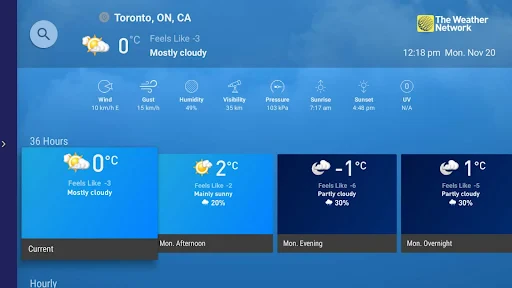
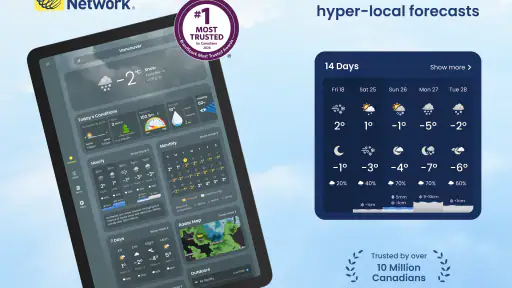
Analysis by Reviewed
My first practical question with a weather app is not just what the forecast says, but whether I can get a useful answer at the moment I need one. With The Weather Network, I’d make the most of its connected views while I have a reliable signal, then use that information to plan ahead rather than assume it will stay current everywhere. That distinction matters on a commute, during a day of errands, or before heading somewhere with patchy coverage.
Planning around a live connection
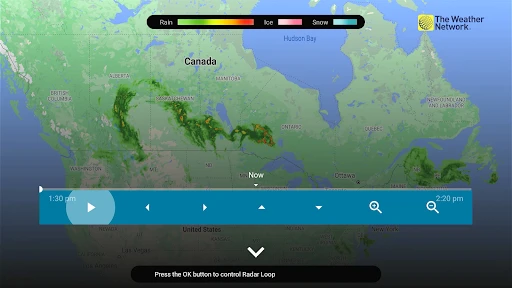
Forecasts, radar views, videos, and personalized notifications all depend on timely information reaching the phone. In practice, I’d check the radar while connected before heading out, especially if I’m planning a walk or drive around unsettled weather. The map is most helpful as a planning aid: it can show a developing picture, but it doesn’t remove the need to refresh and reassess when conditions are changing quickly.
Notifications are useful when I’m busy and might not think to open a forecast, though they work best as a prompt to check the details rather than a complete explanation of what to do. If I’m travelling through patchy reception, I wouldn’t make a last-second alert my only source of information. That’s a sensible trade-off for a connected weather service, and it’s why I prefer checking before I leave.
Using it in everyday mobile situations
A realistic routine is to look at the hourly outlook before a commute, then use the radar to decide whether to carry rain gear or adjust a stop along the way. If the connection drops, I would avoid assuming that a previously loaded forecast is still current; weather changes, and a screen that remains open is not the same as fresh information. Once service returns, reopening the relevant view is a practical way to check again.
This makes the app a better fit for people who usually have mobile data or Wi-Fi when planning their day than for someone who needs dependable, current guidance in remote areas with weak coverage. For hiking or travel where reception is uncertain, I’d check conditions before setting out and keep another appropriate source of local safety information in mind. I also wouldn’t treat a forecast as a substitute for official instructions during severe weather.
Picking the right amount of detail
Weather apps often compete on a quick glance, a detailed forecast, or a map. This one brings forecasts, radar, video, and alerts together, which suits me when I want more context than a single temperature. The trade-off is that richer views need more attention and connectivity than simply checking a basic forecast. If I only wanted a minimal display, a simpler weather app might feel faster; if I want several ways to interpret the day, this app makes a stronger case.
Interface and Usability
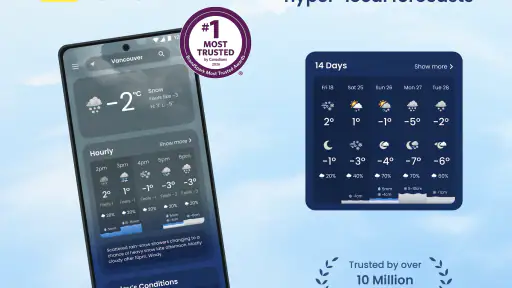
The first thing that caught my eye with The Weather Network app is its sleek and intuitive interface. There’s something about opening an app and having all the info you need right there, without having to dig around for it. The app is well-organized; from current conditions to long-term forecasts, everything is just a swipe away. Plus, the visuals are quite pleasing, with graphics that make even a cloudy day look somewhat appealing. 😄
More From Our News Desk

Clash of Clans Is Won Between the Battles

Android Auto Makes the Case for Quieter Car Software

MobiOffice: Transforming Mobile Productivity with Seamless Integration

EA SPORTS FC™ Mobile Soccer: Redefining Mobile Sports Gaming

How Microsoft OneDrive Became a Mobile Productivity Giant

How Google Translate Breaks Language Barriers Effortlessly
Features Galore
Now, let’s talk features. This app isn’t just about telling you if you’ll need an umbrella or not. It dives deeper with detailed weather forecasts, including hourly and 14-day forecasts. What’s more, you get real-time alerts for severe weather conditions, which is a lifesaver if you live in areas prone to sudden weather changes. I was particularly impressed by the radar maps. They’re interactive and provide a clear picture of what’s happening in the skies above.
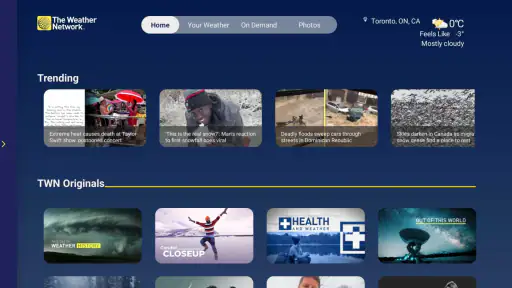
But wait, there’s more! The app also features video content, which is a nice touch if you’re like me and enjoy a more visual approach to getting your weather updates. Plus, the app’s personalized notifications ensure you’re always in the loop with any weather changes that might affect your day.
Performance and Reliability
Performance-wise, The Weather Network app is top-notch. It loads quickly and doesn’t crash, which is a big plus in my book. The data accuracy is commendable, and I’ve found it to be more reliable than some other apps I’ve tried. The app runs smoothly on both Android and iOS, which means no one is left out in the cold. 😉
As a free weather app from The Weather Network & MétéoMédia, it has a 3.0 average from around 2,000 ratings and over 1 million installs. It’s rated for everyone, and its current version is 4.4.3, with Android 5.0 as the minimum requirement. That makes it easy to try without a purchase, but the mixed average is a reminder that people’s experience may differ. I’d judge it by whether its forecast layout, alerts, and connected features suit my own routine rather than by the rating alone.
A more thoughtful daily workflow
One useful approach is to separate a quick check from a deeper one. For a routine morning, I’d start with current conditions and the hourly forecast, then open the radar only if rain could change the timing of my plans. That keeps the map from becoming a distraction on an ordinary day while still making it available when a moving weather system matters. Video is another option when a visual explanation is easier to follow than scanning several forecast details.
If you’re deciding whether to install it, ask yourself whether you’ll actually use those extra views. Someone who wants a simple temperature and a basic outlook may be happier with a lighter alternative already built into a phone. I’d choose this app when I want to move between a forecast, a map, and weather video without treating each as a separate task. The more complicated the day’s plans, the more useful that range becomes.
It’s also worth being deliberate about notifications. I’d enable the alerts that could change a real decision, then avoid letting every update compete for attention. A notification can help me remember to check conditions, but I still want to open the forecast and consider the timing and location myself. For trips or outdoor plans, checking shortly before departure is more useful than relying on a glance from much earlier in the day.
Who should keep it close
The Weather Network is a sensible choice for people who like a visual, connected weather check and want more than a single daily summary. It is particularly handy for households juggling school runs, errands, and outdoor plans, where a change in rain or severe-weather conditions can affect the schedule. I’d recommend it to a friend who has reliable connectivity and enjoys having forecast details and radar in one place.
I’d be more cautious about recommending it as the only option for someone who regularly loses service or needs information while away from a connection. In that situation, check conditions before travelling and use suitable local safety guidance as well. The app’s range is an advantage when it can refresh; it is not a reason to assume a disconnected phone has the latest picture.
When another weather option makes more sense
The choice between this and a phone’s built-in weather view comes down to how much context I want. A compact default forecast can be quicker when I only need to know whether to take a coat, and it may suit someone who prefers fewer screens and fewer decisions. The Weather Network is more compelling when I want to move from an hourly outlook to a radar view or video without changing apps. That convenience has a cost in attention: the extra material is useful only when I take time to interpret it.
I’d also distinguish everyday planning from safety-critical decisions. For a familiar route and an ordinary shower, the app’s combination of forecast and map can help me adjust my timing. For a long drive into unfamiliar areas, I’d check the destination and route conditions before setting off, then reassess when I can get a fresh connection. If severe weather is involved, local official guidance should take priority over any single app’s screen.
Practical limits and recovery habits
A weak connection can turn a rich weather app into a less dependable companion at precisely the wrong time. My workaround is simple: check the relevant location and time window while online, note the parts that affect my decision, and refresh after reception returns. This is not a substitute for current information, but it prevents me from mistaking an old display for a live update. It also gives me a clear reason to avoid relying on a last-minute map check from a dead zone.
There is a similar trade-off with notifications. Too many prompts can become background noise, while too few may mean I miss a useful nudge. I’d keep only the alerts likely to change an actual plan and use them as a cue to inspect the forecast. For a household, that might mean checking before school or a sports practice; for a solo commute, it could mean reviewing rain timing before choosing when to leave.
Who may prefer a simpler choice
This is not the best fit for everyone. If I wanted nothing beyond a quick temperature and a broad outlook, I would choose a simpler display rather than spend time switching among several kinds of weather information. Someone who spends most of the day beyond reliable coverage should also avoid treating it as a stand-alone source. The app is strongest as a connected planning tool, not as a promise that every screen will remain current in every setting.
On the other hand, people coordinating outdoor plans may appreciate the ability to check forecasts, radar, video, and alerts within one service. The key is to use each view for a reason: hourly details for timing, radar for a changing rain picture, and alerts as prompts rather than verdicts. That makes the app feel more purposeful and keeps its extra information from becoming clutter.
Final Thoughts
All said and done, The Weather Network app has proven to be a stellar companion for my daily weather needs. It’s packed with features, easy to use, and most importantly, it’s reliable. Whether you’re planning a weekend getaway or just need to know if you should bring a jacket to work, this app has got you covered. So, if you’re on the hunt for a weather app that delivers a comprehensive weather experience, I’d say give this one a go! 🌈
My practical verdict is to use it as a connected planning companion: check the forecast before the day gets busy, turn to radar when timing matters, and treat alerts as a reason to review conditions rather than as a replacement for judgement. Its combination of quick access and richer context is appealing, while people who need a very lean interface or routinely have no signal may prefer another approach. For everyday decisions with a connection available, I find that balance worthwhile.
The Weather Network Frequently Asked Questions
What is The Weather Network app, and who is it for?
The Weather Network is a weather app from The Weather Network & MétéoMédia, designed for people who want weather information close at hand. Its store summary describes it as “Your weather when it really matters,” so it may suit users checking conditions as part of everyday planning. The app is free and rated for Everyone, making it suitable for a broad audience.
What features does The Weather Network app offer?
The Weather Network app provides users with real-time weather updates, including detailed forecasts, weather radar, and severe weather alerts. Users can access hourly, daily, and weekly forecasts, track storms, and view interactive maps. The app also includes lifestyle forecasts, such as pollen counts and UV indexes, to help you plan your day accordingly.
Is The Weather Network app free to download and use?
Yes, The Weather Network app is free to download on both Android and iOS devices. However, it offers in-app purchases and a premium subscription for users who want an ad-free experience and access to additional features like extended forecasts and exclusive weather insights.
How accurate are the weather forecasts provided by The Weather Network app?
The Weather Network app prides itself on delivering accurate and reliable weather information. It uses data from a variety of sources, including meteorological organizations and local weather stations, to ensure precision. Users can trust its forecasts for making daily decisions, but it's always wise to check multiple sources for critical weather events.
Can I customize alerts and notifications in The Weather Network app?
Yes, The Weather Network app allows users to customize alerts and notifications based on their preferences. You can set up severe weather alerts, daily forecasts, and specific condition notifications, such as rain or snow. This feature ensures you receive timely updates about weather changes that matter most to you.
Pros
- Accurate weather forecasts
- User-friendly interface
- Wide range of weather info
- Real-time weather alerts
- Customizable notifications
Cons
- Contains ads
- May drain battery quickly
- Requires internet connection
- Occasional app crashes
- Limited offline functionality
- Category
- Weather
- Version
- 4.4.3