The State News: South Carolina
- 98.00
- 3.2
- Installs
- 10.00K
- Price
- Free

Screenshots



Analysis by Reviewed
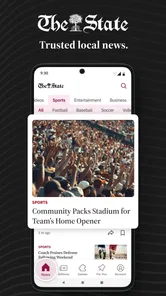
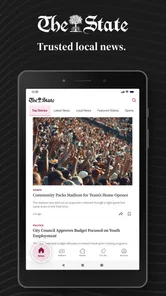
I installed The State News: South Carolina expecting a straightforward way to keep up with Columbia and the wider state, and that is exactly where it makes the strongest impression. It is a free News & Magazines app from McClatchy, aimed at readers who want local reporting, politics, business, weather, and sports in one place rather than relying entirely on a general national news feed. My first reaction was that its value depends less on novelty and more on whether South Carolina news is part of your normal routine.
The app has a 3.2 average from around 321 ratings, with roughly 98 written reviews and over 10K installs. Those figures suggest a modest audience and a mixed experience, which feels fair. This is not an app I would recommend simply because everyone needs it. I would recommend it when its geographic focus matches your life: living in Columbia, working with South Carolina clients, following state politics, attending local events, or keeping an eye on regional weather and sports.
What makes the first week useful
The first week is when the app feels most immediately helpful. Local news is difficult to follow through broad platforms because national stories and viral posts quickly push regional reporting out of view. Here, the subject matter is naturally narrower. I can open it with a specific purpose, scan what is happening around Columbia, and then move toward state-level stories without first sorting through unrelated headlines from across the country.
That focus changes how I use it. I am not opening it for endless entertainment or a constantly changing stream. I am opening it because I want to know what affects the place where I live or work. The distinction matters. A general news app is usually better for international events, technology, finance, and a broad overview of the day. This app is more useful when the question is, “What is happening here?”
The coverage areas also give it a practical range. Politics can help when a state decision may affect schools, roads, taxes, or public services. Business coverage is relevant to people tracking local employers and the regional economy. Weather is useful before commuting or making weekend plans, while sports gives the app a reason to remain part of a household’s regular news habit even when there is no major political story.
A realistic everyday use case is a weekday morning commute. I might check the app before leaving home to see whether a local development, weather situation, or traffic-related story deserves attention. Later, I could return during lunch for a state politics update, then look at sports in the evening. That pattern is more sustainable than trying to read everything in one sitting, and it makes the app feel like a local briefing rather than a replacement for every other source of information.
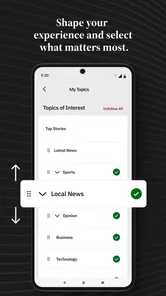
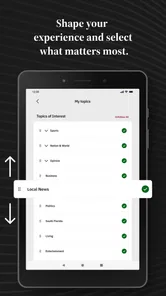
One useful habit is to separate quick scanning from deliberate reading. I use the opening view to identify topics that matter immediately, then choose only one or two stories that deserve more time. Local news can become overwhelming when every headline feels personally relevant. Limiting the session helps preserve the app’s usefulness and keeps it from turning into another source of notification fatigue or background anxiety.
More From Our News Desk

Weather by Xiaomi Review: Clear at a Glance, Less Clear Up Close

X Under Pressure: Can It Recover When Posting Goes Wrong?

Clash of Clans Is Won Between the Battles

Android Auto Makes the Case for Quieter Car Software

MobiOffice: Transforming Mobile Productivity with Seamless Integration

EA SPORTS FC™ Mobile Soccer: Redefining Mobile Sports Gaming
Where it beats a general news feed
The clearest advantage is context. A national news app may mention South Carolina when a story becomes important enough to reach a wider audience, but local coverage does not need to wait for national attention. That makes this app a better starting point for regional awareness. It is especially valuable for readers who have moved away from South Carolina but still care about family, work, property, education, or public affairs there.
It also offers a more focused alternative to social media. Social platforms can surface local information quickly, but the experience is mixed with commentary, repetition, rumors, and posts selected for engagement rather than usefulness. I would rather use this app to establish what is being reported, then use social media only for additional reactions or community discussion. That two-step approach is slower than scrolling, but it gives me a cleaner foundation.
There is a trade-off, though. If your interests are mostly national or international, the narrower focus may feel limiting after the first few sessions. You will still need another source for a complete daily briefing. I would not install this as my only news app unless nearly all of my information needs were tied to South Carolina.
Why the value may or may not last beyond a month
After the initial curiosity fades, the app has to earn a place in a repeating routine. For me, that depends on whether local news is connected to decisions I make. Someone following city or state politics may find a reason to return several times a week. A parent watching school-related developments, a small-business owner tracking regional conditions, or a sports fan following local teams can also build a natural habit around it.
For a casual reader, the long-term value is less certain. Local news does not produce the same volume of dramatic headlines as a worldwide feed, and that is actually a strength when I want calm, relevant information. It can also feel like a weakness when I am looking for constant updates. The app works best when I appreciate selectivity rather than demanding a new reason to open it every few minutes.
I found that recurring value comes from using different sections for different purposes instead of treating the app as one undifferentiated stream. Weather is a practical check. Politics rewards occasional deeper reading. Business is useful when a local company or industry affects my work. Sports can provide a lighter reason to return. This rotation prevents the experience from depending entirely on one category.
A good monthly routine would be to use it frequently during periods of local change and less often when the news cycle is quiet. That is not a flaw; it is a realistic way to use a regional publication. I would rather open it when I have a reason than force a daily habit that turns into empty scrolling. Readers should not confuse “useful” with “necessary every day.”
The app is free to install, which makes that trial easy. It is available for users aged Everyone 10+, and the current version is 11.1.16. The free entry point is helpful for deciding whether the coverage fits your routine before committing attention or money. There are in-app purchases ranging from $7.99 to $159.99 per item, so anyone considering paid access should examine the purchase screen carefully and decide whether the expected reading value justifies it.
That pricing range also changes how I judge the app over time. Occasional readers may be satisfied with the free experience, while frequent readers need to think about the cost as a recurring commitment rather than an impulse purchase. I would not pay simply because I installed it. I would first spend several weeks checking whether I return for meaningful local reporting, not just out of habit.
Who gets the most from it
The strongest audience is people with a direct connection to Columbia or South Carolina. Residents can use it as a regional checkpoint, while former residents may appreciate a convenient way to stay connected. Professionals whose work depends on local government, businesses, development, education, or public events may also find the focused coverage more efficient than searching across unrelated sources.
It can be useful for families as well. A household does not need everyone to read the same stories, but one person can use the app for weather and community developments while another checks politics or sports. That shared regional focus gives the app more staying power than a niche publication aimed at only one interest.
I would suggest skipping it if your main goal is a worldwide news digest, deep specialist reporting outside South Carolina, or a social feed built around conversation. A national newspaper app, a dedicated weather service, or a sports-specific app may be better for those needs. The State News is most convincing when it is used as a local layer alongside those alternatives, not when it is asked to replace all of them.
The maintenance cost of keeping it useful
The maintenance burden is fairly ordinary, but it is still worth considering. A news app requires regular judgment from the reader: deciding when to check it, which stories deserve attention, and whether a paid option remains worthwhile. The app cannot make those choices for me. Its usefulness depends on keeping my expectations realistic and resisting the urge to treat every headline as urgent.
I would begin with a simple schedule rather than constant checking. A morning scan can cover weather and major local developments. A second visit later in the day can handle politics, business, or sports. If I notice that I am opening the app without reading anything meaningful, I would reduce the frequency. That small adjustment protects the app from becoming another habit that consumes time without adding information.
Another practical tip is to compare the app with one broader source once in a while. The local focus is its main strength, but it can create a narrow view if used alone. I would use this app for South Carolina context, then consult a general news source for national and international developments. The combination is more balanced than expecting one regional app to cover every level of news.
Readers should also think about the difference between immediate alerts and deliberate research. If I need to understand a complicated public issue, I would not stop at a headline or a short article. I would read carefully, check the date of the reporting, and look for additional context elsewhere. Local news can affect real decisions, so speed should not replace understanding.
The app’s age is another part of its identity. It was released on March 20, 2012, so it is an established news product rather than a brand-new experiment. That history may appeal to readers who prefer a publication with a long-running local presence, but it also means I judge it by present-day convenience rather than by longevity alone. An older app still needs to fit modern reading habits, and a familiar name does not automatically guarantee a smooth experience.
Compatibility is straightforward for many users: it requires Android 8.0 or later. That is helpful for people with relatively recent devices, while anyone using an older phone should check compatibility before planning around it. The developer is McClatchy, a name associated with newspaper publishing, and that gives the app a clear editorial identity rather than making it feel like an anonymous headline aggregator.
Where fatigue starts to appear
The first source of fatigue is repetition. Regional news naturally revisits ongoing subjects, especially politics, public projects, business changes, weather situations, and sports seasons. If I check too often, I may see little that has changed since the previous visit. That is not unusual for local coverage, but it can make the app feel less active than a national feed.
The second is the emotional weight of local reporting. Because the stories are close to home, they can feel more personal than distant headlines. That makes them valuable, but it also means I need boundaries. A short, purposeful session works better for me than reading every update late at night. The app is more sustainable when it informs my day instead of setting its mood.
Paid access can become another point of friction. The free installation lowers the barrier to trying the app, but the presence of purchases means readers should understand what they are agreeing to before spending. I would especially avoid making a payment during a moment of curiosity. The better test is repeated use: if the app helps me make sense of local developments over several weeks, then I can judge its value more calmly.
The mixed rating also tells me to keep expectations measured. A 3.2 average is not a reason to dismiss the app, but it is a reminder that local usefulness and app satisfaction are not identical. Someone may value the reporting while disliking aspects of the reading experience, while another person may find the regional focus too narrow. I would treat the rating as a prompt to try it personally, not as a final verdict.
There is also a risk of using it passively. Opening a news app repeatedly does not necessarily mean becoming better informed. My best experience came when I approached it with a question: What changed locally today? Is there a state issue I need to understand? Is the weather relevant to my plans? That intention makes the app more efficient and reduces the chance of drifting through headlines.
My long-term verdict on The State News: South Carolina
After the novelty fades, The State News: South Carolina earns lasting space only for readers who genuinely need a South Carolina news connection. Its strongest quality is not an endless stream of content; it is the ability to keep local and state matters in view when broader apps push them aside. That is a meaningful benefit for residents, former residents, professionals, families, and anyone following regional decisions.
I would keep it installed as a focused companion to a broader news source. I would not make it my only news app, and I would not pay automatically without proving that its reporting fits my monthly routine. The free starting point makes experimentation sensible, while the paid options require a more deliberate decision from frequent readers.
My practical recommendation is to try it for a few weeks with a defined purpose. Check it at sensible times, explore more than one coverage area, and notice whether it helps you understand South Carolina better than a general feed or social media search. If the answer is yes, the app has recurring value. If you mostly want national headlines or constant novelty, it will probably become background clutter.
In the end, this is a regional news tool with a clear audience rather than a universal news solution. I appreciate that focus, even when it limits the amount of fresh material available in a single day. For the right reader, its lasting strength is relevance: the stories are closer to home, easier to connect with daily life, and more useful when local context matters. For everyone else, a broader alternative will likely provide better value.
The State News: South Carolina Frequently Asked Questions
Who publishes The State News: South Carolina?
The State News: South Carolina is published by McClatchy, and it is designed for readers interested in news from Columbia and communities across South Carolina. The app brings local reporting and broader state coverage together in a mobile format, making it a practical option for keeping up with developments in the region. Its focus is news and magazines rather than general entertainment.
What is The State News: South Carolina app?
The State News: South Carolina is a news application focused on reporting from across the state, with coverage commonly including local communities, politics, education, business, sports, entertainment, and breaking events. After exploring the app, its main purpose is clear: it provides a convenient mobile way to read articles from The State and follow important developments in South Carolina from one place.
Is The State News: South Carolina free to download and use?
The app is free to download, allowing users to browse available news content and explore its sections. However, access to every article or premium feature may depend on the publication’s subscription policy, which can change over time. The app includes in-app purchases ranging from $7.99 to $159.99 per item, so readers should review the purchase options and subscription terms before paying for access.
What type of news and content can I find in the app?
The State News: South Carolina offers a broad selection of state and regional journalism rather than focusing on only one topic. Users can typically find stories about South Carolina politics, crime, public affairs, schools, transportation, weather-related events, sports, business, and local communities. The exact categories and article availability may vary, but the app is designed for readers who want statewide coverage and timely updates.
Does the app provide breaking news notifications?
The application may support alerts for breaking news, major local developments, and other important updates, depending on the device settings and the features currently offered by the publisher. Notifications can be useful for staying informed without repeatedly opening the app, although frequent alerts may become distracting. After installation, users should check the notification controls inside the app and in their phone’s system settings to customize what they receive.
Pros
- Covers South Carolina news with a strong focus on local communities.
- Offers quick access to breaking stories and important updates.
- Includes sports coverage relevant to South Carolina readers.
- Provides a convenient mobile format for reading news on the go.
- Helps users follow regional issues beyond major national headlines.
Cons
- Some stories may require a subscription or account to access fully.
- Coverage is primarily regional and may feel limited for national news readers.
- Frequent notifications can become distracting if not customized.
- Article availability may vary depending on the publication schedule.
- The app may use more storage or data when loading images and videos.













