The Press-Enterprise
- 215.00
- 2.8
- Installs
- 10.00K
- Price
- Free

Screenshots


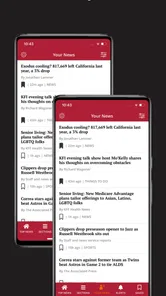

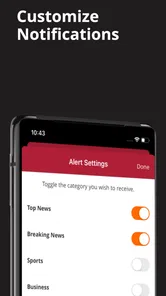



Analysis by Reviewed
When news is shared across a household, the useful question is not simply whether an app has headlines. It is whether different people can use it without confusing local reporting, personal preferences, account details, and paid access. I tested The Press-Enterprise with that everyday situation in mind, treating it as a local news and magazine app for people who want information from Inland Southern California in a more focused place than a general news feed.
The app is developed by MediaNews Group, Inc., and its main value is its regional focus. Instead of asking you to sort through national stories before finding something relevant to your town or nearby communities, it puts local coverage at the center. That makes it especially practical for a household where one person follows traffic and community updates, another checks local events, and someone else wants a quick sense of what is happening across the area.
The Press-Enterprise is free to install and is rated for Everyone, so it is easy to consider for a shared Android device. It supports Android 8.0 or later, and the current version is 10.0.60. There are in-app purchases ranging from $14.99 to $174.99 per item, which is important in a family setting: installing the app costs nothing, but access to paid content can become a separate conversation.
How it works when a household shares local news
When several people use the same device, I’d make the first visit a simple orientation rather than trying to set up a household news system. Open a few local stories together and agree on who will handle any account or purchase decisions; that keeps shared reading easy while giving each person room to decide what coverage matters to them.
A practical role for a shared tablet or phone
I can see this app working well on a kitchen tablet or on a phone passed between family members during the day. Imagine one person checking the morning local news before work, another looking at community developments after school, and a parent opening it in the evening to catch up on regional stories. The advantage is not that everyone receives an identical experience; it is that the household has one recognizable place to look for Inland Southern California reporting.
That regional concentration is also the main reason to choose it over a broad news aggregator. A general app may offer more national and international variety, but local stories can be buried among subjects that have little connection to daily life. With The Press-Enterprise, the starting point is more relevant when your interests include nearby communities, local public affairs, regional events, or developments that affect the area directly.
There is a trade-off, though. Someone who mainly wants world news, business coverage, sports from many regions, or a highly customizable collection of sources may find a larger news platform more flexible. This app makes the most sense when local relevance matters more than having every possible publication in one feed.
More From Our News Desk

Weather by Xiaomi Review: Clear at a Glance, Less Clear Up Close

X Under Pressure: Can It Recover When Posting Goes Wrong?

Clash of Clans Is Won Between the Battles

Android Auto Makes the Case for Quieter Car Software

MobiOffice: Transforming Mobile Productivity with Seamless Integration

EA SPORTS FC™ Mobile Soccer: Redefining Mobile Sports Gaming
A morning routine that avoids unnecessary scrolling
A useful routine is to open the app with one question in mind rather than treating it as an endless stream. I might check it for the biggest local developments first, then read one or two stories that affect my day. A family member could use the same approach for community news, while another person might only open it when there is a local issue they want to follow.
This matters on a shared device because it keeps the app from becoming a vague source of background noise. Local news is most helpful when it leads to an action: changing a route, discussing a community decision, planning around an event, or understanding an issue that has come up at home. The app is better suited to that deliberate check-in than to replacing every other source of information.
My practical tip is to avoid assuming that a headline alone is enough for household decisions. If a story affects travel, school plans, work, or a community commitment, I would open the full article and check its context before passing the information along. That habit is especially useful when several people are relying on the same device and a brief headline could be remembered differently by each person.
Where the shared-device experience becomes less simple
A shared phone or tablet introduces boundaries that are easy to overlook. Reading an article together is straightforward, but a device may also be used for personal browsing, notifications, or paid access. I would not treat the app as a complete household account system. Instead, I would decide in advance who is using the device, which person is responsible for any purchase decision, and whether the app is being used for casual reading or for a more committed subscription-style relationship.
The price structure deserves attention here. The app itself is free, but in-app purchases can be substantial, with the highest listed item reaching $174.99. That does not mean every reader will pay that amount, but it does mean a shared device should not be treated as if every tap is consequence-free. The person who owns the device should review purchase settings and make sure other household members understand when they are only reading freely available material and when a paid option may appear.
I also prefer keeping personal expectations clear. If one family member wants a private reading history or a particular paid arrangement, a shared device may not be the best place for that activity. A personal phone offers a cleaner boundary, while the shared tablet can remain a convenient place for openly discussed local reading.
Account boundaries without making the app harder to use
One of the most useful ways to manage this app at home is to separate the reading routine from the payment routine. Everyone can discuss interesting articles, but only one designated adult should decide whether a purchase is worthwhile. This approach avoids the common problem where a child, guest, or another family member taps through a prompt without understanding its financial meaning.
I would also avoid passing around one person’s credentials casually. Even when a household trusts one another, accounts can contain information that is not intended for everyone using the device. The safest workflow is simple: use the app freely for shared reading, and treat any sign-in or paid access as belonging to the person who knowingly created it.
Another small but useful habit is to say out loud when an article is being saved mentally for later discussion rather than presented as a confirmed household fact. Local reporting often develops over time. Calling something “the article we should revisit” is more accurate than treating an early report as the final word, especially when several people are coordinating plans around it.
Coordinating around local information
The app becomes more valuable when it supports conversation instead of replacing it. If I find a local story that affects someone else in the household, I would summarize why it matters and then show them the article directly. That is more reliable than forwarding a short impression, particularly when the original story includes qualifications that are easy to miss.
A shared device can work as a small household bulletin board. One person checks the app, another reads the relevant article later, and the family decides whether it changes anything. This is a good fit for local developments because not every reader needs to follow every story. The person most affected can spend time with the details, while others receive a concise explanation.
The trade-off is that this workflow depends on people communicating. The app cannot decide which local story matters to your household, and it cannot replace a direct conversation about plans. If someone expects automatic coordination, personalized reminders for every family member, or a built-in system for assigning news to other users, this is not the right expectation to bring to the experience.
I found that the best coordination method is to keep a clear distinction between information and action. Reading about a local change is information. Deciding to leave earlier, attend a meeting, alter a weekend plan, or discuss an issue is action. The app can inform the first step, but the household still needs to make the second step together.
Age context and trust
Because the app carries an Everyone content rating, it is reasonable to view it as suitable for a broad household audience. That does not mean every story will be equally interesting or emotionally comfortable for every reader. News can cover serious events, difficult public issues, or subjects that younger readers may need help understanding.
For that reason, I would use age-appropriate judgment rather than assuming the rating removes the need for supervision. A younger reader can look at local information with an adult nearby, ask questions, and learn how to distinguish a headline from the fuller story. Older children may be able to read independently, but I would still encourage them to discuss confusing or upsetting coverage instead of silently drawing conclusions from a short excerpt.
Trust is also about source habits. I would teach a household member not to repeat a local claim simply because it appeared in a notification or because someone else mentioned it. Open the article, note what it actually says, and compare it with the situation at hand. That is a small reading discipline, but it is more valuable than pretending a news app can make judgment unnecessary.
The app is not a substitute for a child-focused educational news service if the goal is carefully filtered explanations. It is better understood as a local publication app that can be used responsibly by different ages when adults provide context where needed.
What the ratings suggest before you commit
The Press-Enterprise has an average rating of 2.8 from around 507 ratings, with about 215 written reviews. I would read that as a reason to approach the app with realistic expectations rather than as an automatic rejection. The local focus may be exactly what one reader values, while another may be frustrated by aspects of the experience that are less important to someone else.
For me, the rating makes the free installation useful as a trial step. I would install it, read several local stories, and see whether the coverage fits my household’s needs before considering any paid option. That sequence matters because a purchase should be based on the usefulness of the actual reading experience, not merely on the appeal of having local news available.
The app has over 10K installs, which places it in the category of a focused regional service rather than a universally dominant news platform. That is not a weakness by itself. A smaller, location-specific audience can be perfectly appropriate when the reader’s priority is Inland Southern California. It simply reinforces the point that this is a specialized choice, not an all-purpose replacement for every news source.
Comparing it with the usual alternatives
Compared with a general news aggregator, this app offers a clearer regional identity. Aggregators are useful when I want to combine many publications, follow national stories, or create a broad subject mix. The Press-Enterprise is more appealing when I want local reporting to be the reason I open the app in the first place.
Compared with reading news in a mobile browser, the dedicated app should feel more direct for repeat visits. I do not have to begin with a search every time I want to check the publication. The compromise is that an app occupies space on the device and becomes part of a household’s routine, so it deserves the same attention as any other installed service.
Compared with social media, the app is a better starting point when I want to read a story in its publication context rather than rely on a post, comment, or repost. Social platforms may surface more opinions and faster reactions, but they can also make it harder to tell what is original reporting and what is someone else’s interpretation. For local subjects, that distinction is important.
Compared with a print newspaper, the app is more convenient for a phone-centered household and easier to check at different times. Print can be more comfortable for long reading or shared browsing at a table, while the app suits quick updates and individual schedules. A family that enjoys discussing a physical paper together may not find a digital app as satisfying, even if the content focus overlaps.
Who should use it and who should skip it
I would recommend trying The Press-Enterprise if you live in or closely follow Inland Southern California and want a straightforward way to check regional news. It is particularly suitable for households where local issues are a regular topic and where a shared device can serve as a common starting point for discussion.
I would be more cautious if you are looking for one app to cover every major city, international event, specialist topic, and personal interest. A broader news service will probably be a better primary tool, with this app added only if its regional perspective fills a gap.
I would also skip the paid commitment until the free experience has proved useful in practice. The purchase range means the financial decision should be deliberate, especially on a device used by several people. If the household only needs occasional local headlines, free access may be enough; if one person regularly depends on the publication, that person should be the one evaluating whether paid access justifies the cost.
My household verdict
My overall view is that The Press-Enterprise works best as a focused local news window, not as a complete household information center. Its strongest quality is its connection to Inland Southern California, which gives it a clear purpose in a crowded news category. I like the idea of using it during a morning check-in, then bringing relevant stories into a family conversation instead of letting everyone scroll separately without context.
The main caution is to keep shared use organized. Free installation makes trying it easy, but in-app purchases require adult awareness and a clear boundary around who can approve spending. The Everyone rating supports broad access, yet younger readers still benefit from conversation about difficult news and responsible interpretation.
If your household wants local reporting and can agree on sensible account and purchase boundaries, I think this app is worth testing. If you need extensive personalization, broad global coverage, or built-in family coordination, a larger news platform may serve you better. My recommendation is to start with the free experience, use it as a shared local-news reference, and only pay when one clearly identified reader has decided that the regional value is worth making part of the household routine.
The Press-Enterprise Frequently Asked Questions
Who publishes The Press-Enterprise app, and what is it focused on?
The Press-Enterprise is published by MediaNews Group, Inc. and focuses on news and information for Inland Southern California. It is a News & Magazines app for readers who want regional coverage on a mobile device. If your interests center on this part of California, its local emphasis may make it a more relevant choice than a general-purpose news app.
What devices can install The Press-Enterprise app?
The app requires Android 8.0 or later, so check your device’s operating system before downloading. It is offered as an app for mobile readers, and compatibility can depend on the device and the operating system version you are using. Confirm that the download is available for your device in its app store before proceeding.
What is The Press-Enterprise app?
The Press-Enterprise app is a digital news platform focused primarily on Riverside County and the Inland Empire in California. After exploring it, I found that it brings together local reporting, breaking news, politics, crime, business, sports, entertainment, and community stories in a mobile-friendly format. It is designed for readers who want regional coverage alongside access to selected broader news content.
Is The Press-Enterprise app free to download and use?
The app is free to download, allowing users to install it and browse available content. However, some articles, premium features, or the full digital newspaper experience may require a subscription or account, depending on the current access policy. In-app purchases range from $14.99 to $174.99 per item, so check the subscription terms before committing and consider which stories or features you expect to use.
Do I need an account or subscription to read the news?
You may be able to read certain articles without signing in, but an account can be required for enhanced access, saved preferences, newsletters, or subscriber-only stories. A subscription may also be necessary to remove content limits or view the complete digital edition. Requirements can change over time, so review the sign-in prompts and subscription information shown inside the app before committing.
Pros
- Covers Inland Empire news with strong local focus.
- Provides timely updates on breaking regional stories.
- Includes useful coverage of sports
- politics
- and community events.
- Clean layout makes articles easy to browse on mobile devices.
- Supports readers who want news beyond national headlines.
Cons
- Some content may require a subscription or offer limited free access.
- Advertising can interrupt reading and affect the browsing experience.
- Local coverage may be less useful for readers outside the region.
- Article quality and depth can vary depending on the topic.
- App performance may depend on a stable internet connection.













