The Mercury News
- 283.00
- 2.1
- Installs
- 50.00K
- Price
- Free

Screenshots


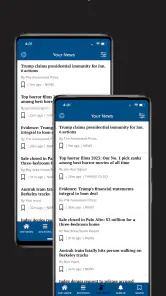



Analysis by Reviewed
I approached The Mercury News as a practical way to keep up with local and general-interest reporting without turning my phone into a constant stream of alerts. It is a free news and magazines app from MediaNews Group, Inc., with coverage that reaches across news, technology, sports, business, lifestyle, and entertainment. That range makes it more useful than a single-topic reader, although the experience is very much tied to the publication’s editorial focus rather than being a neutral dashboard for every source.
My first impression was that it is best understood as a digital newspaper companion. I would open it when I wanted to browse several sections in one sitting, check what was happening locally, or read a longer article instead of jumping between unrelated social posts. The app is aimed at Everyone, runs on Android 8.0 or later, and is currently listed as version 10.0.60. Those details make it accessible to people using older Android phones, provided the device still handles modern apps comfortably.
The store describes it simply as The Mercury News, but that short label does not explain the main decision a new user has to make: whether a publication-centered app fits their reading habits better than a broad news aggregator. In my experience, the answer is yes if you value a recognizable editorial home and want several subject areas together. If you only want breaking headlines from many publishers, a general aggregator may give you a wider first glance.
What to expect when you open the app
The Mercury News is not a game, a social network, or a productivity tool. It is a news and magazines app built around reading articles. I would not install it expecting a highly personalized feed that learns every interest immediately. I would install it when I want a dependable place to browse reporting and features organized around familiar newspaper sections.
The coverage mix is one of its clearest strengths. A reader can move from current events to technology, then check sports or business without changing apps. Lifestyle and entertainment give the session a lighter direction when I do not want to read only hard news. That variety also creates a trade-off: the home experience can feel less focused than a specialist sports app, a dedicated business reader, or a technology publication.
The app is free to download, but in-app purchases range from around twelve dollars to roughly one hundred forty dollars per item. I would pay attention to any purchase screen rather than assuming every part of the reading experience is included at no cost. The sensible approach is to browse first, understand what is available to you, and only then decide whether a paid option fits your needs.
Its current store standing is a 2.1 average from around 500 ratings, with around 300 written reviews. I treat that as a reason to keep expectations measured, not as a complete verdict on every phone. App performance can vary with Android versions, device storage, connectivity, and changes introduced over time. Still, the rating suggests that some readers have encountered enough friction that I would test the app personally before making it my only news source.
More From Our News Desk

Weather by Xiaomi Review: Clear at a Glance, Less Clear Up Close

X Under Pressure: Can It Recover When Posting Goes Wrong?

Clash of Clans Is Won Between the Battles

Android Auto Makes the Case for Quieter Car Software

MobiOffice: Transforming Mobile Productivity with Seamless Integration

EA SPORTS FC™ Mobile Soccer: Redefining Mobile Sports Gaming
The app has been available since late 2011 and has passed 50 thousand installs. That history matters in a modest way: this is not a brand-new experiment that appeared last week. At the same time, longevity does not guarantee that every screen will feel modern or that every update will suit every reader. I would judge it by how quickly it gets me to an article and how comfortable that reading session feels.
Who will get the most from it
I think it suits readers who like a newspaper-style selection of topics and want one publication’s coverage close at hand. It can also work for someone who checks news in short sessions: during breakfast, on a commute, or while waiting for an appointment. The range of sections means I do not need a separate app just to switch from a local story to sports or entertainment.
It is less suitable for a reader who wants a completely source-neutral stream, extensive international coverage from many publishers, or a highly technical feed with no lifestyle material. It is also not my first choice for someone who only follows live scores or market movement. A specialist service will usually be more efficient for those narrow tasks.
Starting with a clean first setup
After installing it, I would begin with a simple goal rather than trying to explore everything at once. Decide whether you want to read the latest headlines, find a specific section, or open a longer article. That small decision prevents the common first-session problem of scrolling without ever reaching something worth reading.
Because the app covers several subjects, I recommend giving each section a quick inspection before settling into a routine. Look at the news area first, then compare it with technology, sports, business, lifestyle, and entertainment. This is not busywork. It tells you whether the app’s balance matches your interests and helps you learn where to go when you return later.
If you are using an older Android device, I would also leave enough free storage and close unusually demanding apps before judging the experience. The minimum supported operating system is Android 8.0, but meeting that requirement alone does not describe how quickly a particular phone will load article pages. A short test on your own device is more useful than assuming that all Android users will see the same behavior.
My practical setup routine would be:
Open the app when you have a few uninterrupted minutes, rather than testing it in the middle of a rushed task.
Scan the available subject areas and identify the one you are most likely to read first.
Open one article and check whether the text layout feels comfortable at your normal brightness and font setting.
Return to the broader news view and see how easily you can move from one topic to another.
Only consider an in-app purchase after you understand the free browsing experience and the value of the paid choice.
This approach gives a first-time user a useful answer quickly: not “does the app contain news?” but “can I comfortably find the kind of news I actually want?” That is the more important test for a publication app.
Your first meaningful success
For me, the first successful action is not installing the app or opening a menu. It is finding one article that matches the reason I downloaded it and reading enough of it to decide whether I would return. If I wanted a broad update, I would start in the main news area. If I had a specific interest, I would go straight to technology, sports, business, lifestyle, or entertainment.
Once I find that article, I would use the back navigation deliberately rather than closing the app. The useful workflow is to read one story, return to the section, compare another headline, and then switch to a different subject. That small loop shows whether the app supports casual browsing or makes every new article feel like a separate chore.
A realistic everyday example would be a quiet morning before work. I might spend a few minutes on the main news selection, open one local-interest story, then move to business to see whether there is anything relevant to the day ahead. If I still had time, I could check technology or sports without opening another service. The success is not consuming everything; it is leaving with a clear sense of what deserves deeper attention.
Another useful routine is to use it as a second-stage reader. I might first hear about an event elsewhere, then open The Mercury News to look for a fuller article or a different angle within its coverage. This keeps the app from competing with every alert on my phone. It becomes the place I visit when I am ready to read rather than merely react.
The best first-session rule is to judge the path from headline to readable article, not the number of sections on the screen. A crowded selection is only valuable if I can move through it without losing track of what I intended to read.
Where new users may become confused
The biggest source of confusion is the difference between a free download and a completely free reading experience. The app costs nothing to install, but the presence of in-app purchases means a reader should not interpret “free” as a promise that every possible option is included. If a purchase prompt appears, I would read its wording carefully and avoid tapping through automatically.
The price range can also make the app seem more complicated than it first appears. A lower-priced item and one costing around one hundred forty dollars represent very different commitments, so I would not make a decision from a single attractive screen or a vague offer. Take a moment to understand what the purchase is for, whether it is recurring or one-time, and how it changes your access before confirming anything.
Another point of confusion is the relationship between the app’s broad topic list and its editorial identity. Seeing technology, sports, or entertainment does not make it equivalent to a dedicated app in each of those fields. I would use those areas for convenient browsing, but I would turn to a specialist service when I need deep scores, highly technical analysis, or a comprehensive market tool.
Readers may also wonder why the app’s rating is not higher despite its long availability. I would read the rating as a warning to test the basics: opening an article, moving back to a section, and repeating that process on your own phone. Do not assume a low average proves the app is unusable, but do not ignore it either. If those basic actions feel slow, awkward, or unreliable during your test, a browser or another news app may be a better daily choice.
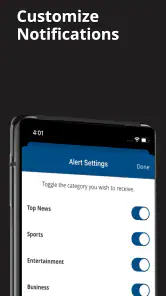
Notification expectations are another reason to stay realistic. I would not install this solely because I want instant alerts for every event unless the app clearly offers the controls I need on my device. For a calmer routine, I would open it intentionally at chosen times. That makes the service more useful as a reading destination and reduces the chance that news becomes an endless interruption.
How it compares with familiar alternatives
Compared with a general news aggregator, The Mercury News offers a more defined editorial center. An aggregator is usually better when I want to compare many publishers, discover unfamiliar sources, or build a feed around several unrelated interests. The Mercury News is better when I prefer to return to one publication and browse its selection without assembling that identity myself.
Compared with reading the publication in a mobile browser, the app can feel more direct because it is designed as a dedicated entry point. The browser remains a sensible alternative if I do not want another installed app, if I switch between many publications, or if the app’s behavior on my phone is frustrating. I would keep the browser option in mind rather than treating installation as a permanent commitment.
Compared with a specialist sports or business app, this one trades depth for breadth. I can move among subjects conveniently, but a specialist tool will normally be the better choice for a reader who spends nearly all their time on one category. This distinction is important because the app’s wide coverage is a strength for general readers and a distraction for narrowly focused ones.
Compared with social media, it is a better fit when I want an article rather than a stream of reactions. Social platforms can surface stories quickly, but they also mix reporting with commentary and unrelated posts. A publication app gives me a more intentional reading path, even if it does not offer the same variety of voices or instant conversation.
Making it part of a useful routine
After the first successful read, I would create a small habit instead of checking it constantly. One session in the morning can cover the main news and business, while an evening visit can be reserved for sports, entertainment, or lifestyle. The exact schedule is less important than having a reason to open the app each time.
One advanced but simple workflow is to separate scanning from reading. During a short break, I would look only for headlines that deserve attention. Later, when I have more time, I would return to the most relevant section and read carefully. This prevents the common mistake of spending the whole break scrolling while retaining very little.
A second useful trade-off is topic rotation. If the news section feels heavy, moving to technology or lifestyle can keep the app from becoming emotionally exhausting. If the lighter sections dominate your sessions, deliberately returning to business or current news can restore balance. The app’s range gives you that flexibility, but you have to use it intentionally.
A third is device-based judgement. Test the same basic reading path on Wi-Fi and mobile data if you regularly switch between them, and test both a short article and a longer one. This does not require technical knowledge. It simply reveals whether the app fits your real routine rather than an idealized one at home. If the experience is comfortable only under perfect conditions, I would treat that as a meaningful limitation.
Privacy-conscious readers may also prefer to use the app selectively rather than granting it a central role in every news habit. I would review the choices presented during setup and in the device settings, then decide whether the convenience justifies the level of integration I want. The right balance is personal, but it is worth considering before building a daily routine around any news app.
The developer, MediaNews Group, Inc., gives the app a clear publication connection, which is useful for readers who already recognize the newspaper and want a dedicated mobile experience. That connection is also why I would not expect the app to replace every source. It works best as one deliberate part of a news diet, especially for someone who values the publication’s selection and wants multiple sections in one place.
My final recommendation is cautious but positive for the right reader. I would try The Mercury News if I wanted a free starting point for newspaper-style browsing across news, technology, sports, business, lifestyle, and entertainment. I would spend a few minutes testing article access and navigation before deciding whether it deserves a permanent place on my phone. The low average rating and paid purchase range make that trial especially sensible.
If you want one publication-centered app for regular reading, it may become a convenient daily stop. If you need a source-neutral aggregator, specialist sports coverage, deep business tools, or a completely frictionless free experience, another option will probably serve you better. In my view, the app succeeds when I use it with a clear purpose: open it, find a meaningful story, read it comfortably, and leave with a better understanding of the day.
The Mercury News is therefore worth trying for broad newspaper-style reading, but I would keep the decision practical. Start with one section, complete one real reading session, understand any purchase prompt, and then decide whether its editorial mix fits your habits. That path gives a first-time user a fair test without asking the app to be something it is not.
The Mercury News Frequently Asked Questions
Which devices can run The Mercury News app?
The Mercury News is a mobile app for Android and iOS, and it is intended for users who want to follow news on a phone or tablet. Its current version is 10.0.60, and the listed minimum operating-system requirement is version 8.0. Check that your device meets the requirement and has enough available storage before installing.
Who publishes The Mercury News app, and what is its age rating?
The app is published by MediaNews Group, Inc. and is listed for everyone, making it suitable for a general audience. It belongs to the news and magazines category and brings news articles to a mobile format. As with any news reader, the subjects and opinions in individual articles can vary, so readers may want to review the content that interests them.
What is The Mercury News app?
The Mercury News app is a mobile news reader for staying informed about local and regional stories, particularly in the San Francisco Bay Area and Silicon Valley. It typically includes breaking news, politics, business, technology, sports, entertainment, opinion, and community coverage. The layout is designed for browsing headlines quickly while also providing access to longer articles and updates.
Is The Mercury News app free to download and use?
The app is free to download, allowing users to install it and browse selected news content. However, access to all articles may depend on the publication’s subscription or digital-access policy, which can change over time. Some stories may be available without payment, while frequent readers could encounter subscription prompts, limits, or premium content. In-app purchase options are listed from $11.99 to $139.99 per item, so review the terms displayed before making a purchase.
Does The Mercury News app require a subscription?
A subscription may be required for unlimited access to certain articles and features. The exact number of free articles, subscription benefits, and pricing can vary by platform and current offer. Before subscribing, check the information shown inside the app or on the official Mercury News website, including renewal terms, billing conditions, and cancellation instructions.
Pros
- Covers breaking news and local events across the Bay Area.
- Offers in-depth reporting on technology
- politics
- and community issues.
- Clean layout makes articles easy to browse on phones and tablets.
- Push alerts can keep readers informed about important developing stories.
- Includes sports coverage for teams and events popular in the region.
Cons
- Many full articles may require a paid subscription to access.
- Advertising can interrupt reading
- especially for non-subscribers.
- Coverage is mainly regional and may feel limited for global news readers.
- Some stories load slowly when using a weak mobile connection.
- Frequent notifications may become distracting unless carefully customized.
- Category
- News & Magazines
- Version
- 10.0.60













