Orange County Register
- 101.00
- 2.3
- Installs
- 10.00K
- Price
- Free

Screenshots







Analysis by Reviewed
Reading local news on a phone sounds simple, but the quality of the experience depends on more than headlines. The connection you have, the time available, and the way the app handles interruptions all affect whether you finish an article or give up. I spent time with Orange County Register as a mobile news and magazines app, and my overall impression is mixed: it can be useful when I want Orange County coverage in one place, but it demands patience in situations where a smooth, dependable news reader matters most.
Orange County Register is developed by MediaNews Group, Inc. and is free to install for everyone. It has been available since 2014, and the current release is version 10.0.60 for devices running Android 8.0 or later. The app has passed the ten-thousand-install mark, while its average score sits at 2.3 from a little over two hundred ratings. Those figures do not define every user’s experience, but they do suggest that reliability and expectations deserve attention before making it your main way to follow the news.
How the connection changes the reading experience
I look at the connection not just as a technical detail, but as part of the handoff between spotting a local story and actually making time to read it. In the next section, I consider how that handoff shapes a simple reading routine—and why I’d choose the moment and network before settling in.
When a strong connection makes the app worthwhile
The clearest reason to use this app is focus. Instead of opening a broad national news service and sorting through stories from everywhere, I can turn to a publication centered on Orange County. That local emphasis is valuable for readers who care about nearby developments, community issues, and regional context rather than only major national headlines.
With a stable mobile connection or reliable Wi-Fi, the basic routine feels straightforward: open the app, look over the available coverage, choose a story, and read. This works particularly well at home, in an office, or in a café where the network is steady enough that loading delays do not interrupt the habit. The app is best understood as a direct doorway to one local news source, not as a replacement for every news service on a phone.
Connectivity also affects how much browsing I am willing to do. When pages appear promptly, I am more likely to move from one story to another and explore subjects I did not initially plan to read. When loading becomes uncertain, I tend to open only the article I came for and leave. That difference matters because a local publication app is most useful when it encourages regular discovery, not just occasional emergency searches.
A realistic morning commute
Imagine checking the app before leaving home, then trying to continue reading on a bus or train. The first part of that routine can be comfortable if the home network has already allowed the content to load. The second part is less predictable because a moving connection can change from strong to weak without warning. A story that opened quickly in the kitchen may hesitate during the journey, especially when the phone moves between coverage areas.
More From Our News Desk

Weather by Xiaomi Review: Clear at a Glance, Less Clear Up Close

X Under Pressure: Can It Recover When Posting Goes Wrong?

Clash of Clans Is Won Between the Battles

Android Auto Makes the Case for Quieter Car Software

MobiOffice: Transforming Mobile Productivity with Seamless Integration

EA SPORTS FC™ Mobile Soccer: Redefining Mobile Sports Gaming
My practical advice is to open the articles you genuinely want before entering a low-signal environment, rather than waiting until the commute has started. I would also avoid assuming that a story will remain available simply because its headline was visible. Treat the app as a connected reading tool and plan around that limitation.
This is one of the important trade-offs with a publication-specific app. A general browser may let me switch quickly to another source when one page struggles, while this app keeps me within the Orange County Register experience. That concentration is its strength for local readers, but it also means the quality of the connection has a larger effect on the session.
Using it in short mobile moments
The app makes the most sense for small, repeated checks: a few minutes during breakfast, a quick look during a break, or a longer read when I have settled somewhere comfortable. Those moments suit a local publication because I am not necessarily trying to consume the entire news cycle. I want a manageable view of what matters in the area.
For a short session, I recommend deciding what you want from the app before opening it. If I am checking for local developments, I scan first and then choose one or two articles. If I am reading for background, I give myself enough uninterrupted time to finish a longer piece. This prevents a weak connection from turning casual browsing into repeated waiting.
The phone screen also changes how I judge the experience. A desktop browser gives me more room to compare tabs and keep several stories visible. On a phone, every delay feels more disruptive because the reading flow is already compact. Orange County Register is therefore more appealing to someone who values a focused local feed than to someone who wants a wide research workspace.
There is another useful distinction between mobile contexts. On a private network, I can be more relaxed about loading several stories. On a busy public connection, I prefer opening only the article that matters most. This is not a criticism unique to local journalism, but it is especially relevant here because the app’s main purpose is repeated content loading rather than a single static reference screen.
What happens when the connection fails
The most frustrating moment is not necessarily a complete outage. A total failure is easy to understand. More annoying is an unstable connection that makes the app appear to be working, then leaves a page partially ready or slow to respond. In that situation, I may tap again, switch screens, or close the app, and each extra action makes it harder to tell whether the problem is temporary or persistent.
When an article does not load, my first step is to stop tapping repeatedly. I check whether other connected apps are responding, then try the app again once the network is stable. If everything else works, restarting the reading session is more useful than spending time guessing which control failed. This simple habit avoids turning a brief connection problem into a confusing app problem.
I also suggest remembering where you were in the story before leaving it. A disrupted session can break concentration, and returning to the same article may not feel as seamless as continuing without interruption. If the article is important, I make a mental note of its subject or headline so I can find it again without relying entirely on the previous screen state.
That recovery pattern is one reason I would not choose this as my only source during a fast-moving local situation. When I need immediate confirmation, I prefer having another trusted news channel available. The app can remain useful for local reporting and context, but depending on one connected source creates unnecessary risk when access becomes unreliable.
Keeping mobile data use sensible
Because this is a news app, repeated browsing can involve more loading than a single visit suggests. Headlines, article pages, and additional items all encourage continued activity. I do not treat the app as something to leave open indefinitely while mobile data is limited. Instead, I use it deliberately and reserve longer reading sessions for Wi-Fi when that is convenient.
A practical workflow is to scan the available stories first, select the most relevant one, and avoid repeatedly refreshing the same screen. If I am traveling, I keep the session short and return later rather than browsing aimlessly. This approach is not about avoiding the app; it is about matching the amount of exploration to the connection and data plan I have at that moment.
Users should also understand the difference between the free installation and the broader access model. The app costs nothing to download, but in-app purchases range from $14.99 to $174.99 per item. That makes it important to read the purchase details shown on the device before committing to anything. I would not assume that free installation means every part of the publication experience is available without a payment decision.
This is also where the app differs from a general news browser. A browser can make it easier to compare free sources, while a publication app is designed around one publisher’s relationship with its audience. If my priority is the Orange County Register specifically, that focus may justify the extra attention to access and connectivity. If I only want the quickest free overview of local headlines, broader alternatives may be more convenient.
Who will get the most from it
I think the strongest audience is a reader with a direct connection to Orange County who wants a dedicated place for local coverage. That could be someone living in the area, someone with family there, or a former resident who wants to keep up with regional issues. For these readers, the app’s narrow focus is not a weakness; it is the reason to install it.
It is also suitable for people who already have a reliable reading routine. If I normally check local news over home Wi-Fi and use my phone for occasional follow-up reading, the connectivity demands are easier to manage. The app becomes one part of a daily information habit rather than the only tool I depend on.
I would be more cautious recommending it to someone who travels through weak-signal areas, relies heavily on uninterrupted reading, or wants one application to combine local, national, and international reporting. Those users may be better served by a broader news reader or a mobile browser that makes switching sources quick. The dedicated local focus can feel restrictive when a wider perspective is the main goal.
The average rating of 2.3 is another reason I would suggest trying the app personally before building a routine around it. A score is not a diagnosis, and individual phones and networks can behave differently, but it is a useful warning that the experience may not be consistently smooth for everyone. I would judge it after several ordinary sessions, including one on mobile data and one on Wi-Fi.
How it compares with familiar alternatives
The closest alternative is opening the Orange County Register through a mobile browser. A browser can be preferable when I want to avoid adding another app, compare the publication with other sources, or use existing browser tools. It may also feel more natural for readers who already manage news through saved pages and search.
The dedicated app has a different appeal: it puts the publication in a more direct, repeatable place on the phone. That can reduce the effort of remembering where to look for local coverage. The trade-off is that I am committing to a single publisher’s mobile experience, including its loading behavior and any access choices presented inside the app.
General news aggregators offer the opposite balance. They are better for scanning many outlets and building a broad picture quickly, but local reporting can become one item among dozens. I would choose an aggregator when speed and variety matter most. I would choose Orange County Register when the local source itself is the priority and I am comfortable with a more focused experience.
Traditional browser bookmarks remain a reasonable option for occasional readers. Someone who checks local news only once in a while may not need a dedicated installation. The app makes more sense when the publication is part of a regular routine and the convenience of a direct entry point outweighs the need to compare several sources.
Access, age rating, and everyday expectations
The Everyone content rating makes the app broadly approachable for general readers. That does not mean every article will interest every age group, but it does indicate that the application is positioned as an ordinary news product rather than a niche entertainment or specialist tool.
The long release history suggests that this is an established publication app rather than a brand-new experiment. At the same time, the current version number and the modest install base mean I would keep my expectations practical. I would look for a useful local reading experience, not the extensive customization or polished ecosystem that comes with the largest national news platforms.
Before installing, I would check that the phone meets the Android requirement and that there is enough room for another regularly used app. After installation, I would test it first on the network I use most often. This is a better decision method than relying only on the store score, because connectivity and reading habits strongly shape whether the app feels dependable.
My connectivity verdict
Orange County Register is worth considering if your main goal is staying close to Orange County news and you usually read on a stable connection. I like the clarity of having a local publication in a dedicated mobile space, and I can see the value for readers who want regional coverage without sorting through a much wider news stream.
However, I would not describe it as an effortless choice for every mobile reader. Unstable networks, limited data, and the possibility of paid access choices all deserve consideration. I would also keep a browser or another trusted news source available for moments when the app is slow or when I need a broader view.
My recommendation is therefore conditional but positive for the right audience: install it if Orange County reporting is genuinely important to you, test it across your normal network conditions, and use it as a focused local-news companion rather than your only source of information. The best experience comes from treating connectivity as part of the app, not as an afterthought.
For me, that balance explains the app’s appeal and its limits. It can make local reading convenient during a calm morning or a reliable Wi-Fi session, yet it becomes less convincing when I need instant recovery, wide coverage, or predictable reading while moving between networks. If that focused purpose matches your routine, it may earn a place on your phone. If not, a browser or broader news service will probably be the more comfortable everyday choice.
Orange County Register Frequently Asked Questions
Who publishes the Orange County Register app, and what kind of app is it?
The Orange County Register is a News & Magazines app published by MediaNews Group, Inc. Its focus is local coverage for readers interested in Orange County, California. If you are comparing news apps, this one is centered on the Register’s reporting and content rather than serving as a general-purpose news aggregator.
What is the Orange County Register app used for?
The Orange County Register app gives readers access to local news and reporting from Orange County, California. After opening it, you can browse sections covering breaking news, politics, business, sports, entertainment, lifestyle, and community events. It is designed for readers who want a convenient mobile way to follow regional stories, headlines, photo galleries, and other content published by the newspaper.
Is the Orange County Register app free to download and use?
Downloading the Orange County Register app is free, but access to all of its content may depend on the newspaper’s subscription policy. Some articles or features can be available to everyone, while other stories may require a digital subscription or an active account. The app is free to download, and in-app purchases are listed from $14.99 to $174.99 per item, so review the current pricing and subscription terms before relying on unlimited access.
Can I read Orange County Register articles offline?
Offline reading capabilities may vary according to the version of the app and the type of content being accessed. Some news applications allow selected editions or articles to be downloaded for later use, while others require an active internet connection for most content. If offline access is important to you, check the app’s current feature description and test whether saved stories remain available after disconnecting from Wi-Fi and mobile data.
Does the app send breaking-news notifications?
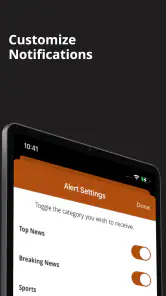
The Orange County Register app may offer notifications for breaking news, important local developments, sports updates, or other selected topics. During setup, you can usually decide whether to allow notifications, and device settings let you turn them off later. Keep in mind that enabling every alert can result in frequent messages, so it is worth reviewing the available preferences and choosing only the categories that matter to you.
Pros
- Covers local Orange County news with strong community focus.
- Offers timely updates on breaking stories and regional events.
- Includes sports coverage for local teams and schools.
- Provides access to opinion pieces and investigative reporting.
- Useful for readers who want news tailored to their county.
Cons
- Some articles may require a subscription or digital membership.
- Ad placement can make parts of the app feel visually crowded.
- Coverage is highly regional and less useful outside Orange County.
- Certain features may depend on a stable internet connection.
- App performance and layout may vary after updates.
- Category
- News & Magazines
- Version
- 10.0.60













