The Modesto Bee | Latest News
- 92.00
- 3.7
- Installs
- 10.00K
- Price
- Free

Screenshots
Analysis by Reviewed
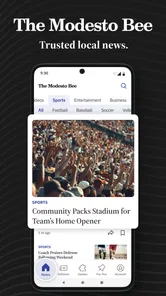
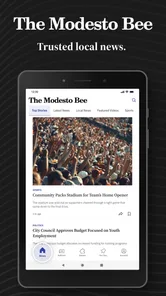
I approached The Modesto Bee as a local news reader rather than as a general headline app, and that distinction matters. This free News & Magazines app from McClatchy is aimed at people who want Modesto-area reporting close at hand, with coverage that reaches into California politics, crime, business, weather, and sports. I found its main value in that local focus: it is less about trying to replace every news source on a phone and more about giving regional stories a clear home.
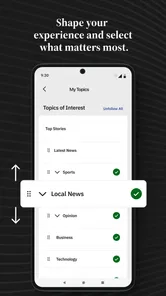
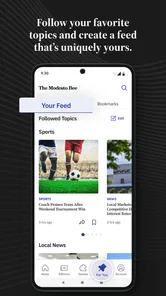
The app has an average rating of 3.7 from around 300 ratings, with more than 10 thousand installs. Those figures suggest a modest but established audience rather than a universal news platform. I would recommend trying it if local California coverage is part of your daily routine, especially if you prefer reading articles in one dedicated place. I would be more cautious if you want a broad national news reader, a highly customizable feed, or a completely free experience without any subscription-related friction.
How clearly the app supports different readers and situations
I find it useful to think of The Modesto Bee not as a universal news feed, but as a focused way to decide which local stories deserve my attention. That distinction matters for readers who dip in briefly, those who want a regional source alongside national coverage, and anyone who needs to keep difficult or distracting subjects at arm’s length. The next section looks at how those different needs shape a practical reading routine.
Readability and navigation for local news
The strongest accessibility choice is the app’s editorial focus. Instead of asking me to sort through a huge mixture of international headlines, The Modesto Bee keeps attention on stories connected to a particular region. That narrower purpose can reduce mental effort for someone who opens a news app mainly to answer practical questions: what is happening nearby, whether local government decisions affect daily life, or whether weather and sports updates are worth checking.
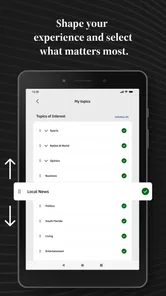
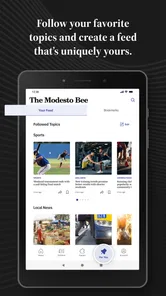
I also found that the different subject areas create a useful mental map. Politics, crime, business, weather, and sports are not interchangeable interests, so separating them helps readers decide where to spend time. A reader who only wants high school or professional sports can approach the app differently from someone following city decisions or local business news. That is more useful than a single undifferentiated stream of headlines.
Still, local focus does not automatically make navigation effortless. News apps can require frequent movement between sections, articles, and account or subscription prompts. For readers with attention difficulties, limited working memory, or low confidence using mobile interfaces, every extra transition can become a small barrier. My practical advice is to begin with one purpose rather than explore everything at once: check weather before work, scan business during lunch, or read politics in the evening. A simple routine makes the app feel less demanding.
Text-heavy news also places a lot of responsibility on presentation. The useful test is not whether an article looks attractive, but whether I can keep my place, distinguish headlines from surrounding controls, and return to the section I was reading without confusion. The Modesto Bee works best for readers who are comfortable with conventional mobile news layouts. It is less convincing for someone who needs unusually strong visual customization or a very simplified reading environment.
More From Our News Desk

Weather by Xiaomi Review: Clear at a Glance, Less Clear Up Close

X Under Pressure: Can It Recover When Posting Goes Wrong?

Clash of Clans Is Won Between the Battles

Android Auto Makes the Case for Quieter Car Software

MobiOffice: Transforming Mobile Productivity with Seamless Integration

EA SPORTS FC™ Mobile Soccer: Redefining Mobile Sports Gaming
The best accessibility advantage here is relevance: fewer unrelated stories can mean less cognitive noise. That benefit is easy to overlook because it is not a feature button, but it changes how tiring a reading session feels. A local reader may spend less time filtering out irrelevant national coverage and more time reaching the information they actually need.
Motor and sensory considerations during everyday use
News reading is often a low-pressure activity, but it still involves repeated taps, scrolling, back navigation, and occasional account actions. I would not describe this app as a specialist accessibility tool; it is a mainstream news product. That means its suitability will depend partly on how comfortably a person can perform those ordinary phone gestures and read the screen for several minutes at a time.
For readers with limited dexterity, the most sensible approach is to use the app in short sessions and avoid treating every section as something that must be explored. Opening one article, reading it, and returning later can be easier than repeatedly scanning a long feed. If a user relies on system-level text enlargement or display adjustments, those settings may help, but larger text can also change how much content fits on screen and may require more scrolling. That trade-off is common in mobile reading: improved letter size can increase the number of navigation movements.
Sensory comfort is another consideration. News can contain upsetting subjects, particularly in crime coverage, and a reader who is sensitive to distressing material may want to approach that section deliberately rather than browse it casually. The local emphasis makes stories feel relevant, which is valuable, but that same closeness can make difficult reports feel more personal. I would use the app with a clear boundary around when and where I read those topics.
People who experience visual fatigue may prefer a short article at a time instead of a long uninterrupted session. Weather and sports checks are especially well suited to this pattern because they can answer a specific question quickly. In contrast, readers who want to compare several sources side by side may find the repeated switching between apps more tiring than using a broad news aggregator.
For users who depend on screen readers, keyboard navigation, captions, audio versions, or other specialized support, I would test the exact current build on the intended device before making it the only news source. I would not assume that a standard news interface will handle every assistive setup equally well. The app’s minimum operating requirement is Android 8.0 or later, so device compatibility is an early checkpoint for anyone using an older phone or an older version of the operating system.
Situational access: when the app becomes genuinely useful
The most realistic use case for me is a local morning check. I can open the app before leaving home, look at weather and major regional headlines, and decide whether any local issue deserves a deeper read. That is more focused than opening a national news app and getting pulled into stories that have no immediate effect on my day. Someone commuting through the Modesto area, following local schools, or keeping up with community decisions could build a similar habit.
Another useful situation is during a developing local event. A general search engine may surface scattered posts, older articles, or social media speculation. A publication devoted to the area offers a more coherent place to look for reporting connected to local politics, crime, business, and weather. I would still compare important claims with official notices and other reputable sources, but having a regional newsroom in the daily workflow is a practical advantage.
The app may also suit family members who live in different parts of California but want one person to monitor a particular community. A reader can check the local angle directly instead of relying on relatives to summarize every change. That makes the app useful beyond personal curiosity: it can support conversations about travel, neighborhood conditions, local services, or events that affect someone close to you.
Situational access is not only about location. It is also about time and attention. A person with a few spare minutes may benefit from checking one topic, while someone with a long evening available may want a broader reading session. The local scope supports both, but the shorter session is where I think the app feels most natural. It answers “what matters around here?” without requiring a large commitment.
Offline or unreliable-connectivity situations deserve a realistic expectation. I would not plan a trip around the assumption that every article will remain available without a connection. If you expect to read during travel, save important information in another dependable way or check it before leaving coverage. That is especially relevant for weather and local incident updates, where freshness matters more than convenience.
What the free download and paid path mean in practice
The app itself is free to install, which makes trying it straightforward. However, in-app purchases range from $7.99 to $159.99 per item, so readers should pay attention to what happens when they move from casual browsing toward regular access. The exact value of paying will depend on how often a person reads local reporting and what access is presented inside the app, but the important point is that “free” does not necessarily mean every part of the reading experience is free.
I would handle this by testing the app with a specific question in mind before committing financially. For example, I might use it for several days to see whether the local sections are relevant, whether the reading flow suits my eyesight and attention, and whether the available coverage justifies a purchase. This is particularly important for households sharing a budget or for readers who already pay for another newspaper or news service.
Subscription decisions can also affect inclusive access. A reader who needs extra time, larger text, or several short sessions may not consume enough content to feel comfortable with a recurring commitment. Another reader may find that local reporting is valuable precisely because it saves time and reduces the need to search multiple sources. The right choice is personal, but I would not judge the app only by its download price.
The developer, McClatchy, gives the app a recognizable newspaper identity rather than the feel of an anonymous headline scraper. That can be reassuring for readers who prefer a publication with a clear regional purpose. At the same time, a newspaper-centered app may feel less flexible than an aggregator that combines many sources and lets users tune a wider range of interests.
Remaining barriers that could affect inclusion
The first barrier is audience fit. If your interests are mainly national politics, international events, technology, entertainment, or global business, the local emphasis may feel narrow. I would skip it as a primary news app in that case and use a broader service instead. The Modesto Bee makes more sense as a focused regional source, either on its own for local readers or alongside a national app.
The second barrier is the possibility of payment friction. A reader may install the app expecting a simple free utility, then encounter purchase decisions while trying to continue reading. That can be uncomfortable for people who have limited budgets, share devices, need help managing purchases, or find account flows difficult. Before handing the app to a less confident phone user, I would explain that paid options exist and make sure they know how to stop before confirming anything.
The third barrier is emotional load. Local crime coverage can be informative, but it can also be stressful when stories concern nearby places or familiar communities. Readers who are prone to anxiety may want to limit notifications or avoid checking difficult sections late at night. I would treat the app as a tool for informed attention, not as something to refresh continuously.
There is also a difference between accessibility and convenience. A focused local publication can reduce information overload, but it cannot automatically solve small text, complex gestures, glare, hearing-related needs, or difficulties with sustained reading. Device settings, a larger screen, and a deliberate reading routine may improve the experience, yet users with more specialized requirements should verify how the current version behaves with their own assistive setup.
The current version is 11.1.16, and the app has been available since March 20, 2012. That long presence suggests an established product rather than a brand-new experiment, but longevity alone does not tell me whether every modern accessibility expectation is met. I would judge it by direct use on the phone I plan to carry, especially if accessibility is essential rather than merely helpful.
Who should use it, and who should choose something else?
I think this app is a good match for Modesto-area readers who want local reporting organized around the subjects that affect regional life. It is also worth considering for people who dislike noisy feeds and prefer a newspaper-style destination. Weather, crime, politics, business, and sports form a practical mix, so the app can support several members of a household with different interests.
I would recommend it less strongly to readers who need a single app for every kind of news. A general aggregator will usually be more efficient for comparing national and international sources, while a dedicated weather service may be better for minute-by-minute forecasts. The Modesto Bee’s strength is not breadth; it is the local perspective and the possibility of replacing scattered searches with one regional starting point.
Age is another practical consideration. The content rating is Everyone 10+, which signals that younger users may encounter material requiring some parental judgment. I would not hand it to a child as an entirely unsupervised news environment, particularly because crime and other serious local subjects can appear in ordinary browsing. For older children and teens, it could support conversations about evaluating local reporting, but adults should still guide the context.
My inclusive verdict after using it as a regional reader
The Modesto Bee is most successful when I use it intentionally: open it for local California reporting, choose a relevant section, read what I need, and leave. Its focused coverage can make news easier to approach for people who feel overwhelmed by broad feeds, and its subjects are directly useful to residents, families, commuters, and anyone maintaining a connection to the Modesto area.
It is not a universal answer to accessibility. Readers who require specialized support, extensive display customization, or a very simple interface should test it carefully on their own device. People with limited budgets should also examine the in-app purchase path before treating it as a long-term news subscription. Those are not reasons to dismiss it, but they are important parts of an honest recommendation.
My final view is positive with clear boundaries. I would keep it as a local news companion, especially for short, purposeful checks of weather, politics, business, crime, or sports. I would pair it with a broader source for national and international coverage, and I would use personal device settings and sensible reading limits to make it more comfortable. If local relevance matters more to you than endless variety, The Modesto Bee is worth trying; if you want maximum breadth or highly specialized accessibility controls, another option may serve you better.
The Modesto Bee | Latest News Frequently Asked Questions
Who publishes The Modesto Bee | Latest News app?
The app is published by McClatchy and is intended for readers who want to follow news from Modesto and the surrounding area. It belongs to the News & Magazines category and is suitable for Everyone 10+. If you are choosing a local news app, its focus on California coverage may make it a useful option alongside broader national or international news sources.
What devices and software does the app support?
The Modesto Bee | Latest News is available for Android devices, with compatibility beginning at Android 8.0. Before installing, check your device’s operating-system version and available storage so the download and update process can complete smoothly. Keeping the app and your device software current can also help with stability and access to the latest available features.
What is The Modesto Bee | Latest News app?
The Modesto Bee | Latest News app is a mobile news reader focused on Modesto, California, and the surrounding Central Valley. It typically provides local reporting, breaking news, politics, crime, weather, sports, entertainment, business, and community coverage. The app is designed for readers who want convenient access to stories from The Modesto Bee without relying exclusively on a desktop browser.
Is The Modesto Bee app free to download and use?
The app is free to download, but access to all articles and features may depend on The Modesto Bee’s subscription policy. Some stories can be available to everyone, while other content may require a digital subscription or account after reaching a reading limit. In-app purchases range from $7.99 to $159.99 per item, so review the purchase details and renewal terms presented in the app before subscribing.
What kind of news and features can I find in the app?
The app focuses on local California coverage, including news about politics, crime, business, weather, and sports. Readers can use it to follow stories from Modesto and the surrounding region in one place. The exact mix of articles and presentation can vary as coverage develops, so the app is most relevant to people who want local reporting rather than an exclusively national news feed.
Pros
- Local coverage focuses on Modesto
- Stanislaus County
- and nearby communities.
- Breaking-news alerts help readers stay informed about important local events.
- Includes reporting on politics
- crime
- education
- sports
- and community issues.
- Clean layout makes articles easy to browse on phones and tablets.
- Subscribers can access additional premium stories and digital content.
Cons
- Many articles may require a paid subscription to read in full.
- Advertising can make the reading experience feel less streamlined.
- Coverage is mainly regional and may feel limited for national-news readers.
- Some features depend on a stable internet connection.
- Notification frequency may feel excessive for users who prefer fewer alerts.













