The General Insurance® App
- 10.90K
- 4.7
- Installs
- 1.00M
- Price
- Free

Screenshots
Analysis by Reviewed
For me, the most useful thing about an auto insurance app is not a long feature list; it’s having the right policy details close at hand when a small task comes up. The General® Auto Insurance is built around that everyday convenience. It gives customers a phone-based way to manage insurance matters, from checking a policy and keeping an eye on payments to starting a claim. I see it as a practical companion to a policy, rather than a tool for deciding which insurer to choose.
A focused role for an insurance app
Insurance apps can be easy to confuse with quote-shopping tools or general finance apps, but they solve different problems. The General’s app is for people who have a policy with the company and want to handle related tasks in one place. It is a business app from The General Automobile Insurance Services, Inc, and its emphasis is on administration rather than broad financial planning.
That focus has a useful consequence: I can go to the insurer’s app for insurance-specific information instead of searching old messages or paperwork. A bank app may show a payment leaving an account, but it is not designed to explain which policy the payment belongs to. Conversely, this app is not a replacement for a budgeting tool or for comparing coverage from multiple companies.
The app is free, carries an Everyone age rating, and its current version is 5.1.2. It has a 4.7 average from around 38,000 ratings and more than a million installs, a sign that many drivers use it as part of their insurance routine. Those figures are useful context, but they don’t tell me whether it fits a particular driver’s needs; that depends on whether you want a simple way to keep up with an existing policy.
Everyday policy management, from payment checks to claims
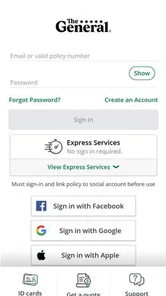
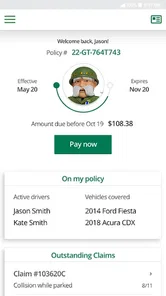
Upon launching the app, I was immediately struck by its clean and user-friendly interface. The home screen is straightforward, providing you with quick access to the most essential features. One of the first things I noticed was the ability to view and manage your policy directly from the app. No more digging through emails or paperwork to find your policy number – it's all right there at your fingertips.
That access is most valuable in short, ordinary moments. Before lending my car to someone, for example, I may want to look up a policy detail rather than assume I remember it correctly. If I’m away from home and need to check when a payment is due, opening the app can be simpler than searching through saved email. I would still keep important documents somewhere I can reach them without relying on a connection, but a phone-based policy view can make routine checks less fiddly.
Checking payments without letting autopay run on autopilot
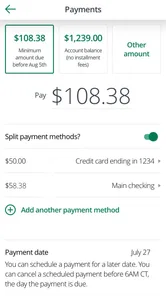
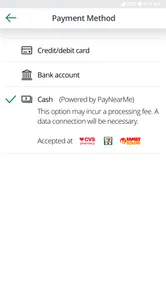
Another feature that caught my eye was the ability to make payments through the app. For someone who tends to forget deadlines, having the option to set up automatic payments is a lifesaver. Plus, you can view your payment history and upcoming due dates, so you're always in the loop.
More From Our News Desk

Weather by Xiaomi Review: Clear at a Glance, Less Clear Up Close

X Under Pressure: Can It Recover When Posting Goes Wrong?

Clash of Clans Is Won Between the Battles

Android Auto Makes the Case for Quieter Car Software

MobiOffice: Transforming Mobile Productivity with Seamless Integration

EA SPORTS FC™ Mobile Soccer: Redefining Mobile Sports Gaming
The practical trick is to use payment history and upcoming due dates as a quick check, rather than waiting for a reminder to prompt action. I’d look over the amount and timing when planning monthly expenses, then use automatic payments only if the account I rely on is likely to have enough funds at the relevant time. Autopay reduces the chance of forgetting, but it doesn’t remove the need to notice a payment or resolve a problem if one occurs.
This is also where the app differs from a general banking app. A bank can show money moving out, but an insurer’s app connects the payment view with the policy it relates to. That makes it a more natural place to check insurance-specific details; a bank remains better for seeing the wider household budget. I would use both for different jobs rather than expect either one to replace the other.
Using the claim workflow thoughtfully
One of the standout features of the app is the claims process. Submitting a claim is as easy as pie – a few taps and you're good to go. The app guides you through each step, ensuring that you provide all the necessary information. You can even upload photos directly from your phone, which is a huge plus if you're dealing with a fender bender and need to document the damage quickly.
A useful habit in a minor collision is to take clear photos while the scene is still safe, then keep notes about what happened so details are fresh when you start a claim. The ability to upload images from the phone can save a separate transfer step later. I would not let filling in an app form distract me from immediate safety or exchanging information; those come first, and the app is for documenting and reporting afterward.
There is a practical trade-off in doing this on a phone: the camera and upload step are convenient, but a small screen can make it harder to review a longer explanation or spot a typo. I’d gather the relevant details first, check what I’ve entered before submitting, and avoid trying to write a careful account while distracted at the roadside. The app can help organize the report; it cannot make an unsafe moment a good time to use a phone.
When support is more useful than self-service
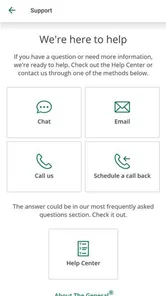
On the customer support front, the app offers a variety of ways to get help. Whether you prefer chatting with a representative or browsing their extensive FAQs, the app has got you covered. Their support team is responsive and knowledgeable, making it easier to find solutions to any issues you might encounter.
The app is most useful as a convenient starting point for a claim, not as a reason to assume every part of a difficult incident can be handled in a few taps. If a situation is confusing, involves an injury, or requires careful explanation, I’d use the support options rather than rush through a form just to finish it. A phone submission can organize the first details, while a conversation may be better for clarifying what should happen next.
That distinction matters when comparing it with calling an insurer directly. A call can feel easier if I have a complicated question and want a person to talk through it; the app is more appealing when I already know what I need to submit or check. Having both routes is valuable because the best one depends on the urgency and complexity of the situation.
A realistic routine, and a sensible backup
Imagine I’m on a lunch break and remember that a payment is coming up. I can check the due date and payment history then, rather than leave it until the evening and try to recall whether I already handled it. Before a weekend drive, I might also open the policy view to confirm a detail I’m unsure about. These are modest jobs, but they are exactly the sort of tasks that benefit from quick access.
For a more stressful situation, I’d treat the app as one part of my preparation rather than my entire plan. Keeping policy documents accessible outside the app and saving useful claim information in a way I can find later gives me a fallback if my phone is unavailable or I’m unable to use it. That isn’t a criticism unique to this service; it is a sensible habit whenever important records live on a mobile device.
Navigation, performance, and the moments that need patience
While the app is packed with features, I found it refreshingly easy to navigate. The menus are intuitive, and I never felt overwhelmed by the options available. Whether you're a tech-savvy user or someone who's just getting accustomed to using apps, you'll find this app accessible and straightforward.
One small gripe I have is the occasional lag when switching between sections. It's not a dealbreaker by any means, but it's something to be aware of if you're in a hurry. That said, the app's overall performance is smooth and reliable. If I need to complete something time-sensitive, I would open the app before I’m rushed and allow a moment for each section to load rather than assume every screen will respond instantly.
The app requires Android 6.0 or later, so it is worth checking that an older phone meets that requirement before relying on it. That matters especially for someone whose device is kept as a backup or used only for essential services. A compatible phone is part of the practical setup, not a guarantee that every task will be convenient in every circumstance.
Where it fits among insurance options
For an ordinary day, imagine checking a payment date during a lunch break, then opening the policy view before a weekend drive. Those are the kinds of quick, specific jobs that make an insurer’s app useful. It is less suited to someone shopping across several companies and comparing coverage side by side: a company’s own app is for managing that company’s policy, while comparison tools or direct conversations with different insurers are better for evaluating alternatives before choosing.
I’d recommend it most to existing customers who want policy access, payment management, and a way to begin a claim without relying on paper records. Someone who rarely uses a smartphone, prefers handling every insurance matter by phone, or needs a broad comparison of providers may gain less from it. It should also be treated as a service companion, not a substitute for reading policy terms and understanding what the coverage actually includes.
When choosing between this app and a call, I’d base the decision on the task. A routine payment check or a straightforward policy lookup is a good fit for self-service. A question that depends on context, or a situation where I’m unsure what information is needed, is a better reason to seek assistance. And if I’m still deciding whether the policy itself suits me, I’d compare the coverage and terms through appropriate channels rather than treating an account-management app as a shopping guide.
My take for different kinds of drivers
I think the app makes the most sense for a customer who wants to handle small insurance tasks independently and is comfortable keeping a phone nearby. It can be especially useful for someone who moves between home, work, and errands and doesn’t want to depend on a folder of papers for a quick policy check. The claim photo option also has a clear practical use for a driver who would rather capture evidence on the spot, once everyone is safe, than remember to transfer images later.
It is a weaker fit for someone who expects an insurer’s app to recommend the best policy across the market, explain every coverage choice without reading the documents, or replace personal support during a complicated claim. Those are different needs. The value here is convenience for managing a relationship with one insurer, not a promise that every insurance decision becomes effortless.
Final Thoughts
In a world where managing car insurance often feels like pulling teeth, the app is a breath of fresh air. It simplifies the process, allowing you to handle everything from payments to claims with ease. While there are minor hiccups here and there, the convenience it offers far outweighs any drawbacks.
So, if you're in the market for a hassle-free way to manage your car insurance, I would definitely recommend giving this app a try. After all, anything that makes life a little easier is a win in my book!
My recommendation comes with one important distinction: I’d choose it for day-to-day access to an existing policy, not as a substitute for comparing insurance or understanding the contract. If that matches what you need, having policy details, payment checks, and claim tools on your phone can make the administrative side feel more manageable. If you prefer a person for every interaction or are still weighing providers, another route will serve you better.
The General Insurance® App Frequently Asked Questions
Can I use The General® Auto Insurance app before I have a policy?
The app is intended for managing auto insurance, so it is most useful to people who have a policy with The General®. You can download it for free, but its policy tools are designed around customer access to insurance information and services. If you are shopping for coverage rather than managing an existing policy, the app may not serve the same purpose as an insurance quote or comparison tool.
What devices and operating systems can run The General® Auto Insurance?
The General® Auto Insurance is available for Android and iOS devices. Android users need version 6.0 or later to install the current release, while the app is also offered through the Apple App Store for iOS users. Before downloading, check that your device has a compatible operating system and enough available storage, and use a stable internet connection to complete installation.
Can I manage my policy and insurance ID card from my phone?
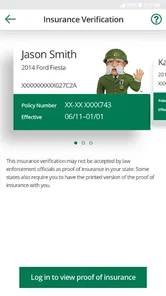
Yes. The app is designed to let customers access policy details and view a digital insurance ID card from a smartphone. That can be useful when you want to check your coverage information without relying on paper documents. The app also provides other policy-management options, so it is intended as a mobile companion for customers rather than a general driving or car-maintenance app.
Who develops The General® Auto Insurance app, and what is it for?
The General® Auto Insurance is a Business app developed by The General Automobile Insurance Services, Inc. It is intended to give customers a mobile way to manage their auto insurance, including checking policy information and accessing services from a smartphone. If you are considering downloading it, its purpose is insurance management rather than a general driving or vehicle-maintenance tool.
What is The General® Auto Insurance app?
The General® Auto Insurance app is a mobile application designed to make managing your auto insurance policy easy and convenient. With this app, users can quickly access their insurance details, make payments, view their insurance ID card, and file claims directly from their smartphone. It's available for both Android and iOS users, ensuring you can manage your insurance on-the-go.
Pros
- Affordable insurance plans available
- Quick online quote process
- 24/7 customer support
- Mobile app for easy access to policies
- Flexible payment options
Cons
- Limited coverage options
- Higher rates for high-risk drivers
- Not available in all states
- App occasionally crashes
- Customer service wait times can be long











