The Driving For Dollars App
- 44.00
- 2.8
- Installs
- 10.00K
- Price
- Free
Screenshots
Analysis by Reviewed
When I look at a real-estate scouting app, I want one thing to be clear: does it help me turn what I notice in a neighborhood into a useful next step, or does it simply add another screen to an already complicated process? Driving For Dollars App is built around that first idea. It is a business app from Driving For Dollars App LLC that focuses on finding possible property leads while I am out looking at homes, streets, and neighborhoods, then supporting direct-mail outreach.
That focus makes it different from a normal property-search service. I would not open it primarily to browse polished listings, compare asking prices, or arrange a showing. I would use it as a field tool for real-estate prospecting: notice a property that appears neglected or potentially interesting, record the opportunity, and organize the next action around it. The concept is simple, but its value depends heavily on how consistently I work with the information I collect.
The app is free to install and is rated for Everyone, which makes trying it relatively approachable. It has an average rating of 2.8 from around 65 ratings, so I would set expectations carefully rather than assume a smooth experience for every user. Its current version is 2.1.2, and it runs on Android from version 6.0 onward. The app has passed 10K+ installs, enough to show that the idea has found an audience, though it is still a specialized tool rather than a mainstream property app.
Turning a passing property into a workable lead
I find the most useful way to judge a scouting tool is to look at the moment between noticing a property and deciding what to do with it. This section focuses on how a location-based lead can become a record worth reviewing, rather than just another address saved without context.
The capability that matters most
The central capability is location-based scouting for direct-mail real-estate leads. In practical terms, the app is meant to help me capture properties I encounter in the real world instead of relying on memory after driving through an area. That distinction matters. A house that looks vacant, poorly maintained, overgrown, or otherwise worth investigating may seem easy to remember, but after an afternoon on the road, details blur together quickly.
What I like about this approach is that it connects observation with follow-up. Traditional prospecting often involves a notebook, phone photos, map pins, and a separate spreadsheet. Those tools can work, but each handoff creates another chance to lose the address, confuse one property with another, or postpone the work until the lead is no longer fresh. A dedicated scouting app has a more useful purpose when it keeps the initial discovery tied to the property record.
The direct-mail angle also changes how I judge a lead. I am not just asking whether a property looks interesting. I am asking whether it deserves a deliberate outreach attempt and whether I can keep the record organized enough to avoid sending careless or duplicate mail. That is where the app can save mental effort, even if it does not replace the research and judgment required before contacting an owner.
More From Our News Desk

Weather by Xiaomi Review: Clear at a Glance, Less Clear Up Close

X Under Pressure: Can It Recover When Posting Goes Wrong?

Clash of Clans Is Won Between the Battles

Android Auto Makes the Case for Quieter Car Software

MobiOffice: Transforming Mobile Productivity with Seamless Integration

EA SPORTS FC™ Mobile Soccer: Redefining Mobile Sports Gaming
The real benefit is not spotting more houses; it is reducing the distance between spotting one and acting on it. If I already drive through target neighborhoods as part of my investing routine, that can be a meaningful improvement. If I rarely scout in person, the app’s main idea may not fit my workflow at all.
Why this is not a standard property-search app
Most real-estate apps begin with properties already advertised for sale or rent. They are designed for people searching from known listings, with filters for location, price, rooms, and other visible details. Driving For Dollars takes the opposite route: I start with the physical neighborhood and identify properties before they necessarily appear in the usual online search.
That makes it potentially useful for investors who want to find off-market opportunities, but it also means the app cannot give me the certainty that comes with a public listing. A neglected exterior does not automatically mean the owner wants to sell. A vacant-looking building may be occupied, under renovation, or managed by someone who has no interest in a direct-mail offer. The app can help me preserve the lead, but it cannot turn a visual impression into a qualified opportunity on its own.
Compared with a paper notebook, the app should be more convenient for keeping scouting activity connected to locations. Compared with a spreadsheet, it is more natural during a drive because the record begins at the place where I noticed the property. Compared with a full customer relationship management system, however, it is narrower. I would not expect it to replace a complete pipeline for negotiations, contracts, follow-ups, and deal analysis.
Using the app in a real scouting routine
A good field routine needs to work at the pace of an actual drive, while still leaving room to assess observations later. I’ll look at how I would keep scouting manageable and make the collected details useful once I’m back at my desk.
What I would do before leaving
I would begin by choosing a small target area rather than driving without a plan. The most useful preparation is not complicated: decide which neighborhoods matter, define what kind of property I am looking for, and make a simple rule for what deserves recording. Without that rule, it is easy to collect a large number of vague leads that later require more time than they are worth.
For example, I might focus on visibly vacant homes, properties with serious exterior maintenance issues, or houses that appear out of place in an otherwise stable block. The exact criteria are personal, but writing them down beforehand helps me stay consistent. It also prevents the app from becoming a digital scrapbook of every building that catches my eye.
I would also make sure the phone is ready for a day outside: enough battery, a reliable connection where possible, and a safe plan for entering information. I would never try to operate the phone while driving. The sensible workflow is to stop legally, park, and record the property, or have a passenger handle the device. The app is meant to support fieldwork, not encourage distracted driving.
Capturing a lead without creating a mess
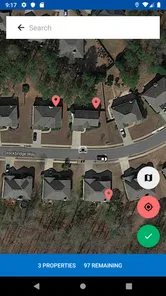
When I find a possible lead, I would record it immediately while the reason for stopping is still clear. The important habit is to add a short, useful observation rather than a vague note such as “good property.” A better note would explain what I actually saw: apparent vacancy, accumulated exterior debris, boarded openings, or another visible condition that made the address worth reviewing.
This is one of the less obvious trade-offs of scouting apps. Fast capture is valuable, but fast capture can also produce poor records. If I save an address without context, the app may preserve the location while losing the thinking behind it. Later, I may not remember why the property stood out or whether the condition was serious enough to justify contact.
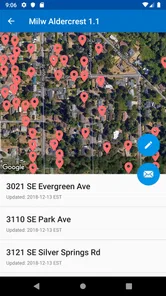
I would treat every record as the beginning of a review process, not as proof that the owner is a prospect. After the drive, I would go through the saved properties and separate promising leads from weak ones. That second pass is where I would look for duplicates, unclear observations, and properties that only appeared interesting because of temporary conditions such as landscaping work or construction.
Making direct mail more deliberate
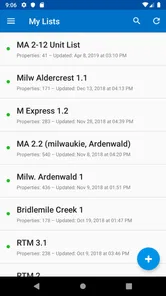
The direct-mail purpose is strongest when I use the app to support a repeatable process. I would group leads by neighborhood or by the reason they were selected, then review them before preparing outreach. This makes it easier to spot patterns: perhaps one area produces many possible vacant homes, while another produces mostly properties that need more research.
A useful discipline is to avoid treating every saved address as ready for the same message. A property that appears abandoned may call for a different tone from one that simply needs maintenance. I would want the information I captured in the field to guide my later review, while keeping the letter respectful and avoiding assumptions about the owner’s circumstances.
The app’s role ends up being more strategic than it first appears. It may help me build a location-based prospecting habit, but the quality of the outcome still depends on what I do after scouting. If I collect leads and never verify or prioritize them, the app cannot create value by itself. If I use it as the first stage of a careful process, it can make the transition from neighborhood observation to organized outreach much cleaner.
A realistic afternoon example
Imagine I spend an afternoon driving through an area where I want to find potential investment properties. I notice three homes that deserve attention. One has an overgrown yard and appears unoccupied, another has visible exterior damage but signs of active renovation, and the third looks ordinary except for a long period of neglected maintenance.
I would record all three only if they fit my scouting criteria, but I would not treat them equally afterward. The first might receive the highest priority for further checking. The second might be placed on hold because renovation activity changes the interpretation of what I saw. The third might remain a lower-priority lead until I can understand whether the condition is persistent.
That example shows why notes and review matter more than raw volume. The app can help me remember the three locations, but my judgment determines whether the afternoon produced three useful leads, one useful lead, or none. In my view, this is the right way to use it: as a memory and organization aid for field prospecting, not as an automatic lead-quality machine.
Where the convenience stops
Convenience has limits when a tool depends on being out in the neighborhood and still requires careful follow-up. Here I consider the points where I would pause, verify what I saw, or choose a different approach instead of assuming every captured property is a worthwhile prospect.
It depends on in-person scouting
The biggest limitation is also the app’s defining characteristic. I need to be physically present in the neighborhood to get the most from it. Investors who work remotely, cover a wide territory, or prefer online research may find a listing database, map service, or lead provider more efficient. This app makes the most sense when driving is already part of the acquisition strategy.
There is also a time cost that is easy to underestimate. Scouting involves travel, parking, observation, recording, and later review. If I compare that with searching a database from a desk, the app may produce richer local impressions but fewer opportunities per hour. The better choice depends on whether the visual condition of a property is central to my strategy.
A captured address still needs judgment
I would be cautious about interpreting visible distress as a guaranteed investment opportunity. Exterior appearance can be misleading, and direct mail can be ineffective when the underlying lead is weak. The app helps preserve the lead, but it does not remove the need for ownership research, local knowledge, legal care, or a thoughtful communication plan.
That means beginners may be tempted to overvalue the app because it makes prospecting feel active. Driving around and saving properties can feel productive, but the real work often happens later. I would measure success by the quality of the reviewed leads and the consistency of follow-up, not by how many locations I can record in one outing.
Free entry, but a paid path to consider
The app itself is free, which is helpful for testing whether this scouting method suits me. It also includes in-app purchases ranging from $19.99 to $399.99 per item. That is a wide range, so I would avoid buying anything until I had used the basic workflow long enough to understand what problem an upgrade is supposed to solve for me.
For a new investor, the sensible approach is to begin with a limited neighborhood and a clear review routine. If the app consistently supports real prospecting activity, paid options may be worth evaluating. If I am still unsure what makes a lead valuable, spending more will not fix the underlying process. The purchase decision should follow demonstrated use, not excitement about building a large mailing campaign.
The modest rating deserves attention
An average rating of 2.8 suggests that the experience has not been uniformly satisfying. I would not use that number as a complete verdict, because a specialized app can divide users according to their expectations and workflow. Still, it is a reason to approach the app as a tool to test rather than a polished replacement for every part of real-estate prospecting.
In practical terms, I would start with a small trial: one neighborhood, a manageable number of observations, and a review of whether the records remain useful after I return home. If the process feels awkward or the captured information does not improve my follow-up, I would stop before building my entire operation around it.
Who gets the most from this approach
This approach is not equally useful for every real-estate professional; it suits people whose prospecting already includes local driving and direct outreach. I’ll close by weighing that fit against the needs of someone better served by listing searches, virtual research, or broader pipeline tools.
Best fit for local investors and disciplined scouts
I think the strongest audience is a local real-estate investor who already spends time driving through target neighborhoods and wants a more organized way to preserve possible off-market leads. It can also suit someone building a direct-mail campaign who values property condition and street-level impressions rather than relying only on online records.
The app is especially useful for people who can commit to the complete loop: scout, record, review, research, prioritize, and follow up. That workflow turns the app from a simple capture tool into part of a repeatable prospecting system. The person who benefits most is not necessarily the one who drives the most miles, but the one who can turn observations into careful decisions.
Who should choose another tool
I would look elsewhere if my main need is browsing active listings, estimating property values, managing transactions, or maintaining a large sales pipeline. A conventional real-estate search app is better for comparing advertised properties. A spreadsheet or customer relationship manager may be better once I have many stages of follow-up. A map-based research service may be more suitable if I want to scout virtually instead of visiting each area.
I would also skip this app if direct mail is not part of my strategy. Its central idea is tied to converting field observations into outreach. Without that goal, I may be adding a specialized step that does not improve the way I find or manage properties.
My final take
Driving For Dollars App is a focused business app with a clear purpose: help me capture real-estate prospects while I am physically scouting neighborhoods and prepare those observations for direct-mail work. I appreciate that it addresses a practical problem—forgetting or losing track of properties that look worth investigating—rather than pretending that every investment decision can be made from a polished listing page.
At the same time, I would use it with realistic expectations. It cannot replace property research, owner verification, careful communication, or a proper follow-up system. Its free entry makes a small trial reasonable, but the in-app purchase range means I would prove the workflow before committing money. The rating also encourages a cautious test instead of blind reliance.
My recommendation is therefore specific: try it if you are a local investor who already drives target neighborhoods and wants to make direct-mail prospecting more organized. Start small, write meaningful notes, review every lead after the drive, and judge the app by whether it improves the quality of your next action. If you want a general property-search service or a complete real-estate management platform, a different category of tool will serve you better.
For the right user, the app’s value is not in replacing expertise. It is in helping that expertise survive the trip from the street to the desk. That is a modest promise, but when used consistently, it can make neighborhood scouting feel less scattered and more actionable.
The Driving For Dollars App Frequently Asked Questions
Who develops the Driving For Dollars app, and what is it designed for?
Driving For Dollars is a business app developed by Driving For Dollars App LLC. Its focus is real estate scouting and direct-mail prospecting: users can note properties they spot in neighborhoods and organize them as leads for follow-up. It is intended to support an investor’s research workflow rather than make investment decisions for them, so each property still needs careful, independent evaluation.
What is the Driving For Dollars app used for?
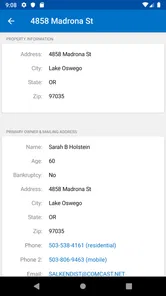
Driving For Dollars is designed for real estate investors who search for potentially distressed or vacant properties while driving through neighborhoods. The app helps users record property locations, add notes, take photos, and organize leads for later research. It is mainly a prospecting and lead-management tool, not a platform that automatically guarantees property ownership information or profitable deals.
How does the app help me find potential investment properties?
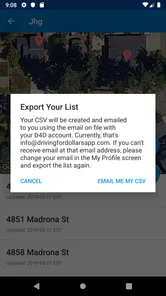
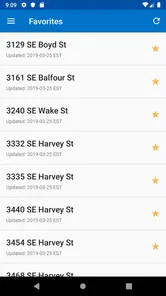
While exploring an area, you can mark houses that appear vacant, neglected, overgrown, or otherwise likely to need attention. The app lets you save these locations and create a list of prospects to investigate later. Depending on the available features and subscription plan, users may also access property data, owner information, mapping tools, and outreach options to support further due diligence.
Is Driving For Dollars free to download and use?
The application may be available to download without an upfront charge, but many of its practical real estate-investing tools can require a paid subscription, credits, or an upgraded plan. Pricing and included features may vary by location, platform, and current offer. Before subscribing, review the billing terms carefully, including renewal conditions, trial periods, and any limits on property searches or contact information.
Which devices can install Driving For Dollars?
The app is available for Android devices running version 6.0 or later. Before downloading, check that your device meets that minimum requirement and that you have room to install and use the app. Driving For Dollars is rated Everyone, though the app’s business-focused scouting and lead-management features are primarily aimed at people interested in real estate prospecting.
Pros
- Helps organize property leads while driving through unfamiliar neighborhoods.
- Photo and location tools make field notes easier to keep in one place.
- Useful for investors targeting vacant or neglected homes.
- Map-based workflow can reduce duplicate scouting efforts.
- Supports a more proactive approach than waiting for listings to appear.
Cons
- Accurate results depend heavily on the quality of the data in your area.
- Frequent GPS use may noticeably reduce your phone’s battery life.
- The driving workflow can be distracting if used while the vehicle is moving.
- Some features may require a paid plan or additional service costs.
- Lead quality can vary
- so every property still needs manual verification.











