The Cepher
- 443.00
- 4.8
- Installs
- 10.00K
- Price
- $21.99

Screenshots
Analysis by Reviewed
I judge a scripture app less by how many titles it claims to gather and more by whether it helps me follow an idea across texts without losing my place. That is the most interesting promise of The Cepher: bringing a broad collection of sacred writings into one reading space, with tools meant to make comparison and return visits easier. It is a paid Books & Reference app from Cepher Publishing Group, and its focus is much narrower than a general ebook reader or a Bible app centered on a few familiar translations.
That focus makes it most useful when I want to study, not simply read a passage and move on. I can see the appeal for readers exploring scripture beyond the standard canon, people comparing interpretations, or anyone who prefers keeping related material together instead of juggling several apps. It is less compelling if I only want a lightweight reader, a familiar translation, or a free way to look up an occasional verse.
What a wider collection changes
For someone deciding whether the purchase makes sense, I’d start with a practical question: will I regularly move between these writings, or do I mainly need one established translation? The first habit makes the app’s central idea valuable; the second can make its breadth feel like extra material I rarely use. I would also think about whether I enjoy self-directed reading. A wider shelf gives me more routes to explore, but it does not choose a route or tell me which interpretation to accept.
That distinction matters in a study group, too. The app can make it easier to look up a passage that comes up in discussion and keep a note of where I want to return, but a shared conversation still benefits from agreeing on the text and edition being discussed. If everyone is using a different source, having a broad library on my phone does not automatically make comparisons consistent. I’d use it as a convenient reading companion, then state clearly which passage or version I’m referring to.
Reading across a wider collection
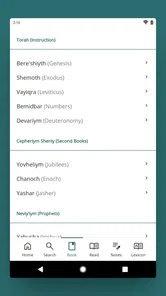
The app’s defining strength is the breadth of its scriptural collection, including texts such as the Dead Sea Scrolls and Apocrypha. The practical effect is that a question about a passage can lead into connected material without requiring a separate search across unrelated reading apps. That does not make every text interchangeable or settle questions of interpretation; it gives me a convenient place to explore them side by side.
How the reading tools fit into study
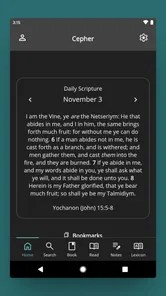
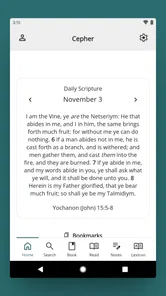
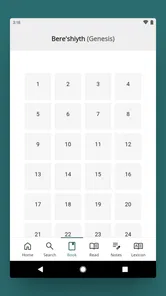
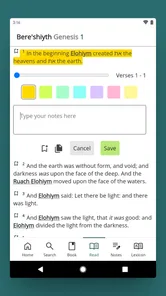
When I first downloaded the app, I was curious about what it could offer that other similar apps couldn't. The moment I opened it, I was greeted with a user-friendly interface that made navigation a breeze. It's like walking into a library where every book is exactly where you expect it to be. The app features a cohesive blend of sacred scriptures, including the Dead Sea Scrolls, the Apocrypha, and even the writings that have been excluded from mainstream religious texts. Whether you're a history enthusiast or someone on a spiritual journey, this app is a treasure trove of knowledge.
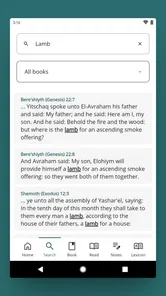
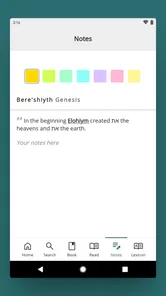
One of the first things I noticed about the app is how well it integrates different features to enhance the reading experience. You can easily switch between texts and even compare different versions of the same scripture. The bookmarking feature allows you to save your favorite passages, making it easier to return to them later. Plus, the search functionality is top-notch, allowing you to find specific verses or topics in seconds. It's like having a personal librarian at your service!
More From Our News Desk

 Gmail
Gmail in a Busy Inbox: Who Benefits Most?
From first account to crowded workday, Gmail earns its place through dependable search and flexible sorting—but its best fit depends on how much inbox maintenance you can tolerate.

 Prime Video
Switching to Prime Video: What Changes in Your Viewing Routine
Prime Video can make a compelling second home for streaming, but switching means learning a different catalog, rental layer, and route from browsing to playback.

 Universal TV Remote Control
 Works Best as a Reliable Backup
A phone remote earns its place through quick setup and reliable habits. Here is how to get more from Universal TV Remote Control—and where its limits show.

 Weather - By Xiaomi
Weather by Xiaomi Review: Clear at a Glance, Less Clear Up Close
Xiaomi’s weather app makes everyday forecasts quick to scan, but its calm surface can leave useful details and recovery paths harder to find than they should be.

 X
X Under Pressure: Can It Recover When Posting Goes Wrong?
A resilience-focused review of X, examining setup, mistaken posts, interruptions, weak connections, and the gaps that matter when recovery needs to be dependable.

 Clash of Clans
 Is Won Between the Battles
Its raids are quick; its community is a long-term project of coordination, teaching, rivalry, and shared responsibility—with all the friction that entails.
Latest News



For a more deliberate workflow, I’d use search to locate a recurring name or topic, bookmark the passages that seem relevant, then compare versions before deciding what to read in depth. That is more useful than treating search as a shortcut to a single answer: a keyword can point me toward material, while the surrounding passage still needs careful reading. Bookmarks also help turn an unplanned browse into a study trail I can pick up another day.
Making comparison more useful
One small habit makes this kind of browsing less confusing: I’d save a passage as soon as I find it, then add a second bookmark only after reading the surrounding section. That gives me a quick pointer and a more considered stopping place, rather than a long collection of search results I cannot remember. When comparing versions, I’d read the same passage in each before jumping to related writings; otherwise, the abundance of material can blur the difference between a wording comparison and a broader thematic connection.
Search is most useful when I have a reasonably distinctive word, name, or phrase in mind. A broad topic can return material that needs sorting, so I would narrow the query and use the result as a starting point, not a conclusion. This is particularly helpful for preparing a question for a discussion or tracing a term across more than one text. The trade-off is that finding a match quickly can create a false sense of completeness: a search result is only as useful as the context I take time to read.
A realistic reason to keep it nearby
Imagine a quiet moment after a study group when someone mentions a passage you have not encountered before. With the app, I can search for the topic, open a related text, and save the section to revisit later rather than trying to remember where I found it. On a commute or during a break, adjustable text settings can make a short reading session more comfortable. Offline access is particularly useful when I want to continue that habit somewhere with unreliable connectivity.
A similar routine works at home when I have only a few minutes before the day gets busy. I can revisit a bookmark from the previous evening, read enough of the surrounding passage to recover the context, and leave another marker for later. That is a better fit for this app than opening it with no question in mind and expecting a guided daily reading path. I’d bring a specific curiosity—such as checking where a name appears or comparing a passage—and let the collection support that focused session.
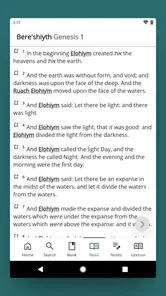
Another cool feature is the ability to customize the reading settings. You can adjust the font size, change the background color, and even switch to night mode for those late-night reading sessions. These customization options ensure that your reading experience is both comfortable and enjoyable.
Comfort and offline reading in daily use
Text adjustments are not just decorative when I’m reading in short bursts. A larger font can help me stay with a passage without constantly leaning toward the screen, while a darker background can be more comfortable in a dim room. I’d set these preferences before settling into a longer reading session, rather than interrupting the flow each time I open the app. The useful payoff is a more personal reading setup; the limitation is that comfort settings cannot replace a layout or reading style that suits everyone.
Offline access also changes where I’d use the collection. I would make sure the material I intend to read is available before leaving a reliable connection, then use saved passages to resume without needing to search from scratch. That is helpful on a flight or in a place with spotty service, but it is worth building the habit of preparing ahead instead of assuming every new search will work when disconnected. For regular study, bookmarks are the bridge between a connected research session and a later offline read.
Where the trade-offs matter
The breadth that attracts curious readers can also make the app a poor fit for someone who wants a simple, familiar Bible-reading routine. A focused Bible app may be easier if all I need is a standard translation and quick daily passages; a general ebook reader is a better match for books from many unrelated subjects. The Cepher’s value depends on actually wanting its particular collection and study-oriented approach, not just wanting another place to read.
There is also a difference between access and interpretation. Having several texts in one place makes comparison more convenient, but it does not explain how to weigh differences or provide a substitute for a trusted study resource. I would take time to check context rather than rely on a search result alone, especially when a phrase appears in more than one passage. Readers who prefer a guided devotional plan or a very minimal interface may find the wider library more than they need.
Choosing it over a simpler alternative
Compared with the usual Bible app, this is a more specialized choice: its appeal is the chance to explore a broader scriptural collection rather than to follow a familiar translation-focused routine. Compared with a general ebook reader, it keeps the experience centered on sacred writings rather than mixed reading material. I would not expect that focus to replace every tool in my reading life. Someone who needs audio, a structured devotional schedule, or a specific translation-first workflow should choose an app built around that need instead of paying for breadth they will not use.
The biggest practical trade-off is therefore not simply “more content versus less.” It is a choice between an open-ended collection and a more guided experience. If I like following references and deciding what to examine next, that openness is a strength. If I want an app to set a daily passage, explain historical context, or keep me on a prescribed plan, I would look elsewhere. The Cepher can support personal exploration, but I would pair it with other trusted resources when I need instruction or scholarly context.
Who is likely to get the most from it
So, why should you consider downloading this app? For one, it’s incredibly comprehensive. The amount of content available is staggering, and it's updated regularly to include new findings and interpretations. Moreover, the app is designed with the user in mind, ensuring that even those who are not tech-savvy can navigate it with ease.
I think the strongest match is a reader who already has questions that lead beyond a single familiar text: someone studying with a group, exploring historical writings, or keeping a personal trail of passages to revisit. A curious beginner could also use it, provided they are comfortable reading independently and checking context instead of treating search as an authority. It is less suited to someone who wants a quick verse lookup once in a while, has no interest in its particular collection, or would rather follow a simple daily plan than browse.
The Cepher has an average rating of 4.5 from around 840 ratings, and it has been installed over 10,000 times. It costs $21.99, so I would treat the purchase as a decision about whether this specific collection will be part of my regular reading, rather than an impulse download. The age rating is Everyone, and version 22.0.49 supports devices running Android 7.0 or later. Its release date is March 7, 2016.
Before buying, I’d consider how often I actually compare texts and whether I expect this to be my main reader or a focused companion. The price is easier to justify if I can name a recurring use—preparing for a discussion, returning to saved passages, or exploring related writings—than if I am merely curious about having a larger library. Since it is a paid app, a reader who mainly wants occasional access to a familiar passage may be better served by a free or less specialized alternative.
Furthermore, the app supports offline reading, which means you can delve into these ancient texts anytime, anywhere—no internet connection required. This is perfect for long flights or when you're in a location with poor connectivity.
In conclusion, the Cepher app is a must-have for anyone interested in ancient scriptures. It’s like having a comprehensive digital library that you can carry around in your pocket. With its user-friendly interface, extensive content, and customizable features, it’s an app that not only meets but exceeds expectations. So, if you’re on the hunt for an app that offers more than just reading, give this one a try. You won’t regret it!
My recommendation is more selective than that closing enthusiasm suggests: I’d choose it when the broad collection is the reason I want a scripture app, not simply because I need a reader on my phone. Its most useful role is as a portable place to search, compare, bookmark, and return to material across a wider range of writings. If that describes the way you study, the purchase has a clear purpose. If you prefer a narrow, guided, or familiar reading routine, a simpler alternative will probably serve you better.
The Cepher Frequently Asked Questions
How much storage space should I have available before downloading The Cepher?
The Cepher is a Books & Reference app centered on a comprehensive restoration of sacred scripture, so it is worth checking that your device has room for the app and its reading content before installing. The app is rated for Everyone and is intended for a broad audience. If you regularly manage storage on your phone or tablet, reviewing available space first can help make the download smoother.
What is The Cepher app?
The Cepher app is a comprehensive biblical study tool that provides users with access to a restored translation of the scriptures. It includes additional books not found in the traditional Bible, aiming to give a more complete understanding of biblical texts. Users can explore historical and religious content with detailed annotations and references.
Is The Cepher app free to download and use?
The Cepher app offers both free and paid versions. The free version provides basic access to the scriptures, while the paid version unlocks additional features such as advanced search options, audio support, and in-depth commentary. Users can choose the version that best suits their study needs. The app is priced at $21.99, so check the purchase details on your device before proceeding.
What platforms is The Cepher app available on?
The Cepher app is available for both Android and iOS devices. Users can download it from the Google Play Store for Android smartphones and tablets, and from the Apple App Store for iOS devices like iPhones and iPads. It ensures accessibility to a wide range of users across different platforms.
Does The Cepher app require an internet connection to use?
The Cepher app can be used offline once it is downloaded and installed on your device. However, certain features, such as updates, additional content downloads, and online commentary, may require an internet connection. This allows for a versatile user experience whether connected to the internet or not.
Pros
- Comprehensive biblical texts included.
- User-friendly interface for easy navigation.
- Offline access to all content.
- Customizable font size and style.
- Regular updates with new features.
Cons
- Limited free content available.
- Some features require in-app purchases.
- Occasional app crashes reported.
- Interface may feel outdated to some.
- Lack of audio versions for texts.