Test'em All: Test & Get Paid
- 1.58K
- 4.5
- Installs
- 1.00M
- Price
- Free

Screenshots


Analysis by Reviewed
I think an app that rewards people for trying mobile apps is most useful when you treat it as occasional pocket-money activity, not a dependable source of income. Test'em All: Test & Get Paid sits in that niche: a free finance app from justDice GmbH, built around testing apps and earning rewards. I’d consider it if you enjoy exploring new apps and can spare a little time to follow task instructions carefully. If you need predictable earnings or want a straightforward budgeting tool, I’d look elsewhere.
What to decide before you install
The key question is whether you’re happy to exchange attention for small rewards. Testing is not simply opening an app and waiting for credit: assignments can ask you to inspect an interface, look for problems, or share a considered opinion. The work suits someone curious and patient more than someone expecting a quick payout for tapping through screens.
It also helps to decide what “extra money” means to you. I’d approach rewards as a modest bonus that might cover a small treat, rather than building them into a budget. The app is free, but your time is still a cost; a task only feels worthwhile if its instructions and reward make sense to you before you begin.
A realistic way to fit testing into a day
Imagine you have a short break between errands and see an assignment that looks interesting. I wouldn’t start it just because the spare minutes are there. First I’d check the brief, work out whether it asks for focused exploration, and decide whether I can give it enough attention without being interrupted. If the task needs more thought than the break allows, saving it for later is better than rushing and then wondering whether I completed it properly.
This is where the app’s appeal differs from a passive rewards routine. You are not simply letting something run in the background: the useful part is noticing how an unfamiliar app behaves and explaining your experience. That can be enjoyable if I’m naturally curious about interface choices, but it is still a small piece of work. I’d count the time spent reading instructions and submitting feedback as part of the task, not just the minutes spent inside the app being tested.
Getting Started with Test'em All
First things first, downloading Test'em All: Test & Get Paid is a breeze. It's available for both Android and iOS, so whether you're team Android or a die-hard Apple fan, you're covered. Once you've got it installed, the registration process is straightforward, asking for basic info and payment details to ensure you get paid for your efforts.
How It Works
The app is designed to connect users with developers who need feedback on their apps. After signing up, you'll find a list of apps available for testing. Each app comes with a set of instructions and tasks you need to complete. Tasks can range from assessing the user interface, checking for bugs, or simply sharing your thoughts on the overall experience.
More From Our News Desk

Clash of Clans Is Won Between the Battles

Android Auto Makes the Case for Quieter Car Software

MobiOffice: Transforming Mobile Productivity with Seamless Integration

EA SPORTS FC™ Mobile Soccer: Redefining Mobile Sports Gaming

How Microsoft OneDrive Became a Mobile Productivity Giant

How Google Translate Breaks Language Barriers Effortlessly
What I love about Test'em All is how simple and intuitive the interface is. The app ensures you know exactly what is expected for each task, and there's a handy progress bar that keeps track of your assignments. Once you've completed the tasks, you submit your feedback, and voilà, your account gets credited.
How to give feedback that is actually useful
One practical habit I’d recommend is separating what happened from what you think about it. If a screen is hard to understand, describe what you tapped, what you expected to happen, and what you saw instead. That is more actionable than saying only that the app felt confusing. For a task about overall impressions, I’d still mention a specific moment that shaped my opinion, such as a label that was unclear or a step that felt easy to follow.
I’d also avoid trying to sound like a professional quality tester if the assignment is asking for an ordinary user’s reaction. Honest, concrete observations are more helpful than guessing what a developer wants to hear. If I don’t encounter a problem, I wouldn’t invent one to make the response seem substantial; I’d explain what worked smoothly and why. The trade-off is that thoughtful feedback takes longer than a quick tap-through, so I’d only choose tasks when I’m willing to pay that attention.
Making each task count
A practical way to avoid wasted effort is to read the full task brief before opening the app you’re meant to test. I’d keep the instructions in mind, note anything confusing as it happens, and give specific feedback rather than a vague “looks good.” That approach makes it easier to complete the assignment as requested and gives your observations more value.
For example, if I had a few minutes while waiting for a bus, I could check whether a task fits that short window before starting. If it calls for careful exploration, I’d save it for a quieter moment instead of rushing and missing details. The progress indicator is useful for tracking an assignment, but I wouldn’t treat visible progress as proof that every requirement is complete; I’d check the brief once more before submitting.
Show Me the Money!
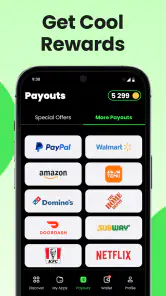
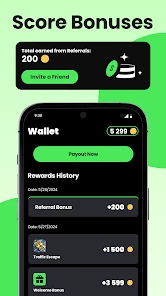
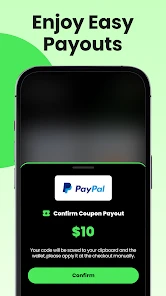
Let's talk about the most enticing part – getting paid. The app offers various payment options, including PayPal and gift cards, so you have the flexibility to choose what suits you best. The payout isn't massive, but hey, getting paid for something you'd probably do for free isn't too shabby, right?
The payment structure is transparent, and the app shows you upfront how much you can earn for each testing gig. It's a great way to make some pocket money, especially if you enjoy exploring new apps and sharing your opinions.
Choosing rewards you will actually use
Before I build up a balance, I’d decide what kind of reward would be useful to me. A gift card can be convenient if I already shop with that retailer; PayPal may suit someone who prefers a more flexible destination for their reward. The better choice depends on how I use money day to day, not on which option sounds more exciting in the moment. I’d check the available choices in the app and keep that preference in mind while deciding whether a task is worth doing.
A question many people have is whether this could replace a regular side job. I wouldn’t plan around that. App-testing assignments are a different kind of opportunity from work with set hours: you choose whether the listed task suits you, and the value is better viewed as an occasional extra. If your goal is reliable monthly income, a job with a defined schedule is the more sensible comparison. If your goal is to turn a bit of spare time into a small reward while trying new apps, this format is easier to justify.
Rewards, patience, and practical trade-offs
I’d compare this with survey and cashback apps by looking at the kind of effort involved, not just the reward. Surveys usually ask for answers; cashback generally depends on eligible purchases. Here, the appeal is app testing and feedback, so it may feel more engaging if you like trying unfamiliar interfaces. But if you want rewards tied to routine shopping, or tasks you can finish without concentrating on another app, those alternatives may suit you better.
Before committing to a task, I’d check its stated reward and requirements, then decide whether the time and attention seem worthwhile. I’d also choose the payment option I genuinely expect to use rather than collecting rewards without a plan. Someone who dislikes sharing opinions, cannot spare uninterrupted minutes, or expects regular income should probably skip this kind of side activity.
What to expect from availability and effort
The practical question is not only how a task works, but whether the assignments currently shown match your schedule and interests. I’d treat the task list as something to check when I have time, rather than assuming there will always be a suitable activity waiting exactly when I want one. That mindset prevents the app from becoming another obligation and makes it easier to leave a task alone if its instructions or reward do not appeal to me.
I’d also be prepared for tasks to differ in how much concentration they need. A quick impression and a careful examination of several parts of an app are not interchangeable, even if both involve testing. There is no universal hourly value I’d attach to the experience: the worth depends on the particular assignment, how naturally it fits your interests, and whether its reward is useful to you. Comparing the displayed reward with the effort you expect is a better decision than judging the whole app by one task.
Overall Experience
In terms of usability, Test'em All delivers a smooth user experience. I encountered no bugs during my time with it, and the app runs seamlessly, which is always a plus. The community aspect where you can see reviews and tips from other testers adds a nice touch, making it feel like you're part of a larger team all working towards the same goal – testing cool apps and getting rewarded.
For a new user, I’d start with one assignment and learn how the instructions, submission, and crediting fit together before making this part of a routine. That gives you a chance to judge the experience for yourself without assuming every task will take the same effort. If you switch from another rewards app, there’s little reason to abandon it immediately: try this alongside it, then keep the option that best matches the way you actually spend your spare time.
Who should choose it—and who should not
I think this app makes the most sense for people who enjoy noticing details, are comfortable trying unfamiliar apps, and want a low-pressure way to earn occasional rewards. It can be a pleasant fit for someone who already spends spare moments exploring new software and would rather give feedback than answer a string of general survey questions. A person who likes to explain why a screen works or falls short may find the activity more satisfying than a reward app based on routine purchases.
I’d skip it if you want a predictable return, dislike writing or sharing opinions, or need a tool that helps organize your finances. Despite being in the finance category, its purpose here is earning rewards through testing, not tracking spending, managing bills, or building a budget. For those goals, a dedicated finance-management app is the more direct choice. Likewise, if you prefer rewards that come automatically from shopping you already planned to do, a cashback service may fit your habits better.
The audience is sizable: it has over a million installs and an average rating of 4.5 from around 28,000 ratings. It is rated for Everyone. It launched on June 20, 2024, and version 5.2.9-TestEmAll supports Android 7.0 and later. I’d take those details as helpful context rather than a guarantee that every person will find the same task selection or value; the practical test remains whether the assignments you see are worth your time.
Switching without making it a chore
If you already use a survey, cashback, or other rewards app, I wouldn’t replace it on day one. Try one assignment here, note how long it actually takes you to read, test, and submit, and compare that effort with the alternatives you use. That small trial gives you a personal basis for choosing, without turning the decision into a project or assuming that all reward systems work alike.
There is also little benefit in keeping several reward routines active if you rarely use them. I’d keep only the ones that fit naturally into my week and whose rewards I can spend or redeem in a way I value. If testing starts to feel like a chore, that is a good reason to pause rather than force yourself to continue just because an assignment is available.
My recommendation
In conclusion, if you're looking for a fun and easy way to make a bit of extra cash, I highly recommend giving Test'em All a try. It's not going to replace your day job, but it's a neat little side hustle that pays you to do what you love. Plus, who doesn't like getting paid to play with apps? Overall, Test'em All is a user-friendly app that does exactly what it promises. Happy testing!
Test'em All: Test & Get Paid Frequently Asked Questions
What is Test'em All: Test & Get Paid?
Test'em All: Test & Get Paid is a Finance app developed by justDice GmbH. Its store summary says, “Gift cards, coupons and more!” The app is presented as a way to explore testing opportunities and rewards. Before you begin, review the current in-app instructions so you understand what each activity involves and what steps are required to take part.
Is Test'em All: Test & Get Paid free to download?
Test'em All: Test & Get Paid is a free app in the Finance category, developed by justDice GmbH. Its focus is reflected in the short store summary, “Gift cards, coupons and more!” If you are considering installing it, keep in mind that free access does not necessarily mean every activity or reward works the same way; read the app’s current terms and instructions before taking part.
What is Test'em All: Test & Get Paid and how does it work?
Test'em All: Test & Get Paid is a platform that allows users to earn money by participating in app testing. Users are required to sign up, download apps, and provide feedback on their experiences. The feedback helps developers improve their applications before launching them to the public. Participants are compensated for each test completed, making it a rewarding opportunity for those who enjoy exploring new apps.
Is Test'em All: Test & Get Paid safe to use?
Yes, Test'em All: Test & Get Paid is safe to use. The platform prioritizes the privacy and security of its users by implementing stringent data protection measures. Users are only required to provide basic information during sign-up, and all testing activities are conducted in a secure environment. Additionally, payment transactions are processed through trusted financial services to ensure users receive their earnings safely.
How do I get started with Test'em All: Test & Get Paid?
To get started with Test'em All: Test & Get Paid, you need to create an account on their website or app. Once registered, you can browse available testing opportunities and select those that interest you. After downloading and testing the app, provide detailed feedback through the platform. You will then receive payment based on the quality and thoroughness of your feedback. It's a straightforward process designed to be user-friendly.
Pros
- Easy to use interface for all users
- Wide variety of tests available
- Earn money quickly by testing
- Encourages learning new skills
- Flexible schedule for testing
Cons
- Limited availability of tests
- Payment can be delayed
- Requires stable internet connection
- App can occasionally crash
- Payout threshold is high
- Category
- Finance
- Version
- 5.2.9-TestEmAll











