

Teaching Strategies Family
- 108.00
- 3.0
- Installs
- 100.00K
- Price
- Free

Screenshots
Analysis by Reviewed
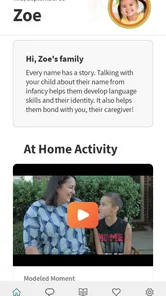
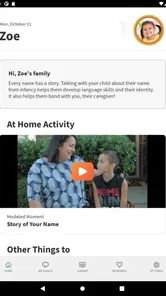
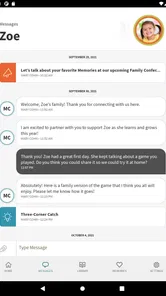
When a child’s day is split between home, school, and other caregivers, small details can easily disappear between conversations. Teaching Strategies Family is built for that gap. I see it as an education-focused communication app from Teaching Strategies, LLC, aimed at helping families stay connected with the adults involved in a child’s care and learning. It is free, rated for Everyone, and available for Android devices running version 7.0 or later.
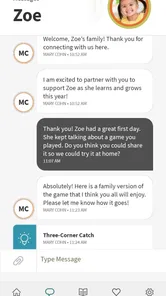
My first impression is that this is not trying to replace a full school-management system or become another social network. Its purpose is narrower and more practical: give families a shared place to follow communication from teachers and caregivers. That focus is useful, especially when a parent cannot speak with a teacher at pickup time or when several adults need the same information without forwarding messages manually.
Following a child’s day from the first message to the next action
I focus here on the handoff from a teacher’s first update to whatever a family does next. A useful approach is to pause before replying, identify whether the message is informational or calls for action, and then make the next step clear to the caregiver who needs it. That small distinction helps keep routine communication manageable and sets up a closer look at how the workflow holds up during a busy day.
Starting with the family’s real situation
The most useful way to understand this app is to start with an ordinary situation. Imagine a child attends an early-learning program while a parent works during the day. The teacher may have an observation, a reminder, or a note about something that happened in class. The parent may not be available for a face-to-face conversation, and another caregiver may collect the child later. Without a shared communication channel, the information can become incomplete or arrive too late.
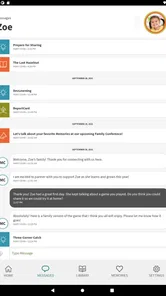
Teaching Strategies Family gives that family a dedicated route for staying in touch with the people supporting the child. Instead of relying entirely on paper notes, phone calls, or a chain of forwarded messages, the parent can check the app as part of the normal daily routine. I would not treat it as a replacement for urgent contact, but it can make routine communication easier to find and revisit.
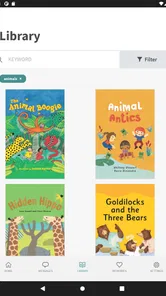
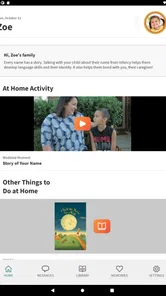
This distinction matters. A family looking for homework planning, a general parenting course, or a broad collection of educational games may find the app too specialized. Its value comes from the connection with a child’s teachers and caregivers, not from offering a large standalone learning library. If nobody in the child’s program uses the same Teaching Strategies communication process, the app will not have much to do on its own.
Setting up the first connection
The first step is getting connected to the child’s educational setting. In practice, that means the family needs an invitation, account information, or another form of access arranged through the participating teacher or caregiver. This is one of the app’s biggest practical trade-offs: the experience depends on the school or care provider being part of the same workflow.
More From Our News Desk

 Instagram
Instagram’s Power Comes From Its Place in Your Phone
A close look at how Instagram turns Meta’s reach, recommendation systems and everyday camera habits into durable platform power—and what that costs users.

 Gmail
GmailGmail in a Busy Inbox: Who Benefits Most?
From first account to crowded workday, Gmail earns its place through dependable search and flexible sorting—but its best fit depends on how much inbox maintenance you can tolerate.

 Prime Video
Switching to Prime Video: What Changes in Your Viewing Routine
Prime Video can make a compelling second home for streaming, but switching means learning a different catalog, rental layer, and route from browsing to playback.

 Universal TV Remote Control
Universal TV Remote Control Works Best as a Reliable Backup
A phone remote earns its place through quick setup and reliable habits. Here is how to get more from Universal TV Remote Control—and where its limits show.

 Weather - By Xiaomi
Weather by Xiaomi Review: Clear at a Glance, Less Clear Up Close
Xiaomi’s weather app makes everyday forecasts quick to scan, but its calm surface can leave useful details and recovery paths harder to find than they should be.

 X
XX Under Pressure: Can It Recover When Posting Goes Wrong?
A resilience-focused review of X, examining setup, mistaken posts, interruptions, weak connections, and the gaps that matter when recovery needs to be dependable.
Latest News



That dependence can feel inconvenient if a parent expects to download an app and immediately begin using every function. I would prepare the details before setup: use the same contact information the program has on file, keep any invitation message available, and confirm which adult should receive access. When multiple caregivers are involved, agreeing on who will monitor messages helps prevent duplicated replies or missed updates.
The app is free to install, which removes an obvious barrier for families. Still, “free” does not mean it works independently of the child’s program. The meaningful content comes through the relationship with the teacher or caregiver. That makes the initial handoff especially important, because a small setup mistake can look like an empty app rather than a technical problem.
Moving from a notification to an actual routine
Once the connection is active, I would use the app at predictable moments instead of checking it constantly. A quick look before the morning rush can reveal a reminder, while an evening check gives the family a chance to discuss the child’s day and prepare for the next one. This habit is more useful than treating every message as an interruption.
A practical routine is to open the app after pickup, read new communication carefully, and then turn the information into a simple action at home. If a teacher shares something the child is practicing, the parent can ask about it during dinner. If there is a reminder for the next day, the family can handle it before bedtime. The app becomes valuable when it closes the loop between what happens in the learning environment and what the family does afterward.
I also recommend keeping communication focused. A parent does not need to send a long response to every update. Short, specific replies are easier for busy teachers to process. For example, confirming that a reminder was seen or explaining a relevant change at home can be more useful than sending several separate messages about the same topic.
Handling the handoff between adults
The handoff is where this app makes the most sense. A teacher shares information with a family, and the family can use it to keep another caregiver informed. That might be a parent who works late, a grandparent handling pickup, or two separated households trying to stay aligned about the child’s routine.
In my view, the strongest benefit is reducing dependence on one person’s memory. If a parent reads an update in the afternoon, that parent can pass along the relevant point instead of trying to reconstruct the teacher’s words later. The app does not remove the need for human conversation, but it gives the conversation a more reliable starting point.
There is an important boundary here: not every message should be treated as a substitute for a direct discussion. Sensitive concerns, urgent health matters, or complicated changes in a child’s behavior deserve a direct conversation with the appropriate adult. I would use the app for regular coordination and follow-up, then move to a phone call or in-person discussion when the situation needs nuance or immediate attention.
Another useful habit is deciding who owns the next step. If a teacher sends a reminder, one family member can acknowledge it and tell the others what has been handled. If a caregiver notices a pattern at home, that person can share a concise observation with the teacher. This keeps the app from becoming a passive inbox and turns it into a simple handoff system.
What the family gets at the end of the flow
The result is not a dramatic transformation; it is better continuity. A parent can have a clearer sense of what the child’s teachers and caregivers are communicating, while the educational team has a more direct way to reach the family. That can be particularly helpful for children whose days involve several adults and for parents who cannot regularly attend pickup or drop-off.
I appreciate that the app’s purpose is easy to explain to another family member. “This is where we check messages from the child’s teachers and caregivers” is more useful than a vague promise of digital learning. That clarity can make adoption easier in a household where one adult is comfortable with apps and another prefers simple, occasional communication.
The app may also help a parent ask better questions. Instead of asking a general “How was the day?”, the parent can refer to a specific classroom update or observation and invite the child to talk about it. For younger children, that connection between school communication and home conversation can be more meaningful than simply collecting notifications.
Where the workflow breaks down
The main weakness is that the experience is only as strong as the communication around it. If a teacher rarely posts, if a family does not check regularly, or if access is connected to the wrong account, the app can feel unhelpful even when the underlying idea is sound. This is a shared workflow, not a tool that can create useful information by itself.
The average rating is 3.0 from around 222 ratings, which suggests that the experience has not been consistently smooth for everyone. I would take that as a reason to approach setup patiently rather than as proof that the app is unsuitable. A communication app is especially sensitive to login confusion, delayed messages, and differences in how each school uses it. Families should judge it after confirming that their child’s program has explained the intended process.
Another limitation is scope. If you want a polished family calendar, detailed academic planning, video lessons, or a broad parent community, this is probably not the right primary app. A general messaging service may be faster for a one-off conversation, while a school’s complete parent portal may be better for schedules, forms, payments, and attendance. Teaching Strategies Family is more appropriate when the central need is maintaining a connection with teachers and caregivers through the Teaching Strategies environment.
I would also avoid assuming that every family member will automatically see the same information. Access arrangements matter, and households with several caregivers should clarify who is connected and how updates will be shared. That is not a reason to reject the app, but it is a real part of the workflow. Digital communication only improves coordination when the people who need the information are actually included.
Small habits that make it more useful
One practical tip is to separate reading from reacting. First read the complete update, then decide whether it needs a reply. This reduces rushed answers and helps the parent distinguish between information, a request, and something that requires a direct conversation. It also makes the teacher’s communication easier to manage.
A second tip is to use the app as a bridge to conversation rather than as the entire relationship. After reading an update, mention it to the child in a natural way. If the child is too young to explain much, watch for connections between the teacher’s note and the child’s mood, interests, or routine at home. The app is most valuable when information travels both ways.
A third tip is to establish a backup habit for important matters. If a message affects tomorrow’s care arrangement or concerns something urgent, confirm it through the channel the program normally uses for immediate issues. This avoids treating a routine communication tool as an emergency service.
A fourth trade-off is worth keeping in mind: convenience can create too much checking. Families may feel pressure to monitor every update immediately, especially when several adults are involved. I prefer setting a reasonable review rhythm and reserving instant responses for genuinely time-sensitive matters. That keeps the app supportive instead of turning it into another source of household stress.
Device compatibility and ongoing expectations
The app was released on July 14, 2017, and its current version is 16.7.20. It supports Android 7.0 and later, so owners of older phones should check the operating system before planning around it. The release history also means I would keep expectations realistic: this is a focused communication tool, not necessarily a modern all-in-one family platform with every feature found in newer education services.
Teaching Strategies Family has reached over 100 thousand installs, so it is not an obscure personal project, but its usefulness still depends more on local adoption than on its install count. The developer, Teaching Strategies, LLC, provides the app within an education context, and that context shapes the experience. A family should ask the child’s program how it uses the app, what kinds of messages belong there, and which channel remains appropriate for urgent questions.
For privacy-conscious families, I would also recommend reviewing the app’s access and notification behavior during setup and choosing a device that the intended caregiver can check reliably. I am not interested in adding another app that nobody opens. The right question is whether it fits the family’s existing communication routine and whether the teachers will use it consistently.
Who should use it, and who should choose something else
I think it is a good fit for parents and caregivers who need a direct connection with a child’s teachers, especially when work schedules make in-person exchanges difficult. It also suits households where more than one adult needs to stay aware of classroom communication and where paper notes or verbal handoffs are easy to lose.
I would be more cautious if you are looking for a complete school administration portal. Families who need payment management, transport details, formal attendance records, or a broad academic dashboard may prefer the institution’s main portal or another dedicated service. Likewise, if the school does not actively use Teaching Strategies Family, downloading it alone will not solve the communication problem.
Compared with ordinary text messaging, the app offers a more education-specific place for the relationship with teachers and caregivers, but texting can still be faster for urgent or informal matters. Compared with email, the app can feel more connected to the child’s care setting, while email may be easier for long explanations or records that a family already organizes there. Compared with a general parenting app, this one is more focused on the school-to-home handoff and less useful as a broad family planning tool.
My final take after following the whole workflow
Teaching Strategies Family works best when everyone treats it as one link in a real communication chain: the teacher shares a useful update, the family reads it at the right time, the relevant caregiver receives the message, and someone turns it into an action or follow-up. That complete flow is more important than the app itself. When the handoffs are clear, the service can reduce forgotten details and make the child’s day easier to understand from home.
Its limitations are equally clear. It relies on participation from the educational setting, it may not cover the wider tasks families expect from a school portal, and its modest 3.0 average shows that some users have encountered friction. I would not recommend installing it without first confirming that the child’s teachers or caregivers use it actively.
For families who do have that connection, I would give it a fair trial and build a calm checking routine rather than expecting instant answers or using it for emergencies. The real benefit is continuity between the adults around the child, not a long list of standalone features. If that is the problem you are trying to solve, this free Everyone-rated education app is worth considering; if you need a complete family-management system, another option will likely serve you better.
Teaching Strategies Family Frequently Asked Questions
What devices and operating systems can run Teaching Strategies Family?
Teaching Strategies Family is an education app for families who want to stay connected with their child’s early learning program. It supports devices running Android 7.0 or later, so checking your device’s operating system before downloading can help prevent installation problems. The app is available for free, and its current version is 16.7.20.
What is Teaching Strategies Family, and who is it designed for?
Teaching Strategies Family is a communication and engagement app designed to connect families with early childhood educators and childcare programs. After signing in through a participating school or center, parents and guardians can receive classroom updates, view information about their child’s learning, communicate with teachers, and stay informed about activities, announcements, and important events. Availability depends on the provider’s subscription and setup.
How do I log in to the Teaching Strategies Family app?
To use Teaching Strategies Family, you generally need an account connected to a participating early learning program, preschool, or childcare center. The school or teacher usually provides an invitation, login instructions, or access code. If you cannot sign in, have not received an invitation, or your information is incorrect, contact your child’s program directly because account access is managed by the participating organization.
What can parents and guardians do with Teaching Strategies Family?
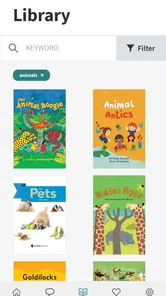
The app may allow families to view classroom messages, photos, learning observations, lesson-related information, announcements, calendars, and other updates shared by educators. Depending on how the program uses the platform, parents can also communicate with teachers, respond to posts, review information about their child’s development, and remain involved in classroom experiences without relying entirely on paper notices or separate messaging services.
Is Teaching Strategies Family free to download and use?
The Teaching Strategies Family app is free to download from the appropriate app store, but access and available features are typically determined by the early childhood program using the Teaching Strategies platform. Families may need an invitation or an account provided by their school or childcare center. Because pricing arrangements can vary, parents should ask the participating program whether any fees, enrollment requirements, or service limitations apply.
Pros
- Keeps families informed about classroom activities and learning goals.
- Offers a convenient way to receive updates directly from teachers.
- Supports stronger communication between home and school.
- Can help parents follow their child’s progress more regularly.
- Useful for coordinating family participation in school events.
Cons
- Available features may depend on the school’s subscription and setup.
- Some notifications can become excessive during busy school periods.
- Requires reliable internet access for timely updates.
- Parents may need separate accounts for children at different schools.
- Older devices may provide a less smooth app experience.











