Tattooist: AI Tattoo Generator
- 362.00
- 3.7
- Installs
- 500.00K
- Price
- Free

Screenshots
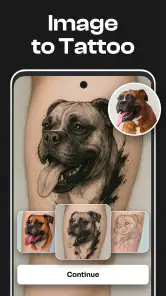
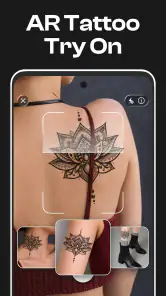
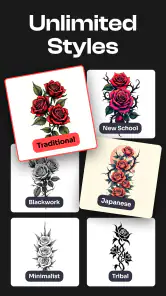
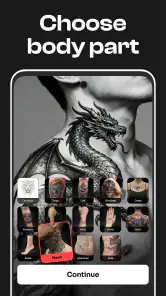
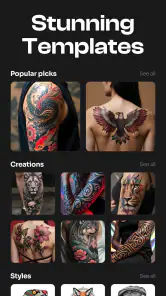
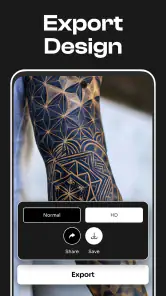
Analysis by Reviewed
When I’m choosing a tattoo design app, I care less about getting the most dramatic picture and more about finding a useful way to turn a half-formed idea into something I can discuss with an artist. I find Tattooist: AI Tattoo Generator most useful as an early-stage sketching aid: it gives a concept somewhere to take shape, and its stencil-oriented approach points toward a practical next step. I wouldn’t treat a generated image as a ready-to-ink design.
That distinction matters if you’re deciding whether to try it. This Art & Design app makes sense when you want inspiration, a way to compare broad visual directions, or a visual prompt for a consultation. If your priority is precise drawing control, print-ready technical work, or a design tailored to your body, a dedicated illustration workflow or a tattoo artist may be a better choice.
Deciding whether it fits your tattoo process
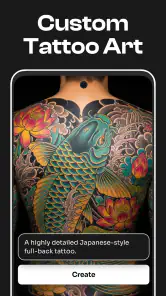
My first question with a tattoo-planning app is what I need it to do today. Am I trying to explain an idea I can’t quite describe, compare broad visual styles, or prepare a finished piece? Tattooist is aimed most naturally at the first two jobs. Its appeal is the chance to explore custom tattoo concepts and stencil-related work without starting from a blank page and drawing every line myself.
That makes it approachable if you’re new to tattoo design. You don’t need to think like an illustrator to explore an idea; you can use the app as a visual conversation starter. I’d still begin with a clear subject and a few constraints. “A small botanical design with a quiet, minimal feel” gives you a more useful direction than simply asking for something beautiful, because it gives you a basis for deciding what to keep and what to change.
It’s also worth being honest about what a generated concept can and can’t settle. A design that looks balanced on a screen may not suit the curve, size, or placement you have in mind. Fine lines can be hard to judge at a glance, and a composition that works as a picture might need adjustment before it works as a tattoo. I’d use the result to clarify my taste, not to skip the conversation with the person who will actually tattoo it.
The app is free to try, with in-app purchases ranging from $6.99 to $39.99 per item. That gives you a chance to decide whether its approach suits you before spending, but I’d check what a purchase unlocks before committing. The useful question isn’t just whether a design looks appealing; it’s whether the paid option helps with the specific part of your process you care about.
What makes this app stand out
In a category crowded with general drawing tools, image-generation services, and collections of ready-made tattoo references, Tattooist has a more focused purpose. It’s built around tattoo ideas rather than open-ended illustration, and the stencil-maker angle gives that focus a practical edge. I like that combination for people who want to move from “I have an idea” toward “Here’s something I can show an artist.”
More From Our News Desk

Clash of Clans Is Won Between the Battles

Android Auto Makes the Case for Quieter Car Software

MobiOffice: Transforming Mobile Productivity with Seamless Integration

EA SPORTS FC™ Mobile Soccer: Redefining Mobile Sports Gaming

How Microsoft OneDrive Became a Mobile Productivity Giant

How Google Translate Breaks Language Barriers Effortlessly
Its audience isn’t limited to people planning their first tattoo. Someone who knows the subject but is undecided about its overall look can use a generated concept to compare directions before booking a consultation. A friend helping someone brainstorm can also use it to turn a verbal description into something both people can react to. In those situations, a rough visual can save a lot of back-and-forth, even if the final tattoo changes substantially.
A useful workflow is to decide the design’s non-negotiables before generating anything: the main subject, the intended mood, and the rough placement. Then treat the first result as a draft, not a verdict. Note what feels right, such as the overall silhouette or balance, and what doesn’t, such as unnecessary detail or a style that feels too loud. This makes the next round of exploration more deliberate instead of sending you in circles among attractive but unrelated images.
Another practical tip is to prepare for the artist meeting while you explore. Keep track of concepts that communicate different parts of your idea, and be ready to explain which elements you want rather than insisting that every detail remain unchanged. A tattoo artist may need to simplify, redraw, or adapt a concept for placement and longevity. Showing your priorities gives them room to improve the design instead of forcing them to copy a draft literally.
The stencil focus is helpful as a bridge, but I wouldn’t assume that a stencil-style output automatically has the line quality or production readiness required for an appointment. Tattooing is a craft with constraints that an appealing screen image can’t resolve on its own. Ask the artist to assess whether the design needs changes for its size and location, particularly if you’re drawn to intricate details or fine marks.
Where other approaches may be better
If you already have a clear image and want to draw every part yourself, a full-featured illustration app is likely a better fit. Those tools are designed for hands-on control over individual strokes and revisions, whereas Tattooist’s value is more about helping you explore a tattoo concept. The trade-off is straightforward: generated exploration can be quicker for someone without drawing experience, while manual illustration gives an experienced user more direct control.
Reference galleries serve a different purpose. They can help you learn what established tattoo styles look like or gather examples from real artists. They may be less useful when your idea combines personal details that don’t appear together in one reference. In that case, a custom concept tool can help you express the combination, while a gallery remains valuable for discussing technique and visual vocabulary with an artist.
Likewise, a general-purpose AI image tool may offer broad creative flexibility, but it isn’t necessarily organized around tattoo planning. Tattooist’s narrower focus is an advantage when you want tattoo-specific brainstorming and stencil-related work; a more general tool may suit you if the concept is part of a larger illustration project or you need to move between many kinds of artwork. Neither route removes the need for a professional to assess the final design.
I’d skip Tattooist if your main requirement is exact production control, if you already have a finished design that only needs technical preparation, or if you’d rather develop the concept directly with an artist. It’s also a poor match if you expect an app-generated image to guarantee how a tattoo will look once healed. The design stage can help with communication, but the human consultation remains essential.
Trying it without creating unnecessary friction
Because the app is free to download, the simplest way to assess it is to test one real idea you might take to an artist. Keep the brief narrow, compare the output with your original intention, and ask yourself whether it has helped you make a decision. If it only produces images you enjoy looking at but can’t imagine wearing, it may be entertaining without being useful for your actual plan.
Be cautious about paying before you understand the purchase in front of you. Individual in-app items range from $6.99 to $39.99, so I wouldn’t assume every paid option is necessary. Start by identifying the bottleneck: do you need more room to explore, a particular kind of output, or something else? Buy only if the item clearly addresses that need. Since the app is free to try, there’s little reason to spend just because you’re eager to see a first result.
There’s also a small but important cost to switching tools midway through a design process: you can lose the clarity of the original idea if you keep collecting variations without recording what matters. I recommend writing down the subject, placement, and two or three visual qualities you want before trying any generator or drawing app. If Tattooist helps you sharpen those choices, it has done something useful even if the final artwork is redrawn elsewhere.
For everyday use, imagine you’re planning a small tattoo and have a few different interpretations in mind. You could use the app to make those possibilities easier to compare, then bring the strongest concept to an artist and explain which parts are personal and which are flexible. That’s a more realistic role for the tool than asking it to make every decision, and it reduces the chance of mistaking a polished-looking image for a finished tattoo plan.
Questions to settle before you commit
If you’re wondering whether you need drawing skills, I don’t think you do to get value from the app’s exploratory role. The more useful skill is knowing what you want to communicate: a subject, a mood, and a placement can give you a better starting brief than a vague request. If you’re already comfortable drawing and want control over every mark, though, an illustration app is likely to feel less restrictive.
You also don’t need to decide in advance that the first image must become your tattoo. I’d use it to identify what attracts you, then show the artist the elements that matter. That approach is especially helpful when two people are planning a matching or related design: each can react to a shared visual direction while keeping room for personal adjustments.
Another question is whether a generated concept can replace browsing artist portfolios. I wouldn’t use it that way. The app can help you express a personal combination of ideas, while portfolios show the kind of work an artist actually makes. Looking at both serves different decisions: one helps you clarify the concept, the other helps you decide whom to consult and what visual language you’re drawn to.
Finally, if you’re unsure whether a paid item is worth it, I’d wait until you’ve tested a concrete brief and can identify what’s missing from the free experience. The price range is wide enough that the right decision depends on the item and your needs, not on a general assumption that paying will automatically improve the tattoo. For a one-off idea, a consultation may be the more valuable next step; for ongoing exploration, a purchase could make sense if it addresses a specific obstacle.
Who should give it a try
Tattooist is made by MAETCH EXPANSION, S.L. and is rated for Everyone. It has an average rating of 3.7 from around 3.8 thousand ratings, with over 500 thousand installs. Those figures tell me plenty of people have tried it, but they don’t prove it will suit your taste. The current version is 1.16.0, and it requires Android 10 or later.
I recommend trying it if you want a low-pressure way to explore a tattoo idea, feel more comfortable choosing between visuals than drawing from scratch, or want to make a consultation more productive. It’s especially promising when you have a personal concept but need help turning it into a visual starting point. Keep your expectations grounded: the best result may be a clearer conversation with an artist, not a design you use unchanged.
If you’re an experienced illustrator who wants fine control, choose a drawing app. If you want to study real-world tattoo work, start with artist portfolios and reference material. If you want an artist to shape the idea from the beginning, booking a consultation is the more direct route. Tattooist makes the most sense between those options, when you have an idea but need help seeing what it could become.
Overall, Tattooist: AI Tattoo Generator is a useful brainstorming companion rather than a replacement for design skill or professional tattoo advice. I’d try it for concept exploration, use its stencil-oriented approach as a prompt for discussion, and stay willing to revise the result. If you treat it as a way to arrive at a better-informed appointment—not as a shortcut around one—it earns its place in the planning process.
Tattooist: AI Tattoo Generator Frequently Asked Questions
What is Tattooist: AI Tattoo Generator, and how does it work?
Tattooist: AI Tattoo Generator is a mobile app designed to help users explore tattoo concepts with the assistance of AI. You typically describe an idea, choose available styles or settings, and let the app produce visual suggestions. The results are best treated as starting points for discussion, not finished tattoo designs: details, placement, size, and line work may need substantial refinement by a professional tattoo artist.
Is Tattooist: AI Tattoo Generator free to use?
The app may be available to download without an upfront charge, but that does not necessarily mean every feature is free. AI generations, premium styles, saved designs, or other tools may be limited by credits, subscriptions, or in-app purchases. Check the current store listing and the pricing shown inside the app before purchasing, and review subscription terms carefully so you understand renewal timing and cancellation options.
Can I use the generated tattoo design directly with a tattoo artist?
You can share a generated image with a tattoo artist as a visual reference, but it may not be ready to transfer onto skin as-is. AI artwork can contain inconsistent details, awkward lettering, or elements that do not translate well into tattoo lines. An experienced artist can adjust the composition for your chosen body area, simplify fine details, and make sure the design is practical and suitable for tattooing.
Does Tattooist: AI Tattoo Generator let me preview a tattoo on my body?
Preview and mock-up options can vary by app version and available features. If the version you install includes a body-placement preview, use it to get a rough sense of scale and location rather than an exact prediction of the finished tattoo. Screen images, lighting, body shape, and image alignment can affect how convincing a mock-up looks, so confirm placement with your tattoo artist before making a decision.
What should I check before downloading Tattooist: AI Tattoo Generator?
Before downloading, confirm that the app is compatible with your Android or iOS device, read the latest store reviews, and check its privacy information and requested permissions. Because AI tools may process prompts or uploaded images, avoid submitting sensitive personal material unless you understand how it is handled. Also look for generation limits, internet requirements, in-app purchases, and subscription conditions in the current listing.
Pros
- Quickly turns text prompts into tattoo design concepts.
- Offers a convenient way to explore styles before visiting an artist.
- Generated designs can help communicate ideas during a consultation.
- Lets users experiment with different concepts without drawing skills.
- Useful for gathering inspiration for custom tattoo artwork.
Cons
- AI results may contain awkward details or inconsistent linework.
- Designs need review and refinement by a skilled tattoo artist.
- Generated artwork may not be unique or exclusive to one user.
- Results can vary considerably depending on the wording of prompts.
- A screen preview cannot show how a design will fit or age on skin.

- Category
- Art & Design
- Version
- 1.16.0