

Talli Baby
- 142.00
- 4.2
- Installs
- 10.00K
- Price
- Free

Screenshots

Analysis by Reviewed
When caring for a baby, the difficult part is often not recording one feeding or one diaper change. It is remembering a pattern while tired, interrupted, and sharing responsibility with someone else. Talli Baby is designed for that narrow but important job: keeping infant feeding, sleep, and diaper information in one place. I found its value less in flashy extras and more in reducing the mental load that comes from trying to remember the last bottle, nap, or wet diaper.
It is a free medical-category app from Talli, Inc., with optional in-app purchases ranging from $3.99 to $39.99 per item. The app is rated for Everyone, and its current version is 1.4.1. That combination makes it approachable for new parents who want to try a tracking routine without committing to a paid download immediately, although the presence of purchases means I would still check each screen carefully before confirming anything.
What Talli Baby feels like in everyday use
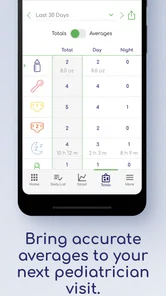
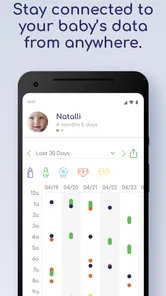
The most useful way to think about this app is as a shared memory aid rather than a medical decision-maker. A parent can use it to create a running picture of feeding, sleep, and diaper activity, then refer back to that record when the day becomes a blur. I would not use an infant log as a substitute for a pediatrician, but I would use one to make a conversation with a healthcare professional more precise.
A realistic example is a night when one parent handles the first wake-up and the other takes the next. Without a log, the second parent may ask whether the baby last fed before midnight or closer to morning, and the answer may depend on a tired guess. With a dedicated record, the handoff can be based on an entry instead of memory. The same applies during daytime care with grandparents, a babysitter, or another family member: the app can help keep everyone oriented around the same record.
The store summary describes it as an infant feed, sleep, and diaper log, and that focus is important. This is not an all-purpose family organizer that tries to cover every appointment, shopping list, milestone, and household task. I see that narrow scope as a strength for parents who want a straightforward care journal. It can also be a weakness if you expect a complete baby-management system with extensive planning tools.
The app has an average rating of 4.2 from around 1.1 thousand ratings, with roughly 142 written reviews and over 10 thousand installs. Those figures suggest that it has found a real audience, but they do not tell me whether its workflow will suit every family. Baby tracking is highly personal: one parent wants a few quick taps, while another wants detailed notes and long-term comparisons. I would treat the rating as encouraging context, not as a guarantee.
Trust starts with knowing what kind of record you are creating
Infant logs can contain sensitive household information even when they are not formal medical records. Feeding times, sleep patterns, diaper observations, and notes about a child’s routine can reveal a lot about daily life. That is why I would approach Talli Baby with a practical trust question: does the app give me clear choices about what I enter, what I share, and how I manage access?
More From Our News Desk

 Gmail
GmailGmail in a Busy Inbox: Who Benefits Most?
From first account to crowded workday, Gmail earns its place through dependable search and flexible sorting—but its best fit depends on how much inbox maintenance you can tolerate.

 Prime Video
Switching to Prime Video: What Changes in Your Viewing Routine
Prime Video can make a compelling second home for streaming, but switching means learning a different catalog, rental layer, and route from browsing to playback.

 Universal TV Remote Control
Universal TV Remote Control Works Best as a Reliable Backup
A phone remote earns its place through quick setup and reliable habits. Here is how to get more from Universal TV Remote Control—and where its limits show.

 Weather - By Xiaomi
Weather by Xiaomi Review: Clear at a Glance, Less Clear Up Close
Xiaomi’s weather app makes everyday forecasts quick to scan, but its calm surface can leave useful details and recovery paths harder to find than they should be.

 X
XX Under Pressure: Can It Recover When Posting Goes Wrong?
A resilience-focused review of X, examining setup, mistaken posts, interruptions, weak connections, and the gaps that matter when recovery needs to be dependable.

 Clash of Clans
Clash of Clans Is Won Between the Battles
Its raids are quick; its community is a long-term project of coordination, teaching, rivalry, and shared responsibility—with all the friction that entails.
Latest News



I would avoid treating the app’s medical category as proof that every entry is medically reviewed or clinically interpreted. The category tells me where the app sits in the store, not how a healthcare professional should use its information. If I saw a concerning symptom, unusual feeding pattern, dehydration concern, breathing issue, or change in behavior, I would contact an appropriate medical professional instead of waiting for the log to explain it.
That distinction also affects how I would write notes. A short, neutral entry such as “fed less than usual” may be more useful in a later conversation than an emotional conclusion about why it happened. A log works best when it preserves observations and timing. It becomes less reliable when it is used to diagnose, predict, or reassure beyond what the recorded information can support.
Controls matter more than a polished dashboard
When I review an app that handles family information, I look for visible user choices rather than assuming that convenience means control. The practical questions are simple: can I decide what to record, can I review what has been entered, can I correct mistakes, and can I control who else can see the information? Those checks are especially important when multiple caregivers use the same routine.
For Talli Baby, I would take a few minutes during setup to inspect every account, sharing, notification, and purchase screen that appears. I would also look for any privacy or data-management area inside the app and read its wording rather than tapping through automatically. This is not unnecessary caution. A tired parent is exactly the kind of user who may accept a default without noticing what it changes.
I would also test the basic record-keeping workflow before relying on it. Enter one feeding, one sleep period, and one diaper event, then check whether each appears clearly in the history. If I make an accidental tap, I would see whether the entry can be edited or removed. That small trial tells me more about day-to-day reliability than a long feature list, because a log is only useful when corrections are easy and visible.
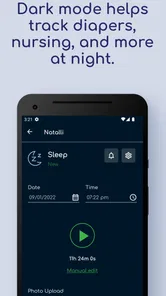
Another sensible check is whether the app remains understandable when a caregiver is in a hurry. A good care log should not force someone to remember a complicated sequence while holding a baby or working in a dark room. If the interface makes a basic entry feel slow, I would simplify my tracking rather than record inconsistently. A shorter, accurate log is better than an ambitious one that nobody maintains.
Where data sensitivity appears in real family routines
The most sensitive moments are not always dramatic. They can happen when a parent hands over a phone, lets another caregiver use an account, or records a note while discussing a health concern. I would be careful about putting unnecessary identifying details into free-text fields. If a note only needs a time and an observation, there is little benefit in adding extra personal information.
I would also think about device access. If other people regularly use the phone, the visible history and notifications may reveal parts of the baby’s routine. That does not mean the app is unsafe; it means the phone itself becomes part of the privacy picture. I would review notification text and lock-screen behavior, then adjust device settings if they expose more detail than I want visible.
Sharing a log with a clinician can be useful, but I would prepare the record before showing it. I would correct obvious mistakes, separate observations from guesses, and explain the period covered. A healthcare professional may find a clear timeline helpful, but a messy sequence of taps can create confusion. The app can support a conversation; it cannot replace the conversation.
There is also a trade-off between detail and sustainability. Recording every small event may seem ideal during the first day, but it can become exhausting. I would decide what information answers the family’s actual question. If the goal is to understand overnight wake-ups, sleep timing may deserve priority. If the goal is to monitor feeding consistency, feeding entries should be the focus. This selective approach protects both the parent’s energy and the usefulness of the record.
How I would give caregivers control without creating chaos
For a shared routine, I would agree on a simple household rule before inviting anyone else to participate: record events as soon as practical, use the same wording for similar observations, and correct duplicate entries rather than leaving conflicting versions. This is a small workflow improvement, but it prevents the log from becoming a second source of uncertainty.
I would also decide who is responsible for reviewing the record. In a two-parent household, one person might enter events while the other checks the day’s pattern. In a larger caregiving arrangement, everyone may need to record but only one person may need to interpret the overall routine. Separating those jobs can reduce arguments about whether an entry was missed or merely entered later.
Before using any paid option, I would identify what the free experience already covers and whether the purchase solves a real problem for my household. The listed price range runs from $3.99 to $39.99 per item, so the difference between a small optional upgrade and a larger commitment is meaningful. I would never purchase simply because a prompt appears during a stressful night. I would first decide whether the added capability is needed and whether the purchase terms are clear.
Account control is equally important. I would use a password I do not reuse elsewhere if the app requires an account, and I would review any available sign-out, deletion, or sharing controls. I would not assume that uninstalling an app automatically handles every account or record-management question. The responsible approach is to use the controls that are visibly offered and keep the account limited to the caregivers who genuinely need access.
What it does better than paper notes and ordinary phone tools
The usual alternative is often not another specialist app. It is a notebook, a note-taking app, a spreadsheet, or a series of messages between caregivers. Those options can work, especially for a family that wants complete flexibility. A paper notebook is easy to understand and does not depend on a particular interface. A general note app may be faster for free-form observations. A spreadsheet can suit someone who enjoys organizing information manually.
Talli Baby’s advantage is that its purpose is already narrowed to infant feeding, sleep, and diapers. That focus can make the record easier to scan than a long note full of mixed household details. It also encourages a consistent habit: open the care log, record the event, and return to the rest of the day. For a new parent who does not want to design a tracking system from scratch, that structure is more useful than unlimited blank space.
The trade-off is flexibility. A notebook can hold anything, while a focused app may feel restrictive when a family wants to track medication questions, temperature readings, appointments, or unusual observations in a custom format. I would keep those needs separate unless Talli Baby visibly supports them in a way I understand. Combining unrelated information into a single log can make the core feeding, sleep, and diaper history harder to read.
Compared with a general baby-tracking app, the deciding factor is not the number of features but the family’s tolerance for complexity. If you want a broad dashboard with many categories, another option may suit you better. If you mainly need a dedicated place for the three routines named by this app, its limited scope may help you stay consistent instead of constantly configuring the system.
Three practical habits that make the record more useful
Use the first few days as a workflow test, not as a demand for perfect data. Notice which entries you reliably remember and which ones you miss. Then simplify the routine around what your household can actually maintain.
Review the history at a calm time rather than interpreting it during a stressful wake-up. Looking back later makes it easier to spot duplicate entries, incomplete handoffs, or a pattern that deserves a professional discussion.
Keep observations separate from conclusions. Record what happened and when, then bring questions to a pediatrician or other qualified professional. This protects the log from becoming an accidental diagnosis tool.
These habits also answer an important question: will the app work if I am too tired to use it perfectly? It can still be useful, but only if the household chooses a manageable standard. I would rather capture the main events consistently than create an elaborate record for two days and abandon it. The best tracking system is the one that survives ordinary family life.
Who should try it, and who should look elsewhere
I would recommend trying Talli Baby to a parent who wants a focused infant log, values a shared reference point, and prefers a dedicated workflow over a blank notebook. It may be particularly helpful during transitions, such as the early weeks at home, a change in caregiving arrangements, or a period when a family wants clearer information for a medical conversation.
I would be more cautious about recommending it to someone who dislikes accounts, notifications, or in-app purchase prompts in care-related tools. I would also suggest another approach for a family that needs extensive custom fields, detailed clinical documentation, or a single system for every baby-related task. A paper record or a more flexible tracker may be a better fit in those cases.
Parents who expect the app to tell them whether a baby is healthy should skip that expectation entirely. No feeding, sleep, and diaper log can make that judgment on its own. The app is most responsible when used as an organized record, not as an authority. That boundary is not a minor detail; it determines whether the information supports good decisions or creates false confidence.
My cautious verdict on Talli Baby
After looking at the app through the lens of everyday use and user control, I see Talli Baby as a practical, focused tool rather than a complete parenting command center. Its strongest idea is simple: give caregivers one place to remember the routines that are easiest to lose track of. The free starting point lowers the barrier to trying that habit, while the optional purchases mean I would review the choices carefully before spending anything.
The developer is Talli, Inc., and the app has been available since May 15, 2019, with support for Android 7.0 and later. Those details make it accessible to many older devices, though I would still install it first on the phone that will actually be used during daily care and test the workflow before making it part of a medical appointment routine.
My recommendation is measured: try it if a dedicated infant feed, sleep, and diaper log matches your needs, but begin with a small, privacy-conscious routine. Check the visible account and sharing controls, avoid unnecessary personal notes, review purchase prompts, and keep medical interpretation with qualified professionals. Used that way, Talli Baby can be a useful memory aid for tired caregivers. It is not the right choice for everyone, but for families seeking a focused record instead of an overloaded baby-management system, it is worth a careful trial.
Talli Baby Frequently Asked Questions
What devices and operating systems can I use Talli Baby on?
Talli Baby is a mobile app for recording infant care routines, so check that your phone or tablet meets its operating-system requirements before downloading. The app supports Android 7.0 and later. As with any mobile app, keeping your device’s operating system up to date can help with compatibility and security. You can also confirm the app is available for your device in its relevant app store.
Is Talli Baby free to download, and are there in-app purchases?
Talli Baby is free to download, with in-app purchases available. The listed purchase range is $3.99 to $39.99 per item, so review the purchase details shown in the app store before installing or buying anything. Prices and available options can vary by platform or region. If you only want to try the basic app, check which features are available without a purchase.
What is Talli Baby, and who is it designed for?
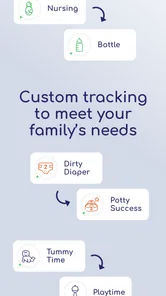
Talli Baby is a family-tracking app designed to help parents and caregivers record important details about an infant’s daily routine. Depending on the version and connected features available, it may help monitor feeding, pumping, diaper changes, sleep, medication, growth-related notes, and other care information. It is especially useful when several caregivers share responsibilities and need access to the same up-to-date records.
How does Talli Baby help parents track feeding and other routines?
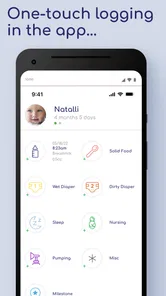
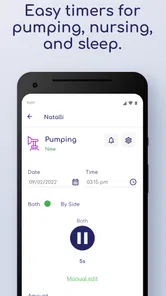
After setting up a baby profile, caregivers can enter routine events such as breastfeeds, bottles, pumping sessions, diaper changes, naps, and other notes. The app organizes this information into a timeline or history, making it easier to review patterns throughout the day. Recording events immediately is generally more reliable than trying to reconstruct the schedule later, particularly during busy or tiring periods.
Can more than one caregiver use the same Talli Baby information?
Talli Baby is intended to support shared caregiving, so parents and other authorized caregivers may be able to access the same baby profile, depending on the app’s current account and sharing options. This can reduce duplicated entries and improve communication between household members. Before relying on shared tracking, check the available permissions, synchronization behavior, and whether every caregiver must create an individual account.
Pros
- Tracks feeding
- sleep
- diapers
- and growth in one place.
- Useful reminders help parents maintain consistent routines.
- Simple logging makes sharing care details with family easier.
- Clear history can help identify changes in a baby's habits.
- Helpful for coordinating care between parents and caregivers.
Cons
- Frequent manual entries may feel tedious during busy days.
- Some features may require a premium subscription.
- Data accuracy depends on caregivers logging events consistently.
- Too much tracking can increase anxiety for new parents.
- Battery use may rise if notifications and syncing stay enabled.











