Tacoma News Tribune: WA Latest
- 185.00
- 3.0
- Installs
- 10.00K
- Price
- Free

Screenshots
Analysis by Reviewed
If you want news focused on Washington State rather than a broad national feed, Tacoma News Tribune: WA Latest is designed around that narrower need. I approached it as a first-time reader looking for a quick way to follow local politics, business, weather, and sports, and its main appeal became clear quickly: it keeps the subject area close to home. It is a free news and magazine app from McClatchy, with optional in-app purchases ranging from $7.99 to $159.99 per item.
The experience is best understood as a digital doorway into Tacoma-area and Washington State reporting, not as a complete replacement for every news source on your phone. I found that distinction important. If your priority is local awareness, the app has a useful purpose. If you want a huge range of international coverage, deep customization, or a completely subscription-free reading routine, you may prefer a general news reader or several individual sources.
Getting from installation to useful local news
I found that the first useful test is whether the app helps me answer a local question, not just whether it can show me headlines. I’d begin with one topic that could affect my day, then use the sections around it to see how Tacoma-area reporting fits together. That approach also makes it easier to decide which stories deserve a closer read.
What to expect when you open it
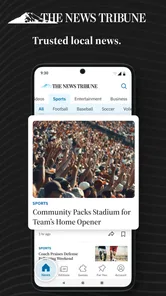
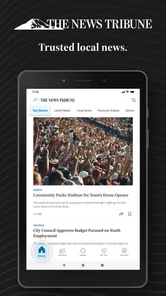
The first thing to keep in mind is the app’s focus. Its store summary points to breaking Washington State local news, with politics, business, weather, and sports at the center. That means the value is not in endless topic variety; it is in reducing the distance between you and regional stories that can get buried inside national news apps.
I would recommend it to someone who lives in the Tacoma area, works there, has family in Washington, or simply wants a stronger local perspective. A person who checks city and state developments before starting the day can get more from this focused approach than from a broad headline aggregator that mixes local items with celebrity, technology, and international stories.
The app is listed under News & Magazines and is suitable for Everyone 10+. It has been available since May 12, 2011, which gives it a long presence compared with many newer mobile news products. The current version is 11.1.16, and it runs on Android 8.0 or later. Those details matter if you are using an older phone: the operating system requirement is worth checking before you spend time looking for it.
Its audience size also gives a useful sense of scale. The app has passed 10K installs, while its average rating sits at 3.0 from 352 ratings and 185 written reviews. I would not treat that score as a final verdict, but I would treat it as a reason to keep expectations practical. This is a focused local-news tool, and your satisfaction will depend heavily on whether its coverage matches the part of Washington you actually follow and how comfortable you are with its reading and purchase flow.
More From Our News Desk

Weather by Xiaomi Review: Clear at a Glance, Less Clear Up Close

X Under Pressure: Can It Recover When Posting Goes Wrong?

Clash of Clans Is Won Between the Battles

Android Auto Makes the Case for Quieter Car Software

MobiOffice: Transforming Mobile Productivity with Seamless Integration

EA SPORTS FC™ Mobile Soccer: Redefining Mobile Sports Gaming
Setting it up without overthinking the process
For a first installation, I suggest beginning with a simple goal rather than trying to explore everything at once. Decide whether you want a morning scan, quick updates during the workday, or a way to check a particular area such as weather or sports. That choice gives you a clear test: can you reach the information you care about without wandering through unrelated sections?
After installing, take a few minutes to look at the main navigation and identify where the major coverage areas sit. I would start with the section most relevant to your daily routine, then return to the main screen and see how easily you can move to a second area. For example, someone commuting around Tacoma might begin with local news and weather, while a sports follower may first check team coverage and then use the wider local feed for context.
Because this is a McClatchy app rather than a generic headline reader, it makes sense to judge it by the usefulness of its regional reporting, not by whether it offers the same breadth as a national portal. The most helpful setup habit is to avoid treating every headline as equally important. Use the app as a local starting point, then open a story only when the subject affects your plans, work, household, or community.
The free download makes that initial trial straightforward. At the same time, the presence of in-app purchases means I would pay attention to any screen that moves from browsing toward paid access. The listed purchase range is wide, from $7.99 to $159.99 per item, so I would not tap through a purchase prompt casually. Read the wording on the screen, check what access it offers, and make sure the purchase matches how often you expect to use the app.
Your first meaningful success: finding a useful local story
A good first test is not simply opening the app and seeing headlines. It is finding one story that changes what you know or helps you make a decision. Try searching the local coverage for an issue connected to your day, then compare the usefulness of that result with the broad news feed you normally use. If the local framing gives you details that a national app would likely overlook, you have found the app’s strongest reason to stay installed.
For a realistic morning routine, imagine that you are preparing to travel across the Tacoma area. I would open the app, check the local news and weather coverage, scan the business or public-affairs headlines for anything likely to affect the day, and then look at sports only if it is relevant to my plans. That sequence is more useful than scrolling randomly because it treats the app as a short briefing rather than a feed that demands constant attention.
Another practical workflow is to use the app when a Washington story begins appearing in national coverage. A national report may tell you that an issue exists, while a local publication can help you understand how it connects to the communities involved. In that situation, I would use the broader source for national context and this app for regional detail. The two approaches complement each other better than either one alone.
Weather is another sensible first check, especially if you want local relevance instead of a generic forecast for a large surrounding area. I would still use a dedicated weather app when I need minute-by-minute conditions or specialized forecasting tools. The advantage here is convenience: local weather coverage sits alongside the news categories, so you can connect conditions with the events and activities being reported in the same region.
For sports readers, the app can serve as a local-news companion rather than only a score screen. I would use a dedicated sports service for live statistics, schedules, and detailed game tracking, but return here for the broader regional angle. That trade-off is important. The app’s strength is the relationship between local subjects, not necessarily the depth of a specialized sports product.
Where first-time readers may become confused
The most likely confusion is the difference between a free installation and completely free access to every part of the reading experience. The app costs nothing to download, but its in-app purchase range indicates that some access or content may involve payment. I would approach the free version as an opportunity to evaluate the app’s usefulness before deciding whether any paid option makes sense for me.
A second point of confusion is the rating. A 3.0 average can look discouraging, but ratings usually combine different expectations. Some readers may want a polished national aggregator, others may be reacting to access or account friction, and some may judge the app against a newspaper website. I would use the rating as a prompt to test the exact things that matter to me: opening stories, moving between local topics, and understanding any access prompts.
It is also easy to expect every Washington community to receive the same level of attention. A regional title can be valuable while still being more useful for certain places and subjects than others. If your interest is specifically Tacoma and nearby local developments, the focus should feel more relevant. If you live far from that area and want detailed reporting on a different Washington community, check the first few sections carefully before making it your primary source.
Another common mistake is judging the app after only a few seconds of headline scrolling. Local news is most useful when you build a repeatable habit. I would give it several short sessions at different times of day, because the value of a news app is not only its first screen; it is whether it becomes a dependable route to the subjects you care about.
Finally, do not confuse a local-news app with an emergency alert service. I would never rely on it as my only source for urgent safety information, official instructions, or rapidly changing conditions. For those situations, official local agencies and dedicated emergency channels are the safer choice. This app can add reporting and context, but it should not replace authoritative notices.
How it compares with the usual alternatives
Compared with a national news aggregator, Tacoma News Tribune: WA Latest offers a more deliberate local angle. A broad aggregator is better when I want one screen covering world events, technology, entertainment, and many regions. This app is better when I want Washington-related reporting to remain visible instead of being pushed down by larger national stories.
Compared with reading a newspaper website in a mobile browser, a dedicated app can feel more direct because I do not have to begin by opening a browser tab and locating the publication. The trade-off is that an app adds another installed destination to maintain, and its own access flow may not feel as flexible as browsing several sites manually. If you already have a browser routine that works well, the app needs to save you enough time to justify staying on your phone.
Compared with social media, the app is a calmer starting point for local awareness. Social feeds can surface events quickly, but they also mix reporting with reaction, repetition, and unrelated posts. I would use social platforms to discover what people are discussing, then use a local news source to understand the underlying story. That separation helps me avoid mistaking online attention for reliable context.
Compared with a dedicated weather or sports app, this product is broader but less specialized. It can place those topics beside politics, business, and general local coverage, which is useful for a compact daily check. It is not the option I would choose when I need advanced weather tools, live score detail, or a deep archive of one sport.
Small habits that make the app more useful
My first tip is to build a two-pass reading routine. On the first pass, scan only the headlines that could affect your immediate day. On the second, choose one story that deserves context. This prevents local coverage from becoming another endless scroll and makes the app useful even when you have only a few minutes.
My second tip is to compare local and national framing instead of choosing one source permanently. When a story matters beyond Washington, read the regional report first for local consequences and then check a broader source for the national picture. This is a more efficient workflow than expecting one app to provide every angle.
My third tip is to treat purchase prompts as a decision point, not an interruption to dismiss automatically. If you read local coverage several times a week, paid access might be reasonable for your needs; if you only open the app during occasional events, the cost may not fit your routine. Since individual purchases can range from $7.99 to $159.99, I would make that choice based on actual reading frequency rather than curiosity.
My fourth tip is to use the app as a conversation and planning tool. Before discussing a Washington issue with coworkers or family, I would check the local coverage so I understand the regional details rather than relying on a headline seen elsewhere. For someone new to Tacoma, this can also help identify which local subjects deserve closer attention, even if the app is not their only source.
My fifth tip is to test it on the device you actually use every day. The minimum requirement of Android 8.0 or later is easy to overlook, and a news app is only helpful if it opens comfortably on your regular phone. If your device is older or storage is limited, confirm compatibility before building a routine around it.
Who should use it, and who should skip it
I think the app is a sensible choice for readers who want Washington State coverage gathered in one focused place, especially when Tacoma-area news is more important than a broad stream of national headlines. It can also suit former residents, relatives of people in the region, and anyone who wants local politics, business, weather, and sports in the same general reading destination.
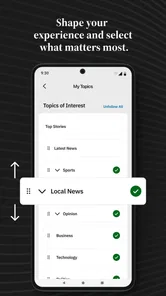
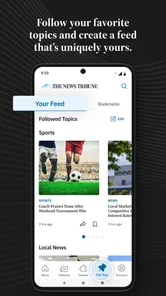
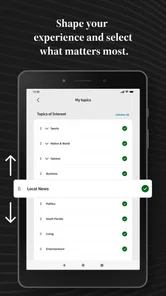
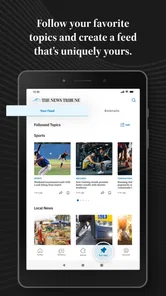
I would be more cautious if you want a completely free experience with no possibility of paid access, because the in-app purchase range deserves attention. I would also look elsewhere if your main requirement is a worldwide news digest, highly personalized topic controls, detailed live sports data, or advanced weather forecasting. A general aggregator, dedicated weather tool, or sports service may serve those needs better.
Readers who dislike trying new apps with mixed user feedback should begin with a short trial rather than committing immediately. The 3.0 average suggests that the experience is not universally loved, so I would judge it through my own routine: Can I find relevant local coverage quickly? Do the articles provide enough value for my needs? Are the access options clear before I make any purchase?
My next-step recommendation
After installation, I would spend the first session checking local news, weather, business, and sports in that order, then save the app’s place in my daily routine only if one of those sections consistently helps me. The goal is not to consume every headline. The goal is to find a reliable local briefing that earns a few minutes of attention.
For me, the strongest case for Tacoma News Tribune: WA Latest is its regional focus. It gives a Washington reader a more relevant starting point than a giant national feed, while still covering several parts of everyday local interest. Its limitations are equally clear: the average rating is modest, paid access may affect the experience, and specialized apps can be stronger for weather or sports details.
My honest recommendation is to try the free installation with a specific test in mind: find one local story, check whether the surrounding coverage is useful, and inspect any payment screen carefully. If that process fits your needs, this can become a practical local-news companion. If you want a universal news dashboard or a specialist tool, keep it as a secondary source or choose an alternative built for that narrower purpose.
For a first-time user, the reassuring part is that there is no need to master the whole app immediately. Start with one meaningful local question, follow the relevant section, and decide from the quality of that experience. That simple path will tell you more than a quick glance at a rating or a long scroll through headlines.
Tacoma News Tribune: WA Latest Frequently Asked Questions
Will Tacoma News Tribune: WA Latest work on my phone or tablet?
The app is available for Android devices running version 8.0 or later. Before downloading, check your device’s operating system version and make sure you have enough space for the installation and app updates. Tacoma News Tribune: WA Latest is a news app, so a reliable internet connection will help you load current stories and other updated content.
Who publishes Tacoma News Tribune: WA Latest, and what is it designed to cover?
McClatchy publishes Tacoma News Tribune: WA Latest as a news app for readers interested in Tacoma and Washington State. Its coverage is designed around local and regional updates, including politics, business, weather, and sports. The app can be useful if you want to keep those subjects together in one place and check for developing stories from your phone.
What is Tacoma News Tribune: WA Latest?
Tacoma News Tribune: WA Latest is a news-focused app designed to help readers follow current events in Tacoma, Pierce County, and across Washington State. It typically brings together local reporting, breaking news, politics, business, sports, entertainment, weather, and community stories in one mobile-friendly place, making it convenient to check regional headlines without visiting several websites.
What kind of news and content can I read in the app?
The app is mainly intended for readers who want Washington and Tacoma-area coverage. Depending on the available edition and current updates, you may find local breaking news, investigative reports, crime and public safety stories, traffic information, sports coverage, opinion pieces, lifestyle articles, and regional developments. Content availability can change throughout the day as new reports are published.
Is Tacoma News Tribune: WA Latest free to download and use?
The app is free to download, but in-app purchases range from $7.99 to $159.99 per item. Access to every article or feature can depend on the publisher’s subscription and paywall policies. Some headlines and stories may be available without payment, while frequent readers could be asked to subscribe for unlimited access. Check the in-app subscription details for current pricing, trial terms, and renewal conditions.
Pros
- Provides quick access to local Tacoma and Pierce County headlines.
- Covers regional politics
- crime
- education
- sports
- and community updates.
- Useful for readers who want Washington-focused news in one place.
- Article layouts are generally easy to scan on a mobile screen.
- Helps users follow developing local stories throughout the day.
Cons
- Some articles or features may require a subscription to access fully.
- Coverage is focused on one region and may feel limited for broader news.
- Advertising can interrupt browsing and reduce reading comfort.
- Breaking-news notifications may become frequent for some users.
- App performance and content availability can vary with internet quality.













