Sunrun
- 636.00
- 3.6
- Installs
- 100.00K
- Price
- Free

Screenshots
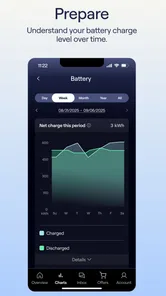
Analysis by Reviewed
I think the best way to judge Sunrun is to ask what you need from a solar-company app once the panels are already part of your home. It is less an all-purpose energy dashboard than a practical place for Sunrun customers to keep an eye on their system, handle bills, and reach support. That focused role is useful, but it also shapes who will get the most from it: if you do not have a Sunrun account, there is little reason to install it.
A useful routine starts with a quick check
For an existing customer, I would make the first visit a simple orientation rather than trying to inspect every screen. Find the system information, locate the billing area, and check where support is reached. Knowing those paths before you need them makes the app more useful later, especially when you have a specific question or need to take care of a payment.
A realistic routine might be to check the system after a week of unusually cloudy weather, then look at the bill when it arrives and contact support if something needs explaining. The value is not in staring at the app every day; it is in having the account and service tools together when a change prompts a question. I would avoid treating a single glance as proof that anything is wrong or right. A homeowner’s energy use and the system’s output are different parts of the picture, so use the app as a starting point for understanding your account, not as a substitute for context.
Make the important paths easy to find
Because billing and support are central reasons to use this app, I recommend checking those sections while everything is calm. If a payment is due, you do not want your first attempt to be spent figuring out where the relevant option sits. Likewise, it helps to know how to get assistance before a system question becomes urgent. These are small habits, but they turn an app you might forget about into a dependable account tool.
I would also keep a repeatable check-in rather than opening it whenever you happen to remember. For example, tie a quick account review to the day you normally manage household bills. That gives you a natural moment to notice an outstanding task without turning solar monitoring into another daily chore. If you are comparing what you see over time, make notes about the circumstances that matter to you, such as a stretch of poor weather or a change in household routine. That approach is more informative than reacting to an isolated screen.
Where it fits among home-energy tools
Compared with a general utility app, Sunrun is the more relevant place for a Sunrun customer’s system and account needs; a utility app is usually the better place to handle services managed by the utility itself. A separate solar-monitoring tool may suit people who want a broader view across equipment or providers, but that is a different job from keeping up with one Sunrun account. I would not install this expecting it to replace every energy tool in the home.
The trade-off is focus. Having system, payment, and support tasks in one customer-facing app can save you from hunting through emails or separate account pages. On the other hand, anyone who wants a detailed household energy analysis should check whether the tools they already use answer those questions better. Sunrun makes the most sense when the task is specifically about your Sunrun service, rather than when you want a universal dashboard for every meter, bill, and device.
More From Our News Desk

 Gmail
Gmail in a Busy Inbox: Who Benefits Most?
From first account to crowded workday, Gmail earns its place through dependable search and flexible sorting—but its best fit depends on how much inbox maintenance you can tolerate.

 Prime Video
Switching to Prime Video: What Changes in Your Viewing Routine
Prime Video can make a compelling second home for streaming, but switching means learning a different catalog, rental layer, and route from browsing to playback.

 Universal TV Remote Control
 Works Best as a Reliable Backup
A phone remote earns its place through quick setup and reliable habits. Here is how to get more from Universal TV Remote Control—and where its limits show.

 Weather - By Xiaomi
Weather by Xiaomi Review: Clear at a Glance, Less Clear Up Close
Xiaomi’s weather app makes everyday forecasts quick to scan, but its calm surface can leave useful details and recovery paths harder to find than they should be.

 X
X Under Pressure: Can It Recover When Posting Goes Wrong?
A resilience-focused review of X, examining setup, mistaken posts, interruptions, weak connections, and the gaps that matter when recovery needs to be dependable.

 Clash of Clans
 Is Won Between the Battles
Its raids are quick; its community is a long-term project of coordination, teaching, rivalry, and shared responsibility—with all the friction that entails.
Latest News



That distinction also helps set expectations about who should skip it. If you are only researching solar, do not have a Sunrun system or account, or want to compare several providers from one screen, this is unlikely to be your main tool. For a current customer who wants a straightforward way to manage the relationship, it has a clearer purpose. The app is free, rated for Everyone, and developed by Sunrun, Inc; its place in the House & Home category reflects that home-service role. It has a 3.8 average from around 1,000 ratings and more than 100,000 installs, so I would weigh that broad reception alongside your own needs rather than treating a score as a guarantee of how it will work for you.
One practical question is whether you need to open it constantly. In my view, no: use it when you have a reason to review the system, pay a bill, or seek help, and let a regular household routine remind you to check in. Another is whether it replaces contacting the company; it is better understood as a convenient route to support, not a promise that every issue can be solved inside the app. If you are deciding between this and a utility app, choose based on whose service you need to manage. Many homes may reasonably keep both because they serve different account relationships.
Useful habits for a less confusing check-in
I find it helps to approach a system check with one clear question instead of browsing without a purpose. For example, if the weather has changed, first ask whether you are looking for a broad status update or trying to understand a bill. Those are related but not interchangeable concerns. Keeping them separate prevents a normal change in production from becoming an assumption about what you owe, or a billing question from turning into an unnecessary technical worry.
A simple note on your phone or household calendar can make repeat visits more useful: record why you opened the app and what you intended to check. You do not need to build a complicated spreadsheet. The point is to remember the context, such as a change in your schedule or a period of poor weather, so that a later comparison is not based on memory alone. This is especially helpful if more than one person in the home handles bills or keeps an eye on the system.
Settings and account details worth reviewing
I would take a moment during setup to make sure you are signed into the account connected to your Sunrun service and that the basic account details are current. That is a practical step, not a hidden feature: account tools are only useful when you can reliably get to the right customer information. If someone else in the household manages payments, agree on who checks the account and who contacts support, rather than assuming both people are looking at the same information.
Also consider the phone settings you already control, such as whether the app is easy to find and whether you want its alerts enabled if they are offered on your device. I would not turn on every notification automatically. Keep only the prompts that help you act, and use a calendar reminder for a regular review if you prefer a predictable routine. This avoids letting a service app become a source of noise while making it less likely that a bill or question slips your mind.
When the app is not the whole answer
For a concern that affects your home’s power or seems urgent, I would not rely on an app screen alone to diagnose the cause. The app is a useful account and support channel, but a digital status view cannot replace the right professional assessment when the issue is physical, safety-related, or outside the information you can see. Use the support route for Sunrun-related questions, and use the appropriate local service or qualified professional when the situation calls for it.
There is a similar limit when you want to understand the full economics of solar. A customer account view can help you stay connected to your system and billing, but a complete household picture may involve utility statements, your own energy habits, and other equipment. I would compare those sources carefully rather than expecting a single company app to explain every charge or every change in consumption. That is not a flaw unique to Sunrun; it is simply the boundary between managing one service and analyzing an entire home.
Hey there, app enthusiasts! Today, I’m diving into the world of energy with the Sunrun app. If you’re like me, constantly searching for ways to make your life a tad more efficient and eco-friendly, then buckle up because this app is all about harnessing the power of the sun. Let’s get into the nitty-gritty of why this app should be on your radar.
Getting Started with Sunrun
First things first, downloading the Sunrun app is a breeze. Available on both Android and iOS, it’s just a couple of taps away from being part of your daily routine. Once installed, the app greets you with a sleek, user-friendly interface that even my grandma could navigate. Seriously, it’s that intuitive! Whether you’re a tech wizard or someone who just learned how to turn on a smartphone, you’ll find it easy to maneuver through the app’s features.
Features that Shine
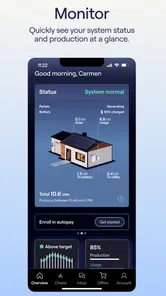
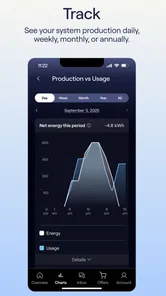
The app’s main attraction is its ability to provide real-time data on your solar energy production. You can monitor how much energy your panels are generating and even track your usage patterns. This feature is particularly handy if you’re aiming to optimize your energy consumption. I found myself checking the app more often than my social media—yes, it’s that addictive!
Another standout feature is the energy bill forecasting tool. It takes into account your current energy consumption and predicts what your upcoming bill might look like. It’s like having a financial advisor right in your pocket. This insight can be a game-changer for budgeting and planning purposes.
User Experience: A Sunny Delight
Let’s talk about the overall user experience, which I must say, is top-notch. The app runs smoothly without any hiccups, and the loading times are impressively quick. Navigating through the various sections is seamless, making the entire experience quite pleasant. It’s obvious the developers put a lot of thought into ensuring the app is not only functional but also enjoyable to use.
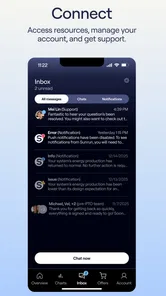
And kudos to the support team! If you ever run into a snag, the customer support is just a tap away. They’re responsive and genuinely eager to help, which is always a plus in my book.
Why You Should Consider Sunrun
So, why should you consider adding the Sunrun app to your collection? Well, if you’re someone who values efficiency and wants to make a positive impact on the environment, this app is a no-brainer. It not only helps you stay on top of your energy consumption but also aids in reducing your carbon footprint. Plus, who doesn’t love saving a few bucks on their energy bill?
In conclusion, the Sunrun app is a fantastic tool for anyone looking to embrace solar energy and take control of their energy usage. Its user-friendly design, coupled with its robust features, makes it a must-have for eco-conscious individuals. So, why not give it a whirl and see how much you can save while doing your part for the planet?
A grounded way to use the numbers
If you use production and usage information to change household habits, treat what you see as a prompt for small experiments rather than a verdict. You might shift a flexible task to a time when you expect solar generation to be stronger, then observe whether that fits your routine. Avoid making a major purchase or changing a long-standing habit based on one reading. Patterns across several ordinary days are more useful than a snapshot, and comfort and convenience still matter alongside energy goals.
The bill forecast can be helpful for planning, but I would treat it as an estimate to prepare around, not as the final amount. When the actual bill arrives, compare it with the forecast and look for the difference in the context of your usage and utility charges. This simple habit makes the feature more practical: it can help you anticipate, while the final statement remains the document to use when paying or resolving a discrepancy.
Who will get the most value
The clearest fit is a Sunrun customer who wants a compact place to check system information, keep up with account tasks, and find a support path without digging through old messages. It is also useful for a household member who is not the primary solar enthusiast but needs to help manage the bill or know where to start when a question comes up. You do not need to turn it into a hobby; a few purposeful visits can be enough to make it worthwhile.
I would skip it if you are looking for a general guide to choosing solar, a complete comparison of providers, or a single control center for equipment from different companies. It is also not the best choice for someone whose main goal is detailed energy auditing across the whole property. In those cases, a utility account, a broader monitoring solution, or a specialist consultation may answer the real question more directly. The right tool depends on whether you are managing Sunrun service or analyzing the whole home.
Version and practical expectations
The current version is 2.17.0, and the app was released on May 16, 2023; it supports devices running Android 7.0 or later. I would check compatibility before installing on an older phone, and keep the app updated through the normal app-store process so you are using the current release. Its customer focus also means your experience depends in part on having a Sunrun account and service to manage, rather than merely downloading it and expecting a general solar dashboard.
Overall, I see Sunrun as a focused companion for handling the ongoing parts of a solar relationship: checking in, managing a bill, and knowing where support begins. Its strongest use is not constant monitoring but a repeatable, low-effort routine tied to real household needs. If that describes your situation, it is worth trying as a free account tool; if you want a comprehensive energy-control center, keep looking for a solution built for that broader job.
Sunrun Frequently Asked Questions
What can I do in the Sunrun app?
Sunrun is a free House & Home app for Sunrun customers. It lets you monitor your solar system, pay bills, and get support in one place. If you already use Sunrun’s services, the app provides a convenient way to keep track of your system and handle basic account tasks from your mobile device.
Who can use Sunrun, and what should I check before downloading it?
The app is designed for Sunrun customers, rather than as a general solar-monitoring tool for every household. Before downloading, consider whether you already have a Sunrun account and service, since the main features focus on monitoring systems, paying bills, and getting support. Sunrun is rated for Everyone, and the app is free to download.
What is Sunrun and how does it work?
Sunrun is a home solar panel and battery storage company that provides homeowners with a clean, affordable, and sustainable energy solution. By installing solar panels on your roof, Sunrun allows you to generate your own electricity, reducing reliance on traditional power sources. The app helps users monitor their energy production and consumption, providing insights into cost savings and environmental impact.
Is Sunrun available in my area?
Sunrun's services are available in multiple states across the United States, but availability can vary based on location. To find out if Sunrun is available in your area, you can visit their website or use the app to enter your zip code. This will provide you with information about service availability and local solar incentives.
What are the costs associated with Sunrun's solar services?
The costs for Sunrun's solar services depend on several factors, including your location, the size of your home, and your energy needs. Sunrun offers various payment options, such as leasing, purchasing, or financing the solar panels, which can impact the overall cost. The app provides a personalized cost estimate based on your specific requirements and potential savings.
Pros
- User-friendly interface
- Real-time solar monitoring
- Customizable alerts
- Easy installation process
- Responsive customer support
Cons
- High initial cost
- Requires stable internet
- Limited offline functionality
- Potential privacy concerns
- Solar panel maintenance needed