

SunPass
- 7.04K
- 3.5
- Installs
- 1.00M
- Price
- Free

Screenshots
Analysis by Reviewed
I judge a toll account app by what happens when I need it in a hurry, not by how many screens it offers. SunPass is most useful when Florida toll roads are part of your regular driving and you want account details close at hand. Before relying on it for a trip, I would check that I can sign in and see the account information I need; a little preparation at home is less stressful than trying to sort out an account from the roadside.
Where the first snags tend to appear
The main point of friction is that an app can only help once its account details are in order. If you cannot sign in, do not assume the toll account itself is the problem: first check the information you entered, your connection, and whether the app needs another try after a brief wait. I would avoid repeatedly changing account details while travelling, because it becomes harder to tell which change solved the issue.
It also helps to separate account management from navigation. SunPass is for managing a prepaid toll account; it is not a substitute for planning a route or checking road conditions. I would decide the route with a navigation tool, then use the toll app to check the account side of the journey. That distinction matters if you are visiting Florida and expect one app to handle every travel question.
Before you count on it during a trip
For a visitor, the useful question is not simply whether the app installs, but whether the account is ready for the way you intend to drive. I would set aside a few quiet minutes before travelling to sign in, inspect the account, and make sure I understand where to find the balance and account history. That small rehearsal helps distinguish a genuine account issue from the ordinary confusion of using an unfamiliar service in a hurry.
There is also a trade-off between keeping the app available for a one-off journey and keeping a prepaid toll account active as part of regular travel. If Florida toll roads are only a small part of your trip, the app may be less important than route planning and understanding your travel options. If you expect to use those roads repeatedly, the ability to check the account yourself becomes more valuable. I would make that decision before setting out rather than downloading the app at the first sign of a toll-related question.
Making the account useful for more than one driver
People who share a vehicle or alternate driving should be especially careful to check the vehicle details and account information before a journey. A quick glance at the account can help the person behind the wheel avoid relying on someone else’s memory about whether a change was made. I would agree in advance on who is responsible for checking the account, since several people making adjustments without coordinating can create avoidable uncertainty.
This is one reason I see the app as a practical companion to a routine, rather than a solution to every toll concern. It can put account information within reach, but the driver still needs to know which vehicle and account they are checking. When travel plans change at the last minute, a calm verification is more useful than assuming an update has taken effect just because someone entered it.
More From Our News Desk

 Weather - By Xiaomi
Weather by Xiaomi Review: Clear at a Glance, Less Clear Up Close
Xiaomi’s weather app makes everyday forecasts quick to scan, but its calm surface can leave useful details and recovery paths harder to find than they should be.

 X
XX Under Pressure: Can It Recover When Posting Goes Wrong?
A resilience-focused review of X, examining setup, mistaken posts, interruptions, weak connections, and the gaps that matter when recovery needs to be dependable.

 Clash of Clans
Clash of Clans Is Won Between the Battles
Its raids are quick; its community is a long-term project of coordination, teaching, rivalry, and shared responsibility—with all the friction that entails.

 Android Auto
Android Auto Makes the Case for Quieter Car Software
The car interface is no longer judged by how much it can do, but by how quietly it helps. Android Auto shows what drivers now expect—and what still gets in the way.

 MobiOffice: Word, Sheets, PDF
MobiOffice: Transforming Mobile Productivity with Seamless Integration
MobiOffice: Word, Sheets, PDF is redefining mobile productivity with a surprising blend of functionality and innovation.

 EA SPORTS FC Soccer Mobile 26
EA SPORTS FC™ Mobile Soccer: Redefining Mobile Sports Gaming
Dive into EA SPORTS FC™ Mobile Soccer, where immersive gameplay and strategic depth transform mobile sports gaming.
Latest News



The All-in-One Toll Solution
The SunPass app is essentially your mobile toll booth. It's designed to make traveling through Florida's toll roads smoother than ever. With this app, you can easily manage your toll accounts, view your account balance, and even add funds without breaking a sweat. It's like having a personal assistant for your toll payments!
User-Friendly Experience
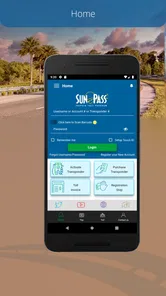
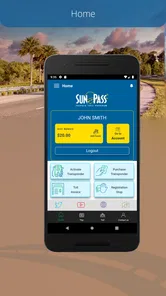
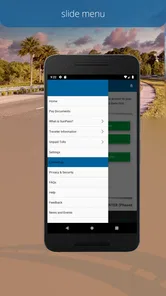
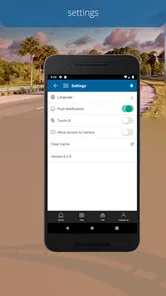
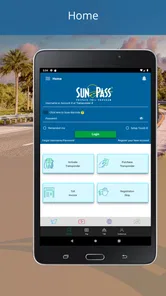
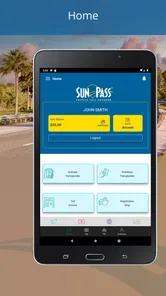
One of the first things you'll notice about the app is its user-friendly interface. Everything is laid out in a way that even the least tech-savvy among us can navigate without any trouble. Whether you're checking your balance, reviewing past transactions, or adjusting your account settings, the process is straightforward and intuitive.
Setup checks that save a roadside scramble
Before relying on the app, I would confirm that I can access my account and that the vehicle information shown is current. Those checks are practical because toll-account questions often concern the account or vehicle details rather than the phone itself. If you have just changed a detail, give yourself time to verify it before setting off instead of making the change in the middle of a drive.
SunPass is a free travel app from SunPass/Florida's Turnpike Enterprise. It has a 4.0 average from around 13,000 ratings, and more than a million installs. The current version is 6.5.8, and it is rated for everyone. Those figures suggest a widely used option, though they cannot tell you whether it fits your own travel pattern. I would treat the app as a convenient account-management channel, not as a guarantee that every toll or account question will resolve instantly.
Choosing a sensible setup routine
I would keep setup simple: sign in when you have a stable connection, look over the account details, and make only the changes you actually need. If you are adding funds, take a moment afterward to confirm the account reflects the result before closing the app. This is a useful habit because it gives you a clear stopping point; you are less likely to wonder later whether you completed the action or merely began it.
For someone who drives in Florida often, a brief check before a longer trip can become part of the same routine as checking the route. For someone visiting once, it is reasonable to do the account work well before the day’s drive and then avoid unnecessary tinkering. The app is most reassuring when you use it deliberately, not when you keep reopening it to chase certainty during a busy journey.
Real-Time Alerts and Updates
Another fantastic feature of the SunPass app is its real-time updates. Say goodbye to unexpected toll fees. The app sends you instant notifications about low balances and other important account updates. This is especially handy when you're on a road trip and want to ensure you have enough funds to cover your journey.
Recovering a stalled workflow
If a screen does not load or an account action seems incomplete, I would pause before trying the same thing repeatedly. Check the connection, reopen the app, and then look at the account balance or transaction history to see whether the change went through. If the display still looks wrong, avoid assuming a second payment or account action is needed until you have checked the account again. This simple sequence can prevent confusion when a slow connection makes the result unclear.
For an everyday example, imagine commuting on Florida toll roads and noticing that the balance may be low before leaving home. Checking it in advance gives you a chance to deal with the account before the drive, rather than trying to troubleshoot while traffic is moving. On an occasional visit, I would make the same check before the first toll road and keep a separate navigation app ready; the two tools solve different problems.
A realistic trip-day workflow
Suppose I am leaving home for a drive that includes Florida toll roads. I would check the route in my navigation app first, then open SunPass while parked and review the balance and vehicle information. If an account action is needed, I would complete it before leaving and check the account again rather than treating a tap as proof that everything is settled. Once I am driving, I would leave account troubleshooting until I am safely stopped.
That order is not complicated, but it avoids mixing three separate tasks: choosing a route, managing the toll account, and driving safely. It also gives me a better chance of spotting a mismatch while I still have time to address it. For a passenger helping with travel, the same workflow can be useful, provided the driver is not trying to read or operate the phone in traffic.
Seamless Payment Options
The app offers multiple payment options, making it super convenient to manage your toll expenses. You can link your credit card, debit card, or even set up an auto-replenish feature that automatically adds funds to your account when it gets low. This way, you never have to worry about running out of funds mid-journey.
When the app may not be the cause
A balance that looks unexpected, a transaction that has not appeared yet, or an account screen that will not refresh can involve more than the app interface. I would check the connection and review the account again later before concluding that a payment failed. If the issue concerns a charge or account status that remains unclear, use the appropriate SunPass account support route rather than making repeated changes in the app.
Auto-replenishment can reduce the need to remember top-ups, but it also means you should be comfortable with the payment arrangement connected to the account. If you prefer to review each addition yourself, checking the balance and adding funds manually may suit you better. For infrequent visitors, this choice is worth thinking through before enabling an automatic option; convenience is useful only when it matches how you want to manage spending.
Knowing when another tool is better
SunPass is not the tool I would open to compare routes, estimate the best time to leave, or look for general visitor information. A navigation app is the better choice for those jobs, while the SunPass app focuses on the prepaid toll account. Treating those tools as partners rather than substitutes makes the setup clearer: plan the drive elsewhere, then use this app for the account details it handles.
It may also be a poor fit if you do not use Florida toll roads, do not want to maintain a prepaid account, or prefer to manage your account through another available channel. A dedicated app earns its place when it saves effort on a recurring task; for a rare journey, another approach may feel simpler. I would not install it expecting broad travel features just because it appears in a travel category.
Account Management at Your Fingertips
With the SunPass app, you have complete control over your toll account right from your smartphone. Need to update your vehicle information? No problem. Want to check the history of your travels? It's all there, just a few taps away. The app gives you the power to manage your account whenever and wherever you need.
Compared with relying on a paper note, a browser session, or memory, having the balance and account history in one place is handy for regular Florida drivers. But it is not the right choice if you rarely use Florida toll roads, want a route planner, or would rather manage everything through another channel. The app’s value is strongest when you have an ongoing prepaid toll account and expect to check or maintain it more than once.
How it compares with familiar alternatives
For everyday account checks, an app is more convenient than trying to remember a balance or searching through saved notes. A browser-based account session can also serve someone who prefers a larger screen, while keeping a separate navigation app is essential for route guidance. These are different ways to handle different parts of a trip, not interchangeable features. I would choose the phone app when I need a quick account check away from a computer, and use another channel when I want a more comfortable setting for detailed account work.
The practical advantage is not that a phone replaces every other travel tool; it is that account information is close by when a toll-related decision comes up. The trade-off is dependence on being able to sign in and get a clear view of the account. If access is unreliable, or you find managing payment details on a phone uncomfortable, a different account-management channel may suit you better.
Who gets the most from it
I would recommend it most to Florida residents and frequent visitors who already use SunPass and want to check their account away from a computer. Occasional travellers can still find it useful, especially before a planned drive, but should not mistake it for a general travel companion. A key practical tip is to check both the balance and vehicle details before a longer journey: doing both at once is more useful than opening the app only after a toll-related concern arises.
It is also a reasonable choice for someone who shares driving responsibilities and wants a straightforward way to inspect account information before a trip, as long as the people involved coordinate changes. I would skip it if my travel rarely involved Florida toll roads or if I only wanted navigation, traffic updates, or destination ideas. In those cases, the app would add another account to manage without solving the main travel problem.
What I would check before deciding
Before depending on it, I would ask myself three practical questions: can I sign in reliably, do I understand how I want to add funds, and will I use Florida toll roads often enough for a dedicated account app to be worthwhile? If the answers are clear, the app can make routine checks easier. If not, I would resolve the account questions before travel or choose a different way to manage the account rather than hoping a last-minute download will remove uncertainty.
My overall view is that SunPass is a focused utility, and that focus is both its strength and its limit. It can make prepaid toll-account tasks more convenient, but it should not be mistaken for a navigation service or a cure for account confusion. Used in advance and with sensible checks, it earns a place on the phone of a regular Florida toll-road driver.
In conclusion, the SunPass app is a must-have for anyone traveling through Florida's toll roads. It's convenient, easy to use, and packed with features that make managing your tolls a breeze. So, if you're tired of fumbling for change at toll booths or worrying about unexpected toll fees, give the SunPass app a try. It just might change the way you travel for the better!
SunPass Frequently Asked Questions
Is SunPass suitable for occasional travelers, or mainly for regular drivers?
SunPass is Florida’s prepaid toll program, so it may be relevant whether you drive on toll roads often or only from time to time. The app is intended to help users manage their SunPass experience while traveling. Before downloading, consider whether you want a mobile way to manage your toll arrangements; the app itself is free.
Can I download SunPass if I’m visiting Florida from another state?
SunPass may be useful to visitors planning to drive on Florida toll roads, as well as to people who live in the state. It is a prepaid toll program, and the app is designed to help users manage their SunPass experience while traveling. If you already use a compatible toll transponder elsewhere, check the relevant SunPass terms before relying on it for a trip.
What can I use the SunPass app for?
SunPass is the State of Florida's innovative prepaid toll program, and its app is intended to help users manage their SunPass experience while traveling. It falls into the Travel & Local category, so it may be useful to drivers who want to keep track of their toll arrangements in one place. The app is free to download and is rated for everyone.
Is SunPass available for my phone, and is it free to download?
SunPass is available as a mobile app, with a minimum operating-system requirement of version 9. It is free to download, making it possible to try the app without an upfront download charge. Before installing, check that your device meets the requirement and that you are downloading the app published by SunPass/Florida's Turnpike Enterprise.
What is SunPass and how does it work?
SunPass is an electronic toll collection system primarily used in the state of Florida. It allows users to prepay for tolls using a transponder attached to their vehicle or via the SunPass mobile app. The system automatically deducts the toll amount from the user's prepaid account when they pass through toll plazas, making it a convenient option for frequent travelers.
Pros
- Easy online account management
- Seamless toll payment integration
- Widely accepted across Florida
- No need for cash or change
- Alerts for low balance and transactions
Cons
- Limited to Florida toll roads
- Occasional app glitches
- Customer service can be slow
- Fees for account maintenance
- No real-time toll updates











