

Sun Life Dental (U.S.)
- 53.00
- 4.7
- Installs
- 50.00K
- Price
- Free
Screenshots
Analysis by Reviewed
Managing dental benefits is rarely difficult because of one major task. The frustration usually comes from small moments: finding the right dentist, locating an insurance card before an appointment, or checking whether a claim has moved forward. Sun Life Dental is built around those practical needs, and after spending time with it, I see its main value as a focused companion for people who already use Sun Life dental coverage in the United States.
This is a free medical app from Sun Life Financial (U.S.), with an Everyone content rating and support for Android 7.0 and later. Its purpose is narrow rather than ambitious: it brings dental-plan information into a mobile space instead of making you depend entirely on paper documents, a browser, or a call to customer service. That focus is useful, but it also means the app makes the most sense when your dental benefits are already connected to Sun Life.
The app has a 4.6 average from around a thousand ratings and has passed 50,000 installs. Those figures suggest that it has found a clear audience, although they do not change the basic question I would ask before installing it: do I need quick access to Sun Life dental information often enough for a dedicated app to be worthwhile?
How Sun Life Dental fits into everyday dental care
I find Sun Life Dental most useful when I treat it as a small part of a repeatable routine, rather than something to open only when a problem comes up. Preparing the ID card before an appointment and checking claims after a visit can make those moments less rushed. The next section looks at the settings and everyday choices that help keep this routine convenient without being careless with account details.
A focused tool instead of a general health platform
Many health apps try to combine appointments, prescriptions, fitness tracking, symptoms, messaging, and records. Sun Life Dental takes a different route. It concentrates on dental coverage tasks, especially finding a dentist, viewing claims, and keeping an identification card available. I appreciate that narrower approach because it avoids pretending to be a complete medical record or a replacement for professional dental care.
In practical terms, I would treat it as a benefits-access app rather than a treatment app. It is not the place I would go to understand tooth pain, compare clinical procedures, or manage a daily oral-care routine. Its role begins when the question is connected to insurance administration: where can I use my coverage, what happened with a claim, or how can I show proof of my plan?
That distinction matters for expectations. If you are looking for educational material, reminders to brush, telehealth, or a broad personal health dashboard, a different medical app may suit you better. Sun Life Dental is more useful when you want to reduce the number of steps between an insurance question and the information needed to act on it.
More From Our News Desk

 Gmail
GmailGmail in a Busy Inbox: Who Benefits Most?
From first account to crowded workday, Gmail earns its place through dependable search and flexible sorting—but its best fit depends on how much inbox maintenance you can tolerate.

 Prime Video
Switching to Prime Video: What Changes in Your Viewing Routine
Prime Video can make a compelling second home for streaming, but switching means learning a different catalog, rental layer, and route from browsing to playback.

 Universal TV Remote Control
Universal TV Remote Control Works Best as a Reliable Backup
A phone remote earns its place through quick setup and reliable habits. Here is how to get more from Universal TV Remote Control—and where its limits show.

 Weather - By Xiaomi
Weather by Xiaomi Review: Clear at a Glance, Less Clear Up Close
Xiaomi’s weather app makes everyday forecasts quick to scan, but its calm surface can leave useful details and recovery paths harder to find than they should be.

 X
XX Under Pressure: Can It Recover When Posting Goes Wrong?
A resilience-focused review of X, examining setup, mistaken posts, interruptions, weak connections, and the gaps that matter when recovery needs to be dependable.

 Clash of Clans
Clash of Clans Is Won Between the Battles
Its raids are quick; its community is a long-term project of coordination, teaching, rivalry, and shared responsibility—with all the friction that entails.
Latest News



The dentist-search workflow is more useful when prepared in advance
The dentist-finding feature is the kind of tool that can save time, but I would not wait until I am sitting in a reception area to explore it. A better workflow is to search before booking, note the practices that appear suitable, and then confirm the details with the office. Insurance directories and office participation can change, and a mobile search should support the conversation rather than replace it.
For someone moving to a new area, this is especially practical. I could use the app to create a starting point for a shortlist, then ask each office whether it is accepting new patients and whether the specific service I need is handled under my plan. That last check is important: finding a dentist connected to a network is not the same as receiving a guarantee about every treatment or charge.
One useful habit is to search while I still have time to compare options. If I wait until I have an urgent problem, convenience may matter more than location, availability, or the questions I should ask about coverage. The app can make the first step easier, but it cannot make a dental office a good fit for every situation.
Claims access helps with follow-up, not instant certainty
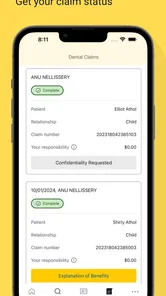
Being able to view claims in a mobile app is valuable because dental billing often involves a delay between a visit and the final explanation of what was processed. I find this kind of access most helpful after an appointment, when I want to check whether the claim has appeared and understand where it stands without searching through email or paperwork.
There is a subtle but important trade-off here. A claim screen can improve visibility, but it does not automatically settle a disagreement with a provider or explain every clinical billing detail in plain language. If an amount looks unexpected, I would use the information as a starting point: compare it with the office statement, check the service date, and contact the appropriate party if the two records do not line up.
This makes the app more useful for organized follow-up than for instant answers. I would not interpret a missing claim as proof that something went wrong, and I would not assume that a displayed claim alone represents the final amount I owe. The app helps me see the administrative trail; it does not remove the need to read the details.
The digital ID card is a small feature with real timing value
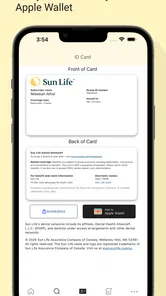
Saving an ID card sounds simple, but it addresses a very ordinary problem: needing plan information when the physical card is somewhere else. I like this feature most for appointments arranged away from home, a replacement-card situation, or a last-minute call to a dental office. It turns a document that is easy to forget into something I can prepare before I need it.
My advice is to open and check the card before an appointment rather than assuming that access will be convenient at the exact moment it matters. If I were traveling, I would also keep the relevant information available in a way that does not depend entirely on a live connection or a low battery. The app can improve access, but it should not encourage me to discard every backup immediately.
This is one of the app’s strongest examples of practical design: it does not need to perform a complicated task to be useful. Removing one forgotten-card problem can make the whole check-in process less stressful.
Trust comes from knowing what the app is—and what it is not
Because Sun Life Financial (U.S.) develops the app, I would approach it as an official channel for Sun Life dental customers rather than as an independent insurance comparison tool. That context is reassuring for a user who wants to manage an existing relationship, but it also defines the app’s limits. It is not designed to compare unrelated insurers or help someone choose a dental plan from the wider market.
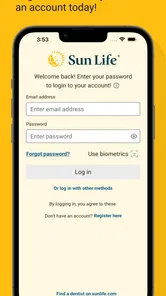
I also prefer to judge trust through visible choices rather than broad promises. With a benefits app, the sensitive moments are obvious: signing in, opening a digital card, reviewing claims, and searching for a provider. I would pay attention to which account details are requested, whether the app clearly explains what is being displayed, and whether I can leave the app without exposing information on a shared device.
I would not treat a smooth interface as proof that every privacy or security question has been answered. My confidence would come from checking the app’s permission prompts, reading its privacy information, and using the account controls available on my device. Those are sensible habits for any app that handles insurance-related information, including one from a familiar developer.
Account control deserves more attention than convenience
The most important control is the one many people overlook: deciding where and when the app remains signed in. On my personal phone, staying signed in may make the ID card and claims easier to reach. On a shared, borrowed, or work-managed device, that convenience may not be worth the exposure. I would use the more cautious option in those situations and lock the phone itself.
I would also review notifications carefully. A notification that openly names a claim or includes benefit details could reveal more than I want on a lock screen. Even when the app gives me a useful alert, the safer approach is to limit what appears publicly and open the app when I am ready to read the full information.
These are not criticisms unique to Sun Life Dental. They are the practical side of using any insurance app. The key point is that the user still has responsibility for the device, the sign-in state, and the visible information around the app. A trustworthy experience is partly created by the product and partly by the choices I make while using it.
What I would do with sensitive information
I would avoid taking screenshots of claims or ID details unless I had a clear reason and a safe place to store them. Screenshots can remain in photo backups, appear in shared galleries, or be visible to other people using the device. Viewing the information inside the app is usually a cleaner habit than creating extra copies that are easy to forget.
I would be equally careful on public Wi-Fi, particularly when checking information that includes account or benefit details. The app may be convenient in a waiting room or café, but convenience should not make me careless about the network or the people around me. If I need to show an ID card at a reception desk, I would display only what is necessary and close the screen afterward.
Another useful habit is separating dental administration from medical urgency. A claim question can wait for a private moment, while severe pain, swelling, bleeding, or an injury calls for appropriate professional advice rather than an insurance screen. Sun Life Dental can help with coverage administration, but it is not a diagnostic tool or an emergency service.
Who will get the most value from it?
I think the app is a good fit for Sun Life dental members who regularly need their plan information away from a computer. Families may appreciate having a digital card ready when arranging appointments, while people who travel or change locations can benefit from having provider-search and claim access in one place.
It may also suit users who dislike keeping paper documents organized. Instead of searching through a drawer for an ID card or trying to remember where a claim notice was filed, they can begin with the app. That does not eliminate all paperwork, but it can make the first check faster and make follow-up less dependent on memory.
For a person who visits the dentist only rarely and already has a reliable physical card, the benefit may be smaller. Installing another app creates its own maintenance cost: updates, sign-in details, storage, notifications, and privacy decisions. In that case, the website or a phone call may be perfectly adequate.
Where it falls short compared with the usual alternatives
The usual alternative is a browser, and for occasional use a browser can be more flexible. It may be easier to access from a computer when I want to read a longer explanation, print information, or manage several documents at once. A dedicated app wins when I need quick mobile access, especially for the ID card or a short claims check.
A phone call is still better for complex or disputed situations. If I need a detailed explanation of a denial, a correction to personal information, or help understanding a complicated benefit question, speaking with a representative may provide more context than tapping through a mobile screen. The app is a good first stop, not necessarily the best final stop.
A general health app is also a different category. Such an app might be better for medication reminders, wellness tracking, or clinical records, while Sun Life Dental is more targeted to insurance administration. I would not choose one expecting it to replace the other. The right choice depends on whether my immediate problem is managing coverage or managing health information more broadly.
Installation, maintenance, and day-to-day expectations
The app was released on May 5, 2024, and its current version is 8.0.7. I would keep it updated through the normal app-store process, particularly because benefits information is sensitive and updates can affect compatibility or account access. Its free price removes the financial barrier, but “free” does not mean there is no personal cost in managing another account-based app.
On Android, support begins with version 7.0, which covers many older devices. Still, I would check the phone’s available storage, operating-system condition, and screen-lock setup before relying on the app for an appointment. A supported operating system does not guarantee that every older phone will feel equally quick or convenient.
I would also plan for ordinary interruptions. A dead battery, a forgotten sign-in detail, or a poor connection can make digital access less convenient at the exact moment it is needed. Keeping basic appointment information available through a sensible backup is not a rejection of the app; it is simply good preparation.
My practical routine for using it well
If I were setting up Sun Life Dental for regular use, I would begin by signing in privately and confirming that the account information looks correct. I would then locate the digital ID card and make sure I know how to reach it without exploring the whole app at the reception desk. This small preparation makes the feature genuinely useful instead of merely available.
Before choosing a new dentist, I would use the search as a shortlist tool and call the office with specific questions. I would ask whether the provider is currently accepting patients and whether the planned service should be checked in advance. After a visit, I would return to the claims area when I expect processing to have begun, compare what I see with the provider’s paperwork, and keep notes about anything that needs clarification.
Finally, I would review the phone’s notification and privacy settings. I would avoid leaving the app open in public, avoid unnecessary screenshots, and sign out or remove access if the phone changes hands. These steps take little time, yet they do more for responsible use than simply downloading the app and forgetting how much personal information a benefits account can reveal.
My cautious verdict on Sun Life Dental
Sun Life Dental is most convincing as a compact access tool for existing Sun Life dental members. Its value comes from reducing friction around three concrete tasks: locating a dentist, checking claims, and presenting an ID card. I would recommend it to someone who frequently handles appointments on a phone, travels, or wants a dependable alternative to carrying paper documents.
I would be more reserved for people who want a complete oral-health companion, a plan-comparison service, or detailed help with complicated claim disputes. The app’s focused design is a strength when the task matches it, but it is also the reason it should not be mistaken for a broader medical platform.
My final recommendation is to install it when Sun Life dental coverage is part of your everyday administration, then use it deliberately: prepare the digital card before appointments, treat provider search as a starting point, read claim details rather than relying on headline amounts, and keep account visibility under control. Developed by Sun Life Financial (U.S.), rated for Everyone, and available without a purchase price, it offers a practical mobile layer for dental benefits. For the right user, that modest scope is exactly what makes it worthwhile.
Sun Life Dental (U.S.) Frequently Asked Questions
What devices can I install Sun Life Dental (U.S.) on?
Sun Life Dental (U.S.) is an app for Android and iOS devices. Before downloading, check that your phone or tablet meets the operating-system requirement: Android 7.0 or later. The app is free, and its age rating is Everyone. As with any mobile app, make sure you have enough storage space and a reliable connection for downloading and signing in.
Who develops Sun Life Dental (U.S.)?
Sun Life Dental (U.S.) is developed by Sun Life Financial (U.S.) and is listed as a medical app. Its purpose is to help make oral healthcare easier for members, with tools such as finding a dentist, viewing claims, and saving an ID card. These functions are most useful when you have eligible Sun Life dental coverage and can sign in to your account.
What is Sun Life Dental (U.S.)?
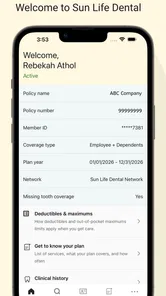
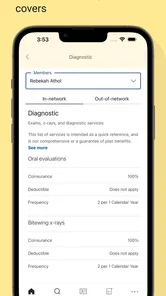
Sun Life Dental (U.S.) is a mobile resource for members of eligible Sun Life dental plans. After signing in, users can typically review plan information, check coverage details, find participating dentists, view claims or benefit activity, and access digital identification information. The exact features available depend on the dental plan provided by an employer or other sponsoring organization.
Who can use the Sun Life Dental app?
The app is intended for eligible Sun Life dental plan members in the United States, and some features may also be available to covered dependents or authorized users. You generally need active plan coverage and account credentials to access personal information. Availability can vary by plan, employer, state, and account status, so not every user will see identical options.
What can I do with Sun Life Dental (U.S.)?
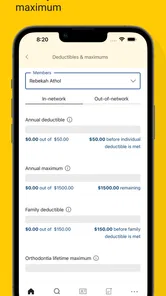
The app is designed to make common dental-plan tasks easier from a phone. Depending on your coverage, you may be able to view your digital dental ID card, review benefits, search for in-network providers, check claim status, access plan documents, and find customer-service contact details. It is mainly a self-service tool rather than a replacement for a dental office or emergency care.
Pros
- Quickly locate participating dentists through the provider search tool.
- Digital access to plan details
- coverage information
- and member resources.
- Helpful for checking dental benefits while away from home.
- Secure account access helps protect personal insurance information.
- Useful companion for members managing routine dental care.
Cons
- Features may vary depending on your Sun Life plan and employer coverage.
- Provider search results may require verification before booking an appointment.
- Some account actions may redirect to a mobile website.
- Not intended for purchasing individual dental insurance plans.
- Users without Sun Life coverage may find limited functionality.











