SumTotal Next
- 0.00
- 0.0
- Installs
- 50.00K
- Price
- Free

Screenshots

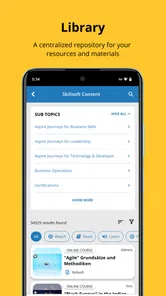
Analysis by Reviewed
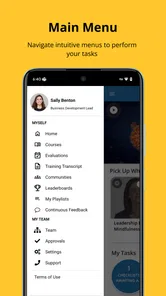
I approached SumTotal Next as a workplace app rather than something to browse casually. Its purpose is straightforward: it gives people a cleaner way to move through the SumTotal environment, with an emphasis on a more intuitive interface and simpler navigation. That sounds modest, but in a business setting, reducing the time spent hunting through menus can make a noticeable difference.
The important question is not whether it looks modern in isolation. The better question is whether its streamlined approach suits the way you already handle work-related tasks. If your organization uses SumTotal and you regularly need to reach information or tools inside that environment, this app is worth considering. If you are looking for a complete standalone productivity suite, however, I would set expectations differently from the start.
What I considered before recommending it
When I review a business app, I pay attention to three things first: how quickly I can understand the layout, how much effort it takes to reach a familiar destination, and whether the app fits naturally into an existing routine. SumTotal Next makes the first two points its main selling point. The experience is built around a simplified path through the product, so the value comes less from adding a new type of work and more from making existing work easier to reach.
That distinction matters. An employee who already has access to SumTotal may appreciate a more approachable mobile entry point, while someone without that wider workplace context may find the app less useful on its own. I would therefore judge it as a companion to an established business system, not as a general-purpose app for everyone.
The app is free to install, carries an Everyone content rating, and is published by SumTotal Systems LLC. It belongs in the business category, and its current release is version 3.4. Those details make it easy to try on a compatible device without treating the installation as a major financial decision. The practical decision is instead whether your organization’s workflow is already connected to SumTotal.
First impressions and everyday navigation
My first impression is that SumTotal Next is trying to remove hesitation. Business software often becomes difficult not because every individual screen is complicated, but because users are unsure where to begin. A reorganized interface can help by making the route feel more obvious. For someone checking the app between meetings or while away from a desk, that clarity is more valuable than a long list of advanced options.
I also like the idea of a focused mobile experience for users who do not want to reproduce a full desktop workspace on a small screen. A phone is useful when I need a quick interaction with a work system, but it is less comfortable when every control is crowded together. Simplified navigation can make short sessions feel more manageable, especially when the user already knows what they need to find.
More From Our News Desk

Weather by Xiaomi Review: Clear at a Glance, Less Clear Up Close

X Under Pressure: Can It Recover When Posting Goes Wrong?

Clash of Clans Is Won Between the Battles

Android Auto Makes the Case for Quieter Car Software

MobiOffice: Transforming Mobile Productivity with Seamless Integration

EA SPORTS FC™ Mobile Soccer: Redefining Mobile Sports Gaming
There is a trade-off, though. A simpler interface can be excellent for common routes while feeling less helpful when a user needs something unusual. In my experience with business software, people often learn a system through repeated habits: they remember a particular path, menu, or shortcut. When an interface changes, those habits have to be rebuilt. SumTotal Next may feel immediately clearer to a new or occasional user, while a long-time user may need a short adjustment period.
A realistic workday scenario
Imagine an employee starting the day away from a computer. They have a few minutes before a meeting and want to enter the SumTotal environment without opening a full desktop browser session. A mobile app with simplified navigation can make that moment less frustrating: open it, recognize the main route, complete the needed interaction, and move on.
The same pattern applies during a busy afternoon. A manager may need to check something connected with an internal process, or an employee may want to handle a routine work task while traveling between locations. The benefit is not that the phone replaces every desktop activity. The benefit is that the user has a more approachable way to reach the business system when a computer is inconvenient.
My advice is to identify your three most common SumTotal tasks before installing it. If those tasks are the reason you keep opening the system, the app has a clear chance to earn a place on your phone. If your work depends mainly on complex, detailed sessions, you may still prefer the usual desktop route and use the mobile app only for quick access.
Where the streamlined design is most convincing
The strongest case for SumTotal Next is consistency. When a business app presents a less intimidating path, it can help occasional users feel less dependent on colleagues for basic navigation. That is a practical advantage that is easy to overlook. An interface does not need to add more tools to be useful; it can create value simply by making the existing environment easier to approach.
I can also see a benefit for organizations with employees who use different devices and have different levels of comfort with workplace software. A clear mobile layout gives users another way to interact with their work system without requiring everyone to become an expert in its structure. That does not eliminate training, but it may reduce the amount of informal guidance needed for routine access.
Another useful insight is that a simplified interface can improve the quality of short sessions. When I know I have only a minute or two, I am more likely to complete a task if the first screen gives me a clear direction. A complicated tool encourages postponement: I tell myself I will deal with it later at a computer. SumTotal Next is most persuasive when it turns those small gaps in the day into workable moments.
The app’s install base is already over ten thousand, which gives it a meaningful presence without suggesting that it is a universal consumer product. I read that figure as a sign that it is aimed at a specific workplace audience. That is not a weakness, but it reinforces the need to check whether SumTotal is part of your organization’s setup before expecting the app to solve a broader productivity problem.
Three ways to get more from the app
First, I would treat the initial session as a route-mapping exercise rather than simply opening screens at random. Find the areas you use most often and note how you reach them. The real benefit of a navigation-focused app appears after you recognize the shortest practical path, not necessarily during the first few seconds of installation.
Second, use it for clearly defined mobile moments. Checking a work item before a meeting, handling a brief task while away from a desk, or reaching a familiar area during travel are better tests than trying to perform every possible activity through a phone. This approach helps you judge the app on its intended strength instead of comparing it unfairly with a full desktop workspace.
Third, give yourself time to adjust if you are moving from an older routine. A redesigned path can feel slower at first because your memory is attached to the previous layout. Rather than deciding immediately that the new interface is inconvenient, repeat the routes you use most. If the simplified structure becomes easier after that short learning period, the change is doing what it should.
Where a different category of tool may fit better
SumTotal Next is not the obvious choice for someone who wants a general task manager, a personal notes app, a team chat service, or a broad office suite. Those categories are designed around different needs. A general productivity app may be better when you are organizing personal projects across unrelated services. A communication tool may be better when the main goal is discussion. SumTotal Next makes more sense when your work already lives inside the SumTotal business environment.
I would also be cautious about choosing it as the only option for work that requires extensive data entry or detailed review. Mobile interfaces are convenient, but convenience does not automatically make a small screen ideal for every job. If your routine involves long sessions, careful comparison of many items, or repeated editing, a desktop browser may remain the more comfortable choice.
This is where the comparison with usual alternatives becomes useful. The desktop version or browser-based route generally suits depth and sustained attention. A general mobile productivity app suits flexible organization across several services. SumTotal Next occupies a narrower middle ground: it aims to make access to SumTotal more approachable from a mobile device. Its advantage is relevance to that specific environment; its limitation is that it is not meant to replace unrelated tools.
Users who work in several systems should also consider context switching. Adding another app can sometimes simplify access, but it can also create one more place to remember. If your organization already has a well-established browser workflow that feels quick enough, the improvement may be too small to justify changing habits. The app is most valuable when the existing mobile route feels awkward or when quick access is a regular need.
The cost of changing your routine
Because the app is free, the main cost is not the purchase price. It is the time required to learn a new route and decide whether it genuinely improves your day. That cost is relatively easy to control: install it, test the tasks you actually perform, and compare the experience with your current method over several ordinary work sessions.
There may also be an organizational cost. If a team adopts a different way to reach the same business environment, colleagues may need to explain the new navigation or update informal instructions. A manager should therefore avoid presenting the app as automatically better for every employee. A short practical demonstration focused on common tasks is more useful than a broad claim that the new interface will solve all mobile-work frustrations.
For an individual user, I would begin with one narrow goal. Choose a recurring task that currently requires a computer or an inconvenient browser session. Use SumTotal Next for that task repeatedly, then ask whether the route feels clearer and whether you are more willing to complete it promptly. This test reveals more than a quick tour of the interface because it measures the app against an actual habit.
Compatibility is another sensible checkpoint. The app requires Android or iOS version 12 or later, so a device running an older operating system will not be a suitable starting point. For supported phones and tablets, the low financial barrier makes experimentation straightforward, but compatibility should still be checked before planning a team-wide rollout.
Who should use it and who should skip it
I would recommend SumTotal Next to employees who already use SumTotal, need occasional or regular mobile access, and value a less complicated path through their business tools. It is especially promising for people who are comfortable with their work processes but do not enjoy navigating dense enterprise software on a phone.
It may also suit supervisors or team members who move between locations and need a practical mobile entry point. The app’s value grows when the alternative is delaying a small task until a computer becomes available. In those situations, a focused mobile experience can support better continuity without asking the user to carry out an entire office session on a small screen.
I would skip it if you are searching for a standalone app to manage personal projects, communicate with a team, or organize information from many unrelated services. I would also hesitate if your work is almost entirely desktop-based and your current process already feels efficient. Installing a business app simply because it is free is not enough; it should solve a repeated inconvenience.
What the release and developer details suggest
The app was released on September 21, 2025, and version 3.4 is the current version. That places it as a relatively recent option for users evaluating SumTotal from a mobile perspective. I would still judge it by daily usefulness rather than by the version number itself. A newer release can be encouraging, but the deciding factor remains whether the navigation helps with your specific work.
SumTotal Systems LLC is the developer, which is relevant for users who want the mobile experience to come from the same named product ecosystem they already recognize. That can make the app easier to identify when several workplace tools are installed on a device. It also gives organizations a clearer starting point when discussing which app employees should use for SumTotal access.
The Everyone rating makes the app broadly suitable from a content perspective, but that should not be confused with universal usefulness. Business relevance depends on your role, your organization’s systems, and the tasks you need to complete. A broadly accessible app can still be highly specialized in its practical purpose.
My recommendation after weighing the trade-offs
I see SumTotal Next as a focused convenience rather than a complete transformation of workplace productivity. Its strongest quality is the attempt to make SumTotal easier to approach on mobile, and that is enough to matter when the existing route feels crowded, slow, or unnecessarily difficult to remember.
Before committing to it as part of your routine, test the app with real tasks rather than judging only its opening screen. Pay attention to whether you can find familiar destinations without second-guessing yourself, whether short sessions feel worthwhile, and whether the mobile format suits the amount of detail your work requires.
My recommendation is simple: try it if SumTotal is already part of your working day and mobile access is a genuine pain point. I would keep the desktop or browser option available for deeper work, and I would choose a different type of app when my needs extend beyond the SumTotal environment. Used in that narrower but realistic role, SumTotal Next has a sensible purpose and a good chance of making routine business access less frustrating.
SumTotal Next Frequently Asked Questions
What devices and operating systems can run SumTotal Next?
SumTotal Next is a mobile app for people who want to access their organization’s learning and talent services from a phone or tablet. It requires Android or iOS version 12 or later, so check your device’s operating system before downloading. Keeping your system and the app updated can also help you use the available interface and navigation features smoothly.
Who develops SumTotal Next, and what is the app’s main focus?
SumTotal Next is developed by SumTotal Systems LLC and belongs to the business category. Its focus is on providing users with a more intuitive interface and simplified navigation for SumTotal services. The app is intended to complement an organization’s learning platform rather than serve as a general-purpose course library, so the experience is shaped by the services and access your organization provides.
What is SumTotal Next used for?
SumTotal Next is a learning and talent management platform designed to help organizations deliver training, manage professional development, and track employee progress. Depending on the company’s configuration, users may access courses, compliance training, assessments, certifications, learning paths, announcements, and personal development information through the mobile experience. Available features can vary significantly between organizations.
Can I use SumTotal Next without an employer or organization account?
Usually, SumTotal Next is intended for employees, students, contractors, or members whose organization uses the SumTotal learning platform. You generally need valid login credentials supplied by your employer or institution, and in some cases you may also need a company-specific server address or authentication method. Downloading the app alone does not normally create an independent personal account.
What features are available in the SumTotal Next mobile app?
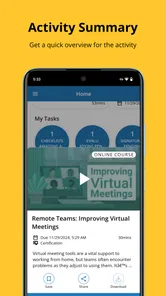
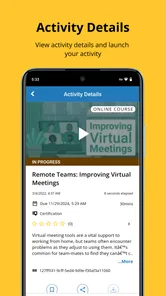
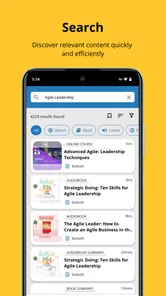
The available tools depend on how your organization has configured SumTotal Next, but the app may let you browse assigned learning, launch eligible courses, review deadlines, complete certain activities, access learning history, and receive notifications. Some content may open in a web browser or require an internet connection. Administrators can also restrict mobile access to particular courses or functions.
Pros
- Access courses and training materials from one mobile app.
- Supports learning on the go
- including during commutes or travel.
- Helps employees track assigned learning and completion progress.
- Can centralize workplace training in a single platform.
- Useful for organizations with structured employee development programs.
Cons
- Features and available content depend heavily on your employer’s setup.
- Some courses may require a stable internet connection to load properly.
- The interface can feel more business-focused than consumer learning apps.
- Login issues may occur if company credentials or permissions change.
- Limited usefulness for users without access to a participating organization.











