Stripe Dashboard
- 3.27K
- 4.2
- Installs
- 1.00M
- Price
- Free

Screenshots

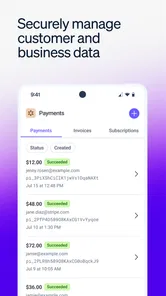
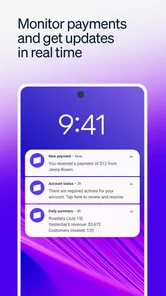
Analysis by Reviewed
When I first stumbled upon the Stripe Dashboard app, I have to admit, I was a little skeptical. I mean, how much easier could it possibly be to manage my finances on the go? But let me tell you, after using it for a couple of weeks, I'm seriously impressed. If you're a business owner juggling a million things at once, this app might just become your new best friend.
What the free access means in practice
Stripe Dashboard is a free business app from Stripe, Inc., so there is no app purchase price to weigh up before trying it. That makes the first decision fairly simple: if your business already uses Stripe, installing the mobile dashboard gives you a way to check in without paying for the app itself. Free access to the app should not be confused with the cost of accepting payments or using other Stripe services; those are separate considerations for a business to check against its own needs.
That distinction matters if you are comparing payment providers. The dashboard is most useful when Stripe is already part of your setup, because it puts activity from that relationship within reach. If you are choosing a provider from scratch, compare the full payment arrangements and the tools you need, rather than treating a free mobile app as proof that one service will be cheaper overall.
When the phone view earns its place
The strongest case for keeping this app installed is the gap between noticing that something needs attention and being able to check it. I find that particularly useful for a solo operator who is away from a laptop but still wants a quick sense of whether a customer payment has gone through. The phone becomes a way to stay informed, not a reason to spend the whole day watching a dashboard.
A practical habit is to treat an alert as a prompt to investigate, rather than as a complete explanation. If a payment notification arrives while I am packing orders or meeting a client, I can look into the relevant activity and decide whether it needs an immediate response. If it involves a refund, a customer question, or a decision that affects my records, I take the extra moment to check the details instead of acting on the alert alone.
That distinction also helps keep the app from becoming noisy. I would use notifications for activity I genuinely need to notice promptly and avoid letting every update interrupt focused work if it is not urgent. The point is to create a useful signal, not to make the phone another source of constant pressure.
All About the User Experience
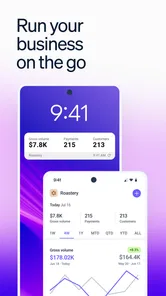
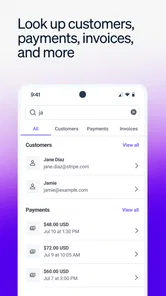
One of the first things I noticed about the Stripe Dashboard is its sleek and intuitive design. Navigating through the app is a breeze, and everything is laid out in such a user-friendly way. It's almost like the app knows exactly what you need before you even realize it. Whether you're checking your daily transactions or issuing refunds, everything's just a tap away.
More From Our News Desk

Weather by Xiaomi Review: Clear at a Glance, Less Clear Up Close

X Under Pressure: Can It Recover When Posting Goes Wrong?

Clash of Clans Is Won Between the Battles

Android Auto Makes the Case for Quieter Car Software

MobiOffice: Transforming Mobile Productivity with Seamless Integration

EA SPORTS FC™ Mobile Soccer: Redefining Mobile Sports Gaming
Features That Stand Out
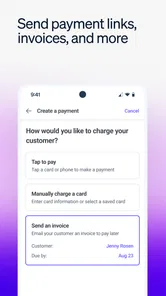
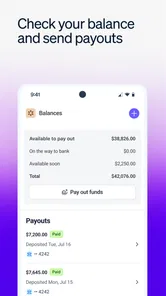
Now, let's dive into the features. The app allows you to keep track of your payments effortlessly. You can view your sales data in real-time, which is incredibly handy if you're like me and love to know everything happening with your business at any given moment. Plus, the ability to issue refunds directly from your phone? Game changer!
The real value here is less about replacing a full accounting process and more about reducing the time between noticing a payment issue and responding to it. I find the phone workflow especially sensible for a quick check: confirm whether activity has arrived, look into a transaction, and take a straightforward action when needed. For a more involved review of cash flow, reconciliation, or business records, I would still use the tools I normally rely on at a desk. A payment dashboard can keep me informed, but it is not a substitute for bookkeeping.
Making a quick check useful
For a realistic example, imagine I run a small online shop and step away from my desk during a busy day. A notification gives me a reason to open the app; I can check the relevant payment activity and decide whether it needs attention now or can wait until I am back at my computer. That quick triage is where a mobile dashboard earns its place. I would avoid making a major financial decision based only on a glance at a phone screen, especially if I need to compare several reports or keep records for later.
A second useful routine is to separate quick monitoring from end-of-day review. I might use the app during the day to catch an unexpected payment event, then sit down later to compare the wider picture with my usual business records. This avoids mistaking a convenient snapshot for a settled view of the business. It also makes the mobile dashboard more useful to a small team: one person can spot an issue promptly without turning a phone check into an informal substitute for shared processes.
When I need to refund a payment, I would first verify that I have selected the correct transaction and understand why the refund is needed. The convenience of doing it on a phone is real, but the action still has consequences for customer communication and bookkeeping. I would make a note through the business’s normal record-keeping process rather than assume the dashboard alone covers every follow-up.
How it compares with other business tools
Compared with checking Stripe through a desktop browser, the app is the more convenient choice for short, frequent check-ins and mobile actions. A browser or dedicated accounting software is usually better for longer sessions, broader financial planning, and work that combines payment information with expenses or other records. If you use a different payment provider, its own dashboard may make more sense than adding Stripe solely for a mobile interface. The app’s usefulness follows the payment setup you actually have.
That is an important difference from an accounting app. Accounting software is generally where I would organize income alongside costs, prepare records, and review a broader financial picture. Stripe Dashboard is better understood as a mobile companion to Stripe payment activity. It can help me respond sooner, but it is not a one-stop workspace for every business task. If the real problem is tracking stock, planning payroll, or bringing several payment services together, a dedicated tool for that job is a better starting point.
There is also a sensible trade-off between mobile convenience and the context available on a larger screen. A phone is excellent for finding a particular event and deciding whether it needs attention. It is less comfortable when I need to compare a number of records, inspect patterns carefully, or coordinate a detailed review with someone else. I would not choose the app over a desktop workflow for those jobs; I would use each for the work it handles well.
Who is likely to get the most from it?
I would recommend it to a business owner, freelancer, or small team member who already depends on Stripe and wants to stay aware of payment activity while away from a computer. It is also a practical fit for someone who occasionally needs to respond to a transaction rather than wait until the end of the day. If you mainly need invoices, inventory, payroll, or a complete accounting workspace, I would look for a tool designed around those tasks instead of expecting this app to cover every part of running a business.
It has a 4.5 average from around 31,000 ratings, and more than a million installs, which suggests it is widely used, though neither figure tells me whether it suits a particular business workflow. The app is rated for Everyone, was released in March 2018, and its current version is 2.25.0. It supports Android 8.0 and later. Those details are useful when deciding whether a device can run it, but the more important question is whether Stripe is already central to your payment operations.
I think it is especially handy for a freelancer who gets paid through Stripe and is often moving between appointments, or for a small shop owner who wants to check a transaction while away from the counter. A team member who only needs to monitor activity may also appreciate having a mobile view. On the other hand, someone who rarely needs to check payments outside office hours may get little practical benefit from adding another business app to their phone.
Before relying on it as part of a routine, I would check that the account it opens is the one I intend to monitor and decide which kinds of activity deserve an immediate response. If more than one person handles payments, it is worth agreeing who should investigate alerts and who is responsible for recording decisions. Those small habits make a mobile tool less likely to create confusion when a quick action has consequences for customer service or the books.
Security and Reliability
Let's talk security because, let's face it, nothing else matters if your financial data isn't safe. Stripe has always been renowned for its robust security measures, and the same applies to the app. With advanced encryption and security protocols, you can rest easy knowing your data is well-protected. Also, the app's reliability is top-notch. In my time using it, I haven't experienced any crashes or glitches, which is a huge plus in my book.
One trade-off with managing sensitive business activity on a phone is that convenience makes it tempting to act quickly. I try to pause before approving or refunding anything important, check that I am looking at the right transaction, and keep a separate record when a decision needs an accounting trail. Notifications are helpful prompts, not a replacement for reviewing the underlying details. That careful habit matters more than treating a mobile app as a complete security or finance policy.
For anyone wondering whether the app is useful without a constant connection, offline access can help when I only need to view data, but it should not be treated as a way to complete every task without internet access. I would plan important payment actions for when I can check the information properly and avoid assuming that a saved view is current. That is a modest but worthwhile distinction for anyone who travels or works in places with unreliable connectivity.
My main limitation is not that the mobile dashboard lacks value; it is that its value depends heavily on already using Stripe. It does not make a different payment setup easier to manage, and the app’s free price does not settle whether Stripe’s broader services fit a particular business. Nor would I use it as my only source for decisions that require a complete financial picture. Knowing those boundaries makes it easier to judge the app fairly instead of expecting a phone dashboard to do the work of several business systems.
In conclusion, the Stripe Dashboard app is a must-have tool for anyone serious about managing their business finances efficiently. It's like carrying a mini financial expert in your pocket, ready to assist you at a moment's notice. So, if you're looking for a way to streamline your financial operations, give the Stripe Dashboard a try. You won't regret it!
My buy-or-skip verdict
Because the app itself is free, I see little downside to trying it if you already use Stripe and want payment information close at hand. I would skip it if you do not use Stripe, need a full accounting system, or prefer to manage all business finances in a desktop workflow. For the right user, it is a convenient mobile window onto payment activity; for everyone else, the free price alone is not a reason to change providers or reorganize a business around it.
My recommendation is simple: install it when quick access to Stripe activity would genuinely change how you handle a workday, and keep your accounting and decision-making routines intact around it. The app is most convincing as a focused companion, not as a complete financial office. If that is the role you need, the free access makes trying it an easy choice; if you need a broader system, choose the tool that fits that job instead.
Stripe Dashboard Frequently Asked Questions
Do I need a Stripe account to use Stripe Dashboard?
Stripe Dashboard is built for managing activity associated with Stripe, so it is most useful to people who already use the service for their business. The app provides a mobile way to check account activity and business metrics. If you are considering Stripe for the first time, the app is not a general-purpose payment wallet or a standalone tool for tracking unrelated finances.
Can I use Stripe Dashboard on both Android and iOS?
Stripe Dashboard is a mobile app for checking Stripe activity, and the service can also be accessed through the web. On Android, the app requires version 8.0 or later. Before downloading, check that your device meets the operating-system requirement and that you are getting the app from the official app store for your device.
Is Stripe Dashboard free to download, and what devices can run it?
Stripe Dashboard is a free business app from Stripe, Inc. It is designed for managing Stripe activity from a mobile device, while the service is also accessible through the web. The app requires Android 8.0 or later. Its Everyone content rating makes it suitable for a broad audience, although its tools are primarily intended for people managing a business or Stripe account.
Who is Stripe Dashboard intended for?
Stripe Dashboard is intended for business owners and teams that use Stripe to accept payments and keep track of business metrics. It brings account activity into a mobile app, which can be useful when you need to check transactions or business performance away from a computer. It is a business management tool rather than a general-purpose wallet or shopping app.
What is Stripe Dashboard and how does it work?
Stripe Dashboard is an intuitive platform that allows businesses to manage their Stripe account activities seamlessly. It provides a comprehensive view of transactions, customer data, subscriptions, and more. Users can track payments, manage refunds, and analyze financial data in real-time. The dashboard is accessible via web and mobile apps, making it convenient for on-the-go management.
Pros
- User-friendly interface design.
- Real-time financial updates.
- Secure data encryption.
- Customizable reporting tools.
- Easy integration with other apps.
Cons
- Requires constant internet connection.
- Limited offline functionality.
- Some features can be pricey.
- Learning curve for beginners.
- Occasional sync issues.











