Stoxy PRO - Stock Market Live
- 242.00
- 4.6
- Installs
- 5.00K
- Price
- $9.99

Screenshots

Analysis by Reviewed
I see Stoxy PRO - Stock Market Live as a market-watching tool for people who want a broad view of financial prices without constantly hopping between separate screens. Its appeal is practical rather than flashy: it brings stocks, indices, futures, commodities, ETFs, and funds into one place. That range can make a quick market check more useful, though it also means the app may feel like more than a casual investor needs.
For me, the best way to use a tracker like this is to decide what questions I want it to answer before opening it. Am I checking how a holding is moving, comparing an index with a commodity, or simply seeing whether markets are broadly up or down? Keeping a short watchlist organized around those questions helps turn a stream of prices into a routine rather than another source of distraction.
A Handy Tool for Stock Enthusiasts
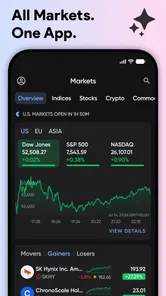
First off, Stoxy PRO - Stock Market Live boasts a user-friendly interface. From the moment I opened the app, I was greeted with a clean layout that didn't overwhelm me with too much information right off the bat. The main screen gives you a neat snapshot of the market trends, making it easy to get a quick overview of what's happening in the financial world.
Features that Stand Out
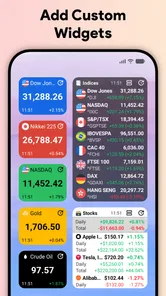
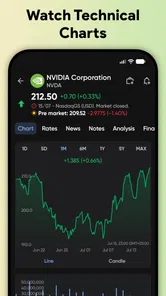
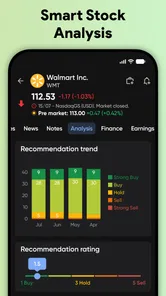
One feature that I really appreciated was the customizable watchlist. It allowed me to track my favorite stocks effortlessly. I could add or remove stocks from my list with just a tap, and the real-time updates ensured that I was never out of the loop. Another gem was the detailed stock analysis. With in-depth charts and data, I felt empowered to make informed decisions without having to switch between multiple apps or websites.
A useful habit is to keep the watchlist selective: include investments you own, a few benchmarks, and only the assets you are actively researching. That makes comparisons easier and reduces the temptation to treat every price move as a reason to act. If you follow funds as well as individual shares, grouping your attention around a particular question—such as how a fund behaves beside its underlying market—can make the wide asset coverage more manageable.
The news section is another highlight. It aggregates financial news from various sources, saving me the hassle of browsing through different platforms. The integration of news and stock data is seamless, providing a one-stop-shop for all things stock market-related.
That pairing is most useful as a starting point, not a substitute for checking the original context. If a headline catches my eye, I would use it to identify what to investigate, then read further before making a decision. Likewise, live prices are valuable for keeping an eye on markets, but a quote on a screen alone cannot explain why an asset moved or whether it fits a longer-term plan.
More From Our News Desk

 Gmail
Gmail in a Busy Inbox: Who Benefits Most?
From first account to crowded workday, Gmail earns its place through dependable search and flexible sorting—but its best fit depends on how much inbox maintenance you can tolerate.

 Prime Video
Switching to Prime Video: What Changes in Your Viewing Routine
Prime Video can make a compelling second home for streaming, but switching means learning a different catalog, rental layer, and route from browsing to playback.

 Universal TV Remote Control
 Works Best as a Reliable Backup
A phone remote earns its place through quick setup and reliable habits. Here is how to get more from Universal TV Remote Control—and where its limits show.

 Weather - By Xiaomi
Weather by Xiaomi Review: Clear at a Glance, Less Clear Up Close
Xiaomi’s weather app makes everyday forecasts quick to scan, but its calm surface can leave useful details and recovery paths harder to find than they should be.

 X
X Under Pressure: Can It Recover When Posting Goes Wrong?
A resilience-focused review of X, examining setup, mistaken posts, interruptions, weak connections, and the gaps that matter when recovery needs to be dependable.

 Clash of Clans
 Is Won Between the Battles
Its raids are quick; its community is a long-term project of coordination, teaching, rivalry, and shared responsibility—with all the friction that entails.
Latest News



Room for Improvement
While I enjoyed my time with the app, there are a couple of areas where it could improve. The notifications, although helpful, can sometimes be overwhelming. A more refined notification system that allows for better customization would be a welcome addition. Additionally, while the app is generally intuitive, new users might benefit from a brief tutorial or guide to navigate the more advanced features.
To keep alerts from becoming background noise, I would start with only the notifications that support a real decision or a planned check-in, then adjust after seeing how often they interrupt. People who prefer to follow markets quietly may be better served by opening the app at set times instead. For learning the basics, a dedicated educational resource is also a better companion than expecting a market tracker to explain every chart or financial term.
For those who thrive on financial data, the app does a fantastic job, but it might be a bit much for someone who just wants to keep an eye on a few stocks. A simpler version or mode could cater to this audience.
Who It Suits Best
I would recommend this app to an investor who follows several kinds of assets and wants a convenient place to scan them, or to someone who regularly checks market movements during the day. A realistic routine might be to review a compact watchlist over breakfast, note a meaningful change, and then look into the relevant news rather than reacting immediately. That approach takes advantage of the app’s breadth without turning every update into a trading signal.
Compared with checking a brokerage app, a dedicated market tracker is better suited to broad observation across asset types; a brokerage remains the more natural place to manage holdings and place trades. Compared with a general finance news app, this one puts price monitoring closer to the center of the experience. If you only need occasional quotes, a basic finance app may be simpler. If you need portfolio management, transaction tools, or guidance for investment decisions, choose a service built specifically for those jobs rather than assuming a tracker covers them.
The app is made by NikitaDev and is listed in the finance category. It has a 4.6 average from around 1.4 thousand ratings, with over 5 thousand installs. It costs $9.99, so I would think about how often I would use its broader market coverage before paying: frequent cross-market monitoring makes the price easier to justify than checking a couple of familiar stocks now and then. It is rated for Everyone, and version 6.9.2 supports operating systems from version 9 onward.
Final Thoughts
All in all, Stoxy PRO - Stock Market Live is a robust app for anyone serious about tracking the stock market. Its comprehensive features and real-time updates make it a valuable tool for both seasoned investors and newbies looking to dive into stock trading. Despite a few minor hitches, it’s an app that delivers on its promise of bringing the stock market closer to you. Whether you're a veteran trader or a curious beginner, this app is worth checking out.
My recommendation comes with one qualification: use it as a way to monitor and investigate, not as an automatic prompt to buy or sell. The broad mix of markets is its clearest advantage, while the busy feel and imperfect notification experience are worth weighing if you prefer a very simple tracker. If you want an accessible overview and will make use of more than one asset class, it is a worthwhile option; if your needs stop at a few occasional quotes, a lighter alternative may suit you better.
Making the breadth useful in a daily routine
The app is most helpful when I treat it as a compact dashboard rather than a place to watch every movement continuously. For example, someone who owns shares, follows a broad index, and keeps an eye on a commodity can check those items together before starting the workday. If one position has moved more than expected, the next step is not to keep refreshing the quote; it is to use the app’s news context and then verify the story through a fuller source. That small pause makes a market tracker more useful and less stressful.
There is also a practical way to keep a mixed watchlist from becoming a jumble. I would separate its purpose mentally, even if the app presents the list as one view: holdings I already own, benchmarks that help me understand the day, and candidates I am researching. When I scan the list, I can then distinguish “this affects my portfolio” from “this is only something I’m observing.” That distinction is especially useful when a strong move in a familiar index makes unrelated assets seem urgent.
For a person comparing related markets, the broad coverage can help frame questions that a stock-only tracker would not answer as conveniently. I might check whether a fund and a benchmark are moving in the same direction, or whether a commodity’s movement is happening alongside a change in a market index. These comparisons are clues, not explanations: simultaneous movement does not prove one asset caused the other to change. The app’s value is in bringing the prices into view so I know what to research next.
What to expect from quotes and analysis
A natural question is whether a live market display is enough for making a trade. In my view, it is not. Price monitoring can help me notice a move, but a chart and a headline do not replace a personal investment plan, careful research, or the tools of a brokerage account. I would use Stoxy PRO to observe and organize attention, then move elsewhere for order execution or detailed portfolio administration. That division of labor is not a flaw; it is simply the sensible role for a tracker.
Another point worth keeping in mind is that “real-time” does not make every displayed figure equally useful for every decision. Markets and instruments can have different trading hours and contexts, and a price snapshot should be interpreted with that in mind. If I check an asset outside its active session, I would avoid reading a quiet display as proof that nothing important is happening. For decisions where timing matters, I would confirm the relevant market status and quote in the service I intend to use for the trade.
The charts and analysis are most valuable when I arrive with a specific question. Instead of browsing indicators without a plan, I would compare a recent move with the asset’s broader behavior or use the chart to identify when a change began, then investigate the circumstances. That approach keeps the visual tools from creating a false sense of certainty. A chart can make patterns easier to inspect, but it cannot tell me whether a particular investment is appropriate for my goals.
Choosing it over a simpler tracker
People often ask whether a dedicated market app is worth keeping when a phone already has a general finance app or a brokerage account. I think the answer depends on how scattered their tracking has become. If their current setup requires jumping between separate pages to see a stock, an index, and a fund, Stoxy PRO’s cross-asset focus is a genuine convenience. If they only check one or two familiar companies occasionally, the extra breadth may add little and a simpler quote screen could be more comfortable.
It also occupies a different middle ground from a financial news app. News-first services are better when the main goal is reading developments and commentary; a brokerage is better when the main goal is acting on an account. This app makes more sense when the first question is “What is moving across the markets I follow?” and the next question is “What should I investigate?” That distinction is useful before paying for another finance tool, because the best choice is the one that matches the task you actually repeat.
For a beginner, I would not use the number of asset types as a reason to follow everything at once. Start with a few holdings or markets that have a clear purpose, learn what their movements mean, and add another category only when it helps answer a real question. Someone who is still learning basic investing may find a structured educational service more valuable than a dashboard full of quotes. The app can support curiosity, but it should not be mistaken for a course or personalized financial advice.
Price, setup, and the right expectations
Because this is a paid app, my practical test would be whether I expect to use its broader coverage often enough to make the purchase worthwhile. Before buying, I would write down the markets I currently check and how many different places I use to check them. If the list spans several asset types and I revisit it regularly, a single monitoring routine may justify the cost. If I mostly look up a stock now and then, I would compare the price with a free or simpler alternative rather than assume more data automatically means more value.
The release history reaches back to Jan 3, 2017, and the current version is 6.9.2. That gives a prospective user useful context about the app’s age and present version, but I would still judge it by whether its current experience fits my routine. It is intended for Everyone and requires an operating system version 9 or later, so checking device compatibility before installing is a straightforward step. The 241 written reviews add another perspective alongside the 4.6 average, though individual comments are most useful when they describe the same kinds of markets and habits you have.
One small but worthwhile setup decision is to decide in advance what deserves an alert. I would avoid enabling every possible interruption simply because it is available; instead, I would reserve alerts for assets or situations that I have a concrete reason to follow. Then I would review the settings after a few days of normal use. If the messages are not changing what I do, turning them down is better than letting the app become a steady stream of noise.
My final take is that this is a focused choice for people who genuinely monitor more than one corner of the market. It is not the right substitute for a brokerage, a research service, or a beginner’s investing course, and its breadth can feel excessive if your needs are modest. But if you want one place to scan a varied watchlist, use charts to inspect movements, and follow related headlines before doing deeper research, I can see the appeal. I would recommend it to a curious, organized market follower who values breadth and is willing to keep a disciplined routine; everyone else should choose the simpler tool that fits their actual habits.
Stoxy PRO - Stock Market Live Frequently Asked Questions
Who develops Stoxy PRO - Stock Market Live, and what is its age rating?
Stoxy PRO - Stock Market Live is a finance app developed by NikitaDev, with an Everyone content rating. That makes its stated age classification suitable for a general audience. Its focus is live market tracking, so it may appeal to people who want to follow financial prices, whether they are exploring markets for the first time or already keep an eye on investments.
How much does Stoxy PRO - Stock Market Live cost, and what devices can run it?
Stoxy PRO - Stock Market Live costs $9.99, and it runs on devices using operating system version 9 or later. Before downloading, check that your device meets that minimum requirement and that the purchase fits your budget. The app is focused on market-price tracking, so its usefulness will depend on whether you want a dedicated tool for following financial markets.
What features does Stoxy PRO - Stock Market Live offer?
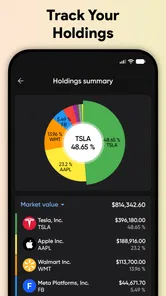
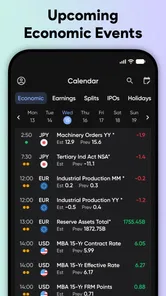
Stoxy PRO - Stock Market Live provides users with a comprehensive suite of tools to track stock market trends in real time. The app includes features like customizable watchlists, detailed stock charts, market news, portfolio tracking, and alerts. It also offers insights into market indices and commodities, making it a versatile tool for both new and experienced investors.
Is Stoxy PRO - Stock Market Live suitable for beginners?
Yes, Stoxy PRO - Stock Market Live is designed to be user-friendly, catering to both beginners and seasoned investors. The app offers easy navigation, intuitive interfaces, and educational resources to help new users understand stock market basics. However, users are encouraged to utilize these tools carefully and seek additional financial advice if needed.
Can I track international stocks with Stoxy PRO - Stock Market Live?
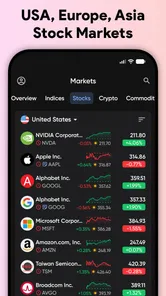
Absolutely! Stoxy PRO - Stock Market Live allows users to track stocks from major markets around the world. This includes exchanges in the United States, Europe, Asia, and other regions. The app's global reach makes it ideal for investors looking to diversify their portfolios across international markets.
Pros
- Real-time stock updates enhance decision-making.
- User-friendly interface for easy navigation.
- Comprehensive market data at your fingertips.
- Customizable alerts for price changes.
- Supports multiple stock exchanges.
Cons
- Requires subscription for full features.
- Limited offline functionality.
- Occasional app crashes reported.
- High data usage over mobile networks.
- No cryptocurrency tracking available.