Centi PRO - Currency Converter
- 24.00
- 4.9
- Installs
- 1.00K
- Price
- $2.99

Screenshots
Analysis by Reviewed
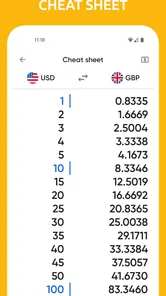
When I’m abroad, a quick currency conversion is useful only if I can trust the number and get to it without fuss. Centi PRO - Currency Converter aims to make that everyday check simple, with exchange rates, widgets and tools for keeping an eye on different currencies. I see its strongest appeal in travel and routine price comparisons, rather than in managing a full budget or making financial decisions that require guaranteed live market data.
A handy tool for quick comparisons
The practical value is easy to picture: you’re at a café, market or shop, and want to know whether a price feels reasonable in your home currency. Instead of opening a browser and searching for a conversion each time, a dedicated converter can make the calculation feel more direct. Centi PRO is a paid finance app from NikitaDev, priced at $2.99, and its widget focus may suit people who want currency information close at hand.
One useful habit is to check the rate before heading out, then treat the result as an estimate rather than the exact amount that will appear on a card statement. Banks and payment providers can use their own rates or fees, so a converter’s figure is best for understanding the rough cost of a purchase. That distinction matters most when comparing larger prices, where a small difference in the rate can change the result noticeably.
Why Centi PRO is a Must-Have
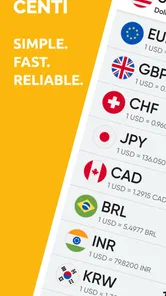
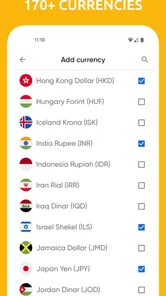
First off, let me just say that the user interface is as smooth as butter. Navigating through Centi PRO - Currency Converter is incredibly intuitive, even if you're not the most tech-savvy person out there. The app supports a vast array of currencies, so no matter where you are or where you're going, Centi PRO has got you covered.
Real-Time Updates
One of the standout features is the real-time updates. Imagine you're at a street market, eyeing a beautiful handcrafted souvenir. You pull out your phone, open Centi PRO, and bam! You've got the latest exchange rate right there in your palm. No more guessing or outdated information. It's like having a personal financial advisor right in your pocket.
For day-to-day use, I’d still check when the rate was last refreshed before relying on a conversion, especially if I’m making a costly purchase. Exchange rates move, and a displayed conversion is not the same as the amount a card issuer will charge. If precision at the point of payment matters more than a fast estimate, checking the payment provider’s own conversion is the safer choice.
Offline Mode
But what if you're in an area with no internet connection? Fear not! Centi PRO has an offline mode that allows you to access the last updated rates. This feature is a lifesaver when you're deep in the mountains or exploring remote islands. Just make sure to update your rates whenever you have a connection, and you're good to go.
More From Our News Desk

 Gmail
Gmail in a Busy Inbox: Who Benefits Most?
From first account to crowded workday, Gmail earns its place through dependable search and flexible sorting—but its best fit depends on how much inbox maintenance you can tolerate.

 Prime Video
Switching to Prime Video: What Changes in Your Viewing Routine
Prime Video can make a compelling second home for streaming, but switching means learning a different catalog, rental layer, and route from browsing to playback.

 Universal TV Remote Control
 Works Best as a Reliable Backup
A phone remote earns its place through quick setup and reliable habits. Here is how to get more from Universal TV Remote Control—and where its limits show.

 Weather - By Xiaomi
Weather by Xiaomi Review: Clear at a Glance, Less Clear Up Close
Xiaomi’s weather app makes everyday forecasts quick to scan, but its calm surface can leave useful details and recovery paths harder to find than they should be.

 X
X Under Pressure: Can It Recover When Posting Goes Wrong?
A resilience-focused review of X, examining setup, mistaken posts, interruptions, weak connections, and the gaps that matter when recovery needs to be dependable.

 Clash of Clans
 Is Won Between the Battles
Its raids are quick; its community is a long-term project of coordination, teaching, rivalry, and shared responsibility—with all the friction that entails.
Latest News



A practical workflow is to refresh rates while connected before a flight or a day trip, then use the saved figures as a reference when reception drops. Offline access is convenient, but it cannot reflect changes made after that refresh. For a quick sense of scale, that is usually enough; for exchanging a substantial amount of money, I would verify the current rate elsewhere first.
Customizable Options
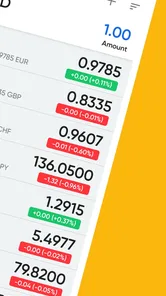
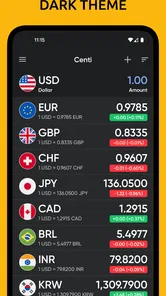
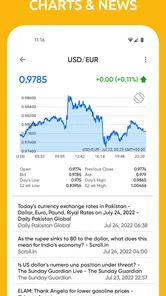
Another feature that I absolutely love is the customizable options. You can set your favorite currencies for quick access, making it super easy to switch between them. Plus, the app also lets you track historical exchange rates over the past year. This is perfect for those who like to stay informed about trends and make strategic financial decisions.
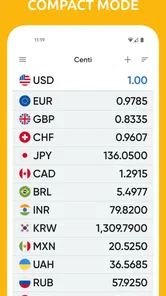
Favorites are particularly helpful if you regularly compare the same home and destination currencies: keeping that pair ready avoids repeatedly searching through a long list. Historical rates can also add context when planning a trip well ahead, but I would use them to understand broad movement, not to predict where a currency will go next. A converter is a reference tool, not a substitute for specialist financial advice.
Widgets for a faster check
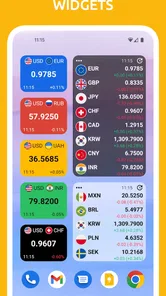
The widget angle is useful when I want a conversion to be visible without making a separate search. It can make Centi PRO feel more like a quick-glance travel aid than a tool I open only after reaching a checkout. If I’m comparing prices over a few days, keeping the same currency pair in view also makes it easier to notice changes without rebuilding the setup each time.
That convenience depends on how you use your phone: some people prefer a clean home screen and will be happier opening a converter only when needed. Others may value a persistent glance at rates. Either way, a widget should support a quick estimate, not encourage treating every currency move as a signal to buy, sell or exchange money.
Where it fits—and where it doesn’t
Centi PRO is aimed at people who want a focused currency tool: travelers, shoppers comparing overseas prices, and anyone who follows a small set of exchange rates. At $2.99, the upfront cost makes most sense if you expect to use those checks regularly or value having a dedicated converter and widgets. Its Everyone age rating makes it suitable for a general audience, while its current version, 7.1.1, runs on operating systems version 9 and later.
It is less compelling if you convert currencies only once in a while; a search engine or a free general-purpose converter may be enough for that. It is also not the right choice if what you need is expense tracking, a travel budget, or a way to send and exchange money. Those jobs call for different kinds of apps, and a converter should not be mistaken for a bank or payment service.
A grounded recommendation
The app has a 4.9 average from 436 ratings, with 24 written reviews and over 1,000 installs. Those figures suggest a small but strongly rated audience, not a reason on their own to assume it will suit everyone. It was released on July 1, 2017, and its core proposition remains straightforward: make checking currencies more convenient through conversions, saved preferences, historical context and widgets.
My main caution is to keep the role of the app clear. Rates can change, offline figures can become stale, and the amount charged by a card provider may differ from a simple conversion. Used as a fast guide rather than a promise of the final transaction amount, it can remove a little friction from travel and international shopping.
In conclusion, Centi PRO - Currency Converter is not just an app; it's a travel essential. With its user-friendly interface, real-time updates, offline capabilities, and robust security, it's hard to imagine traveling without it. Whether you're a frequent flyer or an occasional traveler, this app will undoubtedly enhance your travel experience. So go ahead, download it, and make your travels a whole lot smoother!
Centi PRO - Currency Converter Frequently Asked Questions
Who is Centi PRO - Currency Converter designed for?
Centi PRO is a finance app for people who need to check currency values, whether they are planning a trip, comparing prices abroad, or handling international transactions. Its focus on currency conversion and exchange rates makes it relevant for occasional checks as well as repeated use. The app is developed by NikitaDev, and its Everyone content rating means it is suitable for a general audience.
What is Centi PRO - Currency Converter and what does it offer?
Centi PRO - Currency Converter is a comprehensive financial application designed to provide real-time currency conversion services. It caters to travelers, businesses, and anyone dealing with international transactions. The app features live exchange rates, historical data, and the ability to convert over 150 currencies. It also includes a user-friendly interface, offline mode for use without internet access, and supports multiple languages.
How accurate and up-to-date are the exchange rates provided by Centi PRO?
Centi PRO ensures high accuracy by updating exchange rates in real-time, sourced from reliable financial data providers. The app refreshes rates at regular intervals to reflect the latest market values, which is crucial for users making real-time financial decisions. Additionally, it offers historical exchange rate data, allowing users to analyze trends over time.
Does Centi PRO - Currency Converter work offline?
Yes, Centi PRO offers an offline mode that allows users to access previously fetched currency rates without an internet connection. This feature is particularly beneficial for travelers who may not always have access to the internet. However, it's important to note that offline rates may not reflect the most current market changes until the app is reconnected to the internet and updated.
What platforms is Centi PRO - Currency Converter available on?
Centi PRO - Currency Converter is available on both Android and iOS platforms, making it accessible to a wide range of smartphone users. The app is designed to be compatible with various devices, ensuring a seamless user experience across different screen sizes and operating system versions. Users can download it from the Google Play Store or the Apple App Store.
Pros
- Supports multiple currencies for global use.
- Real-time exchange rate updates.
- User-friendly interface and easy navigation.
- Offline mode available for conversions.
- Customizable currency lists.
Cons
- Occasional ads can disrupt the experience.
- Limited features in the free version.
- Requires internet for real-time rates.
- No multi-language support.
- Some currencies update slower than others.