

Stopfinder
- 1.20K
- 4.4
- Installs
- 100.00K
- Price
- Free

Screenshots
Analysis by Reviewed
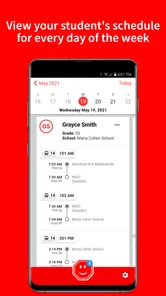
Getting a child to the correct bus stop is usually less about finding a route once and more about staying aligned with the daily changes around that route. Stopfinder is built for that practical job. It is an education app from Transfinder Corporation that lets families view students’ daily bus stops and communicate with the transportation department. I found its appeal strongest when I treated it as a quiet routine tool rather than something I would open for entertainment or exploration.
That distinction matters. The app does not need to become part of your day in the same way as a messaging platform, calendar, or navigation app. Its value comes from being available when a school-bus question appears: Where is the stop today? Has the usual arrangement changed? Who should I contact about transportation? When those questions occur repeatedly, a focused app can be more useful than searching through school emails or trying to interpret a general map.
How Stopfinder Holds Up Beyond the First Week
My first impression was that the app makes most sense for parents and guardians whose children already use a school transportation service connected to it. The store experience identifies it as a free education app, rated for Everyone, and its current version is 3.1.5. It requires Android 8.0 or later, so families using an older device should check compatibility before planning around it.
The first-week appeal comes from reducing uncertainty. A parent preparing for the morning can check the student’s assigned stop instead of relying on memory. In the afternoon, the same information can help a caregiver confirm where to wait. That is a small improvement, but school transportation is full of small moments where a clear reference is preferable to guesswork.
I also like the narrow focus. A general map application may show streets, walking directions, and nearby places, but it does not automatically represent a school’s transportation arrangement. A school website may contain useful notices, yet the transportation information can be buried among calendars, forms, and announcements. Stopfinder sits closer to the specific question a family is asking.
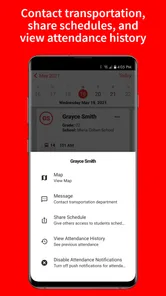
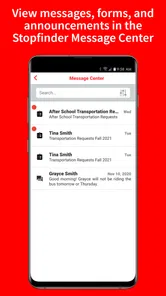
The communication angle is equally important. When a transportation issue comes up, families often need a direct channel to the transportation department rather than another general school contact. Having that purpose attached to the stop information creates a more sensible workflow: check the relevant stop, identify the concern, then contact the people responsible for transportation.
A realistic morning scenario shows where it earns its place. Imagine a child staying with a different caregiver before school. Instead of forwarding a long message with a street name and several qualifications, the caregiver can use the same transportation reference the family relies on. That does not remove the need for adult supervision or common-sense safety, but it can reduce the chance that an outdated note becomes the only source of information.
More From Our News Desk

 Instagram
Instagram’s Power Comes From Its Place in Your Phone
A close look at how Instagram turns Meta’s reach, recommendation systems and everyday camera habits into durable platform power—and what that costs users.

 Gmail
GmailGmail in a Busy Inbox: Who Benefits Most?
From first account to crowded workday, Gmail earns its place through dependable search and flexible sorting—but its best fit depends on how much inbox maintenance you can tolerate.

 Prime Video
Switching to Prime Video: What Changes in Your Viewing Routine
Prime Video can make a compelling second home for streaming, but switching means learning a different catalog, rental layer, and route from browsing to playback.

 Universal TV Remote Control
Universal TV Remote Control Works Best as a Reliable Backup
A phone remote earns its place through quick setup and reliable habits. Here is how to get more from Universal TV Remote Control—and where its limits show.

 Weather - By Xiaomi
Weather by Xiaomi Review: Clear at a Glance, Less Clear Up Close
Xiaomi’s weather app makes everyday forecasts quick to scan, but its calm surface can leave useful details and recovery paths harder to find than they should be.

 X
XX Under Pressure: Can It Recover When Posting Goes Wrong?
A resilience-focused review of X, examining setup, mistaken posts, interruptions, weak connections, and the gaps that matter when recovery needs to be dependable.
Latest News



During the first week, I would not judge the app by how often I open it. A transportation tool can be successful even when it is used briefly. The better test is whether it answers a recurring question faster than the alternatives. For a family with one stable stop and no changes, the benefit may feel modest. For a family coordinating several caregivers, children, or changing routines, the focused access becomes more noticeable.
What the App Is Really Replacing
Stopfinder is not replacing a full navigation system. It is replacing fragments of a household process: saved screenshots, handwritten notes, old messages, school-office calls, and repeated questions between parents. That makes its usefulness less visible than a conventional map app, but also more specific.
The trade-off is that its usefulness depends on the transportation information being available and relevant to the student. It is not a universal tool for planning any bus journey, checking public transit, or finding a route in an unfamiliar city. If your goal is public transportation navigation, a dedicated transit app will be a better fit. If your goal is knowing the school transportation arrangement for a student, Stopfinder is much more appropriately shaped.
One practical habit improves the first-week experience: decide who in the household actually needs access before everyone starts using separate notes and messages. Parents, grandparents, and after-school caregivers may each interpret transportation details differently if they work from different sources. A shared routine around one current reference is more valuable than simply installing the app on several phones.
Why the Value Can Continue Month After Month
The lasting value is not a constant stream of new content. It comes from repeated reliability during ordinary school weeks. Once the initial novelty fades, I would expect the app to become an occasional checkpoint: useful when a schedule, caregiver, or pickup plan changes, and easy to return to when a familiar detail suddenly needs confirmation.
That is a healthy pattern for this kind of education app. It does not need to demand attention. In fact, an app that encourages unnecessary checking could become tiring. Stopfinder makes more sense as a background utility that supports a family’s transportation routine without trying to dominate it.
For month-to-month use, the strongest scenario is a household with changing logistics. A child may spend certain days with another family member, attend an activity after school, or need adults to coordinate who is waiting at the stop. The app can serve as a common starting point when those arrangements are discussed. Its value increases when the cost of a misunderstanding is higher than the few seconds needed to verify the stop.
It is also useful for onboarding a new caregiver. Rather than explaining the transportation arrangement entirely from memory, I would pair the app with a short verbal briefing about safety, timing, and what to do if the child is not present. The important insight is that Stopfinder can organize the transportation detail, but it should not be treated as a complete childcare instruction manual.
Families should also think about how they respond to changes. When something looks different from what they expect, the best workflow is not to assume the app is wrong or to rely immediately on an old message. Check the displayed information, compare it with the latest household plan, and use the transportation communication path when clarification is needed. That three-step approach is more dependable than keeping multiple unofficial versions of the same arrangement.
The app’s audience is reflected in its broad age rating: Everyone. That does not mean every child should manage transportation independently. I read the rating as an indication that the software is intended for general family use, not as a substitute for adult judgment. Younger students may benefit from adults using the information on their behalf, while older students may use it as one part of learning their daily routine.
Maintenance Is Light, but the Routine Still Needs Care
Stopfinder appears most valuable when it stays in the background, and that means maintenance should be simple. Keep the app available on a compatible device, check it when transportation plans change, and avoid allowing old screenshots or copied notes to become the household’s unofficial authority. The technical task is easy; the organizational task is where families can still create confusion.
Because the app is free, there is no subscription decision competing with its practical value. That makes it easier to keep installed even during weeks when it is rarely opened. Still, free does not mean automatic. Families need to remember that the app is a reference and communication tool, not a guarantee that every transportation situation will resolve without human contact.
I would recommend reviewing the app after a meaningful change in routine rather than on a rigid daily schedule. A new school term, a different caregiver, or an unexpected transportation question is a sensible reason to open it. Checking it compulsively when nothing has changed adds friction without adding much safety.
The developer, Transfinder Corporation, has kept the app in active circulation since its release on September 5, 2019. Its presence on the store is substantial, with over 100 thousand installs, an average rating of 4.4, and around 2.7 thousand ratings. Those figures suggest that it has found a real audience, although they do not remove the need to judge whether a particular school transportation setup supports the app.
One maintenance tip I consider especially useful is to separate transportation facts from household assumptions. The app can help with the assigned stop and the transportation contact, while the family should separately record who is responsible for the child before and after the ride. Mixing those two kinds of information in one message is how small changes become confusing. Stopfinder is strongest when it handles the transportation reference and adults handle the broader plan.
Where Repeated Use Can Become Tiring
The main source of fatigue is not an overload of entertainment or unnecessary features. It is the possibility of having to consult another system for a very narrow task. If a family already receives clear, timely transportation information through a school portal or established communication channel, opening a separate app may feel like an extra step rather than a simplification.
That is why I would not recommend installing it merely because it exists. The app earns its space when it becomes the agreed place to check student bus stops and contact transportation staff. If the household continues using email threads, paper notices, school calls, and several different apps at the same time, Stopfinder may add another layer instead of removing one.
There is also a human limitation that no interface can solve: transportation information is only useful when adults act on it. A caregiver who does not check the app, misunderstands the stop, or assumes that yesterday’s plan still applies can still create a problem. The app reduces one type of uncertainty, but it does not replace communication between the adults responsible for the child.
Another potential frustration is scope. Someone expecting live city-bus planning, broad route discovery, or a general school information center may find the experience too narrow. That is not a defect in the same way for its intended audience, but it is an important selection issue. I would skip it if your transportation needs are unrelated to a participating school arrangement or if you want a multipurpose navigation tool.
Families managing multiple students should be especially deliberate about checking whose stop they are viewing before passing information to another caregiver. The more children and schedules a household handles, the more useful a dedicated student-focused reference can become, but also the more important it is to slow down before acting on a detail. A quick glance is helpful only when the right student and day are being considered.
Compared with a traditional school website, Stopfinder has the advantage of a more focused transportation purpose. Compared with a general map, it is better aligned with school-bus stops but less useful for exploring unrelated travel. Compared with phone calls, it can make routine checking faster, while direct communication remains important for questions that require an answer from the transportation department. In other words, it complements those alternatives rather than making every one of them obsolete.
Who Should Keep It Installed
I would keep Stopfinder installed if I were responsible for a student whose daily bus stop matters to several adults, whose routine changes from time to time, or whose family wants a clearer route to the transportation department. It is particularly sensible for households that have grown tired of searching old messages for a stop detail.
I would be less enthusiastic for a family with no connection to the transportation service represented in the app, or for someone looking for public-transit directions. I would also skip it if the school’s own process already provides the same information in a way every caregiver uses consistently. The goal is not to collect education apps; it is to remove a real point of friction.
Before relying on it, I would check that the phone meets the Android requirement, make sure the relevant student information is accessible, and agree with other caregivers on when the app should be consulted. Those steps sound ordinary, but they determine whether it becomes a dependable household habit or another forgotten icon.
My Long-Term Verdict
After the first-week curiosity disappears, Stopfinder’s case rests on recurring usefulness rather than excitement. That is a good sign for a transportation app. I do not need it to surprise me; I need it to remain a clear place to check a student’s bus stop and communicate with the right department when a question arises.
Its strongest quality is focus. It addresses a specific family problem without pretending to be a complete navigation or school-management platform. The free price and Everyone rating make it easy to try, while the established user base and current version give it the feel of a maintained utility rather than a temporary experiment.
My honest reservation is that its value depends heavily on household adoption and the school transportation context. If only one person uses it while everyone else relies on outdated notes, the benefit will be limited. If the family agrees that it is the current reference for bus-stop information, it can quietly eliminate repeated searching and unnecessary uncertainty.
My recommendation is to keep Stopfinder when it replaces a real transportation hassle, not simply because it is free. For families who need student bus-stop details in a focused education app and want a direct way to reach transportation staff, it deserves lasting space. For public transit, broad route planning, or a general school portal, another tool will serve you better. Its long-term strength is modest but meaningful: it turns an easily forgotten daily detail into something the right adults can check when it matters.
Stopfinder Frequently Asked Questions
What does the Everyone age rating mean for families considering Stopfinder?
Stopfinder has an Everyone content rating and is an education app focused on school transportation. Its purpose is to help parents and guardians view students’ daily bus stops and communicate with the transportation department. Families should still follow their school’s guidance about who should create an account and which adults are authorized to access a student’s transportation details.
What is Stopfinder and who is it designed for?
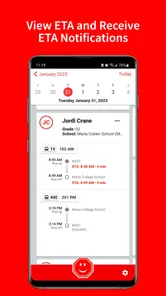
Stopfinder is a school transportation tracking app designed to help parents and guardians monitor a child’s assigned bus route. Depending on the school district’s setup, it can provide bus schedules, route information, stop details, and notifications about estimated arrival times or delays. Access is generally limited to families connected to participating schools or transportation providers.
How do I sign in to Stopfinder?
To use Stopfinder, you typically need an invitation, activation code, or login credentials provided by your child’s school district or transportation department. After installing the app, follow the registration instructions and use the same contact information recorded by the school. If your child or route does not appear, contact the school rather than creating multiple accounts.
Does Stopfinder show the bus location in real time?
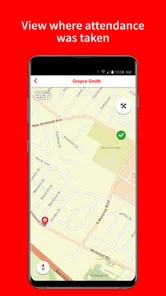
Stopfinder may display a vehicle’s current or approximate location, estimated arrival time, and route progress when the school district has enabled GPS tracking. However, availability and accuracy depend on the bus equipment, cellular coverage, driver activity, and district settings. The map should be treated as a helpful estimate, not a guarantee that replaces normal supervision at the stop.
Can I receive notifications about bus arrivals, delays, or schedule changes?
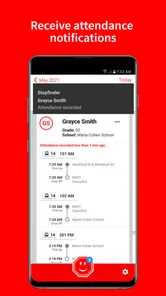
Yes, Stopfinder can provide alerts when supported by the participating school district. Notifications may include approaching-bus updates, delays, cancellations, route changes, or other transportation messages. You must allow notifications on your phone and configure the relevant child, route, or stop settings. The exact alerts and timing can vary considerably between districts.
Pros
- Shows bus locations and arrival times in real time.
- Supports multiple schools and transportation providers.
- Provides route details
- stops
- and scheduled pickup information.
- Push notifications can alert families about delays or changes.
- Simple interface makes daily school travel easier to monitor.
Cons
- Availability depends on whether your school district supports Stopfinder.
- Location data may occasionally be delayed or inaccurate.
- Some features require account access from an approved school district.
- Notifications can be inconsistent if background permissions are restricted.
- The app may use significant battery when location tracking is enabled.











