

Sticker Maker & Funny Emoji
- 1.00
- 4.9
- Installs
- 100.00K
- Price
- Free

Screenshots
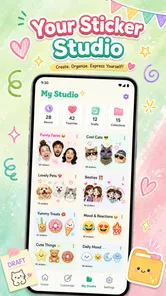
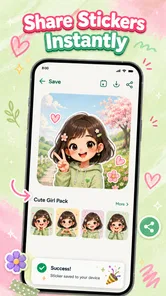
Analysis by Reviewed
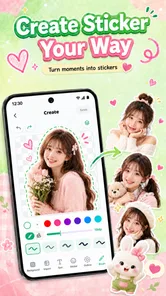
I like Sticker Maker & Funny Emoji best as a focused tool for turning a photo or a passing joke into something I can share as a sticker. It sits in the personalization corner of mobile apps, but its appeal is practical: make a cutout, shape it into a sticker, or build a meme without first learning a full image editor. That narrower purpose is welcome when I want a quick result rather than a new hobby in graphic design.
There is one important expectation to set. A short description can tell you the broad idea, but a sticker workflow is only enjoyable if the cutout looks clean and the finished image is easy to use where you want it. I would approach this app as a convenient creative utility, not a replacement for professional editing software or a guarantee that every photo will produce a polished sticker automatically.
What the current version is for
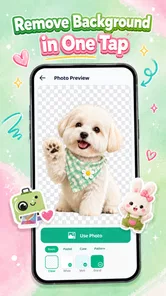
Developed by SHINK COMPANY, Sticker Maker & Funny Emoji is a free Android app, with optional in-app purchases priced from $2.99 to $7.99 per item. It is rated for Everyone, and the current release is version 1.0.1. The app’s core idea is straightforward: make custom stickers, remove photo backgrounds automatically, and create memes. Those jobs fit together well because the same image can become either a clean character cutout or the centerpiece of a joke.
Its early footprint is already notable: it has over 100,000 installs and a 4.9 average from around 925 ratings. I treat that reception as a useful sign of interest, not a promise that every image or phone will behave identically. The app has one written review, so the rating offers less detailed context than a large collection of user explanations would.
The release date is August 22, 2026, which places this version at the beginning of the product’s life rather than after a long history of established updates. That matters when judging it: I would assess the app on what version 1.0.1 offers now, not assume that future refinements are already present. The minimum Android requirement is version 8.0, so people using older systems will need another option.
Why the combination is useful
Many people already have a photo editor for cropping and filters, or use a messaging app’s built-in sticker tools. This app’s distinction is the combination of a background eraser and a meme-making purpose in one small creative workflow. Instead of opening a general editor, finding a cutout tool, exporting an image, and then switching again to add a caption, I can think of it as a dedicated place to prepare expressive images.
The combination is especially useful for casual, personal material: a pet making an unusual face, a friend’s reaction captured with permission, or a simple object that becomes funnier when separated from its background. It also suits people who want their messages to feel less repetitive than a standard emoji keyboard. The value is not that every sticker needs elaborate design; it is that a familiar photo can carry a more personal reaction.
More From Our News Desk

 Gmail
GmailGmail in a Busy Inbox: Who Benefits Most?
From first account to crowded workday, Gmail earns its place through dependable search and flexible sorting—but its best fit depends on how much inbox maintenance you can tolerate.

 Prime Video
Switching to Prime Video: What Changes in Your Viewing Routine
Prime Video can make a compelling second home for streaming, but switching means learning a different catalog, rental layer, and route from browsing to playback.

 Universal TV Remote Control
Universal TV Remote Control Works Best as a Reliable Backup
A phone remote earns its place through quick setup and reliable habits. Here is how to get more from Universal TV Remote Control—and where its limits show.

 Weather - By Xiaomi
Weather by Xiaomi Review: Clear at a Glance, Less Clear Up Close
Xiaomi’s weather app makes everyday forecasts quick to scan, but its calm surface can leave useful details and recovery paths harder to find than they should be.

 X
XX Under Pressure: Can It Recover When Posting Goes Wrong?
A resilience-focused review of X, examining setup, mistaken posts, interruptions, weak connections, and the gaps that matter when recovery needs to be dependable.

 Clash of Clans
Clash of Clans Is Won Between the Battles
Its raids are quick; its community is a long-term project of coordination, teaching, rivalry, and shared responsibility—with all the friction that entails.
Latest News



A workflow that avoids messy cutouts
For a first attempt, I would choose a photo with a clear subject and a background that contrasts with it. Automatic erasing is most helpful when the subject’s outline is easy to distinguish. Hair against a similarly colored wall, transparent objects, busy scenery, and overlapping people are harder cases for any automatic cutout process, so I would not judge the tool solely by an unusually difficult image.
A practical tip is to start with the source photo that already has the best framing. If the subject is tiny in a wide landscape, removing the background will not restore detail or make the sticker feel intentional. I would crop toward the face or object before spending time on decoration, then inspect the edges against both light and dark backgrounds. A faint halo that disappears on a white screen can become obvious in a dark chat.
This is one of the less obvious trade-offs of a one-tap eraser: speed is valuable, but the quality of the original image still controls the result. For a quick reaction sticker, a slightly imperfect edge may be entirely fine. For a sticker meant to look carefully finished, I would use a cleaner source image or a more capable editor that gives me precise manual control over the selection.
From a funny image to a usable meme
The meme-making side gives the same picture a different job. A cutout sticker communicates a reaction through the subject alone; a meme usually depends on the relationship between an image and its words. I find it helpful to decide which one I actually need before editing. If the joke relies on a recognizable face or object, a sticker can be enough. If it needs context, a caption is more useful than extra visual decoration.
For a realistic everyday example, imagine a group chat planning dinner. A photo of a pet staring at an empty food bowl could become a reaction sticker for the inevitable “what are we eating?” exchange. If the joke needs a setup, the same image could instead be used as a meme with a short caption. Keeping the text brief makes it readable on a phone; long lines shrink visually and can turn a funny image into a cluttered one.
I would also keep a simple source-photo habit: save or remember the original before experimenting. When an automatic cutout is not quite right, returning to the untouched image is easier than trying to undo a chain of edits. This is a small workflow improvement, but it prevents a casual creative session from becoming frustrating when I want to make a second version with different framing or wording.
Who will get the most from it
This is a good fit for someone who likes personalizing chats, wants to make occasional custom reactions, or needs a quick way to turn a familiar photo into a meme. It may also appeal to people who create playful images for friends and family but do not want to learn layers, masks, and a complex editing interface just to make one sticker.
I would be more cautious if your goal is a consistent branded sticker pack, detailed edge refinement, or production-ready artwork. A dedicated graphics editor is the better choice when you need precise control over contours, typography, color matching, and repeatable design. Likewise, if you only want to send an occasional emoji, the sticker-making process may be more effort than simply choosing one already available in your messaging app.
People who prefer not to edit personal photos should also think about the images they choose. A sticker can travel farther through conversations than the original context suggests. I would use images I am comfortable sharing, especially when a photo includes another person, and avoid treating a funny private moment as automatically suitable for wider circulation.
Price, access, and practical expectations
The app is free to install, while optional purchases range from $2.99 to $7.99 per item. That makes it reasonable to try the basic idea before deciding whether any paid option is worthwhile. I would check the purchase details in the app before paying and ask whether the particular option solves a real need for me, rather than assuming that every useful editing step requires an upgrade.
The Everyone content rating makes the intended audience broad, but that does not mean every image is suitable for every conversation. The creative tools can be used for harmless jokes or for material that feels unkind, so the user still decides what to make and share. For family use, I would focus on pets, objects, and friendly reactions rather than turning someone else’s photo into a joke without their agreement.
One practical question is where the finished work can be used. The app’s purpose is sticker creation, but I would check its available export or sharing choices on the device before planning a workflow around a specific messaging service. If the exact destination matters, test one simple sticker first; that quickly shows whether the result fits the way you actually communicate.
What version 1.0.1 means for existing users
Because the current version is 1.0.1 and the release date is August 22, 2026, there is little product history to compare against. I cannot honestly describe a long series of improvements or claim that a particular feature has recently changed. The useful takeaway is that this is an early-stage app: people trying it now are encountering a relatively new version, and future development should be judged by changes that are actually released.
For someone already using it, the version number alone does not establish that the editing experience has changed in a particular way. I would treat the present toolset as the baseline, keep successful source images available, and check the app after updates for changes that affect the steps I rely on. That is more useful than assuming a newer version automatically means better cutout edges or broader sharing options.
New users should take the same measured approach. Make one easy sticker first, then try a more demanding image and compare the effort. If the simple example works but a complicated outline does not, that tells you the app’s practical limit for your own photos without wasting time building a large collection around an uncertain workflow.
Where it still asks for patience
Automatic background removal can save work, but it is not the same as careful hand masking. Subjects with loose hair, thin accessories, motion blur, or colors close to the background can challenge the cutout. That limitation is important because a sticker is often displayed small, where a rough edge may be less noticeable, but it can also be enlarged or viewed against a contrasting chat theme where flaws stand out.
There is also a difference between making an image and managing a dependable collection. If you plan to create many stickers for recurring use, organization and easy retrieval become as important as the editor itself. I would test how the app fits into your regular messaging routine before investing time in a large set. A tool that makes a sticker quickly but does not suit your preferred way of finding and sharing it may not replace your existing setup.
Finally, the app’s narrow focus is both its strength and its boundary. It is tailored to stickers and memes rather than broad photo editing. That keeps the task approachable, but anyone expecting detailed retouching, extensive compositing, or the control of a desktop graphics program should choose a different tool for those jobs.
My recommendation
I would recommend Sticker Maker & Funny Emoji to friends who want an approachable way to turn personal photos into playful chat material and who are happy to work within the limits of automatic cutouts. Its strongest case is a quick, low-stakes creative task: choose a clear image, remove the background, and make a reaction or meme that feels more personal than a stock emoji.
I would skip it if you need meticulous editing, a guaranteed fit with a particular sharing workflow, or a full design studio. For everyone else, the free starting point makes it sensible to try with one uncomplicated photo before deciding whether the app belongs in a regular routine. My advice is to judge it on the edges of your own cutouts and on how easily you can use the finished result—not just on how quickly the first edit appears.
Sticker Maker & Funny Emoji Frequently Asked Questions
What can you create with Sticker Maker & Funny Emoji?
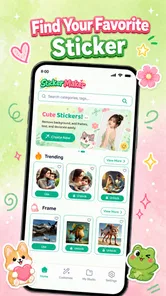
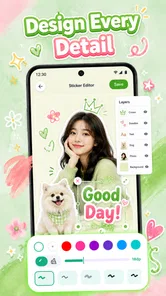
Sticker Maker & Funny Emoji is designed for creating and using expressive sticker content in chats. Depending on the features available in your version, you may be able to choose from funny emoji or sticker collections and personalize stickers using your own images, text, or decorative elements. Check the app’s feature list and screenshots on the store page to confirm which editing tools and sticker packs are included.
How do I use stickers from the app in my messages?
The app may let you add compatible sticker packs to supported messaging services, then select stickers from that service’s sticker or emoji panel while chatting. The exact steps depend on your device, the app version, and the messaging service you use. Before downloading, check the store description for supported platforms, and follow any in-app prompts to enable or add a pack.
Does Sticker Maker & Funny Emoji require an internet connection?
Some parts of a sticker app may work offline after content has been downloaded or saved, while browsing packs, loading online content, or viewing advertisements may require an internet connection. Availability can vary by version and region, so the app’s store listing is the best place to confirm its current requirements. If offline use matters to you, test saved stickers after installation.
Is the app free, and are there ads or in-app purchases?
The price and monetization model can differ between the Android and iOS versions and may change over time. An app can be free to install while offering optional purchases, subscriptions, or advertising. Review the store listing’s pricing and in-app purchase information before downloading, and check the app’s privacy details if you want to understand how advertising or usage data may be handled.
What permissions or privacy considerations should I check before installing?
If you want to create stickers from personal photos, the app may request access to your photo library or camera; permission prompts should explain what is needed for those features. Grant only the access you are comfortable with, and review the privacy policy and store-provided data disclosures before installing. You can also check your device settings later to change or revoke permissions.
Pros
- Create custom stickers from photos for more personal chats.
- Useful editing tools make it easy to cut out and decorate images.
- Funny emoji and sticker options add variety to conversations.
- Sticker packs can be organized for easier browsing.
- A simple interface helps new users get started quickly.
Cons
- Some features or sticker packs may require in-app purchases.
- The editing process can take time when creating detailed cutouts.
- Sticker quality depends on the resolution of the source image.
- Exported stickers may not work with every messaging app.
- Ads may interrupt browsing or sticker creation.











