

Stellarium Plus - Star Map
- 855.00
- 4.8
- Installs
- 100.00K
- Price
- $19.99

Screenshots
Analysis by Reviewed
I usually give a sky map a few minutes of attention, then forget it until someone points out an unusually bright dot. Stellarium Plus has more staying power than that for me: it can answer a quick “what am I looking at?” question, but it also rewards slower exploring. Its appeal depends on whether you enjoy returning to the sky with a little curiosity, rather than expecting a new spectacle every time you open an app.
The first week: easy discoveries, with room to roam
Have you ever found yourself gazing up at the night sky, wondering about the constellations and celestial wonders above? Well, let me introduce you to Stellarium Plus - Star Map, an app that's like having a personal planetarium right in your pocket. I recently had the chance to dive deep into the cosmos using this app, and let me tell you, it’s an experience worth sharing!
Exploring the Universe
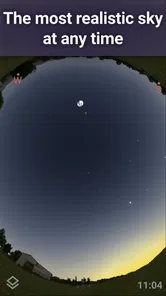
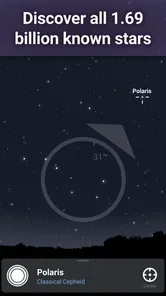
First off, the user interface is sleek and intuitive. When you open the app, you’re greeted with a stunning view of the sky from your current location. The app uses your phone’s GPS to pinpoint exactly where you are, which means the night sky you see on your screen is the same one above you. Pretty cool, right?
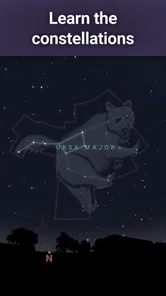
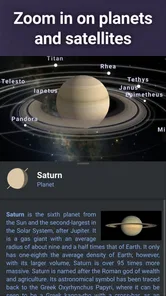
With Stellarium Plus, you can explore stars, planets, and constellations with just a swipe or a pinch. The app provides detailed information on celestial bodies – from their distance from Earth to their brightness and size. It’s like having an astronomy textbook that updates in real-time. I found myself lost in the details of each star and planet, learning new facts that I could impress my friends with at our next stargazing session.
Features that Shine
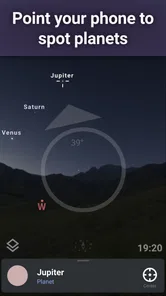
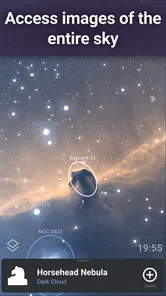
One of the standout features of this app is the ability to zoom in on deep-sky objects. We're talking nebulae, galaxies, and star clusters. The app even supports augmented reality, so you can point your phone at the sky and see labels for stars and planets overlaid on your screen. It’s like magic – or at least, the closest thing to it.
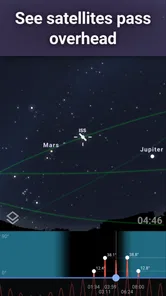
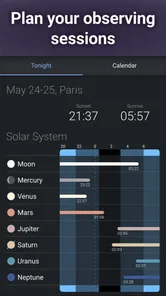
Another feature that I found incredibly useful is the night mode. It turns the screen red to preserve your night vision, which is perfect when you're outside under the stars. Plus, the app offers a calendar of celestial events, so you’ll never miss a meteor shower or a lunar eclipse again. I’ve already marked my calendar for the next big event!
Why You'll Love It
Whether you’re an amateur astronomer or just someone who enjoys a night under the stars, Stellarium Plus - Star Map has something for everyone. The app is packed with information but remains user-friendly, making it accessible for kids and adults alike. I found it particularly engaging because it made learning about space interactive and fun.
More From Our News Desk

 Gmail
GmailGmail in a Busy Inbox: Who Benefits Most?
From first account to crowded workday, Gmail earns its place through dependable search and flexible sorting—but its best fit depends on how much inbox maintenance you can tolerate.

 Prime Video
Switching to Prime Video: What Changes in Your Viewing Routine
Prime Video can make a compelling second home for streaming, but switching means learning a different catalog, rental layer, and route from browsing to playback.

 Universal TV Remote Control
Universal TV Remote Control Works Best as a Reliable Backup
A phone remote earns its place through quick setup and reliable habits. Here is how to get more from Universal TV Remote Control—and where its limits show.

 Weather - By Xiaomi
Weather by Xiaomi Review: Clear at a Glance, Less Clear Up Close
Xiaomi’s weather app makes everyday forecasts quick to scan, but its calm surface can leave useful details and recovery paths harder to find than they should be.

 X
XX Under Pressure: Can It Recover When Posting Goes Wrong?
A resilience-focused review of X, examining setup, mistaken posts, interruptions, weak connections, and the gaps that matter when recovery needs to be dependable.

 Clash of Clans
Clash of Clans Is Won Between the Battles
Its raids are quick; its community is a long-term project of coordination, teaching, rivalry, and shared responsibility—with all the friction that entails.
Latest News



Also, the app runs smoothly without any hiccups, which is a big plus in my book. There’s nothing worse than lagging or crashing when you’re in the middle of discovering a new galaxy!
A practical routine for ordinary evenings
The most useful way I’ve found to bring a sky map into everyday life is to open it with a specific question. On a clear evening walk, I might spot a bright object and check whether it is a planet, then use the nearby constellations to get my bearings. That small loop—look up, check the map, look back up—is more satisfying than scrolling through labels without connecting them to the real sky.
For a family outing, I’d pick one target before heading outside rather than trying to explain the whole screen at once. A child can choose a constellation or a bright planet, and the app gives us something concrete to talk about. The same approach works for a beginner who feels overwhelmed: identify one object, read its details, and stop there. The app is educational, but it doesn’t need to turn a relaxed evening into a lesson.
Make each visit answer a different question
A small change in how I use the map helps it stay interesting after the first burst of discovery. Instead of browsing at random, I might begin with a visible planet one night, then choose a constellation as a reference point on another. This gives each session a clear finish: once I can connect the screen to what I see overhead, I can put the phone away rather than keep tapping through objects.
That approach is especially useful when I’m out with someone who has little astronomy experience. I let them choose what to investigate, then use the map to follow that curiosity instead of delivering a tour of everything on the screen. It keeps the outing conversational and makes the app a shared guide, not the centre of attention.
For a more deliberate session, I’d check the event calendar before going out, pick one event or object to look for, and use the map to get oriented once I’m there. The practical trade-off is that a calendar can help me plan, but it cannot guarantee a good view. Weather, light around the observing spot, and the actual conditions overhead still decide what I can see.
How it fits beside simpler sky apps
Compared with a basic star-finder that mainly identifies what is overhead, this one feels more like an exploration tool. The object information and deep-sky viewing give curious users a reason to linger after identifying a star. That extra depth is useful if you want to move from “what is that?” to “what else can I learn about it?” A simpler alternative may be better for someone who only wants quick labels and has no interest in reading or browsing further.
There is a trade-off: richer information can make the screen feel busy when all you want is a fast answer. I recommend starting with the broad view, selecting one object, and only then following the details that interest you. In augmented reality, the phone is helpful as a guide, but it is still a screen between you and the sky; I use it briefly to orient myself, then lower it and look with my own eyes.
Month-to-month value and the cost of keeping it handy
The novelty is strongest during the first few sessions, when familiar-looking points become named objects. Longer-term value comes from using the calendar to plan an outing and returning to compare what is visible on different nights. It can also help turn a casual interest into a small habit: take a moment to check the sky after dinner, choose one thing to find, and leave the app once you have found it.
That habit is not automatic. Cloudy weather, bright surroundings, and a busy schedule can all make a sky map less useful on a given night. I also wouldn’t treat the calendar as a promise that every event will be easy to see from your location; local viewing conditions matter. Checking the forecast and choosing a darker spot can be more important than spending extra time browsing the map.
A low-effort way to keep the habit alive
I would not try to use it every night. That turns a relaxing interest into an obligation, and the sky does not always offer a satisfying view when I happen to have time. A better routine is to keep it available for clear evenings, unusual bright objects, or a planned event, while accepting that some weeks there may be no reason to open it.
It can also be useful indoors when I want to learn before stepping outside. I can explore an object and its surrounding sky at a convenient time, then use that knowledge later to recognize the same region outdoors. The distinction matters: indoor browsing builds familiarity, while real observing tests whether the map helps me orient myself under actual conditions.
Who should make room for it?
Stellarium Labs makes this education app, which is rated for Everyone. It has a 4.8 average from around 7,600 ratings, with over 100,000 installs, so it has found an audience among people who want more than a novelty sky overlay. The current version is 1.15.1, and it runs on OS 9 or later. Its release was on March 18, 2019, and the price is $19.99—an important consideration for anyone who only expects to use a star map once or twice.
I think it suits curious beginners, families who like learning outdoors, and hobbyists who want a convenient reference while observing. At that price, I would skip it if all you need is an occasional name for a bright object; a simpler, free option may be enough. It is also not a replacement for proper observing equipment or a guide to safe outdoor planning. Its value is in making the sky easier to understand, not in making every night clear or every object easy to spot.
The paid price makes most sense for someone who expects to return to the app, not someone who only wants to settle one question during a holiday or a one-off evening outside. I’d also be selective if I were buying it for a child: the Everyone rating makes it suitable for a broad audience, but a younger user may enjoy it more with an adult helping choose one object at a time rather than being left to navigate a large field of information alone.
Where the experience can wear thin
There is plenty to explore, but the same interaction—point, identify, read—can become repetitive if you open the app without a goal. A large amount of information is not automatically a reason to return. I get more from it when I use one feature for a purpose, such as preparing for a night outside, rather than treating the map as an endless catalogue.
Phone-based sky viewing also has practical friction. Looking at a bright display for too long can work against night vision, which is why the red night mode is useful, but I still keep screen time short when observing. Holding a phone overhead and lining up the view can be awkward, too. If comfort and an unobstructed view matter more than identifying objects, simply watching the sky—or using a printed chart—may be the better choice.
The app’s depth is a strength only when I want to explore. If I’m walking with friends, carrying bags, or trying to keep an eye on children, stopping to aim a phone and read descriptions can interrupt the moment. In those situations, a quick look at a simpler map—or no phone at all—may suit the outing better. I wouldn’t choose this as a hands-free companion; it asks for attention and a little patience.
It also helps to remember that a map is a guide to what should be in view, not a promise that every object will stand out to the naked eye. A bright urban setting can wash out faint targets, and an object shown on screen may be much subtler in person. I find it more satisfying to use the app to learn where to look, then judge the real view on its own terms.
For someone wondering whether it works for casual use, yes: you can open it for a quick identification and close it again. For someone asking whether it can support a deeper interest, it offers enough object detail and exploration to make repeated visits worthwhile, provided you enjoy learning from a screen. The key question is not whether there is always something new to tap, but whether you’ll actually take the app outside or return to it with a specific curiosity.
In conclusion, if you have even a slight interest in astronomy, Stellarium Plus is an app you don’t want to miss. It transforms your phone into a gateway to the universe, offering a captivating blend of education and entertainment. So grab your phone, download the app, and prepare to be awed by the wonders of the universe!
My long-term verdict
For me, this earns lasting space when it becomes a companion to looking up, not a substitute for it. The first-week surprise is enjoyable, but its durable value lies in helping me recognize objects, prepare a simple observing session, and make a familiar patch of sky feel less anonymous. The paid price makes it a considered purchase rather than a casual download, so I’d choose it for recurring curiosity—not just the novelty of pointing a phone overhead.
Stellarium Plus - Star Map Frequently Asked Questions
Is Stellarium Plus available for both Android and iOS?
Stellarium Plus - Star Map is an astronomy app for mobile devices, with versions for Android and iOS. Before downloading, check that your device’s operating system meets the app’s minimum requirement; the Android version requires Android 9 or later. The app is listed in the Education category and is intended for people who want to explore the sky from a phone or tablet.
How much does Stellarium Plus cost, and is it appropriate for children?
Stellarium Plus is a paid app priced at $19.99, so you can expect to pay before downloading rather than treating it as a free star-map app. Its content rating is Everyone, making it suitable for a general audience. It can be an engaging way for families to explore astronomy together, while younger users may benefit from an adult helping them navigate the app and its sky information.
What is Stellarium Plus - Star Map and how does it work?
Stellarium Plus - Star Map is a comprehensive astronomy app designed to bring the wonders of the universe to your mobile device. It operates by using your phone's GPS and compass to provide a detailed, real-time star map. As you point your device at the sky, the app identifies and labels stars, planets, and constellations, offering a rich, interactive experience for both amateur stargazers and seasoned astronomers.
Is Stellarium Plus suitable for beginners in astronomy?
Yes, Stellarium Plus is ideal for beginners. The app provides an easy-to-navigate interface with a wealth of educational content and tutorials to help newcomers understand the basics of astronomy. Its user-friendly design allows users to explore and learn at their own pace, making it accessible for all ages and levels of interest.
What are the system requirements for Stellarium Plus?
Stellarium Plus requires a device running Android 5.0 or iOS 11.0 and above. It also requires access to your device’s GPS, compass, and camera for accurate sky mapping. Additionally, the app may require a stable internet connection for updates and downloading additional content, although basic features can be accessed offline.
Pros
- Comprehensive star database
- Augmented reality sky viewing
- Customizable sky settings
- Real-time celestial events
- Offline mode available
Cons
- High battery consumption
- Steep learning curve
- Occasional app crashes
- Limited on-screen tutorials
- Requires frequent updates












