

Stellarium - Star Map
- 11.55K
- 4.8
- Installs
- 10.00M
- Price
- Free

Screenshots
Analysis by Reviewed
I find a sky map most useful when it answers a practical question, not just when I’m browsing a screen: what is that bright point above the rooftops, and where should I look to find it? That is the appeal of Stellarium Mobile - Star Map. It is an education app from Stellarium Labs that helps turn a casual glance upward into a chance to learn, while still being enjoyable to explore from indoors.
How it fits into everyday skywatching
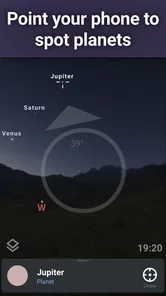
A realistic use is stepping outside after dinner, noticing a bright object near the horizon, and using the map to work out whether you are looking at a planet or a star. I’d first check the direction I’m facing, then move the phone slowly rather than sweeping it around; that makes it easier to connect the screen to the actual patch of sky. Once I find the object, its information can turn a quick identification into a small learning moment.
The app is particularly appealing if you enjoy asking “what am I looking at?” but don’t want to start with astronomy textbooks or complicated charts. It also works well for sharing the sky with a curious child or friend: identify one constellation together, then look for it without staring at the phone the whole time. Its Everyone age rating suits that kind of casual, shared use, though younger children will still benefit from an adult helping them orient the map.
Choosing it over a basic sky chart
Compared with a static star chart, this app is more immediate: the map responds to where you point your phone, and the time-shifting option makes it possible to explore how the sky changes. A printed chart can be easier on the eyes and never needs a charged phone, so I would still take one on a long outing as a backup. A general-purpose weather app may help decide whether it is worth going outside, but it cannot replace a dedicated sky map for identifying objects.
There is a useful trade-off here. Phone-based orientation makes discovery approachable, but it can also distract from the sky if you leave the display open while observing. I use the screen to locate an object, note its position, then lower the phone and look directly. Red night mode is helpful for reducing the harshness of a bright display, but it does not make a phone screen invisible in darkness; dimming it further and limiting checks can help preserve the night-viewing experience.
Small habits that make it more useful
If the map seems hard to match to what you see, pause and compare a few prominent stars rather than trying to identify everything at once. Light pollution can hide faint objects even when they appear on the screen, so I treat the map as a guide to direction and context, not a promise that every displayed object will be visible from my location. For a better first session, choose a clear view of the sky and begin with an easily recognizable bright object before exploring dimmer targets.
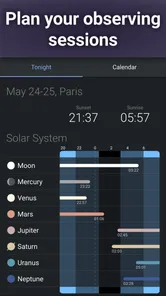
The time controls are also more useful as a planning and learning tool than as a substitute for watching outdoors. I can use them to see where a constellation will be later, then return to the present sky before heading outside. That simple sequence helps answer a practical question—when and where to look—without turning the session into endless screen browsing. If your main goal is a fast forecast of clouds or a guided observing program, another kind of app may suit you better; this one is strongest when you want to identify and explore celestial objects.
More From Our News Desk

 Gmail
GmailGmail in a Busy Inbox: Who Benefits Most?
From first account to crowded workday, Gmail earns its place through dependable search and flexible sorting—but its best fit depends on how much inbox maintenance you can tolerate.

 Prime Video
Switching to Prime Video: What Changes in Your Viewing Routine
Prime Video can make a compelling second home for streaming, but switching means learning a different catalog, rental layer, and route from browsing to playback.

 Universal TV Remote Control
Universal TV Remote Control Works Best as a Reliable Backup
A phone remote earns its place through quick setup and reliable habits. Here is how to get more from Universal TV Remote Control—and where its limits show.

 Weather - By Xiaomi
Weather by Xiaomi Review: Clear at a Glance, Less Clear Up Close
Xiaomi’s weather app makes everyday forecasts quick to scan, but its calm surface can leave useful details and recovery paths harder to find than they should be.

 X
XX Under Pressure: Can It Recover When Posting Goes Wrong?
A resilience-focused review of X, examining setup, mistaken posts, interruptions, weak connections, and the gaps that matter when recovery needs to be dependable.

 Clash of Clans
Clash of Clans Is Won Between the Battles
Its raids are quick; its community is a long-term project of coordination, teaching, rivalry, and shared responsibility—with all the friction that entails.
Latest News



A simple routine for a better first night
I find it helps to decide on one question before opening the map. If I am trying to identify a bright point, I check the app, note its direction and nearby stars, and then close or lower the screen while I look up. If I am exploring a constellation, I use the map to learn its outline first, then search for its brightest stars in the real sky. These small steps keep the app from turning an outdoor moment into a long phone session.
For a family outing, I would take turns choosing one object to find rather than letting everyone crowd around the display. One person can point out the object on the map, another can trace the pattern overhead, and then the phone can go away for a minute while everyone looks. It is a modest change, but it shifts the activity from reading labels to noticing how the sky is arranged. The same approach works for a solo walk: use the app as a guide, not as the destination.
When another tool may be a better fit
The closest alternative is not always another astronomy app. A printed chart is better when I want to keep a screen out of a dark-adapted observing session, while a telescope’s own finder or observing plan may be more useful for someone who already knows what target they want. A weather app answers whether clouds might interfere, but not what a particular object is. Stellarium Mobile sits between those tools: it is for orientation and discovery, rather than forecasting, equipment control, or a structured course in astronomy.
That distinction helps set expectations. Beginners who want instant names for prominent objects will likely appreciate the phone-based map; experienced observers may use it as a quick reference but still prefer a chart or a more specialized planning workflow for a focused session. If you mainly want guided lessons, quizzes, or a step-by-step curriculum, this is not the strongest match. Its educational value comes through exploration and identification, not through replacing a full astronomy class.
Exploring the Cosmos with Ease
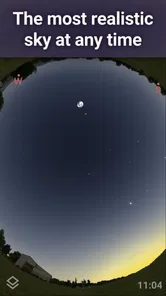
Upon launching Stellarium Mobile - Star Map, you're immediately immersed in a stunningly realistic star map. The first thing that struck me was the app's beautifully detailed sky simulation. It's almost as if you're standing in the middle of a clear field on a perfect night. The interface is user-friendly, allowing even the most amateur stargazers to navigate the cosmos effortlessly.
Features That Shine
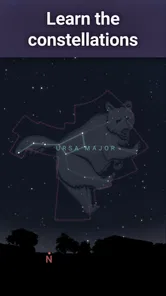
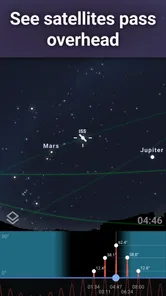
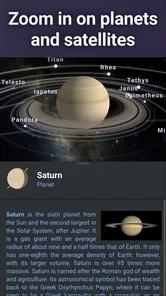
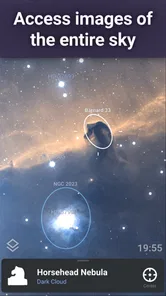
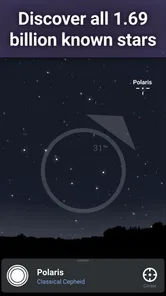
This app is packed with features that make stargazing a breeze. With just a simple tap, you can identify planets, stars, and constellations in real-time. You can even track satellites and discover deep-sky objects like nebulae and galaxies. One of the coolest features is the Time Travel option, allowing you to see the sky at any point in the past or future. It's like having a time machine for the cosmos!
Another standout feature is the Night Mode, which bathes the screen in a soft red hue to preserve your night vision. Trust me, when you're out in the dark trying to spot the Big Dipper, this feature is a lifesaver.
Personal Experience
As someone who loves spending time outdoors, Stellarium Mobile - Star Map has become my go-to app for camping trips and late-night adventures. It's incredibly satisfying to point your phone at the sky and finally put a name to those mysterious celestial bodies. Plus, the app’s educational aspect is a bonus, offering detailed information about whatever you’re looking at.
What to expect from the current version
The app is free to start, with optional in-app purchases ranging from around two dollars to around twenty dollars per item. Its current version is 1.15.1, and it has been available since December 2020. I see those details as useful context rather than a reason to assume every update has changed the experience in a particular way: the version number identifies the current release, but it does not tell me which features changed between releases. The core appeal remains the combination of an interactive sky map and accessible object identification.
For existing users, a newer version number is a reason to check the update notes before expecting a specific improvement. I would also check which optional purchase, if any, matches the way I use the app instead of assuming that every capability requires payment or that every feature is included at no cost. With a 4.8 average from around 282,000 ratings and over 10 million installs, it clearly has a broad audience, but popularity cannot tell you whether its particular interface feels right for your observing habits.
Where the experience has limits
The realistic display is a strength, but it can make the first session feel busy if you are only trying to identify one bright object. I’d keep the goal small: find a planet, learn one constellation, or check a satellite, then explore further when you have more time. The app can show what is in a region of the sky, but local haze, buildings, and bright streetlights still decide what your eyes can actually see. That difference matters most when you are trying to find faint deep-sky objects from a city.
I also wouldn’t choose it as my only tool for a serious observing plan. If I need a paper-free, detailed digital map, it is a convenient companion; if I need to preserve dark adaptation for a long session, a printed chart may be more comfortable. The best choice depends on whether quick identification or uninterrupted observing matters more to you. Keeping that distinction in mind makes the app’s strengths clearer and prevents the screen from becoming the main event.
Who will get the most from it
I would recommend it first to curious beginners, casual backyard observers, and anyone who likes learning by asking questions in the moment. It is also a handy companion for a camping trip when the sky is unfamiliar and you want a quick orientation before settling in. People who already have a preferred observing routine can still find it useful for checking what is above them, but they may not need to keep it open throughout a session.
On the other hand, I would skip it if my priority were a long, screen-free observing session or a tightly structured lesson plan. The app encourages exploration, which is a strength for casual learning but may feel less directed to someone who wants a sequence of lessons or a checklist of targets. Likewise, people expecting a map to make faint objects visible in a bright urban sky may be disappointed: it can help locate and understand objects, but it cannot change local viewing conditions.
Practical questions before installing
Is it useful indoors? Yes, especially for exploring how the sky is arranged or using the time controls to understand when a constellation will be in a different position. I find that indoor browsing is most rewarding when I have a question to investigate; otherwise, the detailed display can encourage aimless tapping. For actual observing, I still get the most value by taking the phone outside briefly and comparing its map with the sky.
Does the app work for someone with no astronomy background? I think so: starting with a bright object and following the nearby pattern is far less intimidating than beginning with a dense chart. Can it replace a telescope or binoculars? No; it helps identify and locate objects, while optical equipment serves a different purpose. And do I need to pay to try it? It is free to start, with optional purchases, so I would explore the basic experience first and only consider an extra if it clearly supports the way I plan to use it.
The experience for returning users
For someone who already knows the app, the main question is not simply whether the release number has changed, but whether the current version fits their routine. I would check the release notes when updating, then test the functions I rely on before heading out for a planned night. That is a sensible habit for any sky tool: a familiar interface can be comforting, but it is better to verify the details of a workflow at home than discover a change while standing outside in the dark.
The developer, Stellarium Labs, has built an app that makes an interactive sky map approachable without making its purpose vague. The most useful measure of progress for me is whether it continues to help me move from screen to sky: recognize a pattern, identify an object, and then look up with more confidence. I would watch future releases for improvements that make that handoff clearer, while treating any specific feature change as something to confirm from the release notes rather than assume.
Personal Experience
What’s more, the app runs smoothly without any annoying lags or crashes, which is always a plus. Whether you’re a seasoned astronomer or just someone who loves looking at pretty stars, this app caters to all levels of interest.
The Final Frontier
In conclusion, Stellarium Mobile - Star Map is a must-have app for anyone with even a passing interest in astronomy. It's not just an app; it's a gateway to the stars. Whether you're planning a night under the stars or just curious about the night sky, this app provides a fun, educational, and immersive experience that’s hard to beat. So next time you find yourself under a starry sky, whip out your phone, open the app, and let the universe come alive in your hands.
Stellarium - Star Map Frequently Asked Questions
Can Stellarium Mobile help me plan a stargazing session before I go outside?
Yes. Stellarium Mobile is a realistic sky map for exploring stars, planets, satellites, and constellations, so you can use it to get acquainted with what may be visible in the sky. Its educational focus also makes it useful for learning the names and positions of celestial objects before heading outdoors. The app is most rewarding when you take time to explore the map and compare it with the sky around you.
Can I use Stellarium Mobile to identify satellites as well as stars and planets?
The app’s description includes satellites alongside stars, planets, and constellations as objects to observe with its sky map. That makes it relevant if you want to explore more than familiar bright stars or learn what you are looking at overhead. As you use it, the map provides an approachable way to connect celestial objects with the view of the sky, whether you are learning on your own or sharing the experience with someone else.
Is Stellarium Mobile - Star Map free to download?
Stellarium Mobile is free to download, so you can try its sky map without paying upfront. It also offers in-app purchases, with items priced from $1.99 to $19.99. The app is rated for Everyone, making it suitable for a broad audience. You can start with the core experience and decide whether the optional purchases are useful for the way you explore the sky.
Who makes Stellarium Mobile, and is it a popular app?
Stellarium Mobile is developed by Stellarium Labs and belongs to the Education category. It has an average rating of 4.8 from around 282,000 ratings, with about 11,000 written reviews and over 10 million installs. Those figures suggest that it has reached a large audience of people interested in exploring the night sky, though your experience will depend on what features you want from an astronomy app.
What is Stellarium Mobile - Star Map and what does it offer?
Stellarium Mobile - Star Map is a comprehensive astronomy app designed for both amateur and seasoned stargazers. It offers a realistic 3D simulation of the night sky, complete with stars, planets, and constellations as seen from any location on Earth. The app provides detailed information on celestial objects and includes features like a night mode, augmented reality support, and a time-lapse function to track sky movements.
Pros
- Highly detailed star maps
- User-friendly interface
- Real-time sky simulation
- Offline mode available
- Educational features included
Cons
- Requires GPS for full features
- Can drain battery quickly
- Premium features are paid
- Steep learning curve for novices
- Large app size












