Staples - Deals & Shopping
- 896.00
- 3.1
- Installs
- 1.00M
- Price
- Free

Screenshots

Analysis by Reviewed
I find a retailer’s shopping app most useful when it solves a specific errand rather than asking me to browse endlessly. Staples can fit that role for a household that regularly needs office or school supplies, printer essentials, or work gear. I’d treat it as a practical way to check options and shop, not as a reason to buy things just because a deal catches my eye.
A shared shopping trip needs a little planning
Picture one person at home noticing that the printer is nearly out of paper while another is preparing for a school project. A shared note with the exact items, preferred sizes, and any must-have details can make browsing in the app more purposeful. I’d search for those items first, then look at offers and recommendations; that order helps keep a discount from steering the household toward something it never needed.
For shared devices, I’d keep the shopping account tied to the person responsible for placing orders and reviewing payment and delivery details. Someone else can help compare products, but they should avoid completing a purchase through an account they do not manage. That simple boundary is useful in any retailer app, especially when a device is passed among adults or older children.
Use the deals without letting them run the list
Staples is a business-category app from Staples Inc, and its focus makes it more relevant to recurring work and school errands than to general household shopping. The app is free, has an Everyone age rating, and is on its fifth-point-sixteen-point-zero version. It has reached over one million installs, while its average rating is three out of five from around one thousand two hundred ratings. I’d read that middling score as a reason to judge the experience against my own needs rather than assume every shopper will find it equally smooth.
One useful habit is to compare the item you actually need with the deal in front of you before checking out. A promotion only helps if the product suits the job, and recommendations based on browsing can be convenient while also nudging you toward extras. I’d review the cart as a household list: confirm quantities, check that everyone’s requested item is included, and remove anything that appeared only because it looked like a bargain.
When I’d choose it—and when I wouldn’t
The strongest fit is someone who already shops at Staples and wants a phone-based route to its products, offers, and checkout. If I needed a particular office item quickly, I’d use search rather than browse broadly, then check the order details before submitting. Someone who mainly wants groceries, clothing, or a broad comparison across many retailers may be better served by a general shopping app or by comparing stores directly.
For a typical weekday, I can see the app helping when a printer starts running low just as a school assignment is due. I’d add the paper or ink to a list, ask the person who knows the printer model to confirm the exact requirement, and then search for that item rather than guessing from a thumbnail. That small pause matters: printer supplies can look similar while fitting different equipment, and an attractive offer is no help if the product is incompatible.
More From Our News Desk

Weather by Xiaomi Review: Clear at a Glance, Less Clear Up Close

X Under Pressure: Can It Recover When Posting Goes Wrong?

Clash of Clans Is Won Between the Battles

Android Auto Makes the Case for Quieter Car Software

MobiOffice: Transforming Mobile Productivity with Seamless Integration

EA SPORTS FC™ Mobile Soccer: Redefining Mobile Sports Gaming
It also gives a household a useful way to divide the work without handing everyone control of the purchase. One person can collect requests and check the product details; the account holder can review the complete cart and handle the order. I prefer that arrangement to passing a phone around with a payment method already saved, because it makes responsibility for quantities, delivery details, and the final decision clear.
Compared with a broad marketplace, Staples is a narrower destination. That can be an advantage when I already know I need a work or school item and want to look within a familiar retailer, but it is less suited to checking many sellers for the same product. A general shopping app may be better for price comparison across retailers; a store’s own app makes more sense when I want to shop that store specifically. I’d decide based on the errand, not assume one app must handle every purchase.
Hey there, shopping enthusiasts! If you’re anything like me, constantly on the lookout for the best deals and seamless shopping experiences, then let’s talk about the Staples - Deals & Shopping app. It’s your one-stop-shop for everything from office supplies to tech gadgets, and honestly, it’s a game changer.
Browsing and Buying Made Easy
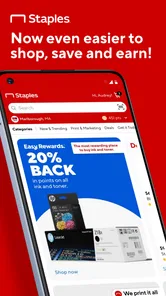
First off, let’s chat about the user interface. The Staples - Deals & Shopping app is clean, intuitive, and pretty much idiot-proof. Whether you’re tech-savvy or not, navigating through the app is a breeze. You can search for specific items or casually browse through categories. It’s like having the entire Staples store in your pocket, minus the hassle of dealing with other shoppers.
Features That Stand Out
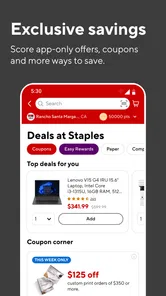
If you’re someone who loves a good bargain, this app is going to be your new best friend. The deals section is constantly updated, ensuring you’re always in the loop about the latest discounts. Plus, the app notifies you about exclusive online offers, so you never miss out.
I’d use the offers as a second step, after identifying what the household actually needs. For recurring supplies, it can help to note the product name and any important specifications somewhere everyone can see, rather than relying on memory when a notification appears. That is particularly handy when more than one person buys supplies: a clear reference reduces the chance of ordering a near-match that does not suit the task.
Another practical trade-off is attention. Notifications can be useful when I am already planning a purchase, but they can also interrupt or encourage browsing when there is no real need. I would keep my routine simple: check deals when I have an errand in mind, and ignore them when I do not. The app is more helpful as a shopping tool than as a reason to shop more often.
Another feature worth mentioning is the easy checkout process. No more fumbling with multiple tabs and windows; everything is streamlined. You can even save your payment methods and shipping details for faster checkouts in the future. Talk about convenience!
Saved details are convenient, but they make account boundaries more important on a shared phone or tablet. I’d avoid treating the device itself as proof that everyone using it should be able to place an order. Before checkout, the account holder should verify the delivery information and the full cart, especially if several people contributed requests or a younger family member helped with browsing.
Personalized Shopping Experience
One of the coolest things about the app is how it personalizes your shopping experience. Based on your searches and purchases, it offers recommendations that actually make sense. It’s like having a personal shopper who knows you inside out. I’ve discovered so many useful products this way that I wouldn’t have found otherwise.
Recommendations are most valuable when they fill a genuine gap, such as suggesting a related supply I had overlooked. I still treat them as suggestions rather than a checklist. For a household trying to avoid duplicate purchases, it is worth asking whether an item is needed now, already on hand, or merely related to something recently searched. That quick check keeps a tailored feed from quietly expanding the order.
Household verdict: useful with clear boundaries
For a household, I’d use the app as a shared reference point for Staples purchases, not as a shared account everyone can order from casually. Before a family member checks out, agree on who is responsible for the account and final order review. That keeps saved payment and shipping details under the account holder’s control and makes it easier to catch duplicate supplies or an incorrect quantity.
For coordination, a written list works better than a chain of vague messages such as “get paper” or “we need folders.” I’d include the intended use and any size, format, or device detail that affects the choice. Then the person placing the order can resolve ambiguities before adding anything to the cart. It is a modest habit, but it makes a retailer app far more useful for shared errands.
If several people in the household need to contribute, I would not assume the app will manage approvals or separate everyone’s shopping responsibilities for us. I’d coordinate outside the checkout flow: gather requests first, settle substitutions with the person who asked, and keep one adult responsible for submitting the order. A family that needs separate spending limits or a dedicated shared-list system may be better off using tools designed around those needs.
The app is intended for Everyone, but that age label does not replace adult judgment around account access, purchases, or saved details. I’d let a younger family member help find an item or compare options while keeping checkout with the adult managing the order. There’s no need to assume that an age rating creates household controls; sensible supervision and a clear division of responsibility matter more.
That distinction also helps set reasonable expectations for children who want to help with school shopping. They can describe what a project requires or point out a preferred item, while an adult checks whether it is appropriate, needed, and within the household’s plan. The age designation describes the app’s content context; it should not be treated as permission for unsupervised purchases.
What to expect from repeat use
The app was released on November seventh, two thousand twenty-two, and it has seven hundred forty-nine reviews alongside its ratings. Those figures give a little context, but they don’t tell me whether it will suit my own shopping habits. I’d try it for a planned Staples errand first, then decide whether its search, offers, and checkout feel worthwhile in everyday use.
Staples Inc is the developer, and the app’s business focus is reflected in the kind of errand I’d bring to it: restocking work supplies, looking for school materials, or checking an office-related product. Its minimum operating-system requirement is Android four-point-four, which makes it relevant to some older Android devices, though I would still check that the app runs properly on the particular phone I plan to use.
For repeat shopping, I’d keep a short household list outside the app and use the app to verify products and build the order. That makes it easier to compare similar items without relying entirely on recommendations shaped by past browsing. If the offer notifications feel distracting, I’d treat them as prompts to check only when I’m already planning a purchase, rather than letting them set the timing or contents of the cart.
One question people often have with a store app is whether it is useful only for browsing or also for completing a purchase. Here, shopping and checkout are part of the intended experience, so I’d use it when I am ready to make a Staples order rather than as a passive catalogue. I would still take a moment to review the final details before submitting, since a quick mobile checkout can make it easy to overlook a mistaken selection.
Another is whether it replaces comparing prices elsewhere. I would not count on a retailer-specific app to provide a complete view of the market. If the exact item, brand, or total cost matters more than convenience, I’d compare options through other retailers before deciding. If I already know Staples is where I want to shop, the app is a more direct route to checking its selection and offers.
Why You’ll Love It
In today’s fast-paced world, having an app that meets all your shopping needs while saving you time and money is like hitting the jackpot. The Staples - Deals & Shopping app does just that. It offers a seamless, personalized, and efficient shopping experience. Plus, with its constant updates and deals, you’re not just shopping; you’re smart shopping.
I’d soften that enthusiasm for anyone who expects a single app to cover every kind of household purchase. Its clearest value is when the errand is specifically about Staples products. If I want broad retailer comparisons, a neutral price-comparison approach is more suitable; if I do not shop at Staples regularly, there may be little reason to keep a dedicated shopping app on my phone.
So, if you haven’t already, give it a whirl. Download the app, explore its features, and start enjoying a hassle-free shopping experience. Trust me, once you go digital with Staples, you won’t want to go back!
My take after weighing the trade-offs
For me, the most sensible reason to keep it is a recurring need for Staples products: search and checkout can make a planned restock less fussy, while offers may help when they happen to match the list. The trade-off is that retailer-specific shopping is naturally less useful when I want to compare a wide range of sellers or shop for unrelated household categories. I’d use it as one focused tool, not as my only shopping app.
I’d also judge it by how well it fits the way my household actually buys supplies. A person who shops for office or school needs now and then may find it handy for a single planned order, while someone who rarely needs Staples products may prefer to shop through a broader retailer they already use. And for people who want to keep every purchase in one place across many stores, a general marketplace will be the more convenient hub.
Would I recommend it to everyone in a household? No. I’d recommend trying it if one person regularly handles Staples orders and the rest can share a clear list of what they need. If several people expect separate accounts, broad retailer comparisons, or a fully managed family-shopping setup, I’d choose a different approach. Used with a simple account boundary and a final cart check, it can be a convenient option for the right kind of errand.
Staples - Deals & Shopping Frequently Asked Questions
Who develops Staples - Deals & Shopping, and what is the app for?
Staples - Deals & Shopping is a business-category shopping app developed by Staples Inc. Its short description is simply “Staples,” while its store summary is “Shop, earn and save.” It is intended for people who want to shop for Staples products and access shopping-related features from a mobile device. The app is free to download and is rated for Everyone.
What features does the Staples - Deals & Shopping app offer?
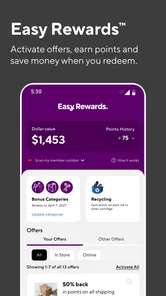
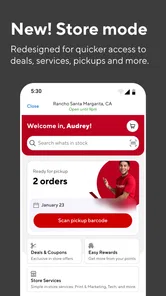
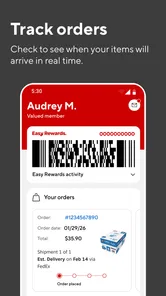
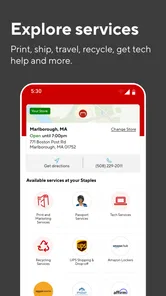
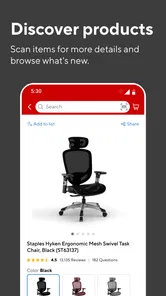
The Staples - Deals & Shopping app provides a seamless shopping experience for users looking for office supplies, electronics, furniture, and more. It features exclusive deals, coupons, and the ability to check product availability at nearby stores. Additionally, users can create shopping lists, track orders, and enjoy a personalized shopping experience through the app.
How user-friendly is the Staples - Deals & Shopping app?
The Staples app is designed with user-friendliness in mind, offering a clean and intuitive interface. Users can easily navigate through categories, view detailed product descriptions, and make purchases with just a few taps. The app also supports easy account management and provides notifications for deals and order updates, enhancing the overall user experience.
Are there any exclusive benefits for using the Staples app?
Yes, the Staples app offers several exclusive benefits to its users. App users can access special deals and discounts not available elsewhere, such as app-only coupons. Additionally, the app provides a more personalized shopping experience, including tailored recommendations and early access to sales events, making it a valuable tool for frequent shoppers.
Is it safe to shop through the Staples - Deals & Shopping app?
Shopping through the Staples app is safe and secure. The app implements robust security measures to protect user data and transactions. It uses encryption technologies and secure payment gateways to ensure that personal and financial information remains confidential. Users can shop with confidence knowing that their data is protected.
Pros
- Easy navigation and user-friendly interface.
- Exclusive in-app deals and discounts.
- Secure and multiple payment options.
- Quick access to order history and tracking.
- Comprehensive product search functionality.
Cons
- Requires account creation for full access.
- Occasional app freezes reported.
- Limited customer support options.
- In-app ads can be intrusive at times.
- Some items may be out of stock.











