

StaffTraveler
- 915.00
- 4.7
- Installs
- 100.00K
- Price
- Free

Screenshots



Analysis by Reviewed
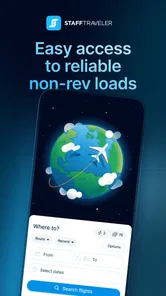
For airline staff and other eligible non-revenue travelers, StaffTraveler is the kind of app that can turn a vague travel plan into a more informed decision. I found its purpose refreshingly narrow: it focuses on helping users check flight-load information quickly rather than trying to become a complete booking, airport, or itinerary platform. That focus matters when I am deciding whether to try a particular flight, wait for another option, or avoid a risky connection altogether.
StaffTraveler is a free Travel & Local app from StaffTraveler Solutions B.V., aimed at people who travel on staff or non-revenue benefits. It is available to everyone by age rating, but its practical value is clearly tied to a very specific travel situation. A regular leisure traveler looking for public fares will not get much from it. Someone who regularly depends on open seats, however, may find it far more useful than a general flight-search app.
How the app feels when connectivity matters
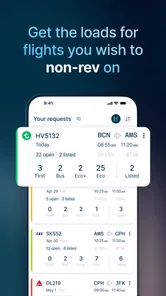
The central experience is built around requesting and viewing flight-load information. That makes the network connection part of the workflow, not a minor convenience. When I am standing in a terminal, changing plans from a hotel room, or trying to make a decision before leaving for the airport, the app is most valuable when it can quickly send a request and return current information.
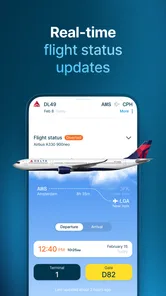
This also creates an important distinction between the app and a normal airline timetable. A timetable can tell me when a flight is scheduled. StaffTraveler is useful for a different question: whether attempting that flight makes sense for a non-revenue traveler. Those two pieces of information work together, but they are not interchangeable. A scheduled departure alone does not tell me how sensible a standby attempt may be.
I would not treat a displayed load response as a guaranteed seat. It is better used as decision support. Even a favorable indication can sit inside a complicated travel day involving check-in deadlines, aircraft changes, operational disruption, priority rules, and onward connections. My best use of the app is therefore comparative: I check several possible flights, consider the connection risk, and choose the plan that gives me the most practical flexibility.
Why a fast response changes the decision
Speed is especially important when plans are moving. If I am already at the airport and a first-choice flight looks uncertain, I may have only a short window to consider another departure. In that moment, opening a general search engine, checking public availability, and trying to translate that into a non-revenue decision is often less direct. The app’s specialized purpose keeps the question focused.
That focus is one of its strongest advantages over ordinary travel tools. Flight-search apps are excellent for comparing public fares, schedules, and routes, but they are not designed around staff travel. StaffTraveler is not a replacement for those tools; it fills a different gap. I use a normal airline or booking app for the timetable and route, then use this app to inform the staff-travel choice.
More From Our News Desk

 Weather - By Xiaomi
Weather by Xiaomi Review: Clear at a Glance, Less Clear Up Close
Xiaomi’s weather app makes everyday forecasts quick to scan, but its calm surface can leave useful details and recovery paths harder to find than they should be.

 X
XX Under Pressure: Can It Recover When Posting Goes Wrong?
A resilience-focused review of X, examining setup, mistaken posts, interruptions, weak connections, and the gaps that matter when recovery needs to be dependable.

 Clash of Clans
Clash of Clans Is Won Between the Battles
Its raids are quick; its community is a long-term project of coordination, teaching, rivalry, and shared responsibility—with all the friction that entails.

 Android Auto
Android Auto Makes the Case for Quieter Car Software
The car interface is no longer judged by how much it can do, but by how quietly it helps. Android Auto shows what drivers now expect—and what still gets in the way.

 MobiOffice: Word, Sheets, PDF
MobiOffice: Transforming Mobile Productivity with Seamless Integration
MobiOffice: Word, Sheets, PDF is redefining mobile productivity with a surprising blend of functionality and innovation.

 EA SPORTS FC Soccer Mobile 26
EA SPORTS FC™ Mobile Soccer: Redefining Mobile Sports Gaming
Dive into EA SPORTS FC™ Mobile Soccer, where immersive gameplay and strategic depth transform mobile sports gaming.
Latest News



There is also a useful psychological benefit. When a travel plan depends on uncertain space, having a current load request can prevent me from relying entirely on guesswork or hearsay. It does not remove uncertainty, but it gives me a more organized way to manage it. That is a meaningful difference on a long journey, where one poor decision can create an expensive or exhausting chain of alternatives.
Using it in real mobile situations
The app makes the most sense on a phone because the decisions it supports happen away from a desk. I can imagine using it while walking through a terminal, sitting near a gate, waiting for transport, or reviewing options before leaving home. Those situations reward a simple interface and short interactions. I do not want to build a complicated spreadsheet while carrying luggage.
At the same time, airport connectivity is not always dependable. A crowded terminal, a basement area, a moving vehicle, or an international connection can make a request slower than expected. I would check important information before I am under time pressure whenever possible. If I know I may need a backup flight, I would review the alternatives while I still have a stable connection rather than waiting until boarding is close.
This is one of the app’s less obvious practical lessons: connectivity affects not only whether information appears, but also when I should make the request. A person who waits until the last possible minute is taking a technical risk on top of the travel risk. A few minutes of preparation can make the difference between calmly comparing choices and scrambling through an airport with no clear plan.
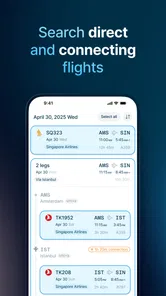
For a short trip, I would use it before leaving for the airport and again when circumstances change. For a multi-leg itinerary, I would check the important sectors separately rather than assuming that one successful segment makes the rest of the journey safe. A weak second leg can undermine an otherwise attractive first flight, especially when the connection leaves little room for recovery.
What I would do when a request fails
Any connectivity-dependent travel app needs a recovery habit, and this one is no exception. If a request does not load, I would first move to a place with a stronger connection, switch between available network options, and try again without repeatedly tapping the same control. If the airport is busy, a small change of location can sometimes be more useful than spending several minutes staring at an unchanged screen.
I would also keep the surrounding travel details available outside the app: flight numbers, departure times, terminal information, and a short list of backup routes. This is not because the app is ineffective; it is because non-revenue travel already involves uncertainty. A single tool should inform the plan, not become the entire plan. Writing down the most important alternatives is particularly sensible before entering an area where reception may be poor.
When information arrives later than expected, I would avoid interpreting the delay as a positive or negative load result. A missing response is not the same thing as a bad flight. The correct recovery is to restore the connection, verify the request, and use another source for schedule or airport details while waiting. Keeping those questions separate prevents a technical problem from turning into a rushed travel decision.
Another practical point is timing. A load check made hours earlier may be less useful when the departure is approaching and the situation has changed. I prefer a layered approach: check early to understand the shape of the options, then check again closer to the decision point if the connection is reliable. That gives me context without pretending that an earlier result is a permanent promise.
Managing data and battery on the move
I would not expect a load-checking app to consume the same resources as a video service, but mobile travel still rewards restraint. I would avoid repeatedly refreshing out of anxiety, especially on cellular data or while the phone battery is low. A better routine is to decide which flights genuinely matter, request information for those, and compare the results before making another request.
This selective approach is more than a data-saving trick. It also makes the information easier to interpret. If I request every possible flight without a clear plan, I can end up with a pile of results but no decision framework. I get more value by separating options into categories: preferred departure, realistic backup, and last-resort route. Then I can spend attention where it affects the journey most.
Before leaving for the airport, I would charge the phone and keep a written or remembered outline of the route. If I am traveling internationally, I would be particularly careful about when I use mobile data and would prefer a trusted connection for non-urgent checks. The app’s usefulness depends on access to current information, so preserving enough battery and connectivity for the important moment is part of using it well.
I also like the idea of treating connectivity as a planning resource rather than assuming it will always be available. If I have a stable connection at home or in a hotel, I would use that time to understand the available choices. At the airport, I would reserve mobile use for updates and decisions. This habit reduces unnecessary refreshing and leaves more room for communication, boarding information, and other travel needs.
Where the app earns its place
The app is strongest for people who repeatedly travel on a non-revenue basis and need a dedicated way to investigate flight loads. Its average rating of 4.7 from around 4.2 thousand ratings suggests that many users find the focused workflow worthwhile, and its install count has passed 100 thousand. Those figures do not guarantee that it will fit every traveler, but they do match my impression of a specialized tool with a clear audience.
The free starting price also lowers the barrier to trying it. However, the app includes optional in-app purchases ranging from $0.99 to $49.99 per item, so I would pay attention to what I am selecting before confirming any purchase. For an occasional staff traveler, the value will depend on how often the app’s information changes a decision. For someone who flies standby regularly, paying for useful requests may make more sense than for a person who uses the app once or twice a year.
That is an important trade-off. The app is not automatically valuable simply because it is free to install. Its real value comes from avoiding poor choices, saving time, and making a complicated staff-travel process easier to manage. If I rarely travel non-revenue, I might be better served by the airline’s own employee resources and a standard flight-search app. If standby travel is a normal part of my life, this specialized workflow is much easier to justify.
Limits I would keep in mind
The biggest limitation is the nature of the information itself. A load indication can improve my odds of choosing wisely, but it cannot turn a standby journey into a confirmed reservation. I still need to understand my employer’s travel rules, airport procedures, connection requirements, and the consequences of being unable to board. Anyone expecting certainty will probably be disappointed.
The second limitation is dependence on timely connectivity. If I cannot reach the service when I need it, the app cannot provide much immediate help. That makes preparation important, particularly for travelers moving through airports with unreliable reception or for those who plan to make decisions only after reaching the gate. I would not build a route with no backup simply because the app showed an encouraging result earlier.
There is also a learning curve for people unfamiliar with staff travel. A public traveler may open the app and still not know how to translate a load response into a sensible route choice. In that case, the app works best alongside knowledge of the relevant airline process or advice from experienced colleagues. It provides specialized information, but it does not replace judgment.
The current version is 3.24.0, and the app has been available since June 13, 2016. That history gives it the feel of an established product rather than a brand-new experiment, while the redesigned experience aims to make the central task quicker. I still recommend checking the app before a major trip so I can become comfortable with the workflow while I have time, instead of learning it during a stressful connection.
Who should install it, and who should skip it?
I would recommend it to airline employees, eligible family members, and other travelers who genuinely use non-revenue benefits and need a practical way to assess flights. It is particularly useful for people who compare several departures, travel through busy hubs, or regularly face the choice between a direct flight and a less convenient route with better prospects.
I would skip it if I only buy confirmed public tickets, need hotel or rental-car booking, or want a complete vacation planner. Those are not the problems this app is designed to solve. A public fare-comparison service will be more relevant for ordinary ticket shopping, while an airline’s own app may be better for confirmed booking, check-in, and official itinerary management.
I would also be cautious about recommending it to someone who dislikes making flexible travel plans. Staff travel can involve waiting, changing routes, and accepting that a good-looking option may not work. The app can make that uncertainty more informed, but it cannot remove the need for patience. If a traveler needs a guaranteed arrival time for a work meeting, cruise departure, wedding, or medical appointment, a confirmed booking is usually the more sensible choice.
My connectivity-focused verdict
After looking at how it fits into real travel, I see StaffTraveler as a focused companion rather than a universal flight app. Its best quality is that it addresses a question ordinary travel tools largely ignore: how promising a flight may be for someone traveling on staff or standby. The experience is most effective when I use it early enough to compare options, keep backup plans ready, and remember that a load result is guidance rather than a promise.
The connection requirement is both its practical strength and its main weakness. Current information is valuable precisely because it can influence a live decision, but that also means I should not wait until the last minute or rely on a single result. With a charged phone, a sensible backup plan, and selective requests, the app becomes much more useful than its narrow description might suggest.
For the right audience, I would recommend giving it a try. StaffTraveler Solutions B.V. has built a tool around a specific and genuinely difficult travel problem, and the free entry point makes experimentation straightforward. My final advice is simple: use it to compare possibilities, combine it with official travel information, and plan for the moments when the network or the flight does not cooperate. That mindset lets the app reduce uncertainty without pretending it can eliminate it.
StaffTraveler Frequently Asked Questions
Who develops StaffTraveler, and what kind of app is it?
StaffTraveler is a Travel & Local app developed by StaffTraveler Solutions B.V. Its focus is non-revenue travel, helping eligible airline staff check flight-load information and plan standby journeys. The app is free to download, with in-app purchases available. It is rated for Everyone, so its content rating is suitable for a broad audience.
What is StaffTraveler and who can use it?
StaffTraveler is a travel information app designed mainly for airline employees, crew members, and eligible staff traveling on standby or non-revenue tickets. It helps users check expected seat availability and receive travel-related information before heading to the airport. Access to some features may depend on your airline, staff-travel eligibility, and the information provided by other users or participating sources.
How does StaffTraveler help with standby travel?
The app allows eligible users to request load or seat-availability information for specific flights and dates. This can make it easier to compare travel options and decide whether a particular flight is worth attempting. However, the information should be treated as an estimate rather than a guaranteed seat. Aircraft changes, last-minute bookings, operational requirements, and airline policies can affect the final availability.
Is StaffTraveler free to download and use?
StaffTraveler is free to download, but in-app purchases are available for users who need additional access or features. Review the purchase options shown in the app before making a transaction, especially if you expect to submit requests frequently. The price of in-app items can range from $0.99 to $49.99, so consider your likely use before buying.
Can StaffTraveler guarantee that I will get a seat on a flight?
No. StaffTraveler provides travel information and availability estimates, but it cannot guarantee boarding, a confirmed seat, or a successful standby journey. Final decisions are made by the airline according to its staff-travel rules, passenger loads, operational needs, priority systems, and airport procedures. Always verify the latest information with your airline before traveling and keep an alternative plan available.
Pros
- Shows standby loads and seat availability for many airlines.
- Useful for planning trips before heading to the airport.
- Lets eligible airline staff request reports from other employees.
- Reports can help compare alternative flights quickly.
- Travel details and requests are organized in one place.
Cons
- Availability depends on employees responding to each request.
- Some reports may become outdated as flights fill up.
- Access is limited to eligible airline and aviation staff.
- The app may not cover every airline or route you need.
- Repeated requests or extra features may require payment.











