

Staff Airlines: Non-Rev Travel
- 20.00
- 3.0
- Installs
- 50.00K
- Price
- Free

Screenshots

Analysis by Reviewed
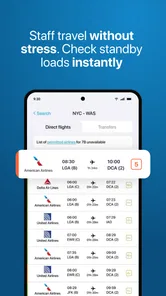
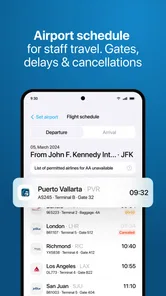
Staff Airlines: Non-Rev Travel is a focused travel app for airline employees who need a practical way to check standby travel information. I approached it less like a general trip planner and more like a working tool for a non-revenue traveler: something to open when a possible flight is on the table, compare available options, and decide how much uncertainty I am willing to accept. That narrow purpose is its biggest strength, but it also explains why it will feel incomplete if you want ordinary holiday planning.
The app is developed by Agat Systems SL and sits in the Travel & Local category. It is free to install, aimed at Everyone, and supports devices running Android 8.0 or later. The current release is version 2.2.10, and the app has passed the 50K+ install mark. Its average rating is 3.0 from around 240 ratings, with roughly 20 written reviews, so I would treat it as a specialized utility with a mixed reception rather than a universally polished travel companion.
How I would build a dependable standby workflow
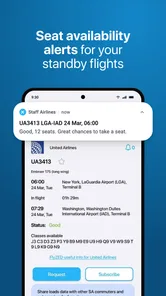
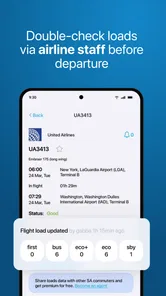
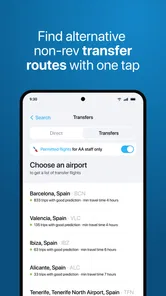
The most useful way to use this app is to make it part of a repeatable decision process. I would not open it only after arriving at the airport and expect it to solve every problem instantly. Before leaving home, I would identify the route, check the relevant flight loads, and compare more than one departure. Standby travel changes quickly, so the value is not simply seeing one appealing flight; it is understanding whether that flight is a sensible first attempt or merely the most convenient-looking option.
The app covers loads for more than 500 airlines, which gives it a broad target audience among airline staff and other eligible non-revenue travelers. That breadth is useful when a journey involves a carrier outside your own employer’s network. It also means I would pay attention to the exact airline and flight details I select rather than assuming that a familiar route automatically represents the same conditions across every carrier.
My baseline routine would be simple. I would start with the intended travel date and route, inspect the available flight information, then look for an alternative departure before making any commitment. If the first choice appears tight, I would keep a backup in mind rather than treating the first result as a promise of a seat. This is an important distinction: a load display can support a decision, but it does not remove the uncertainty built into standby travel.
For a realistic everyday example, imagine I need to travel after a work shift and have two possible departures from the same airport. The earlier flight may be attractive because it gets me closer to my destination sooner, but a later option could provide a more comfortable fallback if the first attempt does not work. I would use the app to compare those possibilities before heading to the airport, then keep the second option visible in my notes or travel plan. The app is most helpful when it improves preparation, not when it encourages a last-second gamble.
I also found that the app makes more sense when I separate three questions. First, is there a flight that fits my schedule? Second, does its current load make it worth trying? Third, what will I do if I do not clear? Keeping those questions separate prevents a tempting result from turning into an incomplete travel plan. Staff Airlines can help with the middle question, while the first and third still require judgment from me.
More From Our News Desk

 Weather - By Xiaomi
Weather by Xiaomi Review: Clear at a Glance, Less Clear Up Close
Xiaomi’s weather app makes everyday forecasts quick to scan, but its calm surface can leave useful details and recovery paths harder to find than they should be.

 X
XX Under Pressure: Can It Recover When Posting Goes Wrong?
A resilience-focused review of X, examining setup, mistaken posts, interruptions, weak connections, and the gaps that matter when recovery needs to be dependable.

 Clash of Clans
Clash of Clans Is Won Between the Battles
Its raids are quick; its community is a long-term project of coordination, teaching, rivalry, and shared responsibility—with all the friction that entails.

 Android Auto
Android Auto Makes the Case for Quieter Car Software
The car interface is no longer judged by how much it can do, but by how quietly it helps. Android Auto shows what drivers now expect—and what still gets in the way.

 MobiOffice: Word, Sheets, PDF
MobiOffice: Transforming Mobile Productivity with Seamless Integration
MobiOffice: Word, Sheets, PDF is redefining mobile productivity with a surprising blend of functionality and innovation.

 EA SPORTS FC Soccer Mobile 26
EA SPORTS FC™ Mobile Soccer: Redefining Mobile Sports Gaming
Dive into EA SPORTS FC™ Mobile Soccer, where immersive gameplay and strategic depth transform mobile sports gaming.
Latest News



That workflow is different from using a normal flight-search service. A conventional booking app is designed to show sellable itineraries, prices, schedules, and confirmed reservations. This tool is aimed at the employee traveler who already understands that a listed flight is not the same as a guaranteed seat. If I need a confirmed ticket for an important appointment, I would use a regular booking channel instead. If I am evaluating standby possibilities, this app is much closer to the problem I actually need to solve.
Settings and account habits worth checking
Because this is a specialized utility, I would spend a few minutes reviewing the available settings and input choices before relying on it during a busy trip. The exact options presented can depend on the release and device, so I would not assume that every preference works the same way for every user. What matters is making sure the selected airline, route, date, and travel context are correct before interpreting any load information.
One practical habit is to verify the airline selection every time a journey crosses carriers. The app’s wide airline coverage is helpful, but that same breadth creates room for an avoidable mistake if I search the wrong operator or choose a similarly named airport. A quick review of the search context is faster than building a plan around information for a different flight.
I would also check how the app presents saved or repeated searches, if those controls are available in the installed release. Reusing a previous route can save time, but it can also preserve an old date or airport choice. Experienced use is not about tapping through screens as quickly as possible; it is about reducing repetitive work without allowing stale details into a new decision.
The free download makes it easy to try the basic experience before deciding whether it belongs in a regular travel routine. The app also includes in-app purchases ranging from $1.99 to $39.99 per item. I would review what a purchase unlocks at the moment it is offered and avoid paying simply because a trip feels urgent. For occasional staff travel, the free experience may be enough. For frequent users, a paid option could be worth considering only if it clearly removes a recurring inconvenience in their own workflow.
Another setting-related habit is to keep expectations realistic about freshness. Standby information is time-sensitive, and I would refresh or recheck before making a final airport decision rather than treating an earlier glance as permanent. I would also compare what the app shows with the operational information available through my employer or airline channels whenever those are required for eligibility, listing, or travel procedures. This app should support that process, not replace rules that come from the carrier.
The Everyone content rating is reassuring for households that share devices, but it should not be confused with suitability for every kind of traveler. The intended audience is still quite specific. A family looking for hotel ideas, sightseeing recommendations, or a simple confirmed booking tool may find the interface and purpose too narrow even though the age rating is broad.
Shortcuts that make repeated checks less tiring
For frequent users, the biggest gain comes from creating a personal rhythm rather than searching randomly. I would group likely journeys by airport pair and airline, then check the most important option first. After that, I would inspect nearby departures and preserve a fallback plan. This approach reduces the temptation to repeatedly reopen the same flight without learning anything new from the comparison.
A useful shortcut is to decide in advance what would make me switch plans. For example, I might choose a primary flight, a later backup, and a point at which I stop waiting and arrange a confirmed alternative. The app can provide the information that informs that choice, but the rule itself should come from my schedule and tolerance for delay. This is more reliable than making a fresh emotional decision after every load update.
I would also avoid checking only the most convenient departure. A flight at an ideal time can be less useful than one that leaves earlier or later with a better chance of clearing. The app’s value is strongest when I use it to compare trade-offs between timing and availability rather than to search for a single perfect result.
Another small but important habit is to record the route context outside the app when a trip matters. I might note the flight number, intended departure, backup choice, and any relevant employee-travel instructions in a separate place. That gives me a compact plan if I need to move between screens, consult another airline system, or explain my options to a travel companion. It also avoids treating the app as the only place where my plan exists.
When checking several airlines, I would use the same order every time: confirm the airport pair, confirm the date, inspect the target flight, then compare alternatives. Repetition sounds basic, but it prevents the kind of rushed input error that is especially costly when a traveler is already on the way to the airport. This is one of the more valuable advanced habits because it improves the process without requiring any unlisted feature.
The app can also complement, rather than compete with, ordinary airline apps. I would use a normal carrier app for confirmed booking details, check-in instructions, airport notifications, or loyalty information when those are relevant. I would use Staff Airlines for the specific standby-load question. Combining the tools is often more sensible than expecting one app to cover both confirmed travel and non-revenue decisions.
Where the app’s limits become important
The central limitation is that standby travel remains uncertain even when the information looks encouraging. A load indicator is not a seat assignment, and it cannot guarantee that I will clear a flight. Operational changes, last-minute passengers, aircraft changes, employee-travel priority, and carrier-specific procedures can all affect the final result. I would therefore be cautious about using the app as the sole basis for a time-critical appointment, a connection with no recovery option, or the last flight of the day.
The app is also not the right replacement for a confirmed booking engine. It does not make sense to open it when I simply want to compare public fares or purchase the cheapest itinerary. A standard travel app will usually be better for that job because it is built around confirmed inventory and conventional trip planning. Staff Airlines is more useful when the user already understands the non-rev context and wants information that ordinary consumer search tools do not emphasize.
Its specialized nature may also create a learning curve. A first-time non-revenue traveler may know the destination but not understand how to interpret loads, priority, or airline-specific staff-travel procedures. In that situation, I would use the app alongside guidance from the employer or carrier rather than assuming that a favorable display explains the whole process. The tool can organize information, but it cannot teach every rule that governs a particular employee’s eligibility or listing.
The mixed average rating suggests that expectations should be measured. With a 3.0 average, I would not describe the experience as flawless, and I would test it well before an important trip. The app has a meaningful audience, reflected by its 50K+ installs, but popularity alone does not guarantee that its workflow will suit every device, airline, or travel habit. I would judge it after trying the routes and carriers I actually use.
There is also a trade-off between breadth and simplicity. Supporting loads across more than 500 airlines is valuable for network travelers, but a broad catalog can feel less direct than a single-airline staff portal. If nearly all of my travel involves one employer and that employer provides a dedicated internal tool with authoritative procedures, that official option may remain my primary source. Staff Airlines becomes more attractive when I need a wider view across carriers or want one place to begin comparing possibilities.
I would be especially careful with connections. Even if the app helps me assess each individual flight, a standby itinerary with multiple segments carries more risk than a single nonstop attempt. Missing the first segment can invalidate the rest of the plan, and a promising second flight does not solve the problem if I cannot reach its departure airport. For complex journeys, I would use the app to examine each leg but make the final decision only after considering the whole chain and its fallback options.
Who should use it and who should skip it
I think the app is best suited to airline employees, eligible staff travelers, and experienced non-rev passengers who regularly compare possible flights. It is particularly useful for someone who travels across different carriers and wants a dedicated way to inspect load information before committing time to a route. The free entry point also makes sense for a traveler who wants to test whether the workflow fits before considering any optional purchase.
I would recommend skipping it if you only take occasional leisure trips and need confirmed fares, hotel reservations, maps, or sightseeing suggestions. Those needs belong to broader travel services. I would also avoid depending on it if you have no backup time and cannot tolerate being delayed. In that case, paying for a confirmed ticket through the usual channel is likely the better decision, even if standby appears cheaper or more flexible.
New staff travelers should treat it as a planning aid rather than an authority. Before the first trip, I would learn the relevant employee-travel rules, understand how listing and priority work for my airline, and ask what information must come from official systems. Once that foundation is clear, the app can make the comparison stage quicker and more organized.
My verdict after using it as a repeatable tool
Staff Airlines: Non-Rev Travel earns its place by focusing on a problem that ordinary flight apps often handle poorly: comparing standby possibilities across a wide range of airlines. I like it most when I use it deliberately, with a primary flight, a backup, and a clear point at which I stop taking chances. That habit turns a potentially chaotic airport decision into a more structured one.
At the same time, I would not mistake specialization for completeness. The app cannot guarantee a seat, replace carrier procedures, or turn a risky connection into a dependable itinerary. Its mixed 3.0 average means I would test it before an important journey, and I would inspect any optional purchase carefully rather than assuming it is essential. The current version, 2.2.10, is suitable for supported Android devices, but personal results may still depend on the airlines and routes I use most.
My final recommendation is straightforward: if standby travel is a regular part of your life, install it, learn its search flow, and build a disciplined comparison habit around it. If you are booking a normal vacation or must arrive at a fixed time, choose a conventional confirmed-travel service instead. For the right user, this is a practical specialist app; for everyone else, its narrow focus is more likely to add confusion than value.
Staff Airlines: Non-Rev Travel Frequently Asked Questions
How much does Staff Airlines: Non-Rev Travel cost to download?
Staff Airlines: Non-Rev Travel is free to download, so you can install it without an upfront app price. It also offers in-app purchases, which are listed between $1.99 and $39.99 per item. Those optional purchases are separate from the basic download, so check the purchase details in your app store before confirming anything.
What is Staff Airlines: Non-Rev Travel used for?
Staff Airlines: Non-Rev Travel is designed for airline employees, eligible family members, and other authorized travelers who use non-revenue or standby travel benefits. It can help users review available flight options, understand listing information, and manage travel plans more conveniently. The app covers flight loads for more than 500 airlines. Because standby seats depend on operational availability, the app should be viewed as a planning and booking-support tool rather than a guarantee of boarding.
Who can use Staff Airlines: Non-Rev Travel?
Access is generally intended for people connected to participating airlines or travel-benefit programs, such as active staff, retirees, dependents, or approved companions. In practice, eligibility may depend on the airline, employee status, and the type of travel privileges assigned to an account. Before downloading, users should confirm that their employer or benefits provider supports the application and that they have valid login credentials.
Does the app guarantee a seat on a standby flight?
No. Staff Airlines: Non-Rev Travel cannot guarantee that a standby passenger will receive a seat. Non-revenue travelers are accommodated only after revenue passengers and other priority categories have been handled, and availability can change until departure. Weather, delays, aircraft changes, cancellations, and oversold flights may all affect your chances. It is wise to keep alternative routes and flexible travel dates available.
What information should I check before listing or traveling?
Before creating a listing, review the departure airport, destination, travel date, flight number, cabin or service eligibility, passenger names, and applicable dress or baggage rules. You should also check the airline’s current non-rev policies, required identification, check-in deadlines, and boarding priority. Information shown in the app may not replace official airport or airline instructions, especially during irregular operations.
Pros
- Designed specifically for airline employees and eligible travel companions.
- Provides access to non-revenue travel options in one dedicated app.
- Can help compare available flights across participating airlines.
- Useful for checking standby travel details while away from a computer.
- May reduce the need to manage staff-travel information through multiple websites.
Cons
- Access is limited to users with valid airline staff-travel eligibility.
- Standby seats are never guaranteed
- even when flights appear available.
- Airline participation and available features may vary by carrier.
- Flight availability can change quickly
- requiring frequent status checks.
- Some users may find the interface less useful outside active travel periods.











