

Stack the States®
- 649.00
- 4.7
- Installs
- 100.00K
- Price
- $2.99
Screenshots
Analysis by Reviewed
I’d choose Stack the States® if I wanted U.S. geography practice to feel more like a short game than a worksheet. Its central idea is easy to grasp: answer questions, earn states, and try to stack them high enough to reach a goal. That mix makes it especially appealing for children who learn better when a fact leads to an immediate action, though adults can enjoy the challenge too.
Who is likely to get the most from it?
I see it working well for a family trying to make a little geography practice part of an ordinary afternoon, or for a student who needs a more lively way to revisit state names and facts. A parent could let a child play a round, then ask them to point out a state on a paper map or explain one fact they remember. That small follow-up turns a quick session into a useful conversation instead of leaving the learning entirely inside the game.
It is less suitable if your main goal is broad world geography, detailed historical study, or a structured lesson plan. The focus here is the United States, and the playful stacking is a reason to choose it, not a substitute for every kind of study. I’d also think twice if the player dislikes quizzes or prefers open-ended exploration; the question-and-reward rhythm may feel repetitive to someone who wants to browse maps freely.
How it fits beside other ways to learn
Compared with flashcards, the app gives each correct answer a physical-feeling payoff: a state joins the growing stack, so recalling information has an immediate visual consequence. Compared with a map or atlas, it offers more active testing but less room for leisurely exploration. I’d use those tools together rather than treat them as rivals: play to notice what you know, then use a map to connect a state’s position to its neighbors.
A useful habit is to pause after a missed question and say the answer aloud before continuing. That keeps the session from becoming only a race to build a taller stack. For younger players, taking turns can also make the quiz feel social without turning it into a lesson; an adult can ask why an answer makes sense, while a child can teach back a fact they just learned.
The Fun Learning Curve
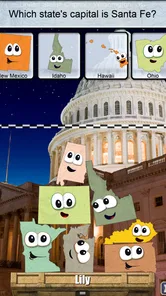
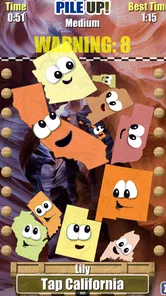
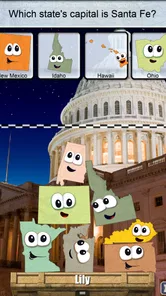
First things first, let's talk about the game mechanics. The idea behind Stack the States® is pretty straightforward. You answer questions about U.S. states, and for every correct answer, you earn a state to stack on a platform. The goal? Stack them high enough to reach the checkered line and unlock new levels. Sounds simple, right? Well, don't be fooled. As you progress, the questions get trickier, and the states wobble more precariously!
Interactive and Engaging
One of the coolest things about this app is how it makes learning geography feel like a game show. The questions cover a range of topics from state capitals to landmarks, ensuring that you’re not just memorizing facts, but really understanding what makes each state unique. Plus, the colorful graphics and playful animations keep you engaged, making it easy to lose track of time while you learn.
More From Our News Desk

 Gmail
GmailGmail in a Busy Inbox: Who Benefits Most?
From first account to crowded workday, Gmail earns its place through dependable search and flexible sorting—but its best fit depends on how much inbox maintenance you can tolerate.

 Prime Video
Switching to Prime Video: What Changes in Your Viewing Routine
Prime Video can make a compelling second home for streaming, but switching means learning a different catalog, rental layer, and route from browsing to playback.

 Universal TV Remote Control
Universal TV Remote Control Works Best as a Reliable Backup
A phone remote earns its place through quick setup and reliable habits. Here is how to get more from Universal TV Remote Control—and where its limits show.

 Weather - By Xiaomi
Weather by Xiaomi Review: Clear at a Glance, Less Clear Up Close
Xiaomi’s weather app makes everyday forecasts quick to scan, but its calm surface can leave useful details and recovery paths harder to find than they should be.

 X
XX Under Pressure: Can It Recover When Posting Goes Wrong?
A resilience-focused review of X, examining setup, mistaken posts, interruptions, weak connections, and the gaps that matter when recovery needs to be dependable.

 Clash of Clans
Clash of Clans Is Won Between the Battles
Its raids are quick; its community is a long-term project of coordination, teaching, rivalry, and shared responsibility—with all the friction that entails.
Latest News



In practice, I’d treat the wobbling stack as a reason to slow down rather than rush through answers. When a session goes well, the game’s physical challenge gives you a memorable moment alongside the fact you answered. When it goes badly, the stack can steal attention from the geography itself. That is a real trade-off: the playful pressure keeps a child engaged, but anyone seeking calm, systematic revision may prefer a map activity or a simple set of questions.
Unlocking New Challenges
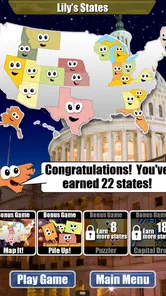
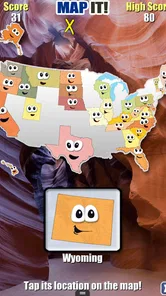
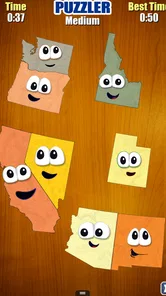
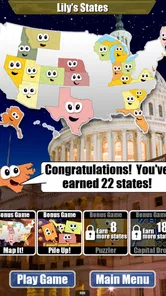
As you stack more states and climb through the levels, you'll unlock new challenges and bonus games that test your knowledge even further. It's a clever way to keep things fresh and exciting. Whether you're a seasoned geography whiz or just starting out, there's always something new to learn and achieve.
For a realistic routine, I’d use it during a short wait or as a quick after-school activity, then stop at a natural break and revisit any tricky facts later. That works better than expecting one long session to teach everything about all fifty states. A child who already knows capitals may still find the stacking goal enjoyable, while a beginner may need an adult to help connect unfamiliar names with locations.
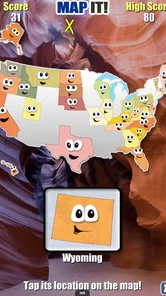
The app also includes a handy map feature where you can review the states you've collected and learn more about them. It's a great way to reinforce what you've learned and discover fun facts you might not have known before.
Perfect for All Ages
What's great about Stack the States® is that it's designed for players of all ages. Whether you're a kid in school or an adult looking to brush up on your geography skills, this app provides an enjoyable learning experience. The intuitive interface and adjustable difficulty settings make it accessible for everyone, so you can play at your own pace.
For a paid education app, the main question is whether you’ll return to this particular format. It costs $2.99, is rated Everyone, and comes from developer Dan Russell-Pinson. Its average is 4.7 from around 2.2 thousand ratings, with over 100 thousand installs and around 643 written reviews. Those figures suggest an established audience, but I’d still decide based on whether quiz-based U.S. geography suits the person who will use it.
The app was released on September 5, 2013, and its current version is 3.2, with Android 5.1 as the minimum operating system requirement. If you’re considering it for a child, the all-ages content rating is reassuring, but I’d still try a session together first: you can see whether the questions match their current knowledge and whether the balancing challenge feels motivating rather than frustrating. The adjustable difficulty can help tailor the experience, though it doesn’t change the app’s U.S.-only focus.
Making a short session count
The best way I’d use the app is as a prompt for recall, not as a complete geography course. Before starting, pick one small focus, such as capitals or landmarks, and ask the player to explain an answer in their own words when the round pauses. Afterward, use the map feature to look at collected states and locate them in relation to familiar places. This gives the quiz a useful before-and-after routine without turning a casual game into homework.
For example, on a rainy afternoon when a child has a few minutes before dinner, I’d let them play a round and then ask them to find one newly earned state on a paper map. If they can remember the answer but cannot place the state, that is a clear cue for what to practise next. If they can do both, there is no need to keep drilling the same material; moving on keeps the activity light and avoids making the game feel like a test.
One less obvious advantage of the stacking mechanic is that it gives adults an easy way to observe how a learner responds to mistakes. A child who gets a question wrong may want to try again immediately, while another may become discouraged when the pile shifts. I’d use that moment to adjust the pace: turn-taking and brief explanations can help, but a player who is already frustrated may be better served by stopping and returning another day.
Choosing the right learning tool
Against a plain quiz app, the distinctive appeal here is the connection between an answer and a visible stacking challenge. That can make a child more willing to attempt another question, but it also means the activity is not the most direct route to quiet repetition. If the main need is memorizing a particular set of facts quickly, a teacher’s worksheet or homemade flashcards may be easier to tailor. If the goal is to build familiarity through play, the app offers a more inviting starting point.
A physical atlas or classroom map is better when the learner wants to follow borders, trace a route, or see the whole country at once. The app’s collected-state map can support that kind of follow-up, but it does not replace the freedom of spreading out a map and exploring at your own pace. I’d pair the two rather than expect one to do the other’s job: use the game to surface questions, then let the map answer spatial ones.
It is also worth distinguishing practice from a full lesson. The question format can help reinforce knowledge, but a child who needs a carefully sequenced introduction may benefit more from an adult explaining the basics first. Once names and locations are less unfamiliar, the quiz has more room to feel rewarding instead of exposing gaps faster than the learner can fill them.
Who may want a different option?
I would skip it for someone whose interest is primarily in countries outside the United States, physical geography, or a detailed account of how states developed. I’d also look elsewhere for a learner who wants to roam freely through maps without being asked questions. The playful format is the point, but that same focus narrows its usefulness; it is a companion to broader study, not an all-purpose geography reference.
For a child who finds balancing games stressful, the wobble can be more distracting than motivating. An adult can soften the pressure by treating each round as practice rather than a score to defend, but that will not suit everyone. Likewise, a confident learner may know many answers already and mainly enjoy the challenge, while a beginner may need steady adult support to make unfamiliar facts stick. The adjustable difficulty helps with pace, though it cannot make the U.S.-only subject matter broader.
Because it is a paid app, I’d consider whether the intended player likes returning to short quiz sessions before buying. The cost makes more sense when the game becomes part of a recurring family or study routine than when it is opened once and forgotten. Its Everyone rating makes it suitable for a broad age range, but the best fit still depends on the learner’s tolerance for quiz questions and a little game pressure.
My recommendation
I’d recommend it to families and students looking for an approachable way to revisit U.S. state facts, especially when a short, playful activity is more likely to happen than a formal study session. I would not choose it as the only resource for a geography unit or for anyone seeking open-ended map exploration. The strongest results come from connecting a round to a brief conversation or map check, so the state facts do not disappear as soon as the stack falls.
Overall, I find the app most useful when its game is treated as a doorway into learning rather than the whole room. It gives quiz answers a memorable physical consequence, and the map feature offers a natural next step for review. If that balance sounds right for the person who will play, it is an appealing educational choice; if they need broader coverage or a calmer, more structured method, a map, atlas, or tailored study material will fit better.
In conclusion, Stack the States® is a brilliant app for anyone interested in U.S. geography. It's educational, entertaining, and incredibly addictive. So, if you're ready to stack your way to becoming a geography guru, give this app a try. You might just find yourself hooked on stacking states and learning more about the diverse and fascinating country that is the United States.
Stack the States® Frequently Asked Questions
How much does Stack the States® cost, and what devices can run it?
Stack the States® costs $2.99 as a one-time purchase. It is an education app from developer Dan Russell-Pinson, and its listed minimum operating system is 5.1. Before buying, check that your device meets that requirement and that the app is available for your particular Android or iOS device. The app is rated for Everyone, making it suitable for a broad audience.
What is Stack the States® and how does it work?
Stack the States® is an educational app designed to teach users about the geography of the United States in a fun and interactive way. Players are quizzed on state capitals, shapes, geographic locations, and more. Correct answers allow players to 'stack' their states on a platform, with the goal of balancing them as high as possible without them falling over. This game combines learning with engaging gameplay, making it suitable for both kids and adults.
Is Stack the States® appropriate for all age groups?
Yes, Stack the States® is designed for users of all age groups, particularly school-aged children. The app's educational content is suitable for kids, while the interactive gameplay and challenging questions can also engage teenagers and adults. Parents and educators find it beneficial for reinforcing geography lessons in a fun way. However, younger children may need assistance navigating the app's more complex questions.
What educational benefits does Stack the States® offer?
Stack the States® offers numerous educational benefits by helping users learn the geographical layout of the United States, including state capitals, landmarks, shapes, and locations. The app encourages critical thinking and problem-solving as players decide how to balance the states. It's a valuable tool for enhancing memory and cognitive skills, making it an excellent supplement to classroom learning.
Do I need an internet connection to play Stack the States®?
No, Stack the States® does not require an internet connection to play. This makes it ideal for use in situations where Wi-Fi may not be available, such as traveling. Once downloaded, all features and content are accessible offline, allowing uninterrupted gameplay and learning experiences without the need for constant internet access.
Pros
- Engaging educational content
- Interactive learning experience
- Covers all 50 states
- Fun for all ages
- Improves geographical knowledge
Cons
- Limited to U.S. geography
- Can become repetitive
- Requires initial learning curve
- Not suitable for younger kids
- Ads in free version












