

Stack the States® 2
- 167.00
- 4.6
- Installs
- 10.00K
- Price
- $2.99
Screenshots
Analysis by Reviewed
I like geography games most when they give me a reason to think about an answer rather than simply memorize a list. That is the appeal of Stack the States® 2: questions about U.S. states feed directly into a physical stacking challenge, so learning and play are tied together. It is an educational game from Dan Russell-Pinson, aimed at anyone who wants state geography to feel more like a quick game than a study session.
A small round can fit into an ordinary day
I can see this working well as a short after-school activity: a child opens the game while waiting for dinner, answers a few questions, then tries another round because the stack was close to the target. A parent can join in without needing to turn it into a lesson. Asking why a state shape or capital was unfamiliar is an easy way to carry the quiz into a conversation, rather than treating a correct answer as the whole point.
The same format suits adults refreshing knowledge for a road trip, a classroom review, or simple curiosity. It is less suited to someone who wants a detailed geography course, long explanations, or coverage of world regions. The focus is specifically on the United States, and the game structure favors recall and recognition over extended reading.
What the stacking adds to the quiz
Compared with a standard flashcard app, the game gives each answer an immediate practical consequence: earned pieces have to be placed, and the growing stack makes the round feel like a small physical puzzle. That creates a useful trade-off. A player is not only trying to know the answer; they also have to pay attention to where a state lands and whether the pile can reach its goal. The game can make a familiar fact feel newly engaging, though it may not satisfy someone who prefers a quiet, no-pressure quiz.
A practical tip is to pause briefly after a surprising answer and connect it to the map or state name before moving on. That small habit can make a quick round more memorable, especially for younger players who may otherwise focus mainly on building the stack. The help section is worth checking if a player is struggling with the stacking part: a little guidance can keep a difficult round from turning into repeated guesswork.
How the play loop earns another round
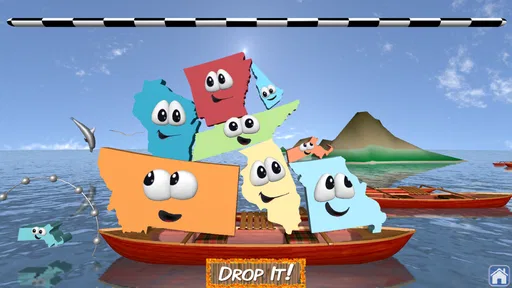
The basic rhythm is easy to understand: answer a question, receive a state piece, place it on the platform, and see whether the stack reaches the required height. The reward is both the piece itself and progress toward the next level. If a pile falls short, or a player wants to do better, starting again has a clear purpose: try to answer more confidently and build a stronger stack. That action-feedback-reward-reset cycle is the game’s most convincing design choice.
It also explains why the game can be useful in short bursts. There is a specific goal to chase, so a player does not need to plan a long session. For a family, taking turns answering or predicting where a piece should go can make the same round feel more social, while solo play keeps the pace quick. I would still set expectations for children who dislike losing a carefully built pile: the stacking challenge is part of the fun, but it can also be the frustrating part.
More From Our News Desk

 Gmail
GmailGmail in a Busy Inbox: Who Benefits Most?
From first account to crowded workday, Gmail earns its place through dependable search and flexible sorting—but its best fit depends on how much inbox maintenance you can tolerate.

 Prime Video
Switching to Prime Video: What Changes in Your Viewing Routine
Prime Video can make a compelling second home for streaming, but switching means learning a different catalog, rental layer, and route from browsing to playback.

 Universal TV Remote Control
Universal TV Remote Control Works Best as a Reliable Backup
A phone remote earns its place through quick setup and reliable habits. Here is how to get more from Universal TV Remote Control—and where its limits show.

 Weather - By Xiaomi
Weather by Xiaomi Review: Clear at a Glance, Less Clear Up Close
Xiaomi’s weather app makes everyday forecasts quick to scan, but its calm surface can leave useful details and recovery paths harder to find than they should be.

 X
XX Under Pressure: Can It Recover When Posting Goes Wrong?
A resilience-focused review of X, examining setup, mistaken posts, interruptions, weak connections, and the gaps that matter when recovery needs to be dependable.

 Clash of Clans
Clash of Clans Is Won Between the Battles
Its raids are quick; its community is a long-term project of coordination, teaching, rivalry, and shared responsibility—with all the friction that entails.
Latest News



First Impressions
When I first launched Stack the States® 2, I was welcomed by a colorful and engaging interface. The graphics are sharp, and the animations make learning about states so much more exciting than I ever thought possible. It's like a cartoon come to life, but with a purpose! The app promises not just to teach you about the states, but to make it enjoyable, and it definitely delivers on that front.
Gameplay and Features
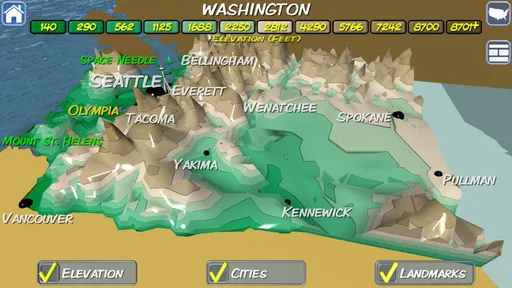
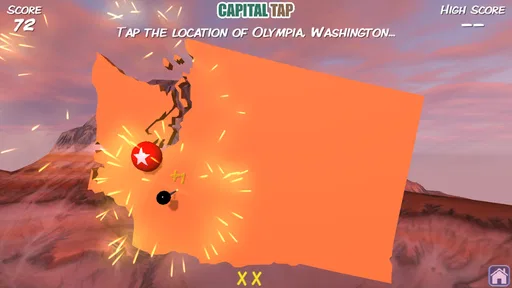
The main objective of the game is to answer questions about the 50 states to earn pieces that you can stack on a platform. The questions cover a variety of topics, including capitals, state shapes, landmarks, and more. You’ll find yourself saying, "I didn’t know that!" more than once. As you stack these states, you aim to reach a certain height to move on to the next level. It’s a simple concept, yet surprisingly addictive.
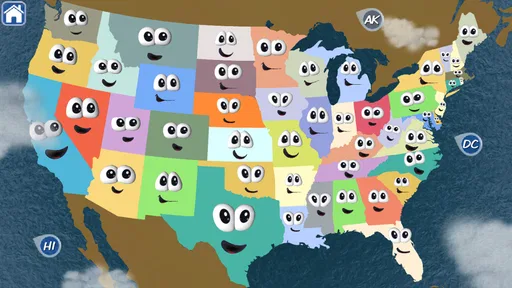
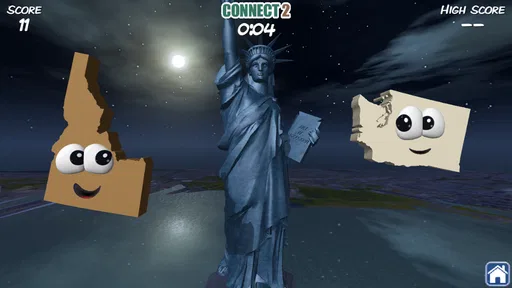
What I really appreciated is how the app caters to different learning styles. Whether you’re a visual learner who benefits from the bright graphics and maps or someone who prefers reading, this app has got you covered. Plus, there are multiple game modes to keep things fresh, such as map puzzles and matching games that test your memory and recognition skills.
Educational Value
Let’s not forget the educational aspect, which is the heart and soul of Stack the States® 2. It’s perfect for kids and adults alike who want to learn more about U.S. geography in a fun, interactive way. The app provides a wealth of information without it feeling like a chore. Trust me, you’ll find yourself getting competitive, trying to beat your previous high score while inadvertently absorbing knowledge about each state.
Stack the States® 2 has an average rating of 4.4 from around 430 ratings, with more than 150 written reviews and over 10,000 installs. It costs $2.99, is rated Everyone, and version 2.2 requires Android 5.1 or later. The game is a focused purchase rather than a general-purpose geography reference, so I’d choose it for repeated, playful practice rather than as a substitute for a textbook or a detailed atlas.
User Experience
The app runs smoothly, with no noticeable lag, which is crucial when you’re on a roll stacking those states. The touch controls are intuitive, making it easy for users of all ages to navigate through the game. The developers have clearly put a lot of thought into creating an app that is user-friendly and educational, all while keeping it entertaining.
And hey, if you’re worried about getting stuck, there’s a handy help section that provides tips and tricks to improve your stacking skills. It’s like having a little geography tutor in your pocket!
Where it fits—and where it doesn’t
For a child learning state names and shapes, the visual puzzle and stacking goal offer more variety than repeatedly drilling cards. A teacher could also use a round as a warm-up before a map activity, then ask students to locate the states they found difficult. That works best when the game supplements discussion; it is not a replacement for explaining regional relationships, reading maps at different scales, or studying geography beyond the U.S.
Because this is a paid game, I’d consider whether the player is likely to return to it. The combination of questions, stacking, and other modes gives it more than one way to revisit the subject, but a child who only wants free-form building may prefer a construction game, while someone preparing for a specific test may get more direct practice from a dedicated quiz or flashcard tool. The right choice depends on whether the playful loop helps the learner stick with the facts.
One useful way to keep it from becoming guess-and-tap play is to have the player say the answer aloud before selecting it, then name one clue that helped. For a parent or tutor, that reveals whether the child recognizes a state by its outline, remembers its capital, or is relying on a lucky guess. It turns the game into a quick check of understanding without slowing every question into a formal lesson.
Making the questions stick beyond the screen
The game is most useful when I treat a correct answer as a starting point, not the finish line. If a player identifies a capital, I might ask them to place that state roughly on a blank map or describe which states border it. If the prompt is about a shape, I might ask what made the outline recognizable. Those small follow-ups help distinguish genuine recall from recognition prompted by the screen, and they make the activity useful even after a round ends.
There is a balance to strike, though. Stopping after every question to explain it would drain the pace that makes the game inviting in the first place. I would pick just one or two uncertain answers to discuss after a round, rather than turning each session into a worksheet. That keeps the stacking challenge enjoyable while giving a curious child a chance to connect isolated facts into a mental map.
For independent play, a child can also keep a simple “look up later” list on paper: state names or facts that felt unfamiliar. The list should stay short, so it does not become homework by another name. It is a particularly handy approach when a player knows some capitals but struggles with locations, or recognizes outlines but cannot recall names. The game supplies the prompt; a map or conversation can fill in the context.
Choosing the right moment to play
A realistic use is a family waiting for food at a restaurant or sitting through a quiet stretch before an appointment. One person can answer, another can predict where the state piece should go, and everyone can react to whether the stack holds. That works better than handing the game over as background entertainment: the shared predictions make the physical challenge visible, while the question gives everyone a reason to pay attention.
It is also easy to use as a brief classroom starter, especially when the next lesson already involves U.S. maps. I would keep the session short, then move from the game’s individual prompts to a larger map task. For example, students can find a state they missed and compare its position with a state they already know. This makes the game a spark for discussion, not a claim that a quick round covers everything a geography lesson should teach.
For a solo player, the best moment may be a small break rather than a long study block. The round goal gives the session a natural stopping point, and returning later does not require setting up a complicated project. That suits someone who wants low-effort repetition. It is less useful if the player needs a structured study plan, a record of weak topics, or a guided sequence that builds from basic map skills to more advanced geography.
How it compares with other ways to learn states
Flashcards are usually more direct when the goal is to drill a particular set of capitals or names quickly. A printed map is better for seeing regional relationships at a glance, and a textbook can explain why places differ instead of asking only for identification. This game occupies another lane: it wraps facts in a physical stacking task and adds map puzzles and matching games, so repeated practice can feel more like play than a test.
That distinction matters when choosing it for a learner. If a student already enjoys quizzes but needs more context, I would pair the game with a map rather than expect the game alone to teach every connection. If a child avoids flashcards because they feel repetitive, the stack may offer a more inviting route into the same subject. And if someone wants to build anything they imagine, a construction game is a better fit; the stacking here serves a geography goal rather than open-ended creation.
The game’s mix of question prompts and physical placement also creates a small cognitive trade-off. The player has to retrieve or recognize information while managing the stack, which keeps attention active, but the challenge may distract someone who needs a calm environment to concentrate on facts. A player who gets flustered when pieces wobble may learn more from answering first and discussing afterward, or from using a quieter quiz for initial practice before returning to the stacking game.
Who is likely to get the most from it?
I would recommend it most readily to families with children who are beginning to learn U.S. state names, shapes, capitals, and landmarks, particularly when an adult is willing to join in now and then. The shared questions make it easy for an adult to help without taking over, and the game gives children an immediate goal beyond getting a score right. It can also suit adults who want a light refresher and are happy to learn in short, playful bursts.
It is not my first choice for someone studying for a tightly defined exam who needs to target exact gaps and track progress systematically. Nor would I buy it for a learner who dislikes quizzes, becomes upset when a stack falls short, or is mainly interested in countries outside the United States. In those cases, a focused study resource, a broader atlas, or an open-ended game may be a more satisfying purchase. The key question is whether the state facts and stacking challenge are both appealing to the person who will use it.
The $2.99 price makes it worth thinking about as a small, specific learning purchase rather than assuming every household needs it. Its value depends on repeated use: a child who asks to play again and starts recognizing states has a clear reason to return, while a player who tries it once and prefers another kind of activity may not get much from owning it. I would consider the learner’s interest in U.S. geography before buying, not just the fact that the game is educational.
Final Thoughts
So, is Stack the States® 2 worth your time? I’d say a resounding yes! It combines learning with fun, which is a rare find in educational apps. Whether you’re a student looking to ace your next geography quiz or an adult wanting to refresh your memory about U.S. states, this app is a fantastic resource.
So go ahead, give it a download, and start stacking your way to becoming a U.S. geography whiz. Happy stacking!
Stack the States® 2 Frequently Asked Questions
How much does Stack the States® 2 cost, and what should I know before buying it?
Stack the States® 2 is a paid educational game priced at $2.99. It is designed around learning U.S. geography through interactive play, so it may suit families or learners looking for a focused geography game rather than a general collection of activities. The app is rated Everyone, making it appropriate for a broad audience. Check that your device meets the minimum operating system requirement before purchasing.
What is Stack the States® 2 and how does it help in learning geography?
Stack the States® 2 is an educational game designed to make learning U.S. geography fun and interactive. It builds on the original Stack the States by offering improved graphics, new question formats, and additional content. Players learn about state capitals, shapes, geographic locations, and more while stacking states to reach a goal line. It's suitable for children and adults looking to enhance their knowledge of U.S. geography.
What are the key features of Stack the States® 2?
Stack the States® 2 offers a range of features including hundreds of unique questions about U.S. states, interactive 3D graphics, and multiple game modes. The app includes new bonus games, a detailed interactive map, and the ability to customize your own avatar. Additionally, it tracks progress and provides educational content in a playful manner, making it a well-rounded tool for learning.
Is Stack the States® 2 suitable for all age groups?
Yes, Stack the States® 2 is designed to be engaging for a wide range of age groups. While it is primarily aimed at children who are learning about U.S. states, the challenging questions and interactive gameplay also appeal to older students and adults who want to refresh their geography skills. It's both educational and entertaining for learners of all ages.
Does Stack the States® 2 require an internet connection to play?
Stack the States® 2 does not require an internet connection to play, making it perfect for offline use. This allows users to enjoy the game while traveling or in areas without stable internet access. However, an internet connection might be needed for initial download and updates, ensuring you have the latest version with all features and improvements.
Pros
- Engaging educational content
- Improves geography knowledge
- Interactive learning experience
- User-friendly interface
- Fun for all ages
Cons
- Limited to U.S. states
- Repetitive gameplay
- Requires in-app purchases
- Ads can be disruptive
- Needs internet to function












