Sprout - AI Job Search
- 660.00
- 4.4
- Installs
- 100.00K
- Price
- Free

Screenshots

Analysis by Reviewed
Job hunting often fails for a surprisingly ordinary reason: the work is scattered across too many small tasks. I have to search several places, compare roles, adjust applications, remember deadlines, and keep track of what I already sent. Sprout - AI Job Search is built around reducing that repeated effort. It is a free business app from Magnifex, and its central promise is simple: help me move from looking for a suitable role to taking a more focused application step.
After spending time with it, my impression is that Sprout is most useful when I treat it as a job-search assistant rather than a complete replacement for careful research. It can make the process feel less chaotic, especially when I am applying regularly, but it does not remove the need to read job descriptions closely or judge whether an employer is genuinely a good fit. That distinction matters, because the app’s value comes from reducing friction, not from making career decisions on my behalf.
How Sprout fits into a real job search
I use this section to look at where Sprout can fit alongside the job boards and personal systems people already rely on. A useful test is whether it helps me make one careful next move without turning a focused search into another stream of notifications and unfinished drafts.
The problem it tries to solve
The hardest part of looking for work is not always finding a vacancy. It is maintaining momentum after the first search. A promising role may require a tailored résumé, a thoughtful cover letter, a review of the company, and a record of the application. When those steps are handled manually in different places, even motivated applicants can lose time or miss useful opportunities.
Sprout approaches that problem with an AI-focused workflow. The app’s store summary is “Land Your Dream Job,” but I found its practical appeal to be more grounded: it helps turn an open-ended search into a sequence of manageable actions. That is particularly helpful for someone who is unemployed, changing industries, returning to work, or applying to several similar positions while trying to keep each application relevant.
I would not describe it as a magic shortcut. A tool can help organize a search and support application preparation, but it cannot know whether a workplace matches my personality, whether a salary is acceptable for my situation, or whether a role will provide the growth I want. Sprout works best when I use its assistance to get to the important human judgment faster.
Getting started without overcomplicating the process
The first useful setup is not about filling every possible detail immediately. I get better results by starting with a clear target: the kind of role I want, the experience I can confidently present, and the locations or working arrangements that are realistic for me. If I begin with vague goals such as “anything in business,” the search becomes harder to evaluate and the app has less useful direction to work with.
More From Our News Desk

Weather by Xiaomi Review: Clear at a Glance, Less Clear Up Close

X Under Pressure: Can It Recover When Posting Goes Wrong?

Clash of Clans Is Won Between the Battles

Android Auto Makes the Case for Quieter Car Software

MobiOffice: Transforming Mobile Productivity with Seamless Integration

EA SPORTS FC™ Mobile Soccer: Redefining Mobile Sports Gaming
My advice is to prepare a short personal brief before using the app. I would include the job titles I am considering, the skills I want employers to notice, industries I would accept, and deal-breakers such as commuting distance or seniority. This takes only a few minutes, but it prevents a common mistake: allowing a stream of vaguely related roles to make the search feel productive when it is actually becoming unfocused.
The app is available at no upfront cost and is rated for Everyone, which makes it approachable for a broad audience. It runs on Android starting with version 8.0, so people using older but still common phones may be able to try it without upgrading their device. The current release is version 2.0.13, and the product has been available since April 1, 2025. Those details do not guarantee a perfect experience on every phone, but they make the entry barrier fairly low.
Sprout has attracted more than one hundred thousand installs and holds a 4.4 average from roughly one hundred nineteen thousand ratings. I see that as a useful sign that the concept has found an audience, although popularity should not replace my own test of whether its workflow suits my habits. The app is developed by Magnifex, and its business category gives a clearer picture of its purpose than the short store label “Sprout” does on its own.
A better way to use the AI assistance
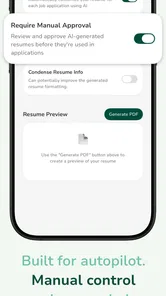
The most important habit is to treat generated help as a draft. If the app assists with wording for an application, I would compare every sentence with my actual experience. Artificially polished language can sound impressive while quietly overstating responsibility, technical ability, or results. I get more value when I use the app to improve structure and clarity, then put the final version back into my own voice.
One practical technique is to keep a small evidence list beside the app. For each major skill, I note a specific project, task, or result that proves it. When preparing an application, I can use that list to check whether the wording is supported by something real. This prevents generic claims from spreading across every application and gives me material for interviews later.
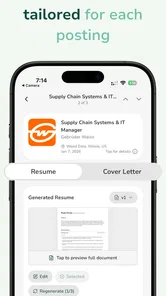
Another useful trade-off is speed versus tailoring. Reusing a strong base résumé can save time, but sending the same wording everywhere makes it harder to show why I want a particular role. I would keep a stable master version, then make focused changes for the opening, the most relevant skills, and the examples that match the employer’s needs. Sprout is more valuable in this workflow than as a button I press to produce identical applications repeatedly.
What a normal day with the app looks like
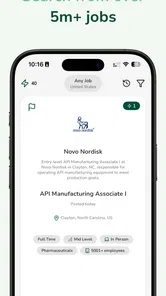
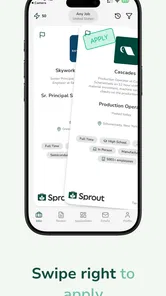
Imagine I have a full-time job and only twenty minutes before dinner to continue my search. Instead of opening several job boards and losing the entire evening comparing tabs, I can use Sprout as the starting point for a narrower session. I decide on one role family, review the opportunities that appear relevant, and select only the openings that match my experience and practical limits.
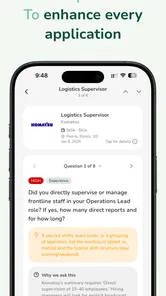
For a promising opening, I would read the original listing carefully before doing anything else. I check the responsibilities, required qualifications, location, work arrangement, and application instructions. Then I use the app’s assistance to help organize my response. The time saved is not merely the number of clicks; it is the reduction in mental switching between searching, drafting, and remembering what still needs attention.
A second scenario is a career change. Suppose I have customer-support experience but want to move toward operations. Sprout may help me frame transferable abilities such as process handling, prioritization, documentation, and communication in language that fits operations roles. However, I would still look for evidence from my past work and avoid presenting myself as an experienced operations specialist if that is not true. The app can help translate experience; it should not rewrite my history.
Students and recent graduates may use it differently. They often have fewer formal job titles but may have coursework, volunteer work, projects, or part-time responsibilities worth presenting. In that situation, the useful question is not “How do I sound more senior?” but “Which real examples show that I can do the work?” I would use Sprout to make those examples easier to explain, then check that the result remains honest and specific.
It can also help someone returning to work after a break. The temptation is to hide the gap under vague wording. I think a better approach is to prepare a direct explanation and emphasize current skills, recent learning, or relevant responsibilities. An AI assistant can help make that explanation concise, but the applicant still decides how much personal context to share and where the boundaries are.
Where the friction really disappears
The strongest benefit is the way a guided tool can reduce starting resistance. A blank document is intimidating, especially after several rejected applications. Having assistance to organize ideas gives me a first version to react to, which is often easier than creating polished wording from nothing. That matters because job searches are repetitive, and small reductions in effort can determine whether I apply consistently or postpone everything.
Sprout is also useful for people who struggle to describe their own strengths. Many applicants know how to perform a task but do not know how to explain its value. Turning “I answered customer questions” into a clearer account of problem-solving, prioritization, and communication can make an application more understandable. The important condition is that the improved wording must still reflect what I actually did.
Another advantage is focus. A job search can become a form of browsing, where collecting listings feels like progress. I prefer to set a small daily objective: identify a few genuinely suitable roles, prepare one careful application, and record the next action. The app supports that mindset because it gives the search a practical center instead of leaving me to wander through endless possibilities.
There is also a less obvious benefit for people who apply across different industries. The same experience may need different emphasis depending on the role. A project involving scheduling, for example, can be described through coordination for one employer and process reliability for another. I would use Sprout to explore those angles, then choose the version that best matches the actual vacancy. This is more useful than asking an AI to make one universal résumé that supposedly fits everything.
What still requires my attention
The app cannot replace the original job listing. I would never rely on an AI-generated interpretation without checking the employer’s wording, because small details can change the meaning of a role. A position that sounds like remote work may have location restrictions, and a familiar title may hide responsibilities that do not suit me. Sprout can help me prepare, but the source vacancy remains the authority for what I am applying to.
Accuracy is another reason to review every output. AI-assisted text can be fluent without being precise. It may choose a stronger verb than my experience supports, repeat a phrase that sounds unnatural, or make two applications feel suspiciously alike. I would edit for truth, tone, and evidence before sending anything. If I cannot explain a sentence in an interview, it does not belong in my application.
I also would not choose this app as my only career resource if I need deep industry research, salary analysis, networking, or detailed interview coaching. A specialized platform, professional contact, recruiter, or career adviser may be better for those needs. Sprout has a narrower strength: helping me handle the practical flow of searching and preparing applications with less friction.
The free entry point is welcome, but in-app purchases range from $4.99 to $124.99 per item. That makes it important to understand what I am comfortable paying for before committing to any optional purchase. I would begin with the free experience, decide whether it genuinely saves me time, and only then consider spending money. Anyone expecting every advanced capability to remain free should examine the purchase prompts carefully rather than assuming the whole workflow has no cost.
Who should use it, and who should skip it
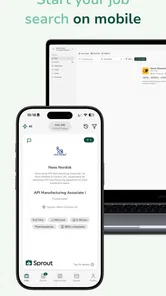
I would recommend Sprout to an applicant who is actively searching but feels slowed down by drafting, organizing, or deciding how to present transferable skills. It is especially promising for people who apply from a phone, need help getting past a blank page, or want a more repeatable routine than opening random job listings whenever they remember.
It may also suit a busy professional who wants to maintain a quiet search without spending hours each week on administration. In that case, the best approach is selective use: define the target clearly, review only relevant roles, and use the assistance for preparation rather than mass applications. The app’s time-saving value is highest when it reduces low-value repetition while leaving the important decisions with me.
I would skip it if I already have a highly effective system built around a preferred job board, spreadsheet, résumé template, and trusted career network. Adding another tool can create more maintenance instead of less. I would also look elsewhere if my priority is a highly specialized sector where personal referrals, portfolios, licenses, or confidential recruitment channels matter more than general application support.
Applicants who dislike AI-written language should not feel pressured to use every automated suggestion. The app can still be approached as a starting point, but if reviewing and correcting generated text takes longer than writing naturally, the supposed efficiency disappears. In that situation, a simple document template and a carefully maintained application tracker may be the better choice.
My final view after weighing the trade-offs
Sprout - AI Job Search succeeds when I judge it by the problem it is actually designed to address: the repeated effort between discovering a job and submitting a credible application. It can reduce the intimidation of a blank page, help organize transferable experience, and make a job-search routine easier to repeat. Those are practical benefits, not reasons to surrender judgment.
Its limitations are equally practical. I still need to verify vacancies, protect the accuracy of my résumé, tailor applications, and decide whether a role deserves my time. The optional purchases also mean that “free” should be treated as an invitation to test the app, not a promise that every useful capability has no cost.
My recommendation is to try it with one clearly defined job goal and a small, honest evidence list. Compare the time and quality of one prepared application with the way I normally work. If Sprout helps me reach a thoughtful final draft faster, it earns a place in my routine. If it produces generic wording or adds another layer of checking, I would return to a simpler method.
Overall, I see it as a useful companion for a messy job search, particularly for people who need structure and momentum. The real advantage is not applying blindly faster; it is spending less energy on repetitive preparation so I can spend more attention on choosing the right work. That makes it worth exploring, provided I remain the editor, fact-checker, and final decision-maker.
Sprout - AI Job Search Frequently Asked Questions
Is Sprout - AI Job Search available for iPhone as well as Android?
Sprout - AI Job Search is an app in the business category, and the version described here is for Android devices running Android 8.0 or later. If you use an iPhone, check the App Store to see whether a compatible version is offered in your region before downloading. On Android, check your operating system version and available storage so installation and updates can run smoothly.
What does Sprout - AI Job Search’s 4.4 rating and user feedback tell me?
Sprout - AI Job Search has an average rating of 4.4 from around 119,000 ratings, with 655 written reviews. These figures can give you a quick sense of user feedback, but ratings alone cannot show whether its tools fit your particular career needs. Reading recent reviews can help you understand what other job seekers value and what to consider before deciding to install it.
What does the Everyone age rating mean for Sprout - AI Job Search?
Sprout - AI Job Search has an Everyone content rating, so it is intended for a broad audience. The app is a business tool for people exploring employment opportunities, and its usefulness will depend on your career needs and how you choose to use its features. If you are helping someone younger with a job search, review any profile details or application materials together before sharing them.
Which devices can run Sprout - AI Job Search?
Sprout - AI Job Search is available for Android devices running version 8.0 or later. Before downloading, check your device’s operating system version and make sure you have enough available storage for the installation and future updates. The app is free to download, though some features may involve in-app purchases, so review the purchase options in your app store before using paid features.
Who develops Sprout - AI Job Search, and is it an established app?
Sprout - AI Job Search is developed by Magnifex and is a business app focused on job searching. It has an average rating of 4.4 from around 119,000 ratings, with over 100,000 installs. Those figures can offer a quick sense of its reach and user feedback, but they cannot guarantee that the app will suit your needs; consider whether its tools fit the way you prefer to search and apply.
Pros
- AI-assisted job matching can surface roles aligned with your skills and preferences.
- Personalized recommendations may reduce the time spent browsing job listings.
- Useful tools can help organize applications and keep your search in one place.
- The interface is designed to make exploring opportunities quick and straightforward.
- Suitable for users who want technology-assisted guidance during a job hunt.
Cons
- AI suggestions may occasionally miss relevant roles or recommend poor matches.
- Results depend heavily on the accuracy and completeness of your profile.
- Some features or job-search tools may require a paid subscription.
- Listings can vary by location
- industry
- and the app’s available data sources.
- Users should verify employers and job details before submitting personal information.











