

Spirit Airlines
- 17.31K
- 4.7
- Installs
- 5.00M
- Price
- Free

Screenshots


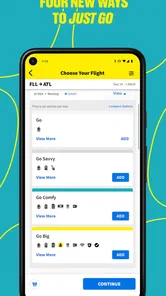
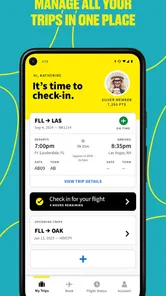
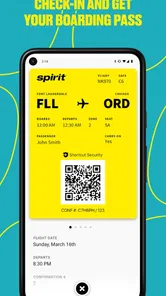

Analysis by Reviewed
I’d decide whether Spirit Airlines is right for me by looking beyond the headline fare. The practical question is how much the trip will cost after I account for the things I actually need: a bag, a particular seat, or food along the way. For a simple journey where I can travel light and don’t mind a basic onboard experience, an airline app focused on managing Spirit trips can be a useful companion. If I need a more comfortable flight or a bundled, predictable travel experience, I’d compare the full cost and convenience with other airlines before choosing.
Choose based on the trip, not just the fare
I find it helpful to separate two decisions: whether Spirit suits the journey, and whether its app suits the way I manage that journey. The app is most useful after I know I’m taking a Spirit flight. It doesn’t change the airline’s low-cost, add-on-based approach, so I’d first think through how I travel: how much I’m bringing, whether seat location matters, and how much flexibility I want once plans are set.
For example, someone heading away for a short visit with only a small personal item may value a low starting fare more than a larger seat or bundled extras. A family traveling together may have different priorities: the total can depend on the bags and seating choices they need, so the initial fare alone is a poor comparison. I’d work out those needs before booking, rather than treating optional choices as surprises at the end.
That same check helps answer whether to use a carrier-specific app or a general travel organizer. If most of my upcoming arrangements are on Spirit, a dedicated place for that itinerary feels practical. If I’m coordinating flights on several airlines, lodging, and ground transport, I’d keep a broader organizer as my main overview and use Spirit’s app for its own trip details. Neither approach has to replace the other.
What the app is useful for on travel day
The Spirit Airlines app is a free travel and local app from Spirit Airlines Inc., built around keeping a traveler’s trips together. I see its value less as a reason to book a flight and more as a way to keep the airline side of a journey close at hand. When plans are spread across email, browser tabs, and a calendar, having a dedicated place to manage Spirit travel can reduce the small bits of searching that become annoying at an airport.
A practical workflow is to check your trip details before leaving home, then use the app as your reference while you’re on the move. I’d also keep essential details somewhere I can reach if my phone battery runs low; an app is convenient, but it shouldn’t be the only place I know my plans are recorded. Before relying on any mobile booking or travel tool, I’d make sure I can sign in and locate the trip while I still have a steady connection.
One useful habit is to review the itinerary at two different moments: when I’m still at home and able to sort out a question calmly, and again before I leave for the airport. That gives me a chance to notice a detail I may have skimmed when booking. I also avoid assuming that a carrier app is a complete travel folder. A hotel confirmation, a ride arrangement, and another airline’s booking may still live elsewhere, so I keep those records accessible without expecting Spirit’s app to organize the entire trip.
More From Our News Desk

 Weather - By Xiaomi
Weather by Xiaomi Review: Clear at a Glance, Less Clear Up Close
Xiaomi’s weather app makes everyday forecasts quick to scan, but its calm surface can leave useful details and recovery paths harder to find than they should be.

 X
X Under Pressure: Can It Recover When Posting Goes Wrong?
A resilience-focused review of X, examining setup, mistaken posts, interruptions, weak connections, and the gaps that matter when recovery needs to be dependable.

 Clash of Clans
 Is Won Between the Battles
Its raids are quick; its community is a long-term project of coordination, teaching, rivalry, and shared responsibility—with all the friction that entails.

 Android Auto
 Makes the Case for Quieter Car Software
The car interface is no longer judged by how much it can do, but by how quietly it helps. Android Auto shows what drivers now expect—and what still gets in the way.

 MobiOffice: Word, Sheets, PDF
MobiOffice: Transforming Mobile Productivity with Seamless Integration
MobiOffice: Word, Sheets, PDF is redefining mobile productivity with a surprising blend of functionality and innovation.

 EA SPORTS FC Soccer Mobile 26
EA SPORTS FC™ Mobile Soccer: Redefining Mobile Sports Gaming
Dive into EA SPORTS FC™ Mobile Soccer, where immersive gameplay and strategic depth transform mobile sports gaming.
Latest News



Who will get the most from it
This is the most natural fit for people who have already chosen Spirit and want their airline arrangements easier to manage. It can be especially handy if you make a trip in stages: check your plans at home, revisit them during the journey to the airport, and refer back after landing before continuing to another stop. That routine is more useful than opening an airline app only once to book and then trying to reconstruct details from old messages.
It is less compelling if you rarely fly Spirit, prefer to organize every airline booking in one general travel planner, or are still comparing carriers and total trip costs. A carrier-specific app is naturally narrower than a broad travel organizer. I’d use it for the Spirit itinerary itself, while keeping hotel, ground transport, and other airline plans in whatever system I already trust.
A realistic use case is a traveler leaving work for an evening flight and then taking a prearranged ride after landing. Before leaving, I’d check the Spirit trip details and confirm that my onward plan is stored separately, then keep the airline app handy for the flight portion. If the ride is time-sensitive, I’d build in a buffer rather than treating the app as a guarantee that every leg will line up perfectly. This is where a focused airline tool helps, but good trip planning still matters more than having every detail on one screen.
I’d also think twice about installing it if I’m only browsing fares or if I have no Spirit trip planned. A general travel search or planning tool makes more sense while comparing different carriers, since the key question then is the whole itinerary and its cost, not how one airline manages a booking. Once I’ve chosen Spirit, the balance changes: keeping that trip in its own app may be more convenient than repeatedly searching messages for the same details.
Getting Onboard with Spirit Airlines
First things first, let's talk about the booking process. Spirit Airlines offers a no-frills, straightforward approach to booking flights. It’s all about getting you in the air without burning a hole in your pocket. I’ve found the website to be quite user-friendly. Just plug in your dates, and voila, you're on your way to securing a seat in those signature yellow planes.
However, keep in mind, when flying with Spirit Airlines, the base fare includes just the seat. Carry-on bags, checked luggage, and even selecting your seat come with additional charges. It’s a unique business model that keeps the initial ticket prices low. If you're a savvy traveler who can pack light, this could be quite the deal!
In-Flight Experience
Once you’re aboard, the cabins are pretty basic. Don’t expect in-flight entertainment systems or complimentary snacks. Instead, you can purchase snacks and drinks if you need to munch on something mid-flight. The seats are, well, functional. They're not the plushest seats out there, but they do the job for those short domestic hauls. Remember, Spirit is all about getting you where you need to go without the extra fluff.
One thing I do appreciate is the cheerful vibe the crew carries. They often make light-hearted announcements that add a bit of humor to the journey. It’s these little touches that make flying with Spirit somewhat memorable.
What to Expect at Your Destination
Landing at your destination with Spirit is usually on time, thanks to their efficient operations. However, the baggage claim can sometimes take a bit longer, so patience is key. It's a good idea to factor in some extra time if you have connecting transport or plans post-flight.
If you’re a frequent traveler, you might want to look into the $9 Fare Club. It’s a membership that offers exclusive savings on fares and bags, which can be beneficial if Spirit is your go-to airline.
That trade-off is why I’d compare the complete itinerary, not only the ticket total shown at the start. A traveler with one small personal item and flexible seating needs may find the low-cost approach sensible; someone carrying more or traveling with companions who want to sit together should calculate those choices before committing. The cheapest-looking option is only useful if it still suits the way you travel.
Comparing alternatives and switching smoothly
When I compare Spirit with other airline options, I don’t treat a lower starting fare as an automatic win or a basic onboard experience as an automatic deal-breaker. I compare the final price for the same journey and the parts that matter to me: baggage, seat choice, and whether I want food included or prefer to buy only what I use. An airline with more bundled services may be the easier choice for someone who values fewer decisions; Spirit may suit someone comfortable keeping the fare lean and making selective choices.
For a mixed-carrier itinerary, a general travel planner can be the better top-level view because it puts different bookings together. But that doesn’t mean it replaces the Spirit app for handling the Spirit portion. I’d use the broad organizer to see the overall trip and the airline’s own app when I need to focus on that carrier’s arrangements. This split is particularly helpful when one journey has a separate return flight or onward transport booked elsewhere.
If I’m switching from a general planner, I wouldn’t move every travel record at once or assume the airline app will take over all reminders and documents. I’d first locate the Spirit booking, confirm that I can access it, and keep the rest of the trip in the system where it already lives. That small check avoids the frustrating moment of reaching the airport and discovering I remember the app password but not where I saved my hotel or ride details.
Making the switch without hassle
If you’re moving from a general travel planner to Spirit’s app, I’d avoid trying to replace your whole system. Keep confirmations and arrangements for other parts of the trip where you normally store them, and use the airline app as the focused place to handle the Spirit portion. That division helps when a journey includes different carriers or separate ground transport, because you won’t assume one airline’s tool covers everything.
On a typical travel morning, I’d review the itinerary before heading out, check it again when I reach the airport, and leave room in my schedule after landing rather than making a tight connection to a ride or appointment. The app can help keep trip management centralized, but it cannot make a packed schedule or an unsuitable fare more forgiving. The useful habit is to pair mobile convenience with a realistic plan for bags, timing, and onward travel.
A few practical questions shape whether I’d rely on it. Is it useful if I’m still deciding which airline to book? Not as my main comparison tool; I’d compare the complete trip first, then use the Spirit app if I choose that carrier. Can it replace a planner for a multi-airline holiday? I wouldn’t count on one airline’s app to be the home for every company’s arrangements, so I’d keep a broader overview too. And should it be my only record of travel plans? No: I’d keep essential confirmation details somewhere accessible as a sensible backup, especially before a long day away from a charger.
Is it worth keeping?
The app has a 4.7 average from around 383,000 ratings, and it has been installed over five million times. It is free, rated for Everyone, and version 4.2.0 supports Android 8.0 and later. Those figures suggest it has a substantial audience, but I’d still judge it by whether I actually fly Spirit often enough to benefit from keeping a dedicated airline app on my phone.
My recommendation is straightforward: if you’ve booked with Spirit, or expect to do so regularly, I’d use the app to keep those trips easier to manage. If you’re choosing an airline, compare the total cost and the kind of journey you want first; a broader travel organizer may suit mixed-carrier trips better, while another airline may be a better match when comfort or included services matter more. Spirit Airlines makes the most sense when its lower-cost, no-frills approach fits your plans rather than forcing you to change them.
Overall, I’d treat it as a practical companion to a Spirit booking, not as a reason by itself to choose the airline. Its strongest role is helping me keep that carrier’s trip details close while I handle the rest of the journey with the tools I already use. If I’m comfortable checking the full fare, traveling within the limits of a basic service, and keeping a backup record of important plans, I’d be happy to use it. If I want a single place for every airline and every travel service, or I value a more inclusive flight experience above the lowest starting fare, I’d look elsewhere first.
Spirit Airlines Frequently Asked Questions
Is the Spirit Airlines app free to download?
Yes, the Spirit Airlines app is free to download. It is a travel app intended to help you manage your trips in one place. Downloading the app does not mean that flights or other travel services are free; those are separate from the app itself. Before installing, check that your device has a compatible operating system and enough space for the app.
Who publishes the Spirit Airlines app, and what age group is it suitable for?
The app is developed by Spirit Airlines Inc. and is rated Everyone, making it suitable for a general audience. It is listed in the Travel & Local category and focuses on managing Spirit Airlines trips. If you are downloading it for a child or another family member, the Everyone content rating is a useful starting point, while the app’s travel features are primarily relevant to passengers.
What devices and operating systems can run the Spirit Airlines app?
The Spirit Airlines app is available for Android and iOS devices, so travelers can use it on either platform. It is listed as compatible with Android 8.0 and later, which is useful to check before downloading if you have an older phone or tablet. The app is free to download, and its content rating is Everyone.
What is the Spirit Airlines app and what can I do with it?
The Spirit Airlines app is a mobile application designed to enhance your travel experience with Spirit Airlines. With this app, you can easily book flights, check in online, manage your reservations, and view your boarding pass. Additionally, it provides real-time flight status updates, notifications for gate changes, and important travel information, ensuring a seamless travel experience from start to finish.
Is the Spirit Airlines app available for both Android and iOS devices?
Yes, the Spirit Airlines app is available for download on both Android and iOS platforms. You can find it on the Google Play Store for Android devices and the Apple App Store for iOS devices. This ensures that users of both operating systems can enjoy the convenience and features offered by the app, making it accessible to a wide range of smartphone users.
Pros
- Affordable ticket prices
- Large selection of flight routes
- User-friendly mobile app
- Frequent promotions and deals
- Efficient boarding process
Cons
- Limited legroom on flights
- Extra fees for carry-on luggage
- No complimentary snacks or drinks
- Inconsistent customer service
- No in-flight entertainment options











