

Spin the Wheel: Random Picker+
- 64.00
- 4.4
- Installs
- 500.00K
- Price
- Free
Screenshots







Analysis by Reviewed
When a group gets stuck comparing the same options, a quick random choice can be more useful than another round of debate. I like the idea behind Spin the Wheel: Random Picker+: it turns a small decision into a shared moment rather than pretending every choice needs a serious system. It is an entertainment app from CEM SOFTWARE LTD, and its appeal is straightforward: make a wheel, add options, and let a spin settle what comes next.
Where a wheel helps—and where it doesn’t
I’d reach for it when the choices are already acceptable and the main problem is choosing among them: who picks the film, which simple activity to try, or what order to tackle a set of chores. For example, friends planning a relaxed evening could put three agreed-on movies into a wheel, spin once, and move on instead of spending twenty minutes revisiting the same preferences. That works because everyone accepts the options before the result appears.
That distinction matters. A wheel can break a tie, but it cannot make an unfair list fair. If one person adds choices that others dislike, the random result may feel arbitrary rather than impartial. I’d build the wheel together, check the entries aloud, and only then spin. For decisions with meaningful consequences—work assignments, money, health, or anything someone may contest—I would use a clear rule or discuss the choice instead.
Useful habits for better results
For recurring decisions, I’d keep separate wheels for separate situations rather than putting every possibility into one crowded list. A dinner wheel should contain realistic meals for that evening, not dishes nobody has time to make. This small bit of preparation makes the result actionable and avoids the familiar problem of winning a choice you cannot actually follow through on.
There is also a trade-off between variety and clarity. More entries can make a wheel feel less predictable, but a long list takes longer to review and may include near-duplicates that muddy the outcome. I’d combine options that mean essentially the same thing and keep genuinely different choices distinct. If the group wants a quick answer, a short, agreed list is usually better than trying to represent every possible preference.
Trust, control, and the right expectations
Random selection is only as useful as the process people can see and accept. The visible wheel gives a group a shared result to react to, which can feel more satisfying than asking one person to pick. Still, I wouldn’t treat an entertaining spin as proof of fairness in a high-stakes setting; for that, a transparent procedure everyone understands is a better fit.
The app is free, has an Everyone content rating, and has a 4.4 average from around 9,700 ratings, with over 500,000 installs. Those figures suggest it has found an audience, but they do not tell me whether its particular controls suit every user. I’d check the choices presented in the app and on its store page before relying on it for a sensitive use. I also avoid putting personal details into a wheel: names or private information are unnecessary for ordinary picks, and a neutral label such as “Player A” is enough for a casual game.
More From Our News Desk

 Gmail
GmailGmail in a Busy Inbox: Who Benefits Most?
From first account to crowded workday, Gmail earns its place through dependable search and flexible sorting—but its best fit depends on how much inbox maintenance you can tolerate.

 Prime Video
Switching to Prime Video: What Changes in Your Viewing Routine
Prime Video can make a compelling second home for streaming, but switching means learning a different catalog, rental layer, and route from browsing to playback.

 Universal TV Remote Control
Universal TV Remote Control Works Best as a Reliable Backup
A phone remote earns its place through quick setup and reliable habits. Here is how to get more from Universal TV Remote Control—and where its limits show.

 Weather - By Xiaomi
Weather by Xiaomi Review: Clear at a Glance, Less Clear Up Close
Xiaomi’s weather app makes everyday forecasts quick to scan, but its calm surface can leave useful details and recovery paths harder to find than they should be.

 X
XX Under Pressure: Can It Recover When Posting Goes Wrong?
A resilience-focused review of X, examining setup, mistaken posts, interruptions, weak connections, and the gaps that matter when recovery needs to be dependable.

 Clash of Clans
Clash of Clans Is Won Between the Battles
Its raids are quick; its community is a long-term project of coordination, teaching, rivalry, and shared responsibility—with all the friction that entails.
Latest News



If you are choosing an app mainly for account controls, data handling, or detailed privacy assurances, I would compare those points directly before settling on this one. For a simple dinner or movie decision, the stakes are lower, but it is still sensible to keep the entries generic. That is a practical boundary, not a claim about what the app collects.
Getting to Know Spin the Wheel: Random Picker+
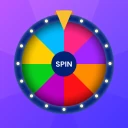
So, what's this app all about? Essentially, Spin the Wheel: Random Picker+ is your go-to app for creating customizable wheels of fortune. Whether you're deciding what's for dinner, choosing a game for family night, or even picking a random workout, this app has got you covered. The interface is super user-friendly, making it a breeze to set up your wheel with all sorts of options.
Customization Galore
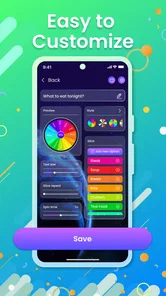
One of the standout features is the level of customization it offers. You can add as many entries as you want, change the colors, and even add images to each slice of the wheel. This makes it not only functional but also a lot of fun to use. Imagine spinning a bright, colorful wheel with all your favorite dinner options – it’s like a mini game in itself!
Spin and Decide
When it’s time to make a decision, just give your phone a shake, or tap that spin button to set the wheel in motion. The app uses a realistic spinning animation that adds to the excitement. It’s almost like being on a game show, waiting in suspense to see where the wheel will stop. And when it does, there’s no more second-guessing. The wheel has spoken!
Perfect for Group Decisions
This app isn’t just for solo decision-making. It’s perfect for group settings too. Whether you’re organizing a team-building activity at work or figuring out who gets to pick the next movie on date night, the wheel can handle it all. It brings an element of fun and impartiality, ensuring everyone feels included in the decision-making process.
Why You’ll Love It
What makes this app a staple on my phone is its versatility and ease of use. It’s incredibly simple yet effective, and it brings a sense of fairness and fun to decision-making. Plus, it’s a great conversation starter. You’d be surprised how much people enjoy watching the wheel spin and waiting for the outcome.
In conclusion, if you’re looking for a fun, interactive way to make decisions, Spin the Wheel: Random Picker+ is absolutely worth downloading. Give it a spin and see how it adds a little excitement to your daily choices. Trust me, once you start using it, you’ll wonder how you ever made decisions without it!
Beyond the usual randomizer
Compared with a coin toss, a numbered die, or asking someone to choose, a wheel is easier to read when there are several named options. A coin is ideal for two outcomes; dice suit choices that can be mapped neatly to numbers. The wheel is more approachable for a family or group because people can see the candidates together, and its colors and images can make the options easier to distinguish at a glance. The trade-off is that it takes a little more setup than flipping a coin, so I would not open it for a decision that can be settled instantly.
Small setup choices that make it work
For a classroom game or family activity, I’d use short labels that are readable on a phone screen and give each option a distinct visual treatment. Images can help younger players recognize choices without asking someone to read every entry aloud, while colors can separate categories such as snacks and activities. Before a group spin, I’d also agree whether the selected item is removed from future rounds or remains eligible; that expectation can change the whole feel of a multi-round game.
Another useful approach is to treat the wheel as a prompt, not a command. If it lands on a dinner idea that someone cannot eat or an activity the group cannot do, pause and remove or replace that option before spinning again. The app can help make an agreed shortlist lively, but it cannot account for changing circumstances unless people update the choices themselves.
Who should choose it
I think this is a good fit for people who want a lightweight way to settle low-stakes choices, especially parents, friends, teachers, or anyone hosting a casual game. The app also makes sense when the visual reveal is part of the fun; a plain list picker may be faster, but it does not create the same shared anticipation. The current version is 1.2.9 and it requires Android 7.0 or later, which gives Android users a straightforward compatibility point to check before installing.
I would skip it if you need a formal draw, an auditable selection process, or a tool centered on detailed record-keeping. A wheel is best when the group values speed and a playful presentation more than documentation. And if you only ever choose between two things, a coin toss or a built-in random number tool is simpler and avoids maintaining a custom set of entries.
Practical expectations before downloading
The app’s store summary points to several kinds of random pickers beyond a wheel, including finger, bottle, dice, number, and coin choices. That breadth can be handy when the format should match the moment: a finger picker suits a group gathered around one phone, while a coin-style choice is easier for a binary question. I would still choose the simplest mode that fits the decision rather than turning every small choice into a setup task.
Before using it with children or a group, I’d try a sample round on my own so I know how the selection and display feel, then let everyone inspect the entries before the real spin. That is also the best way to answer the practical question of whether it feels comfortable to use: a brief test reveals whether the controls and presentation suit your group better than a verbal vote. The app has 64 written reviews alongside its broader rating count, so I would treat individual comments as useful context rather than assuming every person uses it the same way.
My cautious verdict
I’d recommend giving it a try if you want a free entertainment app that makes everyday choices more visible and a little more fun. Its strongest use is not replacing judgment, but helping a group move forward once the options are fair and everyone is happy to accept a random result. Keep entries sensible, avoid sensitive personal details, and use another method when accountability matters. With those limits in mind, it can turn “I don’t mind— you choose” into a quick, shared decision without making a small choice feel like a project.
A smoother way to use it in the moment
For a real evening decision, I’d prepare the wheel while the group is still discussing what is possible, rather than handing over the phone after everyone is already impatient. If friends are deciding what to watch, first agree on a few films that fit the time and mood, then add clear titles and invite everyone to check the list. That sequence prevents the result from reopening the argument and keeps the spin focused on choosing, not negotiating the rules.
There is a useful distinction between a one-off pick and a repeated round. For a one-off choice, a concise wheel is all you need. For a game where the app will choose several people or activities, decide beforehand how repeated outcomes should be handled and make any necessary edits between spins. I would not assume that a previous result automatically changes later choices; checking the wheel before each round avoids surprises and lets the group stay in control.
Choosing the right format for the group
The wheel works best when its visual presentation helps people follow the choice. In a noisy room, for instance, a finger picker can make the selection easy to see without one person announcing a number, while a bottle-style choice better suits a playful turn-taking game. For a quick yes-or-no decision, a coin option avoids the extra effort of building a list. These alternatives are useful precisely because they fit different social situations; the wheel is not automatically the best mode just because it is the most recognizable.
For younger players, I’d keep the choice set small and use labels they can understand without explanation. A group of adults may enjoy a longer list of unusual activities, but children can lose interest while people read through too many entries. The practical tip is to tailor not only the options but also the pace: a short list makes the outcome arrive quickly, while a little visual variety can keep the process engaging without making the wheel hard to scan.
What to consider before relying on it
A common question is whether a spin should settle a disagreement even when someone dislikes the outcome. My answer is to agree on that rule before opening the app. If participation is voluntary and the result is low stakes, the wheel can be a fair-feeling tie-breaker. If the result affects someone’s responsibilities or comfort, a group conversation is more considerate than treating randomness as a substitute for consent.
Another question is whether it suits people who want a record of how a choice was made. I would not use it as an official draw or as proof that a selection followed a formal process. Its strength is a visible, lighthearted decision in the moment, not documentation. Anyone who needs a traceable method should choose a tool designed around that requirement and explain the process to participants.
On privacy, my practical rule is simple: use generic options and avoid entering information that would be awkward to display to everyone holding the phone. A wheel for chores can use task names rather than personal details, and a group game can use neutral labels instead of full names. Before installing, anyone who prioritizes privacy or account management should review the app’s available choices and relevant store information themselves, then decide whether those controls meet their expectations.
A fit for casual choices, not every decision
At its core, this is a small entertainment app for adding a bit of ceremony to choices that do not deserve a long debate. It is particularly suited to people who enjoy making a decision together, whether that means selecting an activity at home, choosing a classroom prompt, or deciding whose turn comes next. The app is free, and its broad audience is reflected in an average rating of 4.4 and over 500,000 installs; I still see those as context, not a guarantee that the experience will match every person’s preferences.
I’d leave it off my shortlist if my main goal were privacy documentation, accountable random selection, or the fastest possible binary answer. A coin toss, verbal vote, or dedicated formal process can be a better choice depending on the need. But when the group wants an engaging way to select from options it has already accepted, the wheel’s visual format gives a simple decision a shared finish. That is the specific job I think it does well.
Spin the Wheel: Random Picker+ Frequently Asked Questions
What can I use Spin the Wheel: Random Picker+ for besides choosing between options?
The app’s entertainment tools include random finger pickers, a bottle, dice, number selection, and a coin, as well as custom wheels. These options make it useful for casual games, group activities, and everyday choices when you would rather let a random picker decide. You can choose the tool that suits the moment instead of relying only on a custom wheel.
What is Spin the Wheel: Random Picker+ and how does it work?
Spin the Wheel: Random Picker+ is an app designed to help users make decisions by creating custom wheels with various options. Once you set up your wheel with desired choices, simply spin the wheel, and it will randomly select one of the options for you. This app is perfect for making decisions like choosing a restaurant, activity, or even picking a winner for a giveaway.
Is Spin the Wheel: Random Picker+ free to use?
Yes, Spin the Wheel: Random Picker+ is free to download and use. It is an entertainment app from CEM SOFTWARE LTD, and its age rating is Everyone. If you are looking for a straightforward way to try custom wheels and random pickers, the free price makes it easy to get started.
Can I create multiple wheels for different purposes in Spin the Wheel: Random Picker+?
Absolutely! Spin the Wheel: Random Picker+ allows users to create multiple wheels tailored to different needs. Whether you need a wheel for deciding dinner plans, picking a workout routine, or even selecting a random name, you can create a personalized wheel for each situation, making it versatile and convenient.
Is it possible to share my created wheels with friends or on social media?
Yes, the app provides options to share your custom wheels with friends or on social media platforms. This feature is great for group decision-making or engaging with your audience online. Simply generate a shareable link or use the app's built-in sharing features to distribute your wheels easily.
Pros
- Easy to use interface for quick setup
- Customizable options for personalized wheels
- Supports multiple wheel themes and designs
- Offline mode available for on-the-go use
- Frequent updates with new features
Cons
- Limited free features in basic version
- Ads can be intrusive during wheel spins
- No option for collaborative wheel creation
- Lacks integration with other apps
- Occasional lag on older devices













