

Spin - Electric Scooters
- 15.23K
- 4.7
- Installs
- 1.00M
- Price
- Free

Screenshots
Analysis by Reviewed
Electric scooters have been steadily gaining popularity as a convenient and eco-friendly mode of transport. Among the many options available, Spin - Electric Scooters stands out for its user-friendly app and reliable service. Whether you're zipping through the city streets or taking a leisurely ride through the park, Spin offers a smooth experience that's hard to beat.
Who Spin suits on a short city trip
I see Spin as most useful when the journey is too far to walk comfortably but too short to justify waiting for a bus or arranging a car ride. Picture leaving a train station with a few blocks still to cover, or crossing town for an appointment when traffic makes a car an awkward choice. A shared scooter can make that last stretch simpler, provided there is one nearby and your destination is practical to reach by scooter.
It is less appealing if you need a predictable door-to-door commute every day. Availability depends on where you are, and a map showing a scooter does not make riding it the best option for every route. I would keep walking, public transit, or a taxi as a fallback rather than build a schedule around finding a scooter at exactly the right moment.
Effortless Navigation
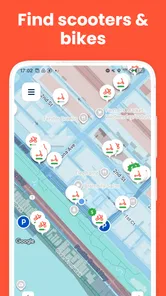
One of the first things you'll notice about the Spin - Electric Scooters app is its intuitive interface. From the moment you download it, the app guides you through the process of setting up your account, finding a scooter, and starting your ride. It's as simple as locating a nearby scooter on the map, scanning the QR code, and off you go. No fumbling around or technical hiccups.
Speed expectations and the ride
When it comes to the actual ride, Spin scooters offer a smooth and stable experience. The scooters are designed for comfort and safety, with features like adjustable speed settings and responsive brakes. I particularly appreciated the sturdy build of the scooter, which made me feel secure even on uneven surfaces. Plus, the scooters have a decent range, so you won't have to worry about running out of battery mid-commute.
Still, I would treat a shared scooter as a practical way to cover a short distance, not a promise of fast travel. Pavement condition, pedestrians, crossings, and turns all affect how quickly a trip feels, and a composed ride matters more than rushing. If your route includes rough ground or crowded walkways, slowing down and choosing a less busy path is the sensible trade-off. I would not plan a tight connection around an assumed riding speed.
A small workflow tip is to check the route and your destination before starting, rather than focusing only on the scooter marker. That helps you spot whether the final stretch is walkable and whether the ride actually saves time. If the trip is only a few blocks, walking may be simpler; if it involves a longer gap between transit and your destination, Spin can be a useful middle ground.
More From Our News Desk

 Weather - By Xiaomi
Weather by Xiaomi Review: Clear at a Glance, Less Clear Up Close
Xiaomi’s weather app makes everyday forecasts quick to scan, but its calm surface can leave useful details and recovery paths harder to find than they should be.

 X
XX Under Pressure: Can It Recover When Posting Goes Wrong?
A resilience-focused review of X, examining setup, mistaken posts, interruptions, weak connections, and the gaps that matter when recovery needs to be dependable.

 Clash of Clans
Clash of Clans Is Won Between the Battles
Its raids are quick; its community is a long-term project of coordination, teaching, rivalry, and shared responsibility—with all the friction that entails.

 Android Auto
Android Auto Makes the Case for Quieter Car Software
The car interface is no longer judged by how much it can do, but by how quietly it helps. Android Auto shows what drivers now expect—and what still gets in the way.

 MobiOffice: Word, Sheets, PDF
MobiOffice: Transforming Mobile Productivity with Seamless Integration
MobiOffice: Word, Sheets, PDF is redefining mobile productivity with a surprising blend of functionality and innovation.

 EA SPORTS FC Soccer Mobile 26
EA SPORTS FC™ Mobile Soccer: Redefining Mobile Sports Gaming
Dive into EA SPORTS FC™ Mobile Soccer, where immersive gameplay and strategic depth transform mobile sports gaming.
Latest News



Heavy-use moments and everyday convenience
Spin is not just about getting from point A to point B; it's about doing so responsibly. The company is committed to sustainability, with a focus on reducing carbon emissions and promoting green transport solutions. This eco-friendly approach is a big plus for environmentally conscious riders. Additionally, the convenience factor cannot be overstated. With Spin, there's no need to worry about parking, traffic, or emissions—all you need is your smartphone.
For a realistic use case, imagine finishing work with a bag and wanting to get from a transit stop to a nearby errand before heading home. I would first check that a scooter is actually convenient for that leg, then allow time to walk if the ride is not a good fit. Carrying belongings, handling a phone, and navigating a busy area can make a scooter less convenient than it looks on a map, so I would keep both hands available while riding and avoid treating it as a substitute for a careful route choice.
Compared with walking, a scooter can shorten a suitable trip; compared with a bicycle, it avoids having to bring and store your own vehicle. Public transit is usually the stronger option for longer journeys or when weather and traffic make riding uncomfortable. Those alternatives are not failures of the app: they are sensible choices when the scooter is unavailable, the route is unsuitable, or you want a more predictable trip.
Reliability, support, and practical limits
Another noteworthy feature is the customer support. Whether you encounter a technical issue or simply have a question, Spin's support team is readily available to assist. This level of service adds an extra layer of reliability that enhances the overall user experience.
In practice, reliability has two parts: whether the app lets you find and start a ride smoothly, and whether a scooter is available and appropriate where you need it. The map-and-scan flow is easy to understand, but shared transport still asks you to adapt when a nearby option is not suitable. I would check the scooter's location before setting off and leave a little flexibility in my plans, especially when arriving somewhere at a particular time.
Spin is a free app from Pheenix USH LLC in the Travel & Local category. It has a 4.7 average from around 48,000 ratings, and more than 1 million installs. The app is rated for Everyone, and its current version is 4.374.0.1, with Android 9 as the minimum operating system. Those details make it easy to judge whether the app fits your device, but the practical question remains whether shared scooters suit your route and local routine.
On the device side, the app relies on a smartphone for finding and starting a ride, so a low battery or unreliable mobile connection can become a real inconvenience at the wrong moment. I would open the app and check the map before leaving a building, while I still have time to switch to walking or transit. That simple backup habit is more useful than assuming every part of a trip will go exactly to plan.
Planning around availability and your phone
A useful way to decide whether to use Spin is to separate the trip into its parts: getting to a scooter, riding, and finishing on foot. A scooter that appears close may still be inconvenient if reaching it means doubling back, or if the last part of the route is awkward to walk. I would compare the whole journey with the walking and transit options rather than judging by the ride alone. This prevents a short scooter trip from becoming a longer detour.
For a first ride, I would choose a familiar route with room to move at an unhurried pace. That gives you a chance to get comfortable with the scooter and the app’s start-up flow without also trying to navigate a complicated intersection or rush to an appointment. Once you know how the process feels, you can make a better call about using it for an unfamiliar trip. This is especially helpful if you tend to rely on your phone for directions, since looking at a screen while moving is a distraction rather than a shortcut.
The phone is not just a minor convenience here: it is the tool for locating and unlocking a ride. I would begin with enough battery for the journey and keep the map check brief before moving. If your connection is unreliable, it is wiser to decide on a backup before you need one. A paperless, phone-led trip can be frictionless when everything works, but it leaves less room for improvisation when the phone is nearly out of power.
When another way to travel makes more sense
Spin is strongest as a flexible connector between places, not as a universal replacement for other transport. Walking is often easier for a very short distance, and it does not require locating or starting a vehicle. A bus or train is usually a better fit when the trip is longer, when you need to carry more, or when you want to avoid riding through uncomfortable conditions. A personal bicycle may make more sense for someone who already owns one and regularly travels routes suited to cycling.
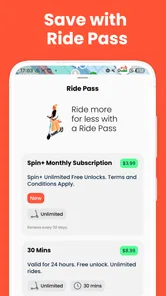
That comparison also helps set expectations about cost without needing to assume a particular trip charge: the app itself is free, but the decision to ride should still be based on the complete journey and the terms shown when arranging a trip. For someone choosing between a short walk and a scooter, convenience may matter more than shaving off a little time. For someone making several connections, a scooter could be useful for one leg while transit handles the longer stretch.
I would also skip a ride when I could not give it my attention. A crowded route, an awkward load, or a destination that leaves no comfortable place to finish the trip can outweigh the benefit of moving faster than walking. The best choice is not always the fastest-looking marker on a map; it is the option that lets you travel without rushing or creating a problem at the other end.
Final Thoughts
In conclusion, Spin - Electric Scooters delivers on its promise of providing an efficient, enjoyable, and eco-friendly transportation option. It's perfect for short commutes, leisurely rides, or simply exploring the city without the hassle of traditional transport. If you're in the market for a convenient travel solution that's also kind to the planet, Spin is definitely worth considering. So, why not give it a spin and see for yourself?
My verdict is positive for occasional, short urban trips where a scooter genuinely fits the route. The best results come from treating Spin as one travel option rather than the whole plan: check availability, allow for walking, and choose another mode when conditions or timing make riding a poor match. If that flexible style suits you, the app is worth trying; if you need guaranteed transport on a fixed schedule, I would rely on a more predictable alternative.
Spin - Electric Scooters Frequently Asked Questions
Can I browse Spin scooters before creating an account?
Spin is designed to help riders find and use shared electric scooters through its mobile app. You can explore the app’s scooter-rental experience, but riding requires following the service’s signup and ride steps. Before relying on it for a trip, open the app and check what is available in your area, then make sure you can complete the account and payment steps it presents.
What should I check before starting a Spin ride?
Before riding, check that the scooter is available in the app and that its condition looks suitable for use. Spin’s app is built around finding a scooter, unlocking it, and ending the trip when you park. Take time to review the in-app instructions and local riding rules as well, so you understand how to begin and finish a ride responsibly.
Can I use Spin for everyday trips or just occasional rides?
Spin can be useful for either occasional trips or regular local travel, depending on whether shared scooters are available where you need them. The app focuses on locating and renting scooters, making it an option for short journeys as well as spontaneous rides. Consider where you usually travel and whether scooter access fits your route before making it part of your routine.
Does Spin require an internet connection while I ride?
The Spin app is used to locate and unlock scooters and to manage the ride, so you should have a working connection when using those features. It is sensible to check your phone’s connectivity before starting, especially if you are depending on the app to end the trip. Keep your phone available during the ride so you can follow the app’s instructions.
What should I do if I cannot unlock or end a Spin ride?
If unlocking or ending a ride does not work as expected, first follow the prompts shown in the app and check that your phone is connected. Make sure you have selected the correct scooter and completed the relevant steps before moving on. Since the app manages the rental, resolving the issue through its current instructions is important before leaving the scooter.
Pros
- Easy to locate nearby scooters.
- Quick unlock with app integration.
- Eco-friendly transportation option.
- Affordable pricing for short trips.
- User-friendly app interface.
Cons
- Limited availability in some areas.
- Requires smartphone for access.
- Battery life can be inconsistent.
- Potential safety concerns in traffic.
- Usage fees can add up quickly.











