SPIC - Play Integrity Checker
- 14.00
- 4.2
- Installs
- 100.00K
- Price
- Free

Screenshots
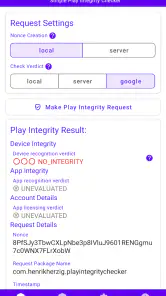
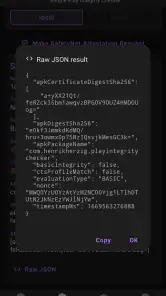
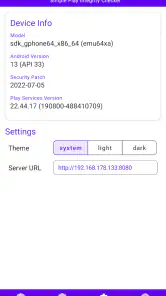
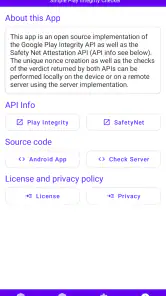
Analysis by Reviewed
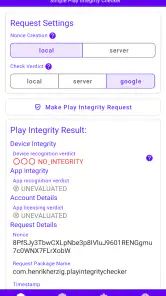
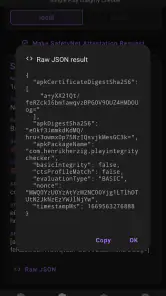
When a security check depends on an online service, a pause or error can be hard to interpret: is the phone having trouble, or is the connection? That distinction matters with SPIC - Play Integrity Checker, a free Android utility from Henrik Herzig in the Libraries & Demo category. It demonstrates Play Integrity and SafetyNet Attestation, so I’d approach it as a way to inspect these checks, not as a general-purpose malware scanner.
What a connection changes
For someone exploring app integrity, connectivity is part of the result, not just a background detail. If a check takes longer than expected, I’d first make sure the phone has a working connection and try again before drawing conclusions about the device. A failed or delayed response is not, by itself, proof that an app is unsafe or that the phone has failed an integrity check.
This is useful when testing a device on home Wi-Fi and later on mobile data: repeating the same check under different network conditions can help separate a temporary connection issue from a result that persists. I would keep the conditions in mind and avoid treating one interruption as a definitive diagnosis.
Reading a result without overclaiming
The key distinction I keep in mind is that an attestation check answers a narrower question than “Is my phone secure?” It can help you examine how Play Integrity or SafetyNet Attestation responds, but it should not be treated as a complete audit of every app, setting, or threat on the device. That makes the result useful for a specific investigation, while limiting what you can conclude from it.
If you are trying to understand why a particular app behaves differently on two devices, write down the device and network conditions before comparing checks. A result that changes after a network switch deserves a different interpretation from one that remains consistent under steady connectivity. This small habit makes the app more useful as a diagnostic tool and reduces the temptation to treat a single response as a verdict.
I would also separate an unexpected result from an immediate security scare. If an app refuses to work, the integrity check may be one piece of context, but it does not automatically identify the cause. The practical value here is in gathering a signal you can compare and discuss, not in replacing careful troubleshooting.
What SPIC helps you explore
Picture this: You download a new app, but there's a nagging worry at the back of your mind about its authenticity. With SPIC - Play Integrity Checker, those worries are a thing of the past. This app acts as a security guard for your device, checking to ensure that all installed applications are legitimate and safe. The app is designed to perform a thorough check of the apps installed on your phone, verifying their integrity against known malware and security threats. It's like having a digital bouncer right on your device!
More From Our News Desk

Clash of Clans Is Won Between the Battles

Android Auto Makes the Case for Quieter Car Software

MobiOffice: Transforming Mobile Productivity with Seamless Integration

EA SPORTS FC™ Mobile Soccer: Redefining Mobile Sports Gaming

How Microsoft OneDrive Became a Mobile Productivity Giant

How Google Translate Breaks Language Barriers Effortlessly
Getting Started with SPIC
Setting up SPIC is a breeze. Once you've downloaded it from the Google Play Store, you're just a few taps away from securing your phone. The user interface is straightforward, making it accessible even for those who aren't particularly tech-savvy. Just open the app, and it automatically scans your device for any potential threats. It’s quick, efficient, and barely takes a toll on your device’s performance.
The more useful way to approach that first run is as an introduction to the checks themselves. If you are new to attestation, take time to notice what the app reports before deciding what it means for another app or for the phone. The tool is most valuable when you use it to learn what a check can tell you, rather than expecting it to issue a simple all-clear.
Using it while out and about
A practical moment to use a checker like this is after changing networks or arriving somewhere with unreliable service, when you want to understand what an attestation check reports before continuing with a test. I’d wait until the connection is stable, run the check, and note whether the outcome changes after reconnecting. That simple sequence is more informative than repeatedly tapping the same control while a request may still be waiting.
SPIC is a better fit for curious Android users, developers, and people troubleshooting an app’s integrity behavior than for someone who simply wants a broad security suite. It is rated for Everyone, has an average rating of 4.2 from around 387 ratings, and has been installed over 100,000 times. Its current version is 1.4.0, and it runs on Android 8.0 or later.
For a developer or tester, a useful workflow is to run a check at a known point in a test, then repeat it only after making one meaningful change, such as restoring a stable connection. Changing several things at once makes it harder to work out what influenced the outcome. SPIC is best used as a small part of that process, alongside notes about what you changed and what you observed.
Features That Stand Out
One of the best things about SPIC is its real-time monitoring feature. This ensures that any new app you download is immediately checked for integrity. Plus, the app provides detailed reports, so you know exactly what's going on with your device. Another cool feature is the app's ability to work offline. You don't always need an internet connection for SPIC to do its magic, which is perfect for those moments when you're off the grid.
Moreover, SPIC doesn’t just stop at checking apps. It also looks at your device's settings to ensure everything is configured correctly for maximum security. It’s like having a personal IT specialist right in your pocket.
Those broad claims should not blur the app’s central purpose: demonstrating integrity and attestation. I would not use it as a substitute for a security product or as proof that every installed app is harmless. For readers who want to understand how an integrity check is presented, the focused subject is an advantage; for someone seeking a comprehensive security assessment, it is a reason to look elsewhere.
Making sense of interruptions
If a check does not complete as expected, I’d use a basic recovery routine: confirm that other internet-dependent activity works, switch between Wi-Fi and mobile data if practical, then retry once the connection is steady. If the same result persists, record what you see and when it happens rather than assuming the cause. This is especially helpful when comparing behavior across devices or explaining a test to a developer.
For a more data-conscious workflow, avoid running repeated checks simply because the first attempt is slow. A deliberate retry after reconnecting is more useful than several rapid attempts, and it keeps the result easier to interpret. When you are on a limited mobile plan, waiting for a reliable Wi-Fi connection may be the sensible choice for exploratory testing.
There is a useful stopping point, too: if the connection is unstable and the check continues to stall, pause rather than turning retries into a test of patience. Return to it when the network is dependable, then compare the result with what you saw before. That approach cannot diagnose every cause, but it avoids confusing a temporary interruption with a meaningful change in device behavior.
Where it fits among alternatives
Compared with a typical security app, SPIC serves a narrower purpose: it focuses on demonstrating integrity and attestation checks rather than replacing antivirus protection, app-store safeguards, or careful download habits. If your goal is to understand how these checks behave, that focus is useful. If you want continuous malware defense or a general device-cleanup tool, a dedicated security product is a better match.
It also occupies a different role from simply opening an app that performs its own integrity check. An app’s response may tell you whether that particular service accepts the device, while SPIC gives you a place to explore the checking concepts directly. Neither approach alone explains every reason for a rejection, so I would use the checker to gather context rather than expect it to resolve another app’s decision automatically.
That distinction also shapes who should skip it. Someone who expects a one-tap guarantee that every installed app is safe may find the concept confusing, because an integrity result is not the same thing as a full malware scan. I’d use it as a diagnostic aid and keep ordinary precautions in place, including choosing trusted sources and reviewing app behavior.
Who will get the most from it
The clearest audience is someone who already has a reason to investigate attestation: a developer checking behavior during testing, an Android enthusiast learning what integrity checks do, or a user trying to make sense of an app-related issue. For these people, a focused demonstration tool can be more helpful than a broad suite that bundles unrelated maintenance and security functions.
It is less suitable if you want a background guard that continuously protects you from malware, or if you need a definitive answer about whether a specific download is safe. In those cases, use a dedicated security tool and trusted app sources instead. SPIC’s value comes from examining a particular kind of check, not from covering every part of mobile security.
A realistic everyday case might be a tester who installs a work app before leaving home, then finds that a check is slow while waiting for a train. I would first confirm whether ordinary internet activity is also struggling, then wait for a steadier connection before trying again. If the result still differs, I would note the circumstances and share those details with the person investigating the app, rather than declaring the phone compromised.
Why You Might Love It
If you're someone who values security and peace of mind when it comes to your mobile devices, SPIC is a must-have. It’s particularly useful for those who frequently download apps and want to make sure their device remains secure. The app is lightweight, so it won't bog down your phone’s performance, and it's free, which is always a nice bonus.
For a realistic everyday example, imagine installing a work or testing app and then needing to check its integrity while commuting. If the connection is patchy, I would wait until service improves rather than interpreting a stalled check as a warning. That makes SPIC more useful as a deliberate test than as something to rely on for instant reassurance in every location.
That makes the free price easy to appreciate if you have a concrete reason to explore the subject, but it is not a reason to install it expecting a general security solution. The app is for Android devices running version 8.0 or later, so it is not an option for someone using an older Android release or looking for an iOS tool. Those boundaries help set expectations before you build it into a troubleshooting routine.
One practical question is whether a person without technical experience can still get value from it. The straightforward setup described above lowers the barrier to trying it, but interpreting an integrity result still takes care. If you are comfortable following a simple process and treating the output as one clue rather than a full diagnosis, it can be approachable; if you want an automatic explanation of every security issue, it is not the right fit.
Another question is when to retry. My preference is to check basic connectivity first, make one deliberate attempt after the connection improves, and then stop if the result remains unclear. Repeatedly checking without changing the conditions gives you little extra insight. That restrained workflow is particularly useful on mobile data, where conserving attention and avoiding unnecessary retries matter as much as getting an answer quickly.
In conclusion, SPIC - Play Integrity Checker offers a robust solution for anyone looking to enhance their device's security. With its easy setup, real-time monitoring, and detailed reporting, it stands out as a top choice for Android users. If you haven't tried it yet, give it a spin and see how it can transform your security experience!
My connectivity verdict
SPIC makes most sense when you have enough connectivity to run and interpret an integrity check without guessing whether a delay is network-related. I’d choose it for learning, testing, or troubleshooting Play Integrity and SafetyNet behavior on a compatible Android device. For broad protection, or for dependable conclusions from a single check on a poor connection, I’d choose a different tool or wait for a better moment.
My bottom line is that this is a focused utility for people who want to inspect attestation, not an everyday necessity for every phone owner. Use it when you have a specific question, keep network conditions in view, and pair its results with sensible security habits. If that is the kind of clarity you are after, SPIC has a clear role; if you need all-round protection, choose a tool built for that instead.
SPIC - Play Integrity Checker Frequently Asked Questions
Does SPIC - Play Integrity Checker work on iOS?
SPIC - Play Integrity Checker is an Android app, so it is intended for use on compatible Android devices rather than iPhones or iPads. If you are considering downloading it, check that your device meets its Android version requirement and use the Android app store to find it. It is a utility for demonstrating Android integrity APIs, not a cross-platform security scanner.
Who develops SPIC, and what does the app demonstrate?
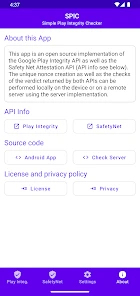
SPIC is developed by Henrik Herzig and belongs to the Libraries & Demo category. Its purpose is to demonstrate the usage of the Play Integrity and SafetyNet Attestation API. That makes it most relevant to people who want to explore how these Android services work, rather than to anyone expecting a general-purpose antivirus or a complete device-protection suite.
What is SPIC - Play Integrity Checker used for?
SPIC - Play Integrity Checker is an application designed to assess the integrity and security of your Android device's applications and games. It provides users with detailed insights into app permissions, security vulnerabilities, and potential threats, ensuring that your device remains secure and all installed apps comply with Google's integrity standards.
How does SPIC - Play Integrity Checker enhance device security?
SPIC - Play Integrity Checker enhances device security by scanning installed apps for any signs of tampering, unauthorized modifications, or security vulnerabilities. It verifies that apps are genuine and checks their compliance with Google's Play Integrity standards, alerting users to any potential security risks and helping them take corrective action to protect their data.
Is SPIC - Play Integrity Checker free to use?
Yes, SPIC - Play Integrity Checker is free to download. Its focus is demonstrating the Play Integrity and SafetyNet Attestation APIs, so it is best approached as a utility for learning about those services rather than as a paid security package. You can consider its intended purpose before installing it, especially if what you need is a broader antivirus or device-cleaning tool.
Pros
- Accurate integrity checks.
- User-friendly interface.
- Lightweight app.
- Quick installation.
- Free to use.
Cons
- Limited to Android devices.
- Requires internet access.
- No advanced settings.
- Occasional ads.
- No iOS version available.
- Category
- Libraries & Demo
- Version
- 1.4.0










