

Speedometer, Odometer, HUD
- 1.57K
- 4.3
- Installs
- 1.00M
- Price
- Free
Screenshots
Analysis by Reviewed
I like having a speed readout that doesn’t depend on the car’s dashboard, especially when I’m curious about how a short trip adds up. Speedometer, Odometer, HUD is a travel app from ForNextGen that turns a phone into a simple driving display. It’s free to install, and that makes it easy to try without committing to a purchase, though optional in-app items cost between $1.49 and $15.99 each. I’d treat the core appeal as a practical utility rather than a reason to spend before you know it suits your routine.
What free access lets you judge
The free starting point is useful because the app’s value depends less on a long list of tools and more on whether its central readouts fit your habits. I’d test it on a familiar route first: check that the speed display settles, see whether the trip distance is useful to you, and decide if the screen is comfortable to read without fiddling. That gives you a fair sense of whether it belongs in your routine before considering any optional purchase.
The in-app purchase range runs from $1.49 to $15.99 per item, but I wouldn’t treat the higher end as a necessary upgrade or assume that every item adds something I need. The right question is what a particular purchase does for the way I use the app. If the free experience already covers occasional speed checks and a simple trip record, paying may add little practical value. If an optional item addresses a clear need, I’d weigh that against how often I expect to use it.
Driving with a Digital Companion
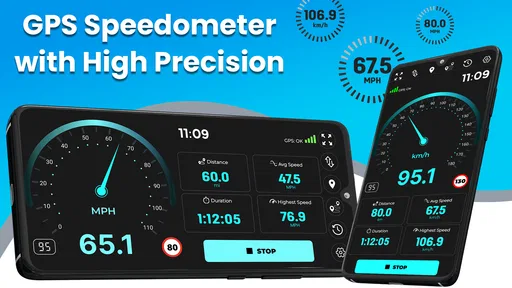
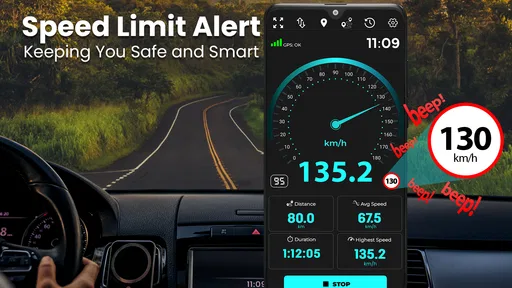
First off, the Speedometer, Odometer, HUD app is like having a digital co-pilot. You know those moments when you're driving, and you can't help but wonder if your car's speedometer is accurately reflecting your speed? Well, this app has got you covered. It uses GPS technology to provide real-time speed updates, and the accuracy is pretty spot-on. I was able to verify this by comparing it with my car's speedometer, and the results were synchronized beautifully.
Features That Make a Difference
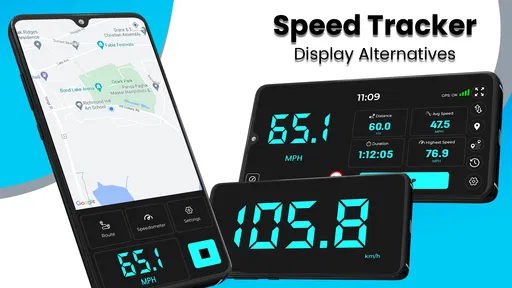
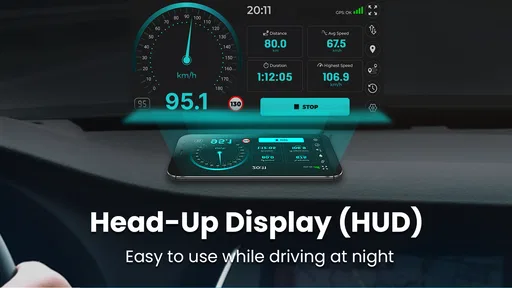
One of the coolest features of this app is the Heads-Up Display (HUD) mode. Imagine being able to project your speed onto your windshield. It felt like I was in the future every time I used it during night drives. It’s both innovative and practical, allowing you to keep your eyes on the road while still monitoring your speed.
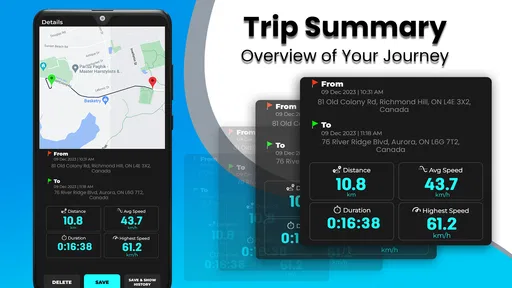
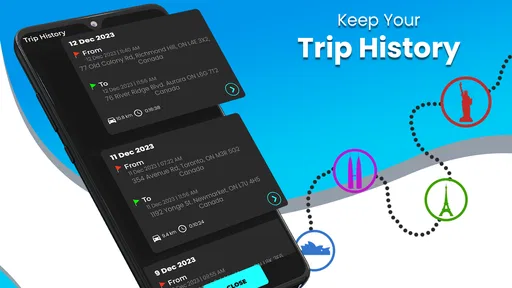
Additionally, the app tracks your trip distance and duration through the odometer feature. Whether you're planning a cross-country road trip or just curious about how far you’ve driven in a day, this feature logs it all for you. It's like having a personal driving diary at your fingertips.
Making the Readout Useful on Ordinary Trips
For a more everyday use, I’d start the tracker just before setting off, rather than after pulling away. That gives a cleaner record of a commute or errand run, and makes the distance readout easier to compare with another trip later. If I’m checking a route, I’d use it as a rough personal log, not as a replacement for a dedicated navigation app: a speed and distance display answers a different question from turn-by-turn directions.
More From Our News Desk

 Weather - By Xiaomi
Weather by Xiaomi Review: Clear at a Glance, Less Clear Up Close
Xiaomi’s weather app makes everyday forecasts quick to scan, but its calm surface can leave useful details and recovery paths harder to find than they should be.

 X
X Under Pressure: Can It Recover When Posting Goes Wrong?
A resilience-focused review of X, examining setup, mistaken posts, interruptions, weak connections, and the gaps that matter when recovery needs to be dependable.

 Clash of Clans
 Is Won Between the Battles
Its raids are quick; its community is a long-term project of coordination, teaching, rivalry, and shared responsibility—with all the friction that entails.

 Android Auto
 Makes the Case for Quieter Car Software
The car interface is no longer judged by how much it can do, but by how quietly it helps. Android Auto shows what drivers now expect—and what still gets in the way.

 MobiOffice: Word, Sheets, PDF
MobiOffice: Transforming Mobile Productivity with Seamless Integration
MobiOffice: Word, Sheets, PDF is redefining mobile productivity with a surprising blend of functionality and innovation.

 EA SPORTS FC Soccer Mobile 26
EA SPORTS FC™ Mobile Soccer: Redefining Mobile Sports Gaming
Dive into EA SPORTS FC™ Mobile Soccer, where immersive gameplay and strategic depth transform mobile sports gaming.
Latest News



GPS-based speed can also behave differently from a dashboard reading, particularly when reception is weak or the phone has not settled on a location yet. I’d give it a moment to establish a stable reading before treating the number as useful, and I wouldn’t glance down repeatedly while driving. Set up the screen before leaving, mount the phone safely, and let a passenger handle adjustments if anything needs changing on the road.
A practical trip workflow
For a weekend drive with several stops, I’d use the distance and duration readout to keep a rough record of the day without turning the app into a route planner. Before leaving, I’d open it while parked, choose the display that makes sense for the trip, and start tracking at the same point each time I want comparable records. At a stop, I’d deal with any screen changes while the vehicle is safely parked rather than trying to manage the phone in traffic.
This routine also helps avoid a common source of confusion: a trip log is only useful for comparison when I start and stop it consistently. If I begin tracking after the first leg or forget to end a session, the resulting distance is still a record, but not a clean comparison with another journey. I’d use it for personal context—such as comparing two familiar commutes—not as a formal mileage record where precision and consistent documentation matter.
User-Friendly Interface
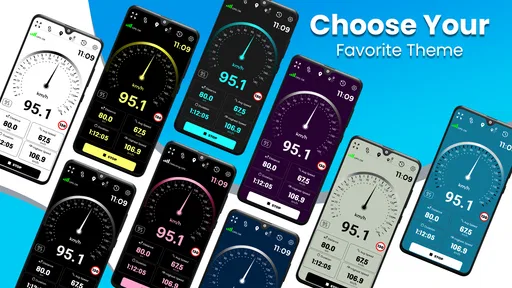
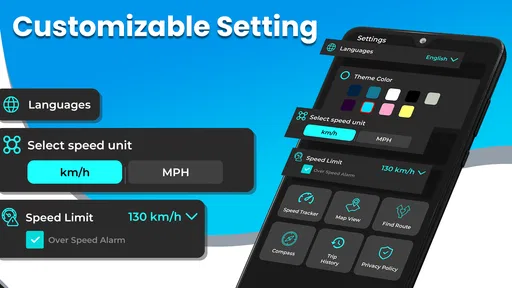
The app's interface is straightforward and intuitive, which is something I really appreciated. Even if you’re not tech-savvy, you’ll find it easy to navigate. All the essential information is displayed clearly, and you can customize the units of measurement to suit your preference. Whether you prefer kilometers or miles, the app adjusts seamlessly.
Small decisions that improve the experience
Choosing miles or kilometers before a drive is more than a cosmetic preference: it keeps the displayed number immediately legible, especially if I’m used to reading the car’s instruments in one unit. I’d also decide in advance whether I’m using the regular screen or the HUD, rather than changing modes while moving. These small steps make the app easier to use as a glanceable reference and reduce the temptation to interact with a phone on the road.
One trade-off with any phone-based driving display is that the phone has to be positioned where its screen is useful without obstructing the driver’s view. A HUD can suit a night drive, but it is not automatically the best display for every vehicle, windshield, or lighting situation. I’d try it while parked first and keep the standard display as the fallback if the reflection is hard to read. The safer choice is the one that lets me spend less time looking away from the road.
What It Replaces—and What It Doesn’t
Compared with a standard car speedometer, the phone offers a separate GPS-based reference and a trip-distance view in one place. Compared with navigation apps, it is more focused: it is useful when I want a visible speed readout or a simple record of distance, but it is not the better choice when I need route planning. Drivers who want a permanent, integrated display may prefer their vehicle’s built-in instruments; cyclists or walkers should also consider whether a driving-oriented screen fits how they travel.
It also occupies a middle ground between a basic dashboard and a dedicated navigation setup. The car’s instruments are normally the least fussy option because they are already in place, while a navigation app makes more sense when directions and route decisions are the priority. This app earns its place when I want a separate speed reference or a straightforward trip readout without needing the rest of a navigation interface. If I already have a trusted, clear dashboard and never review trip distance, adding another screen may create more distraction than value.
When a different tool is the better choice
If my main problem is getting somewhere, I’d open a navigation app instead; a speed and distance display does not answer questions about turns or route choices. If I need an integrated speed display for every journey, I’d rely on the vehicle’s instruments rather than make a phone part of the routine. And if I need an authoritative measurement, I would not treat a GPS app as a certified instrument. Its sensible role is as a convenient personal reference, not as a substitute for specialist equipment or safe driving judgement.
For someone who walks or cycles, the same distinction matters. The app is described and presented as a driving display, so I would not assume that its layout or workflow is the best match for other kinds of travel. A tool designed around the actual activity may be more comfortable and relevant. I’d choose this one when the car use case is the reason for installing it, rather than expecting a single utility to cover every trip.
Who Gets the Most from It
ForNextGen’s app has an average rating of 4.3 from around 24,000 ratings, with about 1.6 thousand written reviews and over a million installs. It is rated for Everyone, and version 7.7.8 requires Android 7.0 or later. Those details make it approachable for many Android users, but the practical fit matters more than popularity: I’d recommend it to drivers who want a second speed reference, a simple trip log, or the option to use the HUD view.
A particularly good fit is a driver whose car offers a speed display but no convenient way to think about a particular trip’s distance, or someone who wants to compare a GPS-based reference with the dashboard on a familiar road. A passenger can also help set up the screen before a journey, leaving the driver free to concentrate. The app is less appealing for anyone who expects it to provide directions, replace vehicle instruments, or deliver dependable readings in every reception condition.
On a regular commute, for example, I’d start tracking while parked, let the reading settle, and leave the phone alone until I arrive. Later, I could use the distance as a rough personal note about that trip. If the phone’s location reading is slow or inconsistent on a particular journey, I would not force a conclusion from it; I’d fall back on the car’s display and treat the app as an optional reference. That modest, repeatable use is more realistic than expecting it to transform driving.
Limits worth keeping in mind
The main limitation is not that the app tries to do too little; it is that a phone’s GPS reading depends on conditions and is not the same thing as an instrument built into a vehicle. Poor reception or an unsettled location can make the number less useful, so I would avoid relying on a brief reading as definitive. Nor would I make the phone the center of my driving setup if its position, glare, or screen use draws my attention away from the road.
There is also a practical battery-and-device trade-off common to running a phone during a drive: the screen and tracking are additional tasks for a device already being used for other things. I would keep the display simple and avoid running multiple demanding tasks just to check speed. That is not a reason to avoid the app altogether, but it is a reason to use it selectively rather than assume it should remain open on every journey.
Final Thoughts
In conclusion, if you're someone who spends a lot of time on the road, the Speedometer, Odometer, HUD app is a must-have. It’s reliable, easy to use, and adds a futuristic touch to your driving experience. Plus, the added safety of the HUD mode makes it a game-changer for night-time driving. So, if you’re looking to upgrade your driving experience, give this app a try. You won't regret it!
My recommendation is a little more measured: it is worth trying if its focused speed-and-distance tools solve a real need for you, especially since basic access is free. I wouldn’t pay for an optional item until I had checked what it offers and knew I would use it; the listed purchase range alone doesn’t tell me which extras are worthwhile. As a lightweight companion to a car’s instruments, it can be handy. As an all-in-one driving solution, it isn’t the right fit.
My buy-or-skip judgement
I’d try it if I wanted a second speed reference, a simple way to keep track of a drive, or a HUD option I could assess on my own car. The free access makes that trial low-commitment, while the optional purchases are something I’d judge item by item rather than treating as part of the basic decision. If the app’s core display does not help on a familiar trip, I would not expect spending more to make it essential.
I’d skip it if my dashboard already gives me everything I need, if I want turn-by-turn guidance, or if I would be uncomfortable placing a phone where it can be seen safely. For me, its value is deliberately narrow: a handy extra for selected drives, not a replacement for the car or a reason to interact with a screen while moving. That makes it an easy app to consider, but not one every driver needs.
Speedometer, Odometer, HUD Frequently Asked Questions
Does Speedometer, Odometer, HUD track both speed and distance during a trip?
Yes. Speedometer, Odometer, HUD is described as a GPS speedometer with distance and speed tracking, so it can help you monitor how fast you are moving and how far you have traveled. It is intended as a travel companion for drivers who want these readings in one app. Keep your attention on the road and use the display only when it is safe to do so.
Can I use the HUD feature while driving at night?
The app includes a heads-up display (HUD) mode that shows driving information on the windshield, which may be useful when you want a glanceable readout. Whether it is comfortable to view can depend on your windshield, phone placement, and surrounding light. Set it up before setting off, and avoid adjusting the phone or app while the vehicle is moving.
Does Speedometer, Odometer, HUD work for walking, cycling, or other trips as well as driving?
The app is described as a GPS speedometer and distance tracker, so its core purpose is to measure movement using your device’s GPS. That can make it useful for checking speed and distance beyond a car journey, although the published feature description focuses on travel and driving. Try it in a safe setting first and treat readings as estimates rather than a replacement for dedicated equipment.
Can I keep the app open while using navigation or another app?
The main appeal of Speedometer, Odometer, HUD is having speed and distance information available while traveling. If you plan to use it alongside navigation or another app, check how your phone handles switching between apps and whether the display remains convenient on your device. For safer use, prepare your preferred setup before you begin driving rather than navigating menus on the road.
Will the app drain my phone battery or use a lot of mobile data?
The app relies primarily on GPS to provide speed and distance readings, so battery use may be noticeable during longer sessions because GPS is active. GPS tracking itself does not require a constant internet connection, though online features may use data if you access them. If battery life is a concern, start a trip with a charged phone and avoid relying on the app as your only travel instrument.
Pros
- Accurate speed tracking
- Simple
- user-friendly interface
- HUD mode for easy viewing
- Customizable display settings
- Works offline without data usage
Cons
- Limited to basic speed functions
- Ads can be intrusive at times
- No advanced analytics features
- Battery usage can be high
- Doesn't support all vehicle types











