

Speak: Language Learning
- 7.75K
- 4.7
- Installs
- 10.00M
- Price
- Free

Screenshots

Analysis by Reviewed
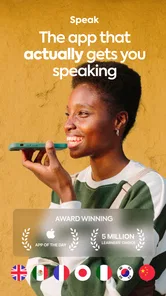
When I choose a language app, I want more than another stack of vocabulary cards: I want a reason to say the words out loud. That is the idea I find most useful in Speak: Language Learning. It is an education app from Speakeasy Labs built around spoken practice, with Spanish, French, English, and Japanese among the languages it focuses on. I’d consider it most valuable when I already know a few words but hesitate to use them in a sentence.
A practical way to judge the current experience
The app is free to download and rated for Everyone, though optional in-app purchases range from $14.99 to $349.99 per item, so I’d check the purchase details before committing to a paid plan. Its current version is 4.25.0, and the product has been around since March 10, 2019. That history gives existing learners a reason to look at the present experience rather than assume it is still the same product they may have tried years ago. I wouldn’t treat a version number alone as proof of a particular change, though.
At a glance, the scale is reassuring: Speak has a 4.7 average from around 99,000 ratings and more than 5 million installs. Those figures suggest that plenty of learners have tried it, but they don’t tell me whether a particular course suits my level or learning style. I’d use the app’s free access to test the actual speaking routine before deciding whether its paid options make sense for me.
Why Speak Stands Out
First off, let me just say, the Speak - Language Learning app is super user-friendly. You know that feeling when you open an app and immediately know where everything is? Yeah, that’s what you get here. The interface is clean and intuitive, and it doesn’t take a tech wizard to figure things out.
Interactive Lessons
Okay, so let’s talk about the lessons. They’re interactive, which means you’re not just passively absorbing information; you’re actively participating. The app uses a mix of video, audio, and text to keep things interesting. Plus, the repetition and reinforcement help you remember what you’ve learned. It’s like having a conversation with a friend, except this friend is super patient and doesn’t mind repeating themselves a million times.
Real-life Conversations
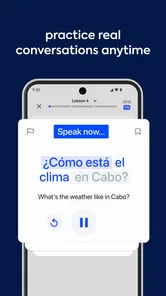
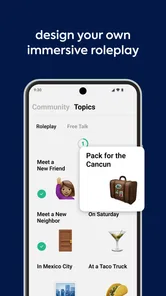
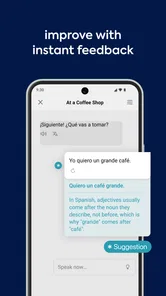
One of the coolest features has to be the real-life conversation practice. The app uses voice recognition to help you practice speaking. You get feedback on pronunciation, which is super handy if you’re trying to lose that heavy accent or just want to sound like a local. It’s as close as you can get to chatting with a native speaker without actually hopping on a plane.
Make speaking practice fit into a real day
I’d use the conversation exercises as a low-pressure warm-up, not as a replacement for every kind of language study. For example, before a lunch break ends, I might rehearse a few phrases I expect to need that evening, then repeat them without looking at the text. That small change matters: recognizing a phrase is easier than retrieving it when someone is waiting for an answer. If I can produce it from memory, I have a better clue whether it is becoming usable.
More From Our News Desk

 Instagram
Instagram’s Power Comes From Its Place in Your Phone
A close look at how Instagram turns Meta’s reach, recommendation systems and everyday camera habits into durable platform power—and what that costs users.

 Gmail
GmailGmail in a Busy Inbox: Who Benefits Most?
From first account to crowded workday, Gmail earns its place through dependable search and flexible sorting—but its best fit depends on how much inbox maintenance you can tolerate.

 Prime Video
Switching to Prime Video: What Changes in Your Viewing Routine
Prime Video can make a compelling second home for streaming, but switching means learning a different catalog, rental layer, and route from browsing to playback.

 Universal TV Remote Control
Universal TV Remote Control Works Best as a Reliable Backup
A phone remote earns its place through quick setup and reliable habits. Here is how to get more from Universal TV Remote Control—and where its limits show.

 Weather - By Xiaomi
Weather by Xiaomi Review: Clear at a Glance, Less Clear Up Close
Xiaomi’s weather app makes everyday forecasts quick to scan, but its calm surface can leave useful details and recovery paths harder to find than they should be.

 X
XX Under Pressure: Can It Recover When Posting Goes Wrong?
A resilience-focused review of X, examining setup, mistaken posts, interruptions, weak connections, and the gaps that matter when recovery needs to be dependable.
Latest News



Voice recognition is helpful, but I would treat pronunciation feedback as a guide rather than a final verdict. A microphone can tell you something about how a sound was interpreted; it cannot recreate the give-and-take of a person who asks an unexpected follow-up. When a phrase keeps being misunderstood, I’d slow down, listen again, and try a different rhythm instead of repeating it louder. That is a practical way to turn correction into learning rather than a frustrating score-chasing loop.
And let’s not forget about the vocabulary exercises. They’re designed to be short and sweet, perfect for squeezing in a quick practice session while you’re waiting for your coffee or during a lunch break.
Where it fits among other learning tools
Compared with flashcard-first apps, Speak puts more of its appeal in producing language aloud rather than mainly recognizing and reviewing words. That makes it a sensible pick if speaking is the skill you avoid, but less compelling if your main goal is memorizing spelling, studying grammar rules in depth, or reading long passages. I’d pair it with a dictionary or a grammar reference when I need a careful explanation, and with real conversation when I need practice responding to another person’s timing and meaning.
A useful routine is to keep a note of phrases that feel awkward, then revisit those in a later session instead of trying to cover everything at once. I’d also rotate between familiar and new material: familiar phrases make it easier to speak smoothly, while new ones reveal where I still need help. This is a better use of short sessions than rushing through them just to feel productive.
Turning a lesson into something you can use
For a concrete routine, I’d choose one situation rather than a broad goal like “get better at Spanish.” Imagine I have plans to meet a friend who speaks Spanish. I can practise a greeting, explain how I got there, and ask one simple question. After working through a lesson, I’d close the text and try to say those ideas in my own order. If I can only repeat them in the lesson’s exact sequence, I know I have rehearsed the material but may not yet be ready to use it flexibly.
This approach also helps me decide what to do when a session feels easy. Instead of moving quickly through more material, I’d change one detail: say the phrase from memory, switch the person or place, or combine two familiar ideas. That small variation tests whether I understand the sentence pattern rather than merely echoing a sound. It is especially useful for learners who tend to recognize answers but freeze when asked to produce one.
Progress Tracking
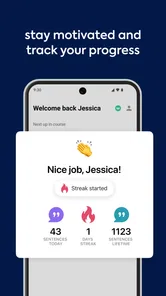
Another thing I love is the progress tracking. I mean, who doesn’t like seeing a graph that shows how much you’re improving? It’s super motivating to see your skills grow over time. Plus, the app sends you little nudges and reminders to keep you on track, which is great for those of us who need a little extra push now and then.
I’d pay attention to whether the progress it shows matches what I can actually do without prompts. A visible streak or chart can encourage consistency, but practical progress is being able to answer a simple question without translating every word in my head. To test that, I’d occasionally try to retell a familiar event aloud using phrases I have practiced. If I get stuck, that gives me a clear target for the next session.
Oh, and before I forget, there’s a whole community aspect. You can connect with other learners, share your progress, and maybe even find a study buddy. It’s a nice little touch that adds a sense of camaraderie to the whole learning experience.
Choosing the right role for the app
I’d recommend trying Speak if you are learning one of its supported languages and want regular, private speaking practice without having to arrange a conversation partner each time. It can also suit someone who understands more than they can say, since rehearsing aloud gives passive knowledge a job to do. If you are starting from zero, use the lessons patiently and don’t expect a few spoken drills to replace the basics of vocabulary and grammar.
On the other hand, I’d look elsewhere or add another resource if you want a highly structured textbook-style course, detailed grammar instruction, or live correction from a human tutor. Those needs call for different tools. I’d also skip paying until I know I enjoy speaking to an app and have checked which purchase option fits my intended use; a wide range of in-app purchase prices makes that decision worth taking slowly.
What regular practice can and cannot solve
For someone who feels self-conscious speaking in front of people, practising privately can make the first attempts less intimidating. I can repeat a sentence, pause to think, and try again without worrying about slowing down a partner. That is a genuine advantage, but it is also a particular kind of comfort: the app does not get confused, change the subject, or respond with a personal story. I’d use it to build a starting point, then seek human conversation when I’m ready to work on listening and spontaneous replies.
It is also worth separating pronunciation practice from accent removal. Clearer sounds can make communication easier, but I wouldn’t judge progress by whether I sound like a local. The more useful test is whether I can make myself understood and recognize the phrases I need. If I am preparing for a trip, a small set of reliable requests and replies may matter more than polishing every sound in a sentence.
What to expect as a continuing learner
Speak was released in 2019, and version 4.25.0 is the current point in its development. That establishes that the app has continued to receive versions, but it does not tell me exactly which lesson, interface, or learning changes arrived along the way. For someone returning after a break, I’d simply open it and try a short session before rebuilding a routine. Existing users can judge the newer experience by whether speaking practice still feels clear and useful for their own goals, rather than by the version number alone.
For a returning learner, I’d avoid trying to make up for time away by cramming. I’d pick a familiar lesson and notice what comes back easily, then use a newer or less comfortable topic to find the current edge of my ability. That gives me a more honest baseline than relying on an old streak or assuming I remember everything. If the routine still feels worthwhile, I can build consistency from there; if it feels repetitive, another tool may be a better fit for the next stage.
A good companion, not a complete language plan
My main advice is to make the app serve a specific situation: ordering food, introducing yourself, or explaining a small problem. Practise the phrases, then try to say them without reading. That makes each session easier to evaluate and exposes the difference between repeating a model and communicating an idea. If you want a speaking-focused companion for Spanish, French, English, or Japanese, Speak is worth exploring; if you need a complete course or human conversation first, treat it as one part of a broader plan.
It is a particularly reasonable choice when your schedule makes a regular tutor or language exchange hard to arrange, but you still want to practise out loud. It is less suited to a learner who wants every uncertainty resolved in a single place. I’d keep a separate list of grammar questions and look them up when they arise, rather than expecting a speaking exercise to explain every rule behind a phrase. That way the app stays focused on what it does best, while other resources handle the gaps.
All in all, if you’re serious about learning a new language, or even just want to dabble in one, Speak - Language Learning is definitely worth checking out. It’s engaging, effective, and just plain fun. So why not give it a try and see where your language journey takes you?
Speak: Language Learning Frequently Asked Questions
What should I know about Speak before downloading it?
Speak is an education app centered on learning through speaking, with a focus on Spanish, French, English, and Japanese. Its store summary emphasizes building fluency by speaking, so it may appeal if you want active oral practice rather than a study experience based mainly on reading. The app is free to download, with in-app purchases available.
Who develops Speak, and is it a well-established app?
Speak is an education app developed by Speakeasy Labs. It has an average rating of 4.7 from around 99,000 ratings, with about 5.8 thousand written reviews and over 5 million installs. Those figures suggest it has reached a broad audience, though whether its speaking-focused approach suits you will depend on your learning goals and preferred study style.
Which languages can I focus on with Speak, and is it mainly for speaking practice?
Speak’s central idea is to build fluency by getting learners to speak, rather than relying only on reading or memorizing vocabulary. Its featured languages include Spanish, French, English, and Japanese. That focused selection may suit learners interested in one of those languages, especially if practicing spoken responses is a priority. It is worth checking the available course options in the app before deciding whether they match your needs.
What is Speak - Language Learning and how does it work?
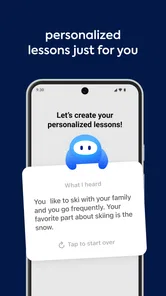
Speak - Language Learning is an innovative app designed to help users learn new languages through interactive and engaging lessons. It uses cutting-edge speech recognition technology to provide instant feedback on pronunciation. Users can practice speaking in real-life scenarios and gradually improve their language skills with the help of personalized learning paths and progress tracking.
Is Speak - Language Learning suitable for beginners?
Yes, Speak - Language Learning is suitable for beginners as well as advanced learners. The app offers a variety of courses tailored for different proficiency levels. Beginners can start with basic vocabulary and phrases, while more advanced learners can engage in complex conversations. The app’s adaptable learning paths ensure that users of all levels can benefit from its features.
Pros
- Intuitive user interface
- Wide range of languages
- Interactive lessons
- Offline access available
- Progress tracking features
Cons
- Limited free content
- In-app purchases required
- Occasional app crashes
- Requires internet for updates
- Ads in free version











