Spam Calls Blocker for Android
- 580.00
- 4.4
- Installs
- 100.00K
- Price
- Free

Screenshots

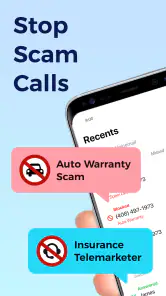
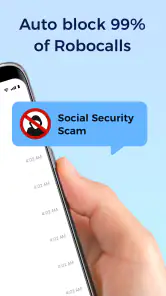
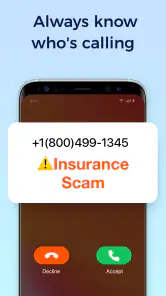
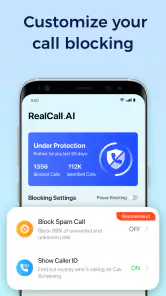
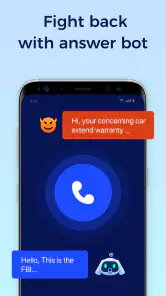
Analysis by Reviewed
Spam Calls Blocker is the kind of Android app I would consider after a week of interruptions from unknown numbers, repeated sales calls, or suspicious robocalls. It is a communication app from AI Phone Call focused on identifying and blocking unwanted calls, rather than replacing the phone app I already use. In my experience, that distinction matters: the value comes from reducing interruptions in the background, while the quality of the result depends heavily on how carefully the app is set up and how I handle calls that are not clearly recognized.
The app is free to install and is suitable for everyone. Its current version is 2.5.5, and it runs on Android 7.0 or later, so it remains accessible on many older phones as well as newer devices. It has reached over 100 thousand installs, with a 4.4 average from around four thousand ratings and roughly six hundred written reviews. Those figures suggest that many people find the basic idea useful, but they do not remove the need to check how it behaves on a particular phone.
Getting past the setup points that cause the most confusion
The first place I would slow down is the initial configuration. A call-blocking app cannot be judged fairly if it has not been given the role it needs to perform its job. Android phone settings vary by manufacturer, and a battery-saving system can interfere with apps that are expected to react when a call arrives. If the app appears inactive, I would first revisit its in-app options and the relevant phone settings instead of assuming the service is broken.
I would also make a deliberate choice about how aggressive the protection should be. Blocking every unfamiliar number sounds attractive until a delivery driver, clinic, school, or new customer tries to reach me. A safer starting point is a conservative approach: let known contacts through, review uncertain calls, and only tighten the rules after I have seen how the app treats ordinary calls in my routine. That small adjustment prevents one of the most frustrating mistakes with any call-screening tool—solving spam by creating missed legitimate calls.
Another useful check is whether the phone itself is still handling calls normally. I would place a normal call, receive one from a saved contact, and then observe what happens with an unwanted call. This simple sequence separates three different problems: the app may not be active, the phone may be applying its own filtering, or the incoming number may simply be outside the app’s recognition capability. Testing familiar contacts first gives me a baseline before I trust the blocker with important calls.
The most important setup habit is to test protection without making it your only safety net. I keep voicemail, my phone’s built-in call controls, and a way to return important calls manually. Spam Calls Blocker can reduce noise, but no caller-identification tool should be treated as proof that a number is safe or dangerous. A familiar-looking number can still be misused, and an unknown number can belong to someone I genuinely need to contact me.
Why a blocked call may still appear briefly
Some users expect a blocked call to vanish without any trace. In practice, the phone may still show a notification, a missed-call entry, or a short interruption depending on Android’s call handling and the manufacturer’s interface. I would not immediately interpret that as a failed block. The useful question is whether the call actually rang through, connected, or merely left a record for later review.
You May Like

Clash of Clans Is Won Between the Battles

Android Auto Makes the Case for Quieter Car Software

MobiOffice: Transforming Mobile Productivity with Seamless Integration

EA SPORTS FC™ Mobile Soccer: Redefining Mobile Sports Gaming

How Microsoft OneDrive Became a Mobile Productivity Giant

How Google Translate Breaks Language Barriers Effortlessly
This is also where the difference between identification and blocking becomes important. An app may recognize a suspicious caller without treating every recognized number in exactly the same way. I would review the result after a few calls rather than judging it from one notification. If a legitimate number is affected, I would add it to my trusted contacts or adjust the blocking choice instead of leaving the app disabled altogether.
Practical checks before blaming the application
When protection seems inconsistent, I would work through a short checklist. First, confirm that the app is still installed and enabled. Next, check whether the phone’s default calling application or system updates have changed the way incoming calls are managed. Then make sure the device is not restricting background activity so aggressively that the blocker cannot respond in time. These are ordinary Android issues, but they are especially noticeable with call tools because their main work happens at a moment when the user cannot open the app and inspect it.
I would avoid changing several settings at once. If I alter the app’s rules, the phone’s call settings, and battery controls together, I will not know which change helped. Instead, I would make one adjustment, test with a safe call, and observe the result. This is slower than tapping every available option, but it makes troubleshooting much less confusing.
There is also a human check that is easy to overlook: ask whether the unwanted calls are actually coming from different numbers. If a caller changes numbers frequently, a blocker based on recognition may reduce some interruptions without stopping the entire campaign. In that situation, reporting or ignoring the calls consistently can be as important as the app itself. I would never call back a suspicious number merely to test it.
How I would use it during a normal week
My preferred workflow would be to install Spam Calls Blocker, configure a cautious blocking level, and then leave it alone for several days while I watch real call patterns. I would not spend the first hour trying to create a perfect list of blocked numbers. A better approach is to learn which calls I actually receive, which ones matter, and whether the app’s decisions match my expectations.
Imagine receiving several calls during a workday while I am speaking with customers. If the app handles the obvious nuisance calls without forcing me to answer each one, its benefit is immediate: fewer interruptions and less time spent deciding whether an unfamiliar number deserves attention. Later, I can review the phone’s call history and return only calls that look relevant. That is more useful than treating every unknown number as an emergency.
For people who use their phone for appointments or job searches, I would take a more careful approach. I would save expected numbers as contacts whenever possible and avoid the most restrictive setting until I know how unknown calls are treated. A call from a recruiter, medical office, landlord, or school may look exactly like a nuisance call to an automated system. In this situation, the app is best used as a filter that reduces risk, not as a wall that rejects everything unfamiliar.
A less obvious benefit is mental rather than technical. Once I stop reacting to every ringing number, I can create a simple routine: let the protection handle obvious interruptions, check missed calls at a convenient time, and verify questionable callers through an independent channel. This keeps the phone from dictating my attention. The trade-off is that I must accept a little delay before deciding whether an unfamiliar call matters.
Recovering when an important call is filtered
If I discover that a legitimate caller was blocked or treated as suspicious, I would not simply turn the entire app off. I would first identify the number in the call history, save it if appropriate, and review the current blocking choice. Then I would ask the caller to use a known contact method if the conversation is important. This creates a safer record for future calls and avoids relying on memory.
If the call does not appear where I expect, I would check the phone’s own call history as well as any available records inside the app. Different Android phones organize these records differently, and a filtered call may not be displayed in the same place as a normal answered call. The practical lesson is to know where the phone keeps missed and rejected calls before an important one arrives.
When the app seems to stop working after a phone update or a settings change, I would repeat the basic test rather than immediately reinstalling. Reinstallation can erase useful preferences and makes it harder to compare the old behavior with the new one. I would first verify the app version, the Android version, and the current call-handling configuration. The app supports Android 7.0 and later, but compatibility with an operating system does not guarantee identical behavior across every phone brand.
There is a sensible limit to troubleshooting. If normal calls work, the app is enabled, the phone is not restricting it, and only certain unfamiliar callers get through, that may be a recognition limitation rather than a setup failure. No tool can reliably infer the intent of every caller from a number alone. At that point, I would use the app as one layer of protection and keep my own judgment involved.
When the phone or the caller is the real problem
Not every failed call filter is caused by Spam Calls Blocker. Android’s built-in spam controls, the manufacturer’s phone application, carrier-level filtering, and other communication tools can overlap. If more than one system is trying to manage incoming calls, their results may be difficult to interpret. I would identify which tool is making the final decision before changing settings in all of them.
Network conditions can also create misleading symptoms. A delayed ring, a missed call, or a voicemail notification may be related to the mobile network rather than the blocker. If ordinary calls are also arriving late or disappearing, I would test the phone without focusing only on suspicious numbers. That comparison is more informative than repeatedly calling from the same unknown number.
Caller behavior matters too. Some spam operations rotate numbers, disguise their identity, or leave no useful message. In those cases, a blocker may reduce part of the problem but cannot eliminate the source. I would never share personal information, verification codes, banking details, or remote-access instructions with an unexpected caller, even if the number appears familiar.
This is where Spam Calls Blocker differs from simply ignoring calls. It adds an organized layer for dealing with unwanted communication, which is helpful for people who receive enough nuisance calls to make manual screening tiring. However, it is not a substitute for the phone’s emergency functions, a trusted contact list, or careful verification. Someone who rarely receives spam may prefer Android’s existing controls and avoid adding another app to manage.
Free access, optional spending, and the right type of user
The app is free, but in-app purchases range from $3.99 to $59.99 per item. I would begin with the free experience and decide whether it solves my actual problem before paying for anything. A person receiving occasional nuisance calls may not see enough improvement to justify an upgrade, while someone whose workday is repeatedly interrupted may value additional protection if the available purchase clearly addresses that need.
I would also think about privacy and control in practical terms before installing any communication utility. Call-related tools naturally need to participate in the phone experience, so I would read each Android prompt and avoid approving settings I do not understand. The safest habit is to grant only what is necessary for the behavior I want, then check the result with ordinary calls. If I am uncomfortable with an app influencing incoming calls at all, the built-in phone controls may be a better fit.
For families, the Everyone rating makes the app broadly approachable, but younger users may still need guidance about what a blocked call means. I would explain that an unfamiliar number is not automatically malicious and that important callers should leave a message or use an agreed contact route. The app can reduce interruptions, but it should not teach a child to ignore every call or trust every label.
Compared with manually blocking numbers one by one, this app is more convenient for recurring nuisance calls because it is designed around identification and broader call protection. Compared with relying only on a carrier or the phone’s built-in filter, it gives me another layer to consider, but also another setting to understand. My preference would be to use one primary system confidently rather than stacking several filters without knowing which one is responsible for a missed call.
Who should choose it, and who should skip it
I think Spam Calls Blocker is a good match for someone who receives frequent sales calls, robocalls, or suspicious interruptions and wants a dedicated communication tool instead of manually rejecting each number. It is also useful for people who want to separate urgent calls from background noise and are willing to review uncertain calls rather than demand perfect automation.
I would be more cautious recommending it to someone who depends on calls from changing or unsaved numbers, such as a freelancer waiting for new clients, a delivery recipient, or a patient expecting a clinic to call. That user should start with the least aggressive protection and keep a close eye on missed calls. If every unknown call is potentially important, a simple contact-and-voicemail routine may be safer than strict automatic blocking.
I also would not choose it as the only defense for someone dealing with targeted fraud. A caller can change numbers, imitate a legitimate organization, or pressure the recipient into acting quickly. The app may reduce exposure, but the essential protection is still refusing unexpected requests and verifying them through an official channel.
My practical verdict
After looking at the app as a daily tool rather than a single-button solution, I see its strongest point in convenience. Spam Calls Blocker can make an Android phone calmer by helping identify and block unwanted calls, especially when manual screening has become a repeated chore. Its free entry point makes it reasonable to test, and its broad Android support means many users can try it without owning a recent device.
My reservation is not about the basic idea; it is about expectations. Call filtering is inherently imperfect, and setup choices can create as much frustration as they remove if I block too aggressively or overlook Android’s own controls. I would use it gradually, test saved contacts and ordinary calls, and keep an alternative way for legitimate callers to reach me.
Overall, I would recommend it to a friend who wants help reducing persistent spam and is comfortable checking occasional uncertain calls. I would not recommend blindly enabling the strictest behavior for someone whose livelihood or healthcare depends on unknown numbers. Used as a flexible layer rather than an unquestioned gatekeeper, Spam Calls Blocker is a practical free app worth trying, with optional purchases for users who decide its protection deserves a larger role in their call routine.
Spam Calls Blocker for Android Frequently Asked Questions
Can I use Spam Calls Blocker on my Android phone?
Spam Calls Blocker is an Android communication app for identifying and blocking unwanted calls. It requires Android 7.0 or later, so check your phone’s operating system before installing. The app is free to download, and its age rating is Everyone. If your device meets the minimum requirement, you can try its call-protection features and decide whether its filtering options suit the way you handle incoming calls.
Who develops Spam Calls Blocker, and how widely is it used?
The app is developed by AI Phone Call and has more than 100,000 installs. Its average rating is 4.4 from around 4,000 ratings, with about 580 written reviews. Those figures offer a general sense of how other users have responded, but individual experiences can differ depending on a person’s phone, Android version, and preferred call-blocking settings.
What is Spam Calls Blocker for Android and how does it work?
Spam Calls Blocker is an Android utility designed to identify, filter, and block unwanted calls, including telemarketing, robocalls, suspicious numbers, and repeated nuisance callers. Depending on the version and your device settings, it may compare incoming numbers with a spam database, use community reports, or apply blocking rules that you configure yourself. It can also help you review blocked-call history.
Does Spam Calls Blocker automatically block every unknown number?
Not necessarily. Most spam-blocking apps allow you to choose how strict the filtering should be. You may block numbers reported as spam while still receiving calls from unknown contacts, or enable a more aggressive setting that rejects calls not saved in your address book. Before enabling automatic blocking, check the app’s rules carefully, because legitimate calls from delivery services, doctors, workplaces, or new contacts could also be filtered.
Does the app require access to my contacts, phone calls, or other personal information?
Spam Calls Blocker may request permissions related to phone calls, caller identification, contacts, notifications, and sometimes call logs. These permissions are used to recognize incoming numbers, apply blocking rules, and show information about rejected calls. The exact requirements can vary by Android version and app release. Review the privacy policy and Android permission screen before approving access, and disable permissions you do not consider necessary.
Pros
- Blocks unwanted calls automatically using customizable filters.
- Helps identify suspicious numbers before you answer.
- Maintains a personal blacklist for repeat nuisance callers.
- Runs quietly in the background with minimal user interaction.
- Can reduce interruptions from telemarketing and scam attempts.
Cons
- Some legitimate callers may be blocked by overly strict filters.
- Caller identification may be inaccurate for unfamiliar numbers.
- Advanced blocking features may require a paid subscription.
- Effectiveness depends on regularly updated spam-number databases.
- Background operation can have a small impact on battery life.

- Category
- Communication
- Version
- 2.5.5












