AI Phone:Call&Voice Translator
- 1.56K
- 4.6
- Installs
- 1.00M
- Price
- Free
Screenshots
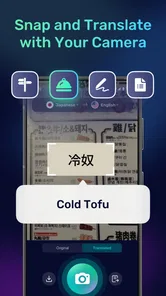
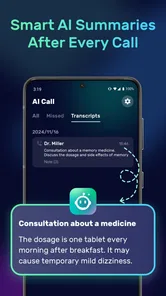
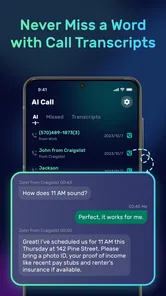
Analysis by Reviewed
I often think about the awkward moment when a conversation needs to happen now, but neither person is comfortable speaking the other’s language. AI Phone: Phone Call Translate is built for that kind of situation: a communication app from AI Phone that aims to help people speak across language gaps during calls. It is free to install, rated for Everyone, and has a 4.5 average from around 64,000 ratings. I’d treat it as a practical aid for everyday conversations, not a replacement for a human interpreter when accuracy really matters.
From a language gap to a real conversation
I find the most useful way to judge a translated-call app is to start with the moment you would actually reach for it: a call that matters enough to make, but not so much that a translation slip could cause serious harm. In this section, I focus on setting that expectation and choosing a manageable first conversation, so the next steps feel practical rather than like a promise of effortless fluency.
How It Works
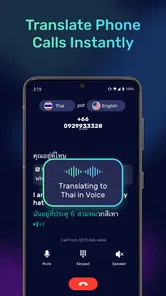
The process is surprisingly simple. Once you've installed the app, you can initiate a call as you normally would. The app then works its magic, translating your conversation in real-time. You speak in your native language, and the person on the other end hears the translation in their language, and vice versa. It's like having a personal translator in your pocket.
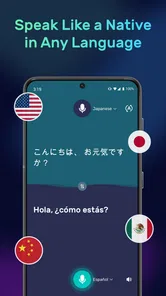
One of the standout features of AI Phone: Phone Call Translate is its ability to handle a wide range of languages. Currently, the app supports over 30 languages, and the developers are constantly working to add more. This makes it a versatile tool for anyone who frequently communicates with people from different linguistic backgrounds.
In practice, I’d begin with a low-stakes call rather than relying on it for an urgent or sensitive conversation. Agree with the other person that you’ll speak in short, clear turns, then pause long enough for each thought to be translated. That small change can make a live exchange easier to follow than speaking quickly in long sentences. It also gives both people a natural chance to correct a misunderstood name, address, or detail before moving on.
Performance and Usability
I've been testing this app for a few weeks now, and I must say, I'm impressed. The translations are generally accurate and delivered with minimal delay, which is crucial for maintaining the flow of a conversation. There are occasional hiccups, especially with more complex sentences or less common languages, but these are relatively rare.
As for the user interface, it's intuitive and user-friendly. Even if you're not particularly tech-savvy, you'll find it easy to navigate the app and start making translated calls. The developers have clearly put a lot of thought into making the app accessible to everyone.
More From Our News Desk
 Instagram
’s Power Comes From Its Place in Your Phone
A close look at how Instagram turns Meta’s reach, recommendation systems and everyday camera habits into durable platform power—and what that costs users.

 Gmail
Gmail in a Busy Inbox: Who Benefits Most?
From first account to crowded workday, Gmail earns its place through dependable search and flexible sorting—but its best fit depends on how much inbox maintenance you can tolerate.

 Prime Video
Switching to Prime Video: What Changes in Your Viewing Routine
Prime Video can make a compelling second home for streaming, but switching means learning a different catalog, rental layer, and route from browsing to playback.

 Universal TV Remote Control
 Works Best as a Reliable Backup
A phone remote earns its place through quick setup and reliable habits. Here is how to get more from Universal TV Remote Control—and where its limits show.

 Weather - By Xiaomi
Weather by Xiaomi Review: Clear at a Glance, Less Clear Up Close
Xiaomi’s weather app makes everyday forecasts quick to scan, but its calm surface can leave useful details and recovery paths harder to find than they should be.

 X
X Under Pressure: Can It Recover When Posting Goes Wrong?
A resilience-focused review of X, examining setup, mistaken posts, interruptions, weak connections, and the gaps that matter when recovery needs to be dependable.
Latest News



A useful workflow is to prepare the important pieces before calling: write down a booking reference, a street name, or the question you need answered, and keep those details in front of you. Translation can carry the meaning of a conversation while still stumbling over names or unfamiliar terms, so spelling a key word or repeating it slowly is a sensible safeguard. For anything consequential, confirm the final result in simple language instead of assuming a fluent-sounding translation captured every nuance.
Where It Fits in a Busy Day
Picture calling a guesthouse while travelling to check whether a late arrival is possible. You can explain the request in your own language, listen to the translated reply, and clarify the time before ending the call. That is a more natural fit for this kind of tool than a complex negotiation: the goal is a short, practical exchange, and both sides can take turns keeping each sentence focused.
It can also help someone who needs to make occasional calls to relatives, service providers, or contacts abroad but does not want to ask a bilingual friend to interpret every time. The call format matters here. Unlike typing into a translation app and showing the screen to someone nearby, a translated call is useful when the other person is not in the same room. If you are face-to-face, a text or voice translation tool may be simpler because you can review the wording together and point to objects or documents.
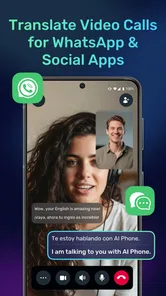
The app’s store summary also mentions video calls and use with WhatsApp and social apps, which may suit people whose conversations already happen there. I would still choose the route that feels least complicated for the particular call: a standard translated phone conversation for a direct voice exchange, or a social app when that is where both people are already reachable. A handoff between apps can interrupt the flow, so it is worth agreeing on the channel before the conversation starts.
Making the Handoff Work
The most useful preparation is not technical; it is agreeing on what each person should do once the call connects. I would tell the other person, in advance if possible, that the conversation is being translated and that brief pauses are intentional. That prevents a natural silence from being mistaken for a dropped call and makes it easier to take turns rather than talking over the translation.
For a practical appointment call, I’d keep a small checklist beside me: the date or time I’m asking about, the name of the person or place, and the one decision I need to make. After the translated exchange, I would repeat the outcome back in plain terms. This is especially useful when one side is choosing between options, such as a morning or afternoon appointment. A short confirmation can expose a misunderstanding while there is still time to correct it.
There is also a social handoff to consider. If a friend or family member normally helps with calls, AI translation may let you handle routine exchanges independently, but it does not mean that person should disappear from high-stakes decisions. I see the app as useful for reducing the number of small calls that require help, not as a reason to avoid asking for an interpreter when the conversation becomes complicated.
Limits, Cost, and Who Should Skip It
AI translation is most helpful when the subject is familiar and the stakes are modest. I would not use it as the sole safeguard for medical instructions, legal commitments, financial decisions, or any conversation where a subtle distinction could change what someone agrees to. In those cases, a qualified interpreter or a written confirmation reviewed by both parties is a better choice. Background noise, rapid speech, accents, and overlapping turns are also ordinary sources of friction for voice translation; slowing down and taking turns can help, but cannot guarantee a perfect result.
The app is free to download, with in-app purchases ranging from $2.99 to $99.99 per item, so I’d check the current purchase options before building a regular routine around it. It has over 500,000 installs, and version 3.21.0 requires Android 10 or later. Those details make it easier to judge whether it fits your device and whether you want to explore paid options, but they do not change the main practical question: will you use translated calls often enough to justify any extra cost?
That purchase question is worth answering through your own pattern of use rather than a single successful call. If you only need help once in a while, the free installation makes it straightforward to try, but paid options may matter if you begin relying on it regularly. I’d check what an in-app purchase offers and how it is charged before committing, then compare that cost with the value of having a call-based translation option ready when needed.
It is also sensible to check the language pair before making plans around a call. Broad language coverage is helpful, but the practical question is whether the two languages you need are supported for the conversation you intend to have. I would not assume that every language works equally well in every setting. A quick test with a familiar phrase, or a harmless practice call with someone you know, can reveal whether the pace and wording feel usable before you depend on it for a booking or an important arrangement.
I’d recommend trying it if you make occasional cross-language calls and can keep the conversation clear and unhurried. I’d skip it if you need certified accuracy, prefer to inspect every translated sentence before sending it, or rarely speak with people in other languages. For those needs, a human interpreter or a text-first translation workflow gives you more control. The best result comes from treating AI Phone as a bridge for ordinary conversation, while checking the details that matter rather than assuming the bridge is flawless.
Who Benefits Most—and Who Has Better Options
This is a particularly sensible choice for someone who can already manage the basics of a call but gets stuck at the language barrier: a traveller asking about a reservation, a person arranging a repair with a service provider, or relatives who want to catch up without a fluent family member translating every sentence. The call-based format is the point. It helps when both people are apart and a shared screen, gestures, or a printed phrasebook cannot do the work.
It is less compelling for people who mostly communicate by text. A text translation app lets you inspect a sentence before sending it, edit a name, and keep a visible record of what was said. That extra control is valuable for addresses, dates, product details, and other information that can be checked visually. For a quick spoken exchange, though, repeatedly typing and waiting for replies can feel more cumbersome than taking turns on a call.
Compared with a human interpreter, the app is more convenient for ordinary, short exchanges, but a person is better at noticing context, asking a clarifying question, and handling sensitive language. Compared with a general voice translator used in the same room, the call-focused approach is more useful when the other person is remote; the in-person tool wins when you can point to an object or show a document together. I would choose based on the setting, not assume one translation method is best for every conversation.
If you are deciding whether to try it, ask yourself what the next real call will be. If you can name a specific, low-risk conversation and both people can slow down, it is a good test. If the purpose is unclear, or the call is likely to involve detailed instructions or a binding decision, I would choose a different route from the start rather than trying to make a live translation tool carry more responsibility than it should.
Why You Should Try It
If you're someone who regularly communicates with people in different countries, AI Phone: Phone Call Translate is a must-have app. Not only does it make communication easier, but it also opens up new possibilities for personal and professional relationships. Imagine being able to connect with people without the language barrier getting in the way.
In conclusion, while there are a few areas for improvement, AI Phone: Phone Call Translate is a solid offering in the world of language translation apps. Its ease of use, wide language support, and real-time translation capabilities make it a standout choice for anyone looking to break down language barriers in their phone conversations. Give it a try – you might just find it becomes an indispensable part of your communication toolkit.
AI Phone:Call&Voice Translator Frequently Asked Questions
What languages can AI Phone: Phone Call Translate handle?
AI Phone: Phone Call Translate is intended to make conversations across language barriers easier, including voice conversations, phone calls, and video calls. Before depending on it for a particular language pair, check the language choices available in the app and make sure they suit your conversation. For an important call, it is sensible to consider whether you can clarify anything that is not translated as expected.
Can I use AI Phone: Phone Call Translate with WhatsApp and other social apps?
Yes, the app’s description specifically highlights use for translating voice, phone calls, and video calls, including with WhatsApp and social apps. That makes it relevant if you communicate through services beyond ordinary phone calls. The experience may vary depending on the service and device, so check that your intended app works with it before relying on it for an important conversation.
Is AI Phone: Phone Call Translate free to download, and are there optional purchases?
AI Phone: Phone Call Translate is free to download, so you can try the app without paying an upfront price. It also offers in-app purchases, giving users the option to buy items within the app. Before choosing any purchase, check the price and terms shown in the app so you can decide whether the available features fit your needs.
Which types of calls and communication can AI Phone: Phone Call Translate help translate?
AI Phone: Phone Call Translate is designed for translating voice conversations, phone calls, and video calls. Its description also mentions use with WhatsApp and other social apps, making it relevant for people who communicate through more than standard phone calls. How it works with a particular service may depend on the app and device, so check compatibility before relying on it for an important conversation.
Is AI Phone: Phone Call Translate suitable for every age group?
The app has an Everyone content rating, which means it is rated as suitable for a general audience. That rating can help families decide whether it is appropriate to install, but adults should still review how the app will be used and any in-app purchase choices. As with any communication tool, consider your own needs and comfort before using it for personal conversations.
Pros
- Real-time call translation feature.
- Supports multiple languages seamlessly.
- User-friendly interface design.
- Integrates with major phone carriers.
- Minimal battery consumption during use.
Cons
- Requires stable internet connection.
- May have occasional translation delays.
- Limited free usage options available.
- Not available in all countries yet.
- Subscription can be pricey.