

Space Launch Schedule
- 138.00
- 4.2
- Installs
- 100.00K
- Price
- Free

Screenshots
Analysis by Reviewed
I installed Rocket Monkey because I wanted a practical way to keep track of launches without constantly searching through space-news pages. It is an events app from Kickstand Technology Inc, focused on rocket launch schedules and launch sites around the world. My first impression was that it aims to answer one useful question quickly: what is launching, and when should I pay attention?
That narrow purpose is its greatest strength. This is not a general astronomy reference, a live space-news magazine, or a replacement for a full mission tracker. It is better understood as a compact planning tool for people who enjoy following launches and want a single place to check upcoming activity. The app is free and rated for Everyone, so it is easy to recommend as a low-commitment option for curious beginners, families, students, and experienced space enthusiasts.
How the schedule feels to use
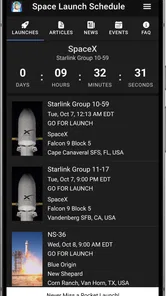
I find the schedule most useful as a discovery tool: it gives me a reason to notice launches I might otherwise miss, without turning a quick check into a long search. I use an entry as a prompt to consider its timing and location, then decide whether I want to follow up elsewhere. That distinction matters in practice, especially when a launch becomes part of an evening plan.
Readability and navigation
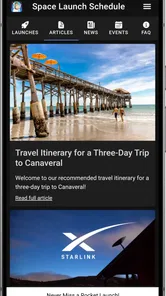
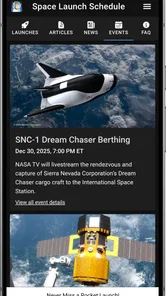
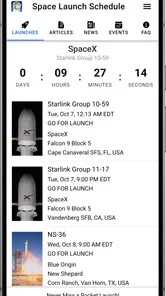
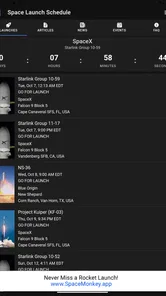
The most important test for an event schedule is whether I can understand it at a glance. Rocket Monkey works best when I open it with a specific purpose: checking the next launch, scanning the calendar, or looking for activity connected with a particular launch site. Its value comes from putting time-sensitive event information ahead of long articles and unrelated content.
I found that this kind of focused layout is easier to approach than a conventional search engine. A web search can return press releases, old launch reports, videos, and changing estimates mixed together. Here, the central idea is the schedule itself. That makes it more suitable for a quick check while planning an evening or deciding whether an event is worth following.
There is also a useful difference between browsing launches casually and using the app as a planning reference. Casual browsing benefits from a simple chronological flow, while planning requires me to slow down and inspect the event details rather than treating the displayed time as a guarantee. Launch schedules can change, so I see the app as a starting point for awareness, not as a promise that a rocket will lift off exactly when first listed.
For readers who prefer large, high-contrast text, simplified screens, or carefully spaced controls, the experience will depend on the device settings and the way the information is presented on their particular phone. I would not describe the app as a specialized accessibility tool. Still, its limited subject matter can reduce cognitive clutter compared with a crowded news application. There are fewer competing topics, which helps me stay focused on the event I am trying to understand.
More From Our News Desk

 Gmail
GmailGmail in a Busy Inbox: Who Benefits Most?
From first account to crowded workday, Gmail earns its place through dependable search and flexible sorting—but its best fit depends on how much inbox maintenance you can tolerate.

 Prime Video
Switching to Prime Video: What Changes in Your Viewing Routine
Prime Video can make a compelling second home for streaming, but switching means learning a different catalog, rental layer, and route from browsing to playback.

 Universal TV Remote Control
Universal TV Remote Control Works Best as a Reliable Backup
A phone remote earns its place through quick setup and reliable habits. Here is how to get more from Universal TV Remote Control—and where its limits show.

 Weather - By Xiaomi
Weather by Xiaomi Review: Clear at a Glance, Less Clear Up Close
Xiaomi’s weather app makes everyday forecasts quick to scan, but its calm surface can leave useful details and recovery paths harder to find than they should be.

 X
XX Under Pressure: Can It Recover When Posting Goes Wrong?
A resilience-focused review of X, examining setup, mistaken posts, interruptions, weak connections, and the gaps that matter when recovery needs to be dependable.

 Clash of Clans
Clash of Clans Is Won Between the Battles
Its raids are quick; its community is a long-term project of coordination, teaching, rivalry, and shared responsibility—with all the friction that entails.
Latest News



The current version is 8.2.1, and the app supports devices running Android 6.0 or later. That gives it a broad compatibility range for Android users, including people who keep an older phone rather than upgrading frequently. Compatibility is not the same as perfect usability, though. A phone with a small display may make dense schedule information harder to scan, especially for someone who enlarges system text.
Making sense of launch information
A launch schedule is not just a list of names. For someone new to spaceflight, the useful context is the relationship between the mission, the rocket, the launch site, and the planned time. Rocket Monkey is most helpful when I use it as a visual prompt to ask those questions, then look for more detailed mission information elsewhere if I need technical background.
This creates a sensible learning path. A beginner can start by noticing that launches happen from different locations and that dates may move. A more experienced follower can use the schedule to keep an eye on several sites without maintaining a personal spreadsheet. The app does not need to explain every engineering detail to be useful, but it should not be mistaken for a complete educational guide either.
One practical habit improved my experience: I checked the schedule at two different times instead of assuming that one visit settled the plan. This matters because launch timing is inherently changeable. If I were arranging travel, inviting friends to watch, or setting aside a specific evening, I would verify the event again close to the planned time and consult an official source for final confirmation.
The average rating is 4.2 from around 392 ratings, which suggests that many users find the focused approach worthwhile. I treat that figure as a helpful signal rather than a guarantee, because a schedule app can suit one person perfectly and feel too limited to another. The audience response makes sense to me: people who want launch awareness get a direct tool, while people expecting live coverage or deep mission analysis may want more.
Motor and sensory considerations
From a motor perspective, a schedule app is generally easier to use when it allows short sessions. I can open it, inspect an event, and leave without needing to perform a long sequence of gestures. That is helpful for users who find extended scrolling tiring or who rely on one-handed phone use. The best workflow is to decide what I am looking for before opening the app: the next event, a location, or a date range.
There are still ordinary phone-use challenges. Small touch targets, frequent scrolling, or tightly packed information can be difficult for people with tremors, limited dexterity, or reduced precision. I would use the device’s own accessibility controls, such as display enlargement or an alternative input method, where available, but I would not assume every screen will respond equally well to those adjustments.
For sensory needs, the app’s narrow purpose can be an advantage. Someone sensitive to busy feeds may prefer a schedule over a social platform filled with autoplay media, comments, and rapidly changing headlines. Someone who needs strong visual separation, however, may find any calendar or list of time-sensitive entries demanding if dates, locations, and mission names are presented close together.
People with color-vision differences should be cautious about relying on color alone to interpret event status or grouping. I would look for text labels and familiar date information rather than assuming that a color change carries the entire meaning. This is a general practical check I make with event apps, and it is especially important when a user is deciding whether an item is upcoming, changed, or no longer relevant.
Users who are deaf or hard of hearing may find a text-centered schedule more approachable than an audio-led experience, but a schedule alone does not replace launch coverage. If the goal is to hear commentary, follow spoken updates, or watch a broadcast, another service will still be needed. In the same way, users with low vision may appreciate a concise event list but require magnification or a screen reader workflow that should be tested personally before relying on it.
Situational access in everyday life
My most realistic use case was planning around a launch while doing something else. I might be commuting, preparing dinner, or organizing a weekend activity and suddenly remember that a rocket is scheduled. Opening a dedicated schedule is less distracting than searching across several websites. I can identify whether the event is worth following, then return to what I was doing.
It also works well as a conversation starter for families. A parent can use the schedule to choose one event to discuss with a child, rather than opening a complicated technical database. A student can use it to build a simple observation plan or connect current events with a science lesson. The free price removes a common barrier for casual learners, especially when the app is being tried for a single project or school activity.
For people with limited data, time, or attention, the focused format may be more comfortable than a video-heavy space application. I would still avoid treating it as an emergency reminder system. A launch can move, and an event schedule is not the same as a guaranteed notification service. If missing the event would be genuinely disappointing, I would combine the app with a second confirmation source and a personal reminder.
Travel is another situation where the app can be useful but needs careful interpretation. Seeing a launch associated with a site does not automatically tell me whether public viewing is possible, whether access is restricted, or whether the event can be seen from my location. I would use Rocket Monkey to discover what to investigate, not to make assumptions about tickets, viewing areas, transport, or local conditions.
The international scope is helpful for users who follow launches beyond one familiar region. It encourages a broader view of space activity and makes the app more interesting than a single-site calendar. At the same time, different time zones can create confusion. Before making plans, I would confirm how the displayed time relates to my device and location, then check the event again near launch day.
Where the experience still has limits
The main limitation is scope. If I want detailed mission objectives, vehicle specifications, astronaut biographies, launch commentary, video coverage, or a lively community discussion, I need another source. Rocket Monkey can point me toward an event, but it is not designed to replace the wider ecosystem of official mission pages, news sites, streaming platforms, and specialist forums.
That trade-off is not necessarily a flaw. A smaller tool can be easier to understand than an all-in-one platform. The problem appears when a new user assumes that the schedule is the complete story. I would describe it as an index for planning and discovery, not a definitive archive of every fact surrounding a launch.
Another barrier is the uncertainty built into the subject itself. A schedule can become outdated as conditions change, and users may interpret a listed time too literally. This is particularly important for people who need advance planning because of mobility arrangements, childcare, medication routines, or limited access to transport. The app can help identify a possible event, but it cannot remove the unpredictability of launch operations.
There is also a difference between being accessible in principle and being comfortable for every person. The app is free, supports an older Android baseline, and presents a focused topic, but those facts do not guarantee ideal support for every screen reader, magnification setting, contrast preference, or alternative input method. I would test the exact device and settings before recommending it as the only tool for someone with specific accessibility requirements.
People who dislike changing information may also find the experience frustrating. A launch date that shifts can make a carefully planned reminder feel unreliable. My workaround is simple: I use the app for discovery, keep my own flexible note rather than a fixed promise, and recheck before committing time or travel. That workflow preserves the convenience without expecting the schedule to behave like a permanent appointment calendar.
Who should use it, and who should choose something else
I would recommend Rocket Monkey to anyone who wants a lightweight way to follow launches around the world. It is especially suitable for beginners who do not yet know which sites or missions to follow, families looking for a science-related activity, and enthusiasts who want a quick schedule check before opening more detailed sources.
It is also a good fit for people who prefer a focused utility over a social feed. The absence of unrelated conversation is valuable when I only want to know what is coming up. The free access makes experimentation easy, and the Everyone rating keeps it suitable for a broad audience.
I would choose a different option for someone who wants a complete space-news experience in one place. A dedicated news app is better for analysis and reporting. An official mission source is better for final confirmation and technical detail. A streaming service is better for watching a broadcast. A general calendar is better for managing personal commitments once I have decided which launch matters to me.
I would also hesitate to recommend it as the only resource for a person who needs highly dependable, accessible scheduling. In that case, I would pair it with a source whose interface and update behavior the user has already tested. Rocket Monkey can remain useful in that combination, but it should not carry the entire responsibility for reminders or accessibility-sensitive planning.
An inclusive verdict on the launch schedule
After using it as a focused event reference, I see Rocket Monkey as a practical companion rather than a complete space platform. Its best quality is restraint: it keeps attention on launches and launch locations instead of asking the user to navigate a large collection of unrelated material. That can make space activity easier to approach for beginners and less tiring for people who prefer short, purposeful interactions.
Its inclusive value comes from that simplicity, free access, broad Android compatibility, and suitability for different everyday contexts. A parent, student, commuter, or enthusiast can use the same basic workflow, while adjusting the phone’s own display or input settings to fit personal needs. The experience is not automatically perfect for every ability, but it gives users a manageable starting point.
My advice is to use it in layers. First, scan it to discover an event. Next, inspect the timing and location carefully. Then, if the event matters, confirm the latest details through an official or more specialized source. That three-step habit is the most important practical tip I can offer because it handles both the app’s convenience and the uncertainty of real launch schedules.
With over 100 thousand installs and a 4.2 average, it has clearly found an audience for this focused job. I understand why: it saves the effort of repeatedly searching for the next launch while avoiding the overload of a full news service. For quick discovery and simple launch planning, it is a useful free tool; for guaranteed updates, deep context, or specialized accessibility needs, it works best alongside something more comprehensive.
Kickstand Technology Inc has kept the concept clear, and that clarity is what I value most. I would install it for a friend who asks how to keep track of rocket launches without becoming a spaceflight expert. I would simply explain that the app helps them find the event, while good planning still means checking the details again before the countdown.
Space Launch Schedule Frequently Asked Questions
Who develops Space Launch Schedule, and is it suitable for all ages?
Space Launch Schedule is developed by Kickstand Technology Inc and is an events app focused on rocket launches and spaceflight. Its content rating is Everyone, so it is intended to be suitable for a broad audience. The subject matter can make it a handy option for families, students, and anyone curious about space, while the app’s main purpose remains helping users follow launch schedules.
What is Space Launch Schedule?
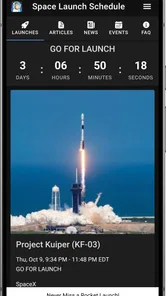
Space Launch Schedule is an app designed to help users follow upcoming rocket launches and major spaceflight events. It typically presents launch dates, mission names, rocket information, launch locations, countdowns, descriptions, and related updates in one place. The app is useful for space enthusiasts, students, photographers, and anyone who wants a convenient way to keep track of scheduled missions. Its store summary describes it as a rocket launch schedule for launch sites around the world.
Does Space Launch Schedule provide real-time launch updates?
The app can provide schedule information, countdowns, notifications, and updates when mission details change, depending on the available data source and the version you install. However, launch times are often affected by weather, technical checks, range restrictions, or other delays. For critical or time-sensitive information, it is still recommended to confirm details through the official space agency, launch provider, or mission website.
Can I receive notifications for upcoming rocket launches?
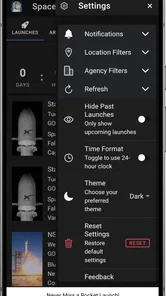
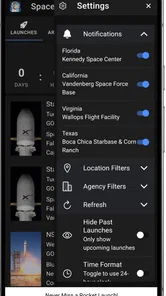
Space Launch Schedule may allow you to receive reminders or notifications for selected launches, helping you avoid missing important missions. Notification availability and customization can vary by platform and app version. Before relying on alerts, check the application settings and make sure notifications are enabled on your device. Some events may also be updated at short notice when a launch is postponed or rescheduled.
Does the app show launches from different countries and space agencies?
One of the main advantages of Space Launch Schedule is that it is intended to gather launch information from multiple providers and locations rather than focusing on a single agency. Depending on the current database, you may find missions connected with organizations such as NASA, SpaceX, ESA, Roscosmos, ISRO, CNSA, and other commercial or national operators. Coverage can change, so some smaller or newly announced missions may appear later.
Pros
- Covers launches from multiple agencies and private space companies.
- Provides mission details
- launch windows
- and countdown information.
- Notifications can help users avoid missing important launches.
- Clean layout makes upcoming events easy to browse quickly.
- Useful for both casual followers and dedicated space enthusiasts.
Cons
- Launch times may change frequently because of weather or technical delays.
- Some mission information can depend on external data sources.
- The number of features may feel limited for users wanting deep analysis.
- Notifications may become excessive if alerts are enabled for every launch.
- Certain content or features may require an internet connection.











