Solocator - GPS Field Camera
- 217.00
- 3.8
- Installs
- 100.00K
- Price
- $0.99
Screenshots

Analysis by Reviewed
So, I recently got my hands on Solocator - GPS Field Camera, and let me tell you, it’s like having a pocket-sized navigator and camera rolled into one. If you’re someone who loves exploring the great outdoors and wants to capture every moment with precision, this app might just become your new best friend. After tinkering around with it, here’s what I think.
Getting Started with Solocator
First things first, downloading Solocator - GPS Field Camera was a breeze. It’s available on both Android and iOS, so no one’s left out in the cold. Once installed, the app greets you with an intuitive interface that’s easy on the eyes and even easier to navigate. I didn’t need a manual to figure things out, which is always a plus in my book.
Features That Stand Out
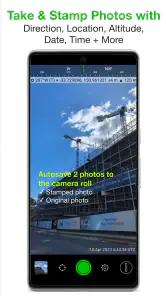
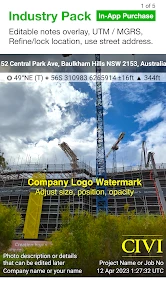
One of the coolest features is the ability to overlay GPS coordinates, compass direction, and even altitude right on your photos. Imagine snapping a pic on a hiking trail and having all that data right there on the photo – it’s like being a modern-day explorer! The app also allows you to add notes, which is super handy for keeping track of specific locations or remembering why you took a particular shot.
Another feature I found particularly useful is the timestamping option. For anyone who’s ever needed to remember exactly when they captured a moment, this is a lifesaver. Plus, you can customize the data overlays to suit your needs, which means you’re not stuck with a one-size-fits-all solution.
Real-World Application
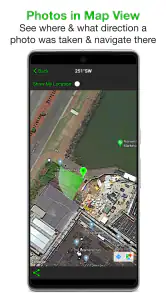
Let’s talk about how this app performs in the wild, literally. I took it out on a weekend camping trip, and it was like having a digital diary of my adventure. The GPS tagging was accurate, and I loved being able to look back at my photos and see exactly where I was. It’s a great tool for hikers, surveyors, or anyone who needs to document their travels with precision.
However, it’s not just for professionals. Even if you’re just someone who loves taking pictures during your travels, the clarity and precision of the data overlays add an extra layer of depth to your photos, making them more than just images – they become memories marked in time and space.
Final Thoughts
All in all, Solocator - GPS Field Camera is like having a Swiss army knife for your camera. It’s packed with features that are both fun and functional, making it a must-have for anyone who loves the outdoors or just wants to add a little extra something to their photos. Sure, there might be a bit of a learning curve at first, but once you get the hang of it, it’s smooth sailing.
If you’re looking for an app that combines practicality with a dash of adventure, give Solocator a try. It’s more than just a camera app; it’s your personal field journal in digital form. Happy snapping!
Pros
- Accurate GPS tagging for photos.
- Easy-to-use interface for quick snaps.
- Offers multiple overlays for context.
- High-resolution image capture.
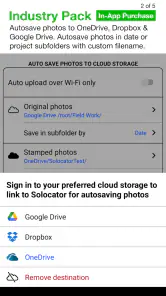
- Seamless cloud integration.
Cons
- Limited free features available.
- Occasional app crashes reported.
- Battery drains quickly during use.
- Slow loading times for maps.
- No night mode for low-light shots.
- Category
- Photography
- Version
- 2.7.6











